

Gaming over Wi-Fi can mean choosing between one router with gaming controls and a mesh system that extends coverage across several rooms. The best mesh Wi-Fi for gaming depends on where you play, whether you can connect a console by Ethernet, and how many devices share your network.
This guide compares systems with Wi-Fi 7, Wi-Fi 6, and older Wi-Fi 5, along with their listed coverage, ports, and management features. One product is a standalone gaming router rather than a mesh kit, so its fit depends on your home layout.

Pros
- Dual 2.5 Gbps ports on each node
- Up to 4,600 square feet of mesh coverage
- Built-in VPN client and server support
Cons
- Lacks dedicated 6 GHz WiFi 7 frequency
- Requires a separate standalone modem
- Users needing tri-band performance should skip it


Pros
- Three-router mesh system
- Supports gigabit internet plans
- Built-in Thread and Zigbee hub
Cons
- Some security and management features require a separate subscription
- Skip if you need those features without a subscription

Pros
- Expansive coverage reaching up to 8,000 square feet
- Supports multi-gigabit internet connections up to 2.5 Gbps
- WiFi 7 speeds supporting up to 70 simultaneous devices
Cons
- Advanced security tools require a paid subscription after trial
- Restricted strictly for use within the United States
- Dual-band design rather than a tri-band setup

Pros
- Multi-gigabit wired connectivity including 10 Gbps ports
- Extensive wireless coverage up to 8,100 square feet
- Built-in VPN client and server functionality
- Tri-band Wi-Fi 7 with Multi-Link Operation
Cons
- Standalone modem required and not included
- Skip if using standard sub-gigabit internet connections

Pros
- Three-unit mesh system
- Single network name across units
- Six Gigabit Ethernet ports
- Wired Ethernet backhaul support
- Parental controls with family profiles
Cons
- Most providers require a separate modem
- Who should skip it: users seeking an all-in-one modem and router

Pros
- Four 2.5GbE ports
- Wi-Fi 7 with Multi-Link Operation
- Gaming traffic prioritization features
Cons
- Who should skip it: Buyers who need tri-band Wi-Fi
The Best Mesh Wi-Fi Systems by Use Case
Best for Wi-Fi 7 on a Moderate Footprint: TP-Link Deco 7 BE25 Dual-Band BE5000 WiFi 7 Mesh Wi-Fi
The TP-Link Deco 7 BE25 Dual-Band BE5000 WiFi 7 Mesh Wi-Fi is a two-unit Wi-Fi 7 system listed for coverage up to 4,600 square feet and more than 150 devices. Its two 2.5G ports on each unit support wired connections and wired backhaul, which can help when you can run Ethernet between mesh nodes. The listing also specifies Multi-Link Operation (MLO), VPN support, and AI-driven roaming.
Reasons to buy:
- Wi-Fi 7 and MLO suit homes with compatible newer devices.
- Two 2.5G ports per unit give you multi-gig wired connection options.
- The two-pack offers a stated coverage area of up to 4,600 square feet.
Reasons to avoid:
- It is dual-band, unlike the tri-band Deco 7 Pro, and its listed coverage is smaller.
- Coverage and advertised wireless speeds vary with distance, walls, and other conditions.
Skip it if you need the larger coverage claim or tri-band design of the Deco 7 Pro, or if you do not need Wi-Fi 7.
Best for Large Homes and Multi-Gig Connections: TP-Link Deco 7 Pro Tri-Band BE14000 Wi-Fi 7 Mesh System
The TP-Link Deco 7 Pro Tri-Band BE14000 Wi-Fi 7 Mesh System is a three-unit Wi-Fi 7 kit with a listed coverage area of up to 8,100 square feet and support for more than 200 devices. Its tri-band design includes 6 GHz, 5 GHz, and 2.4 GHz bands, while each unit has 10 Gbps, 2.5 Gbps, and 1 Gbps WAN/LAN ports. Those details make it a candidate for a large home with compatible devices, multi-gig service, or a preference for wired backhaul.
Reasons to buy:
- Three bands include 6 GHz for compatible Wi-Fi 7 devices.
- Each unit has three Ethernet port speeds, including a 10 Gbps port.
- The listing specifies coverage up to 8,100 square feet and more than 200 devices.
Reasons to avoid:
- Its three-unit coverage and multi-gig ports may be unnecessary for a smaller home or standard internet plan.
- Wi-Fi 7 features and 6 GHz benefit compatible clients; older devices will not gain those capabilities.
Skip it if your gaming setup is in a small area and you do not need its larger coverage claim or higher-speed ports.
Best for Wide Coverage with Wi-Fi 7: NETGEAR Orbi 370 Series WiFi 7 Mesh System
The NETGEAR Orbi 370 Series WiFi 7 Mesh System includes a router and two satellite extenders, with the four-pack listing a coverage area of up to 8,000 square feet. It supports up to 70 devices and lists Wi-Fi 7 speeds up to 5 Gbps, plus a 2.5 Gig port and enhanced backhaul. This setup may suit a multi-level home where you want to place satellites beyond the room containing the modem.
Reasons to buy:
- The router-and-satellite arrangement is designed to extend coverage through a home.
- The listed 2.5 Gig port supports connection to compatible multi-gig internet equipment.
- The Orbi app guides setup and offers device and guest Wi-Fi management.
Reasons to avoid:
- The system is dual-band, not tri-band.
- The advertised coverage depends on home layout, building materials, and satellite placement.
Skip it if you want a tri-band system or need several high-speed Ethernet ports at each node.
Best for Gaming Controls and Wired Play: ASUS TUF Gaming BE6500 WiFi 7 Router – Dual-Band
The ASUS TUF Gaming BE6500 WiFi 7 Router – Dual-Band is a standalone Wi-Fi 7 gaming router, not a multi-unit mesh kit. It lists four 2.5GbE ports, a dedicated gaming port, game packet prioritization, and Open NAT features. Those controls and wired ports may suit a player who wants to connect a console or gaming PC directly and prioritize game traffic on a network centered around one router.
Reasons to buy:
- Four 2.5GbE ports provide several wired connection options.
- Gaming features include a dedicated gaming port, mobile game prioritization, and Open NAT.
- The listing specifies Wi-Fi 7 with MLO and wireless speeds up to 6.5 Gbps.
Reasons to avoid:
Reasons to avoid:
- It is one router, so it does not include mesh satellites for extending coverage.
- Its gaming controls do not guarantee lower latency, which also depends on your internet connection and game server.
Skip it if you need a multi-unit mesh kit to cover distant rooms or multiple floors.
Best for OpenWrt and VPN Options: GL.iNet GL-MT6000 Flint 2 Wi-Fi 6 Gaming Router
The GL.iNet GL-MT6000 Flint 2 Wi-Fi 6 Gaming Router is another standalone router, rather than a mesh system. It lists eight-stream Wi-Fi 6, dual 2.5G ports, pre-installed OpenWrt, and OpenVPN and WireGuard support. It may fit technically confident users who want router-level VPN options and multi-gig wired connections, but its single-router design is less suited to a home that needs mesh nodes.
Reasons to buy:
- OpenWrt and listed VPN support offer configuration options for users who want them.
- Two 2.5G ports support multi-gig wired networking.
- The listing specifies Wi-Fi 6 speeds up to 6 Gbps and support for more than 100 devices.
Reasons to avoid:
Reasons to avoid:
- It is a single router, not a mesh kit with included satellites.
- The manufacturer recommends updating firmware during initial setup, and its advanced options may be more than some users need.
Skip it if your priority is extending Wi-Fi across a large home with a ready-to-use multi-unit mesh system.
Also Considered
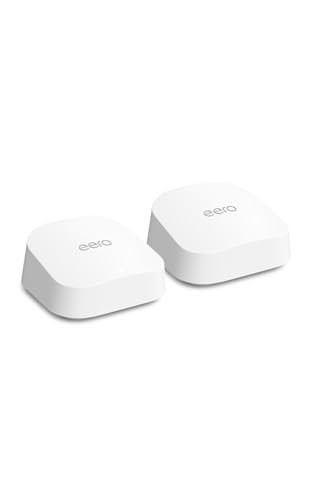
The Amazon eero 6+ mesh wifi system could suit gigabit internet and a smart home using compatible Thread or Zigbee devices, but it uses Wi-Fi 6 rather than Wi-Fi 7. The TP-Link Deco S4 Mesh AC1900 WiFi System may fit buyers who want basic mesh coverage and wired backhaul, but its Wi-Fi 5 generation makes it a less compelling match for a guide focused on gaming and newer wireless standards.
How to Choose the Best Mesh Wi-Fi for Gaming
Check Your Wi-Fi Standard and Client Devices
Wi-Fi 7, Wi-Fi 6, and Wi-Fi 5 identify different wireless generations. A newer router can offer features such as MLO on compatible Wi-Fi 7 products, but your console, PC, or other client must also support the relevant feature to use it. Check your device’s Wi-Fi specifications before paying for a newer standard; a Wi-Fi 7 mesh system still connects older devices, but those devices do not become Wi-Fi 7 clients.
For example, the Deco 7 Pro lists tri-band Wi-Fi 7, while the Flint 2 is a Wi-Fi 6 router. The generation and bands describe capability, not guaranteed game speed or ping. Your internet plan, signal quality, network traffic, and distance from a node also affect play.
Match Coverage and Node Count to Your Layout
Manufacturers state coverage figures under particular conditions, so treat them as planning claims rather than promises for every home. Walls, floors, construction materials, and node placement can reduce real coverage. A larger listed area does not automatically mean better performance at the room where you play.
Compare the number of included units as well as the coverage claim. The Deco BE25 is a two-pack; the Orbi listing includes a router and two satellite extenders in its four-pack description, while the Deco 7 Pro is a three-pack. Place a satellite where it can still receive a useful signal from the main unit, rather than assuming that putting it in a dead zone will solve the problem.
Look at Ethernet Ports and Backhaul
A wired Ethernet connection between a console and router avoids relying on that device’s Wi-Fi link. For a mesh network, wired backhaul uses Ethernet between units instead of sending their traffic over Wi-Fi. This can be useful when you can run a cable between nodes, but the kit must provide suitable ports and support the connection method.
The Deco BE25 lists two 2.5G ports per unit and wired backhaul support. The Deco 7 Pro lists 10 Gbps, 2.5 Gbps, and 1 Gbps ports on each unit, while the Orbi listing specifies a 2.5 Gig port. Check whether port speed, port count, and WAN/LAN roles match your modem, internet plan, and wired devices. A faster port does not make an internet plan faster than its service rate.
Choose Mesh Coverage or Gaming Controls
A mesh kit is useful when you need multiple access points to spread a network across rooms. A gaming router may offer features such as prioritization or easier multiplayer port forwarding, but one unit may not cover a distant gaming room. The ASUS TUF model lists gaming controls and four 2.5GbE ports, but it is not an included multi-node kit. Choose based on whether the main problem is whole-home reach or control over traffic and wired devices.
Prioritization can affect how a router handles traffic within your home network, but it cannot remove congestion outside your home or shorten the route to a game server. If stable play matters most, connect your gaming device by Ethernet where practical and consider mesh placement alongside router features.
Review Setup, Security, and Ongoing Features
App setup can make it easier to add nodes, manage guest access, or see connected devices. The Deco systems and Orbi list app-guided setup. The eero 6+ also lists automatic updates and a built-in hub for compatible Thread and Zigbee devices. Check which features are included and which require a separate subscription; the Orbi listing says its Armor service has a trial and then requires a separate subscription.
VPN support can be useful if you want network devices to use a VPN connection, but it is separate from improving game latency. The Deco BE25 lists VPN client and server support, and the Flint 2 lists OpenVPN and WireGuard. Check whether your intended VPN setup and speeds suit your needs, and review the manufacturer’s current security and update information before purchase.
How We Compared
We compared the published product specifications and design details, including Wi-Fi generation, listed coverage, number of units, Ethernet ports, backhaul support, gaming controls, setup apps, and security features. The available product information included no customer-review detail to assess, so these recommendations reflect stated features and their fit for different home layouts, devices, and gaming setups.
Frequently Asked Questions
Does mesh Wi-Fi reduce lag in online games?
Mesh Wi-Fi can improve coverage where a single router’s signal is weak, which may help a device maintain a more reliable connection in that part of the home. It cannot guarantee lower ping or fix congestion from your internet provider or a distant game server. For the most direct home connection, use Ethernet between your gaming device and a router or mesh node when possible.
Should I use Ethernet backhaul for a gaming mesh system?
Ethernet backhaul can carry traffic between mesh units over a cable instead of over Wi-Fi. It is worth considering if you can run Ethernet between the nodes and your chosen system supports wired backhaul. Verify the ports and setup instructions for the exact kit, then connect your gaming device by Ethernet as well if a suitable port is available.
Can a Wi-Fi 7 mesh system work with older consoles?
The Deco 7 listings state compatibility with Wi-Fi routers or devices as part of their network setup, and Wi-Fi systems generally connect clients according to the client’s supported Wi-Fi capabilities. An older console will not gain Wi-Fi 7 features such as MLO just by joining a Wi-Fi 7 network. Check the console’s own wireless specifications and use Ethernet if you want a wired connection.
Is a gaming router better than a mesh system?
It depends on the problem you need to solve. A standalone gaming router such as the ASUS TUF lists game prioritization and several 2.5GbE ports, while a mesh kit includes multiple units intended to extend coverage. For a nearby gaming device, router controls and Ethernet may matter most; for a distant room, extra mesh nodes may be more useful.
Do I need a modem with these mesh Wi-Fi systems?
The Deco BE25 listing says a separate modem is required, and the Deco 7 Pro listing also notes that a modem must be purchased separately. The Orbi listing says to connect its router to existing modem equipment. Check your internet provider’s equipment requirements and whether the mesh router can connect to your current modem or gateway before buying.

Write Your Review
No reviews yet. Be the first to share your experience!