

Mesh Wi-Fi can help extend wireless coverage across rooms where one router may not reach reliably, but a larger advertised coverage area does not tell the whole story. The best mesh Wi-Fi under $300 depends on your home’s layout, the number of devices you connect, your internet plan, and whether wired Ethernet matters.
This guide compares two dual-band Wi-Fi 7 systems with different strengths: one emphasizes a two-unit setup and eero compatibility, while the other includes a router and two satellites with a larger stated coverage area. Use the picks and shopping advice below to decide which setup better suits your home.
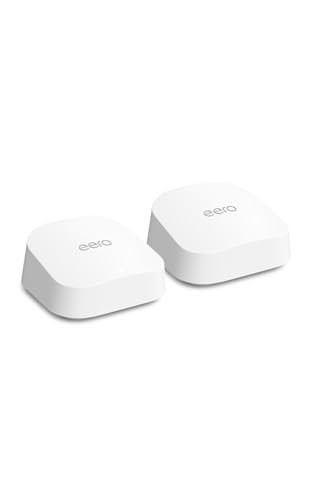
Pros
- Dual auto-sensing 2.5 GbE Ethernet ports
- Coverage spans up to 4,000 square feet
- Backward compatible with previous eero devices
- Three-year manufacturer warranty
Cons
- Advanced security features require paid subscription
- Skip if wanting parental controls without subscription fees

Pros
- Covers up to 6,000 square feet reliably
- WiFi 7 speeds reach up to 5 Gbps
- Supports up to 70 simultaneous connected devices
- 2.5 Gbps port accommodates multi-gigabit internet plans
Cons
- Advanced security suite requires paid subscription after trial
- Hardware restricted to United States operation only
- Skip if needing tri-band operation or international use
The Best Mesh Wi-Fi Systems by Use Case
Best for Larger Homes: NETGEAR Orbi 360 Series WiFi 7 Mesh System
The NETGEAR Orbi 360 Series WiFi 7 Mesh System is the stronger fit for shoppers who want a three-unit package and a larger stated coverage area. Its router and two satellite extenders are listed for coverage up to 6,000 square feet and support up to 70 devices, which may suit a multilevel home or a household with many connected devices. NETGEAR lists speeds up to 5 Gbps, though actual wireless performance depends on the internet plan, connected devices, home layout, and satellite placement.
Reasons to buy:
- Three-piece package with a router and two satellites.
- Listed coverage up to 6,000 square feet and support for up to 70 devices.
- Guided setup and network management through the Orbi app.
Reasons to avoid:
- Coverage figures are manufacturer claims, not a guarantee for every floor plan or building material.
- The listing specifies dual-band Wi-Fi, so shoppers prioritizing a tri-band system should compare other options.
Who should skip it: Skip this system if you need a compact two-unit package, or if you need confirmed tri-band support.
Best for Existing eero Setups: Amazon eero 7 dual-band mesh Wi-Fi 7 router
The Amazon eero 7 dual-band mesh Wi-Fi 7 router suits buyers who want Wi-Fi 7 in a two-unit package and may already use eero equipment. The listing says two units cover up to 4,000 square feet, support more than 120 devices, and work with previous eero generations. Two auto-sensing 2.5 GbE ports on each router support wired connections, while the system supports internet plans up to 2.5 Gbps.
Reasons to buy:
- Backward compatibility with previous eero generations can help extend an existing eero network.
- Two auto-sensing 2.5 GbE ports provide wired connection options.
- Supports eero Built-in on select Amazon Echo devices, according to the listing.
Reasons to avoid:
- The stated coverage is lower than the Orbi system’s listed coverage, so check your floor plan and placement needs.
- Advanced security, ad blocking, parental controls, and other listed eero Plus features require an optional subscription.
Who should skip it: Skip this system if you need a three-piece package out of the box or want the larger stated coverage area in this comparison.
How to Choose the Best Mesh Wi-Fi Under $300
Match the number of units to your floor plan
A mesh system uses multiple units to spread Wi-Fi through a home. The number of units matters because each one needs a suitable place to connect and extend the network. The products here differ in package size: the eero listing specifies two routers, while the Orbi listing specifies one router and two satellite extenders.
Coverage claims can help narrow choices, but they cannot predict signal quality in every home. Walls, floors, building materials, and the position of each unit can affect coverage. Compare the stated coverage with your home’s size, then consider whether the included unit count gives you practical placement options. Check the product listing for exactly what comes in the package, especially if you are comparing a two-unit system with a router-and-satellite set.
For a smaller or simpler layout, two units may be enough to address a weak signal area. For a larger or multilevel home, a three-piece set may offer more placement flexibility. The Orbi’s listed coverage is higher, but that does not prove it will cover every home more effectively. Plan to place units where they can connect with one another while serving the rooms where you use Wi-Fi.
Check your internet plan and speed needs
Router speed figures are not the same as the speed you will receive on each device. Your internet plan, connected device, wireless conditions, and network setup all affect real-world results. The eero listing specifies support for plans up to 2.5 Gbps and wireless speeds up to 1.8 Gbps. NETGEAR lists speeds up to 5 Gbps and compatibility with plans up to 2.5 Gbps.
Before choosing, check the speed tier supplied by your internet provider and the maximum speed supported by your modem or gateway. If your plan is below the systems’ stated plan limits, a larger headline speed may not change the service reaching your home. If you expect to upgrade your plan, compare the plan support and Ethernet ports instead of assuming the highest wireless figure will determine your actual connection speed.
Wi-Fi 7 support can be useful for a newer device that supports the standard, while both systems also list compatibility with older Wi-Fi devices. That backward compatibility does not turn an older device into a Wi-Fi 7 device. Check the Wi-Fi capabilities of your phones, computers, TVs, and other important equipment before paying extra for features they cannot use.
Compare Ethernet ports and wired needs
Ethernet can be valuable for devices that stay in one place, such as a desktop computer, game console, or smart TV. A wired connection may also suit people who want to connect networking equipment directly. The eero listing specifies two auto-sensing 2.5 GbE ports on each router. NETGEAR lists a 2.5 Gig port, but the published details do not say how many Ethernet ports are available on every unit.
If you need multiple wired connections, check the port count and port locations for the exact system before buying. Do not assume every satellite has the same ports as the main router. Also verify that your modem, internet plan, and wired devices support the speeds you want. A 2.5 GbE port can support a faster wired link than standard Gigabit Ethernet when the rest of the connection supports it, but it cannot raise the speed of a slower internet plan.
For a home with several wired devices, port count may matter more than a larger wireless speed claim. If you mainly connect over Wi-Fi, compare unit placement, coverage claims, and device capacity instead. This simple check can prevent choosing a system that meets your wireless needs but leaves too few ports for your wired equipment.
Consider household device count and traffic
Connected-device limits can help you compare systems in a busy household, but they are not a promise that every device will receive high speeds at once. The eero listing says two units support more than 120 devices. NETGEAR lists support for up to 70 devices. Your experience also depends on what those devices are doing, how far they are from a mesh unit, and how much bandwidth your internet plan provides.
Count more than phones and computers. TVs, speakers, cameras, consoles, and smart-home devices can also connect to Wi-Fi. A household that streams video, plays online games, and joins video calls at the same time may benefit from a system designed to handle multiple simultaneous connections, but the supplied device limits do not establish performance under any particular workload.
Use device capacity as one selection factor, not a substitute for checking your internet plan or home layout. If your household has many connected devices, the eero listing has the higher stated device count. If the number is less important than having three mesh units, the Orbi package may be the more relevant fit.
Review setup, compatibility, and security details
Both systems are designed to work with an existing internet connection, but their setup and ecosystem details differ. NETGEAR describes guided setup through the Orbi app and says the system works with cable or fiber provider equipment when connected to an existing modem. eero highlights backward compatibility with previous eero generations and support for eero Built-in on select Amazon Echo devices. Verify the exact modem, provider equipment, app requirements, and any existing mesh products before ordering.
Security features also differ in what the published listings specify. NETGEAR lists security features enabled out of the box, automatic firmware updates, and a 30-day Armor trial; continued Armor use requires a separate subscription. eero lists an optional eero Plus subscription for features including advanced security, ad blocking, parental controls, Malwarebytes, 1Password, and a VPN powered by Guardian. Compare the included features with the subscription terms and tools you actually want.
Mesh compatibility is not universal. The eero system is stated to work with previous eero generations, but the published details do not establish compatibility with other brands’ mesh products. Likewise, do not assume a NETGEAR satellite from another series will work with this system unless the manufacturer confirms it. Check the exact model and series when planning to expand a network later.
For more context on how networking equipment fits together, see our guide to the best cable modem. You can also browse the Mesh Wi-Fi Systems category and the broader Networking category for related buying guides.
How We Compared
We compared the published listing specifications, package contents, stated coverage, Wi-Fi standard, speed and plan support, Ethernet details, device capacity, setup information, compatibility notes, and security features. The comparison treats coverage and speed figures as manufacturer claims rather than guaranteed results in every home. The published rating information does not include written customer feedback, so this guide does not rely on customer experience claims.
Frequently Asked Questions
Will these mesh systems work with my internet provider?
NETGEAR says the Orbi 360 Series works with cable or fiber internet provider equipment when connected to an existing modem. The eero listing specifies support for internet plans up to 2.5 Gbps. Check your provider’s equipment requirements and confirm that your modem or gateway can connect to the mesh router before buying. The system does not replace internet service from your provider.
Do I need Wi-Fi 7 devices to use a Wi-Fi 7 mesh system?
No. The published listings describe backward compatibility with older Wi-Fi devices, including Wi-Fi 6 and Wi-Fi 5 for the Orbi system. Older devices can connect, but they will not gain Wi-Fi 7 capabilities. Check device specifications if you want to know whether a particular phone, computer, or other client supports Wi-Fi 7.
Which system is a better fit for a larger home?
The Orbi listing states coverage up to 6,000 square feet and includes a router plus two satellite extenders. The eero two-unit package lists coverage up to 4,000 square feet. Those figures make Orbi the larger-coverage option on paper, but walls, floors, unit placement, and interference can change results. Compare the stated areas with your home’s layout rather than treating them as guarantees.
Can I mix mesh units from different brands?
Do not assume that mesh units from different brands will work together. The eero listing specifically says it is backward compatible with previous eero generations, but that does not establish compatibility with other brands. For Orbi expansion, check that any additional satellite is explicitly supported by the Orbi 360 Series and the exact model you own.
Do these systems include all listed security features without a subscription?
No. NETGEAR lists built-in router security features and a 30-day Armor trial, with a separate subscription required for Armor after the trial. eero lists eero Plus features as optional subscription services. Review current plan details and included protections before relying on a particular feature for your household.
Should I choose more coverage or more Ethernet ports?
Choose based on the problem you need to solve. A larger stated coverage area and an extra mesh unit may matter more if you need to reach distant rooms or multiple floors. Ethernet ports matter more if you connect stationary devices by cable. The eero listing specifies two 2.5 GbE ports on each router, while the Orbi listing mentions a 2.5 Gig port; check the exact port count and locations if wired connections are a priority.




Write Your Review
No reviews yet. Be the first to share your experience!