

PC controllers differ in connection options, platform support, and customization, so a feature-rich model may still be a poor fit for your setup. This guide to the best game controller for PC gaming compares wired and wireless choices, including models with Hall Effect controls, extra buttons, and broad device compatibility.

Pros
- Hall Effect joysticks
- Quiet button design
- Three connection options
- Two programmable top buttons
Cons
- Not compatible with Xbox, PlayStation, Luna, or GeForce
- Who should skip it: players using those platforms

Pros
- Hall Effect joysticks and triggers
- Remappable L4/R4 bumpers without software
- 1000 Hz polling on 2.4G and wired
Cons
- Skip if you need platforms beyond Windows or Android
Pros
- Multiple wired and wireless connection options
- Textured grips on triggers, bumpers, and back
- Button remapping through Xbox Accessories app
Cons
- Who should skip it: buyers needing a specified compatibility list

Pros
- Familiar Xbox 360-style layout
- Four-switch floating D-pad
- Six-foot cord
- Programmable controls with Profiler software
Cons
- Who should skip: wireless players or users needing broader OS support

Pros
- Hall effect joysticks and triggers
- Three connection modes
- Two programmable back buttons
- RGB lighting can be turned off
Cons
- No mic jack or gyro; skip if either is essential
Pros
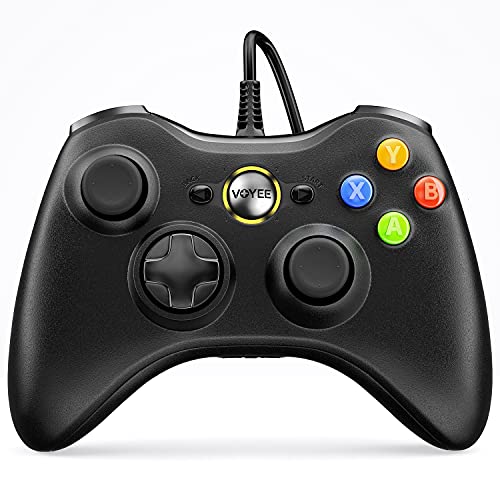
- Long 7.2-foot cord
- Rumble control
- Plug-and-play setup listed
Cons
- Not intended for FPS games
- Who should skip it: players seeking an FPS controller

Pros
- On-controller settings screen
- Four saveable configurations
- Hall Effect sticks and triggers
- Charging dock included
Cons
- Not compatible with Xbox, PlayStation, or GeForce Now
- Does not wake Switch or Switch 2
- Skip if you need unsupported platform compatibility

Pros
- Hall Effect sticks
- Adjustable trigger travel
- Two programmable back buttons
- Switch, PC, Android, and iOS compatibility
Cons
- Who should skip it: players needing confirmed support for unlisted platforms

Pros
- Compatible with Xbox consoles and Windows 10 or later
- Hall Effect joysticks and triggers
- Two customizable back keys
- 3.5mm headset jack
Cons
- Skip it if you need wireless play
The Best PC Game Controllers by Use Case
Best for Flexible Wireless Play: GameSir Nova Lite 2 Wireless PC Controller Hall
The GameSir Nova Lite 2 Wireless PC Controller Hall suits players who want wireless play and customization across several devices. The listing specifies PC, Switch, Android, and iOS support, with Bluetooth, wired, and wireless-dongle connections. Hall Effect sticks and triggers, trigger-lock settings, and two rear buttons add options for action and racing games. Its stated 1000Hz polling rate applies to wired and 2.4G connections, not every connection mode. Browse more gaming gear if you are comparing accessories for a broader setup.
Reasons to buy:
- Use Bluetooth, wired, or wireless-dongle connections with supported devices.
- Adjust stick and trigger dead zones, vibration, and firmware through GameSir software.
- Set two rear buttons for button mapping or macro recording.
Reasons to avoid:
- The 1000Hz polling specification applies to wired and 2.4G modes; confirm your preferred connection before buying.
- Software customization involves downloading the GameSir app or GameSir Connect app.
Skip it if you need Xbox or PlayStation compatibility, or prefer a controller that does not depend on an optional app for software adjustments.
Best for Windows and Android: 8Bitdo Ultimate 2C Wireless Controller for Windows
The 8Bitdo Ultimate 2C Wireless Controller for Windows is a focused choice for Windows PC and Android users who want wireless play with extra remappable controls. Its listing specifies a 1000Hz polling rate over 2.4G and wired connections, Hall Effect joysticks and triggers, and additional L4/R4 bumpers. Button mapping does not require software, which may appeal if you want to customize controls without installing a companion program. The stated compatibility is narrower than multi-platform alternatives in this guide.
Reasons to buy:
- Supports Windows and Android.
- Maps buttons without software and includes extra L4/R4 bumpers.
- Offers Hall Effect sticks and triggers, plus a stated 1000Hz rate in 2.4G and wired modes.
Reasons to avoid:
- The supplied compatibility information does not list Switch, iOS, or Xbox support.
- The polling-rate claim applies to wired and 2.4G modes, so check connection details if you plan to use another mode.
Skip it if you need one controller for Switch or iOS as well as Windows and Android.
Best for Quiet Play: EasySMX X05Pro Wireless Gaming Controller for PC
The EasySMX X05Pro Wireless Gaming Controller for PC is aimed at players who want quieter button operation and support for several device types. Its listing describes silicone-damped buttons, USB-C, 2.4G wireless, and Bluetooth connections, plus support for Windows PC, Switch, Android, and iOS. The stated 1000Hz polling rate applies to wired and 2.4G modes, while Bluetooth is listed at 125Hz. That distinction matters if you plan to use it for fast-response play over Bluetooth rather than a wired or dongle connection.
Reasons to buy:
- Designed with silicone-damped buttons for quieter operation.
- Supports USB-C, 2.4G wireless, and Bluetooth across listed platforms.
- Includes two programmable top buttons and dual-stage adjustable triggers.
Reasons to avoid:
- Bluetooth has a lower listed polling rate than wired and 2.4G modes.
- The listing excludes Xbox, PlayStation, Luna, and GeForce Now compatibility.
Skip it if you need a controller for Xbox or PlayStation, or prioritize the stated 1000Hz rate while using Bluetooth.
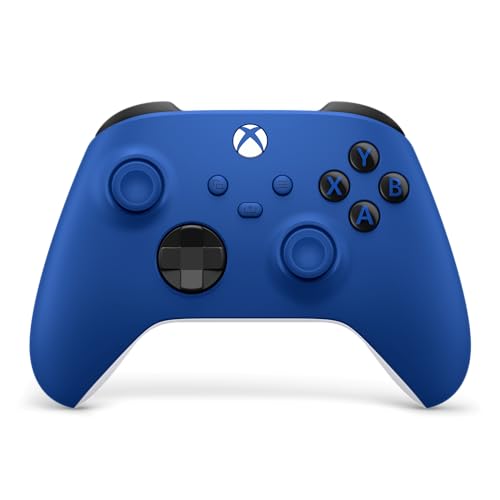
Best for Xbox and PC: XBOX Wireless Gaming Controller | Shock Blue
The XBOX Wireless Gaming Controller | Shock Blue suits players who want a familiar Xbox-style controller for PC and supported devices. It connects through USB-C, Xbox Wireless, or Bluetooth, and includes a 3.5mm audio jack for compatible headsets. The Xbox Accessories app supports button remapping and custom profiles. Check your PC’s wireless setup and the game’s controller support before choosing wireless play, since the listing does not specify a PC wireless adapter or polling rate.
Reasons to buy:
Reasons to buy:
- Choose USB-C, Xbox Wireless, or Bluetooth connection.
- Use the Share button to capture and share screenshots or recordings.
- Connect a compatible headset to the 3.5mm jack and customize controls with the Xbox Accessories app.
Reasons to avoid:
- Some customization depends on the Xbox Accessories app.
- The published details do not state polling rate or battery life.
Skip it if you want Hall Effect sticks, rear buttons, or detailed polling-rate specifications in the listing.
Best for Hall Effect Triggers and Wired Play: GameSir G7 SE Wired Controller for Xbox Series
The GameSir G7 SE Wired Controller for Xbox Series is a wired option for players using Windows 10 or later, Xbox One, or Xbox Series consoles. Its USB cable is detachable, and the listing specifies Hall Effect joysticks and triggers, two customizable back keys, vibration, and a 3.5mm audio interface. A wired connection avoids the need to pair a wireless controller, but it ties play to the cable’s reach. The published information does not give cable length, so check that detail if desk placement matters.
Reasons to buy:
Reasons to buy:
- Supports Windows 10 and later, Xbox One, and Xbox Series consoles.
- Uses Hall Effect sticks and triggers, with two customizable back keys.
- Includes a 3.5mm audio interface and vibration features.
Reasons to avoid:
- Wired play limits freedom to move away from the connected device.
- The listing does not specify cable length.
Skip it if wireless play is essential or you want compatibility with mobile devices and Switch.
Also Considered
The Game Controllers category includes more options; these four products offer distinct alternatives. The USB-C cable guide may also help if you are planning a wired gaming setup.
The Logitech G F310 Wired Gamepad Controller Console could suit someone seeking a straightforward six-foot wired controller with programmable buttons, but it lacks wireless connectivity and the newer multi-device features of selected picks.
The VOYEE PC Controller, Wired Compatible with Xbox could work for a low-cost wired Xbox 360-style setup. Its listing says it is not for FPS games, so that limitation makes it less versatile for this roundup.
The ManbaOne Interactive Screen Wireless may appeal to players who want on-controller settings, a charging dock, and extensive customization. It is not compatible with Xbox, PlayStation, or GeForce Now, and its many features may be unnecessary if you want a simpler PC pad.
The EasySMX X15 Wireless PC & Steam Gaming Controller offers three connection modes, Hall Effect sticks and triggers, and two programmable rear buttons. It missed the main picks because the X05Pro covers quiet operation while the Nova Lite 2 offers broader listed mobile compatibility; the X15 listing also says it has no mic jack or gyro sensor.
How to Choose the Best Game Controller for PC Gaming
Check connection type and polling-rate details
Wired controllers connect directly and avoid wireless pairing, but the cable can limit where you sit. Wireless models offer more freedom, though they may use different connection modes with different stated polling rates. For example, the EasySMX X05Pro lists 1000Hz for wired and 2.4G connections and 125Hz for Bluetooth. Compare the exact mode you will use rather than assuming every wireless connection performs alike.
Match compatibility to your devices and games
Do not treat “PC compatible” as support for every operating system, console, or game service. The 8Bitdo Ultimate 2C lists Windows and Android, while the GameSir Nova Lite 2 lists PC, Switch, Android, and iOS. The ManbaOne listing explicitly excludes Xbox, PlayStation, and GeForce Now. Check the controller’s exact platform list and the game’s input support before purchasing, especially if you plan to move between a PC and another device.
Decide whether Hall Effect controls and extra buttons help
Several models list Hall Effect joysticks, triggers, or both. These features may matter if you want the particular control design described by the manufacturer, but the label alone does not establish how a controller feels in your games. Back buttons and remapping can help when you want extra commands without moving your thumbs from the sticks. Compare what each model lets you map: the Nova Lite 2 has two back buttons, while the Xbox controller uses app-based profiles.
Consider setup, customization, and accessories
Some controllers are described as plug-and-play, while others offer software or on-device settings. The GameSir G7 SE listing describes USB plug-and-play; the Logitech F310 offers Profiler software for keyboard and mouse commands, which requires installation. A headset jack, charging dock, or programmable buttons can be useful only if they fit your routine. Check whether a stated feature needs software and whether required connection accessories are included; the available product details do not specify every included item.
How We Compared
This comparison uses the published product specifications, design details, compatibility information, and customer-rating data. We focused on connection modes, supported platforms, control features, customization, and stated limitations. Manufacturer-listed polling rates and feature claims are presented as listing details, not as independently established results. The published ratings show zero reviews for these listings, so this guide does not infer a customer consensus.
Frequently Asked Questions
Will every controller listed as PC-compatible work with every PC game?
No. Compatibility with Windows or PC does not guarantee that every game supports controller input or recognizes every button. Check the game’s input options and the controller’s listed connection mode. The Logitech F310 includes Profiler software that can map gamepad controls to keyboard and mouse commands for games without gamepad support, and its listing says software installation is required.
Is wired or wireless better for PC gaming?
Wired models suit players who prefer a direct connection and do not mind a cable. Wireless models allow more freedom but may use Bluetooth or a 2.4G dongle, and listed polling rates can vary by mode. Choose based on where you play and whether the controller supports your preferred connection. Verify any dongle or cable requirements in the product details.
What does Hall Effect mean on these controller listings?
In this roundup, Hall Effect refers to the joystick or trigger technology specified in a product listing. Models differ: some list Hall Effect sticks and triggers, while others specify only certain controls. Treat claims such as drift resistance as manufacturer descriptions, and compare the exact components named rather than assuming every Hall Effect controller has identical features.
Can I use one controller with a PC and a console or phone?
Some products list support for multiple platforms, but compatibility varies by model and connection mode. The GameSir Nova Lite 2 lists PC, Switch, Android, and iOS; the Xbox Shock Blue model lists PC, console, and cloud-device use. The published information does not establish compatibility with every phone, game service, or console generation, so check your exact device before buying.
Do I need controller software to remap buttons?
Not always. The 8Bitdo Ultimate 2C listing says its custom button mapping works without software, while the Xbox controller uses the Xbox Accessories app for remapping and profiles. GameSir also offers software for adjustments on certain models. Check whether your preferred changes are available on the controller itself or depend on an app, and confirm that the software supports your operating system.






Write Your Review
No reviews yet. Be the first to share your experience!