

A floodlight camera can brighten a driveway while recording activity, but local storage, camera coverage, and installation needs vary by model. This guide to the best floodlight camera with local storage compares five wired options so you can match recording features, Wi-Fi requirements, and viewing angles to your property.
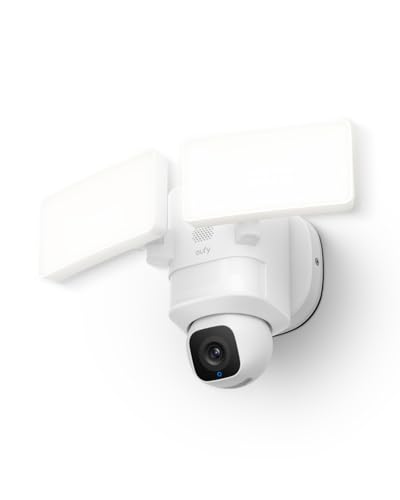
Pros
- Pan-and-tilt coverage with scheduled patrols
- AI tracking for people and vehicles
- 2K video and 2,000-lumen lights
- 24/7 recording with hardwired power
Cons
- Requires hardwired installation
- Uses 2.4GHz Wi-Fi
- Skip it if hardwired installation or 2.4GHz Wi-Fi is unsuitable

Pros
- 2K video with color night vision
- Wide camera view and motion detection
- Dimmable motion-activated floodlights
- Continuous local recording option
Cons
- Requires 2.4GHz Wi-Fi
- Who should skip it: Homes without 2.4GHz Wi-Fi

Pros
- 4K 8MP video resolution
- 180-degree panoramic coverage
- No-subscription AI detection
- Multiple local storage options
Cons
- Requires 100–240V AC hardwiring
- MicroSD card sold separately
- Skip if you need a battery-powered camera

Pros
- Dual lenses with up to 8x hybrid zoom
- Pan, tilt, and AI tracking
- Local continuous recording without a subscription fee
- Adjustable floodlight and built-in alarm
Cons
- Wired outdoor installation required
- Continuous recording needs microSD card or HomeBase S380
- Skip it if you need 3K resolution during AI tracking

Pros
- Wide 180° camera view
- 2.5K video with color night vision
- Adjustable 3000-lumen floodlights
- Continuous local recording option
Cons
- Compatibility and installation requirements are not specified
- Skip if you need confirmed smart-home platform compatibility
The Best Floodlight Cameras by Use Case
Best for 24/7 Pan-and-Tilt Recording: eufy Security Floodlight Camera E30, 2K
The eufy Security Floodlight Camera E30, 2K suits buyers who want a camera that can move across a broad area and record continuously. Its listing specifies 360-degree pan-and-tilt coverage, AI detection and tracking for people and vehicles, 2K video, and 24/7 recording on constant hardwired power. The 2,000-lumen lights add motion-activated illumination.
Reasons to buy:
- Pan-and-tilt control and scheduled patrols can cover changing views around a mounting point.
- AI tracking follows detected people and vehicles, according to the product listing.
- Hardwired power supports the listed 24/7 recording feature.
Reasons to avoid:
- The published details do not specify a microSD card capacity or identify the local storage method, so confirm storage requirements before buying.
- It uses 2.4GHz Wi-Fi, which may not suit a network or installation plan that depends on 5GHz connectivity.
Skip it if you need confirmed expandable local storage details or a camera with a fixed panoramic view rather than a moving lens.
Best for Affordable Continuous microSD Recording: WYZE Floodlight Camera v2
The WYZE Floodlight Camera v2 is a straightforward choice when continuous local recording and strong lighting matter more than a pan-and-tilt camera. Its listing specifies 24/7 microSD recording, with footage storage of up to 30 days, alongside 2K video and 2,800-lumen dimmable lights. The 160-degree camera view and 270-degree PIR motion detection cover different angles: the first describes the camera view, while the second describes the motion sensor’s detection area.
Reasons to buy:
- Continuous local recording to microSD supports buyers who want footage stored on the device.
- Customizable motion zones help narrow event recording and light activation to selected areas.
- Two-way talk, a listed 105dB siren, and ambient light mode add communication and lighting options.
Reasons to avoid:
- The product details do not state the supported microSD card capacity, so check card requirements and whether a card is included.
- The camera view is 160 degrees, not a full panoramic 180-degree view.
Skip it if you want 4K video, dual-band Wi-Fi 6, or a camera that pans and tilts to follow activity.
Best for Multiple Local Storage Routes: REOLINK Elite Floodlight WiFi 4K 8MP 180°
The REOLINK Elite Floodlight WiFi 4K 8MP 180° is aimed at buyers who want high-resolution panoramic coverage and options for choosing where footage goes. Its listing specifies a dual-lens 180-degree view, 4K 8MP video, and 24/7 recording to a microSD card up to 512GB, a compatible Reolink NVR or Home Hub, or FTP/NAS. It also lists RTSP/ONVIF support, which may matter if you are building around compatible network video equipment.
Reasons to buy:
- Several listed recording destinations give buyers more choice than an on-device-only setup.
- Dual-band Wi-Fi 6 supports 2.4GHz and 5GHz connections, subject to network coverage at the mounting location.
- Customizable detection zones and recognition for people, vehicles, and animals can help tailor alerts.
Reasons to avoid:
- It is the most feature-rich and highest-priced model in the published comparison, and some storage routes involve separate equipment or a separately purchased card.
- The listing describes an AC hardwired operating connection and a separate 5V/2A adapter and USB-C cable for initial setup; check installation details and included accessories carefully.
Skip it if you only need basic event recording to a memory card and do not need its additional storage options or 4K panoramic view.
Best for Zoom and Tricky Angles: eufy Security Floodlight Camera E340, Dual-Lens
The eufy Security Floodlight Camera E340, Dual-Lens fits driveways, porches, or side yards where both a broad view and closer detail may be useful. Its wide-angle 3K lens works with a 2K telephoto lens and 8x hybrid zoom; the listing says the telephoto lens can capture details up to 50 feet away. Maximum resolution drops to 2K when AI tracking or Dual Views are used, a limitation to consider if you expect full resolution during those features.
Reasons to buy:
- Dual lenses and hybrid zoom provide a way to inspect distant details without giving up a wide-angle view.
- Pan-and-tilt movement, auto-tracking, and scheduled patrols support coverage of awkward angles.
- Local storage supports a microSD card up to 128GB or a eufy HomeBase S380, with no subscription fee listed.
Reasons to avoid:
- The maximum video resolution is 2K during AI tracking or Dual Views.
- The 2,000-lumen lights are less bright on paper than the 2,800- and 3,000-lumen options in this group.
Skip it if you need the largest listed microSD capacity or prioritize brighter floodlights over zoom and lens flexibility.
Best for a Fixed 180-Degree View: WYZE Floodlight Camera Pro
The WYZE Floodlight Camera Pro suits buyers who want broad fixed coverage and bright lighting rather than a camera that pans around. The listing specifies a 180-degree view, 2.5K video, three adjustable light panels with 3,000 lumens, and 24/7 local recording to microSD with storage for up to 30 days. AI computer vision can activate lights for selected motion types, including people and vehicles.
Reasons to buy:
- The listed 180-degree view can suit wide areas that benefit from a stationary panoramic camera.
- Three adjustable light panels let you direct the listed 3,000-lumen output.
- Local continuous recording and customizable motion zones address both recording and alert preferences.
Reasons to avoid:
- The published details do not state the supported microSD capacity, so check the card limit before purchase.
- Unlike the E30 and E340, the listing does not specify pan-and-tilt movement or auto-tracking.
Skip it if you need a camera that can follow a moving subject or want a stated memory-card capacity before choosing.
How to Choose the Best Floodlight Camera With Local Storage
Check what “local storage” means for each model
Local storage can mean recording to a card in the camera, a separate hub, an NVR, or a network destination. Those options are not interchangeable: a memory card is a simpler, device-level route, while an NVR, hub, or NAS may add equipment and setup. The WYZE v2 and WYZE Pro listings specify continuous microSD recording and up to 30 days of footage, but do not give card capacities in the published details. REOLINK lists microSD support up to 512GB as well as NVR, Home Hub, FTP, and NAS options. Eufy E340 specifies a card up to 128GB or a HomeBase S380, while the supplied E30 details do not identify a storage method or capacity. Check whether a card is included, the supported card type and capacity, and whether chosen features need a hub.
Choose coverage to match the mounting point
A wide fixed view can suit a garage frontage or broad driveway, while pan-and-tilt can help cover areas that wrap around a corner. The WYZE Pro and REOLINK listings specify 180-degree views; WYZE v2 specifies a 160-degree camera view. Eufy E30 and E340 use pan-and-tilt movement and list 360-degree coverage. These figures describe listed views or coverage claims, not a guarantee that one camera sees every approach from every mounting position. Sketch the area you want to monitor, then compare the camera’s view, movement, and mounting direction against likely obstructions.
Match resolution and tracking to the footage you need
Higher listed resolution can help preserve detail, but it does not by itself establish how recognizable footage will be at night or at a distance. REOLINK lists 4K 8MP video, while the WYZE Pro lists 2.5K and WYZE v2 lists 2K. Eufy E340 combines wide and telephoto lenses with 8x hybrid zoom, but its maximum resolution falls to 2K during AI tracking or Dual Views. If you need to follow activity, compare tracking behavior with the specific recording mode you plan to use. If you mainly want a stationary overview, a fixed wide-angle model may be a simpler fit.
Consider lights, detection, and alert control
Brightness and motion detection affect how the camera works as a light as well as a recorder. The listed models list outputs from 2,000 to 3,000 lumens, and several offer dimming, adjustable panels, or ambient lighting. Compare the stated output and controls with the area you want illuminated instead of assuming that the highest lumen figure provides the best placement for your property. Motion zones, AI detection categories, and sirens also differ. WYZE v2 lists customizable zones and a 105dB siren; REOLINK lists detection for people, vehicles, and animals, customizable zones, and a 105 dB siren. Check which alerts and light triggers can be adjusted in the app.
Verify power, Wi-Fi, and installation before buying
These products are outdoor floodlight cameras, and the published listings describe wired or hardwired power rather than battery operation. Confirm that your intended location has a suitable power connection and that the mounting and wiring requirements fit your home. For electrical work, follow the manufacturer’s installation instructions and local requirements; use a qualified electrician if you are not equipped to handle the connection safely. Wi-Fi bands also matter: E30 specifies 2.4GHz, while E340 and REOLINK list dual-band Wi-Fi, and REOLINK specifies Wi-Fi 6. Confirm that your network reaches the mounting location and that the camera’s app and voice-assistant features meet your needs. The published details do not establish compatibility with every smart-home platform, so verify specific integrations before purchase.
For broader context on the connected devices in your home, see our Smart Home Security category and Smart Home guides. Buyers planning a larger setup can also compare the best smart home hubs without a subscription, but check each camera’s supported integrations rather than assuming hub compatibility.
How We Compared
This comparison uses the published product specifications and feature descriptions, including listed video resolution, camera movement or field of view, lighting, recording methods, connectivity, detection features, and installation details. We also considered the supplied customer-rating information, but the product data lists zero reviews for each model, so it does not provide customer feedback to weigh. Recommendations reflect the features documented for each camera and the needs those features may suit; missing storage limits or compatibility details are identified for buyers to verify.
Frequently Asked Questions
Do these floodlight cameras need a subscription for local recording?
The published listings describe local recording without a monthly fee for several models. WYZE v2 and WYZE Pro specify microSD recording, while REOLINK lists local and network storage options with no subscription. Eufy E340 describes free local storage. The E30 listing says no monthly fee but does not specify its storage method in the published details. Confirm which functions are available without a subscription, including alerts, playback, and any cloud features.
Which camera supports the largest stated microSD card?
REOLINK Elite Floodlight WiFi 4K 8MP 180° lists support for microSD cards up to 512GB. Eufy Security Floodlight Camera E340, Dual-Lens lists support up to 128GB. The supplied WYZE product details do not state maximum card capacity, so check the current listing and card requirements before buying.
Should I choose a fixed panoramic view or pan-and-tilt?
A fixed panoramic camera can cover a broad frontage without moving, as described for WYZE Pro and REOLINK. Pan-and-tilt models such as the two eufy cameras can change their viewing direction and support patrol or tracking features. Choose based on the shape of the area and whether you need a stable overview or a camera that can follow activity. A wide listed view does not guarantee coverage around walls or obstructions.
Can these cameras record continuously?
The published descriptions specify 24/7 recording for all five models, with continuous local recording clearly described for WYZE v2, WYZE Pro, REOLINK, and eufy E340 when local storage is enabled. Eufy E30 lists 24/7 recording with constant hardwired power, but the published details do not explain its local storage method. Check what storage is needed for continuous recording and how much footage the selected card or storage system can retain.
Will these cameras work with my Wi-Fi and smart-home setup?
Wi-Fi details vary: eufy E30 specifies 2.4GHz, eufy E340 lists 2.4GHz and 5GHz Wi-Fi 6, and REOLINK lists dual-band Wi-Fi 6. The WYZE v2 and WYZE Pro details available here do not specify Wi-Fi bands. WYZE v2 lists Alexa voice control, but the published details do not establish broad compatibility for every model. Check the exact network band, app requirements, and named voice-assistant or smart-home integrations in the current product listing.
Do I need an electrician to install a floodlight camera?
These models are described as wired or hardwired cameras, so installation depends on the power connection at your chosen location. The REOLINK listing specifies a 100–240V AC connection for regular use and a separate adapter and USB-C cable for initial setup. Check each model’s instructions and your local electrical requirements before starting. If you are unsure about the wiring, contact a qualified electrician.




Write Your Review
No reviews yet. Be the first to share your experience!