

Shaky walking footage calls for different gear than a fixed talking-head video. A motorized gimbal can steady a moving phone, while a tripod kit can prioritize lighting, microphones, and hands-free recording without motorized stabilization.
This Best Phone Gimbal for Vlogging guide compares two DJI stabilizers with a creator kit built around a tripod, lights, and wireless microphones. Use the differences to match your filming style, phone compatibility needs, and preferred setup.

Pros
- Built-in extension rod and tripod
- Tracking and lighting module included
- Up to 10 hours of operating time
Cons
- Skip if you require Google Play app installs; DJI Mimo is unavailable there

Pros
- Plug-and-play wireless microphones require no app setup
- Wide extension range spans 13 to 71 inches
- Versatile 3-in-1 receiver supports Lightning, USB-C, and 3.5mm
- Dual detachable fill lights offer three color temperatures
Cons
- Receiver requires manual disconnection to preserve device battery
- Manual head lacks motorized tracking for dynamic panning
- Creators needing automated motion tracking should skip it
Pros
- Three-axis stabilization
- Built-in extension rod
- Foldable design
- ShotGuides included
Cons
- Who should skip it: Buyers who need detailed compatibility requirements
The Best Phone Gimbals by Use Case
Best for Tracking and Built-In Lighting: DJI Osmo Mobile 7P Gimbal Stabilizer for iPhone
The DJI Osmo Mobile 7P Gimbal Stabilizer for iPhone combines three-axis stabilization with a multifunctional module for intelligent tracking and lighting. The listing also specifies a built-in extension rod and tripod, plus a maximum operating time of 10 hours. These features make it a strong fit for creators who move around while filming and want fewer separate accessories to carry.
The magnetic phone clamp and quick-launch design may also suit spontaneous clips: unfold the gimbal, mount a paired phone, and start filming through DJI Mimo. The app listing mentions ShotGuides and One-Tap Edit, so this model may appeal to creators who want guided capture and an editing shortcut. The listing says the Multifunctional Module can receive DJI Mic 2 or DJI Mic Mini audio, but check microphone and phone compatibility before buying.
Reasons to buy:- Three-axis gimbal stabilization and intelligent subject tracking support moving shots.
- Built-in extension rod and tripod give you more framing options without a separate stand.
- DJI Mimo includes ShotGuides and One-Tap Edit, while the module adds lighting and specified mic-reception features.
- Several listed features depend on pairing a smartphone and using DJI Mimo, so check your phone and app compatibility first.
- The 10-hour figure is a listed maximum, not a guarantee for every filming setup; the published details do not explain usage conditions.
Skip it if you mainly record stationary videos and prefer a tripod kit with included lavalier microphones over motorized stabilization.
Best for a Complete Stationary Setup: Content Creator Essentials Vlogging Kit
The Content Creator Essentials Vlogging Kit centers on a manually adjusted tripod, two detachable lights, and wireless lavalier microphones. Its listing specifies a 13-to-71-inch extension range, a remote, and a phone holder that rotates and tilts. It is the clearest match here for creators who film seated, record interviews, or want lighting and audio equipment in one package rather than a motorized gimbal.
The kit lists a receiver with USB-C, Lightning, and 3.5 mm connections, along with a transmitter and two lavalier microphones. Confirm that the included receiver connection matches your phone before relying on it for recording. The listing also specifies two lights with three color temperatures and a Bluetooth remote. Its holder is described as fitting smartphones from 4.7 to 6.9 inches, but check your phone’s size and case against the clamp width details before purchase.
Reasons to buy:- Includes two lavalier microphones and a receiver described with USB-C, Lightning, and 3.5 mm connections.
- Two detachable lights offer warm, cool, and natural-white color settings.
- The adjustable tripod can serve as a handheld selfie stick, desktop stand, floor tripod, or light stand.
- This is a manually controlled stand, not a motorized gimbal, so it does not provide three-axis stabilization.
- The listing’s microphone range and recording-time figures are manufacturer claims; check connection fit and intended use before depending on them.
Skip it if you need a powered gimbal to stabilize walking footage or track a moving subject.
Best for a Straightforward Gimbal: DJI Osmo Mobile 6 Smartphone Gimbal Stabilizer
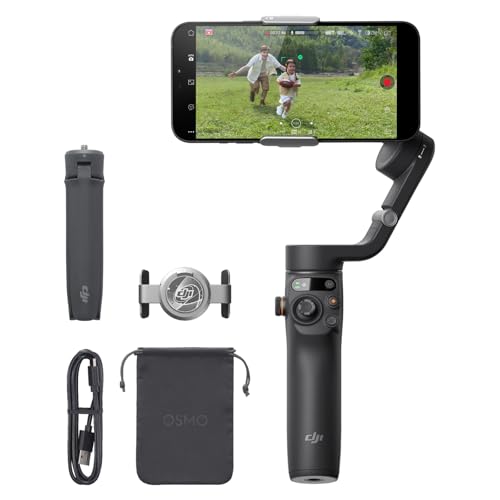
The DJI Osmo Mobile 6 Smartphone Gimbal Stabilizer is described as a foldable, portable phone gimbal with three-axis stabilization and a built-in extension rod. Its listing also names ShotGuides and compatibility with Android and iPhone. Those stated features make it a reasonable option for creators who want a conventional moving-shot stabilizer with an extension rod, without the 7P’s separately described multifunctional module.
Product details available for this model are limited. They do not specify operating time, tracking behavior, included accessories, or phone size and weight limits, so do not assume it matches the 7P on those points. Before ordering, check the current listing for supported phone models, app requirements, clamp details, and package contents. Its stated foldable design may suit someone who wants a compact gimbal to carry between filming locations.
Reasons to buy:- Three-axis stabilization is specified for steadier phone footage while moving.
- The built-in extension rod supports framing options beyond a basic handheld grip.
- Foldable design and ShotGuides are listed, with Android and iPhone compatibility stated.
- The published details do not establish battery life, tracking functions, or which accessories come in the box.
- Confirm phone fit and app support in the current listing because the available product data does not give specific limits.
Skip it if you need clearly specified tracking, lighting, and battery details before choosing; compare the 7P’s stated feature set instead.
How to Choose the Best Phone Gimbal for Vlogging
Choose stabilization for the way you move
A motorized gimbal is designed to stabilize a phone as you reposition it. Both DJI models list three-axis stabilization, making them the relevant options in this group for moving footage. The Ocwqp kit uses a manually adjusted tripod and selfie stick instead. That design can hold a phone for stationary recording, but its listing does not describe motorized stabilization.
Think about the footage you make most often. Walking tours, moving introductions, and shots that follow you point toward a gimbal. Desk videos, interviews, and fixed-angle tutorials may benefit more from a tripod, lights, and microphones. Check product descriptions for the exact stabilization type rather than treating every phone holder or selfie stick as a gimbal.
Check tracking needs and app requirements
Tracking can help keep a person in frame while they move, but a listing’s tracking claim does not establish that every camera app or phone works with it. The 7P listing specifies intelligent tracking and describes DJI Mimo features. The Osmo Mobile 6 listing names ShotGuides, but published details do not confirm tracking functions. Verify the app, phone model, and desired recording mode before choosing based on tracking.
If you film alone, subject tracking could reduce the need to adjust framing between takes. If you record from a fixed position, a tripod remote may be more useful. The Ocwqp kit lists a Bluetooth remote for shutter control and other functions, but it should not be confused with gimbal-based subject tracking.
Match the phone mount and connection to your device
A gimbal or tripod can only help if your phone fits its mount. The 7P includes a magnetic phone clamp, while the vlogging kit lists a holder for smartphones from 4.7 to 6.9 inches and gives a clamp-width range. The supplied Osmo Mobile 6 details do not state a phone-size limit. Check the current listing for your exact phone model, especially if you use a case or a large phone.
Audio accessories add another compatibility check. The Ocwqp receiver is listed with USB-C, Lightning, and 3.5 mm connections, but confirm which connector is included and appropriate for your phone. The 7P listing describes reception for DJI Mic 2 and DJI Mic Mini through its module; it does not say that every wireless microphone will work. Do not infer compatibility from connector shape alone.
Decide whether built-in accessories matter
Integrated gear can cut down on separate pieces to pack, but it can also make a product less suited to buyers who want only one function. The 7P combines a tripod and extension rod with a module described for tracking, lighting, and specified microphone reception. The Ocwqp kit bundles a tripod, lights, microphones, and a remote, prioritizing a stationary creator setup instead.
Consider where you record and what you already own. If you have lights and microphones, a gimbal may matter more than bundled extras. If you film from a desk or record two speakers, the kit’s listed lights and two lavalier microphones may better match your needs. Compare included items with the current package listing, since the Osmo Mobile 6 details provided here do not identify its included accessories.
Read battery claims in context
The 7P listing specifies a maximum operating time of 10 hours and says the module can provide extra power to a phone when acting as a microphone receiver. Those are listing claims, not a promise for every shooting pattern. The supplied Osmo Mobile 6 details do not provide a battery figure, so compare the current listing if runtime is important.
The Ocwqp kit’s lights and remote are described as USB-C rechargeable, and its microphone listing gives recording-time and range claims. These figures refer to listed accessories, not gimbal runtime. Check which components need charging, how you expect to use them, and whether you need a phone charging feature before making a decision.
How We Compared
This comparison uses the published product specifications, design details, and listed functions to assess likely fit for different vlogging setups. Product-specific judgments rely on stated features such as stabilization, tracking, mounting, lighting, microphone connections, app tools, and portability. The available customer-rating information does not provide written review feedback, so it cannot support conclusions about long-term reliability or typical owner experience. Where details are missing, the guide identifies what buyers should verify in the current listing.
Frequently Asked Questions
Is a phone gimbal different from a phone tripod?
Yes. A motorized gimbal uses moving axes to stabilize a phone, and both DJI models list three-axis stabilization. A tripod holds a phone in place, while the Ocwqp kit adds manual rotation and tilt. Choose based on whether your footage needs stabilization during movement or a steady fixed position.
Can I use these products with Android phones?
The DJI Osmo Mobile 7P listing says it supports iPhone and Android, and the Osmo Mobile 6 listing also names Android and iPhone compatibility. The Ocwqp kit lists support for iPhone and Android, with a stated smartphone size range. Check your exact phone model, clamp fit, and app requirements before ordering.
Which option makes sense for filming alone?
For a solo creator who moves in front of the camera, the 7P’s listed intelligent tracking may be useful. For a fixed shot, the Ocwqp kit includes a tripod, lights, and a remote for hands-free recording. Confirm that the feature you need works with your phone and recording app.
Does the Ocwqp kit replace a motorized gimbal?
No motorized stabilization is listed for this kit. Its tripod and phone holder support manual positioning, while its lights and microphones address other parts of a recording setup. Choose one of the DJI models if three-axis phone stabilization is a priority.
Should I choose the Osmo Mobile 6 or 7P?
The 7P has more specific published feature details, including intelligent tracking, a multifunctional module, a built-in tripod, and a listed maximum operating time. The Osmo Mobile 6 listing identifies three-axis stabilization, a built-in extension rod, a foldable design, and ShotGuides, but leaves more questions unanswered. Compare current package contents, phone support, and app requirements before deciding.





Write Your Review
No reviews yet. Be the first to share your experience!