

A smart thermostat can simplify scheduling and remote temperature changes, but compatibility with your heating and cooling system matters more than a familiar brand name. This guide compares the ecobee Smart Thermostat Essential with two Google Nest color options, focusing on HVAC support, wiring, app control, and smart home integration.

Pros
- App scheduling and remote temperature control
- Automatic adjustments when you leave
- HVAC alerts and maintenance reminders
- ENERGY STAR certified
Cons
- Some HVAC systems need a C wire or power accessory
- Who should skip it: households without Wi-Fi or a compatible HVAC system

Pros
- Touchscreen and app controls
- Works with major smart home platforms
- Supports scheduled temperature adjustments
Cons
- Power Extender Kit sold separately for homes without a C-wire
- Who should skip it: households with incompatible HVAC systems
Pros
- App scheduling and remote temperature control
- Automatic adjustment when you leave
- HVAC alerts and maintenance reminders
Cons
- Some systems require a C wire or compatible power accessory
- Who should skip it: buyers whose HVAC system is incompatible
The Best Smart Thermostats by Use Case
Best for Apple HomeKit: ecobee Smart Thermostat Essential
The ecobee Smart Thermostat Essential is the clearest fit here if you want an ecobee thermostat and use Apple HomeKit, Alexa, or Google Assistant. It has a color touchscreen, remote app control, and scheduling features, and ecobee says its energy-saving schedule can adjust temperatures when you are away and at home. The maker estimates savings of up to 23% on heating and cooling compared with holding the thermostat at 72°F, a claim that will depend on your home and habits.
Reasons to buy:
- Works with Apple HomeKit, Alexa, and Google Assistant.
- Supports a range of common 24 VAC systems, including specified conventional, heat-pump, and boiler setups.
- Can pair with ecobee SmartSensors, sold separately, to monitor temperatures and movement in selected rooms.
Reasons to avoid:
- Homes without a C wire need the separately sold ecobee Power Extender Kit.
- SmartSensors are an additional purchase, not an included room-monitoring solution.
Skip it if your HVAC system is outside its supported types or you want room sensors included from the start. Check ecobee’s compatibility checker before ordering, especially if your system has multiple zones or an unusual wiring setup.
Best for Google Home Scheduling: Google Nest Thermostat – Smart Thermostat for Home
The Google Nest Thermostat – Smart Thermostat for Home suits households that want app-based scheduling and Google Home control. Google says it can turn itself down when you leave, let household members change the temperature remotely, and suggest schedule adjustments through Savings Finder. It is ENERGY STAR certified, and the Sand version is listed here as a separate color option.
Reasons to buy:
- Builds a programmable schedule in the Google Home app for Android or iPhone.
- Supports remote temperature changes from a phone, laptop, or tablet.
- Google describes HVAC monitoring alerts and maintenance reminders as part of its feature set.
Reasons to avoid:
- Some heating-only, cooling-only, zoned, and heat-pump systems need a C wire or compatible power accessory.
- Setup and control rely on Wi-Fi and the Google Home app.
Skip it if you need a thermostat designed around Apple HomeKit integration, or if your wiring and HVAC system fail Google’s compatibility check. Confirm the Sand color and system fit before purchase.
Best for Matter-Compatible Voice Control: Google Nest Thermostat – Smart Thermostat for Home
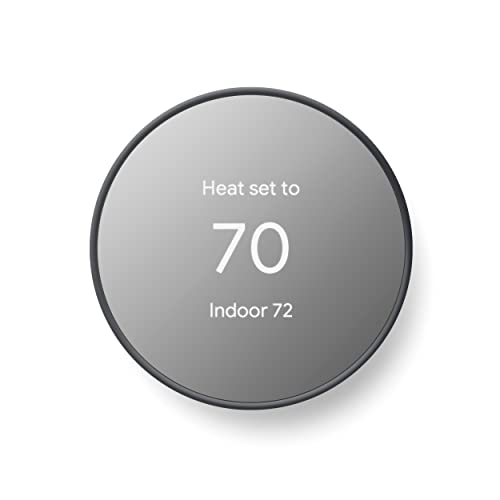
The charcoal Google Nest Thermostat – Smart Thermostat for Home has the same core Nest features described for the Sand option, making it a practical choice if you prefer this finish and use Google Home. Google says the thermostat works with Google Assistant and Matter-certified voice assistants, provided you have a compatible smart device for voice control. This model’s stated Wi-Fi support includes 2.4 GHz and 5 GHz networks.
Reasons to buy:
- Supports Google Home scheduling, remote adjustments, and Savings Finder suggestions.
- Google identifies compatibility with Matter-certified voice assistants, subject to the required compatible device.
- The listed connectivity includes both 2.4 GHz and 5 GHz Wi-Fi.
Reasons to avoid:
- Like the other Nest option, it may need a C wire or power accessory on certain HVAC systems.
- The charcoal finish does not add a distinct HVAC or scheduling capability over the Sand version.
Skip it if you need the ecobee model’s stated Apple HomeKit support or want to choose based on a functional difference between the two Nest colors. Verify system compatibility and the exact finish before ordering.
Best for a Simple Color Choice: Google Nest Thermostat – Smart Thermostat for Home
The Sand Google Nest Thermostat – Smart Thermostat for Home is an alternative for buyers who want the Nest feature set in a lighter finish. Its key strengths are app scheduling, remote control, automatic temperature adjustments when you leave, and smart-home control through Google Home and compatible voice assistants. This is a color-based choice rather than a separate feature tier, so decide between the two Nest entries by finish and current purchase details, not by assuming one has a different thermostat function.
Reasons to buy:
- Provides app-based schedules and remote adjustments for household members.
- Google Home can surface Savings Finder schedule suggestions.
- Google lists HVAC monitoring alerts and maintenance reminders.
Reasons to avoid:
- Compatibility varies by HVAC setup, and some systems need a C wire or other power accessory.
- Choose this version for its Sand finish, not a separate set of smart features.
Skip it if the color is not important and you are comparing the Nest options for capabilities; their described functions substantially overlap. If you need HomeKit support, consider the ecobee instead.
How to Choose the Best Ecobee Thermostat for Your Home
Confirm HVAC compatibility before comparing features
Smart thermostats connect to specific heating and cooling wiring, so a familiar app or voice assistant cannot make an incompatible system work. The ecobee Essential is described as compatible with 85% of systems and supports listed 24 VAC equipment types such as gas, oil, electric, conventional forced air, certain heat pumps, and boilers. That percentage is not a guarantee for an individual home. Google likewise directs buyers to its compatibility checker, and notes that some system types need a C wire or another compatible power accessory.
Before you buy, identify your current thermostat wires and HVAC type, then use the appropriate brand compatibility checker. If you have a zoned system, dual fuel equipment, or a heat pump, check the exact system details rather than relying on a general compatibility statement. When the wiring is unclear, ask a qualified HVAC professional to identify it.
Check the C-wire situation and installation plan
A C wire supplies continuous power to many thermostats, but the two brands describe different paths for homes that lack one. Google says its Nest Thermostat works without a C wire in most homes, while noting exceptions that include heating-only, cooling-only, zone-controlled, and heat-pump systems. Ecobee says the Essential can be used in a home without a C wire with its Power Extender Kit, which is sold separately.
Do not assume that “no C wire” means every installation is straightforward. Check the wiring instructions for your precise HVAC system, and confirm whether a separate accessory is needed and available. If you are considering the ecobee, include the separate kit in your installation decision; with Nest, confirm whether your system falls into one of the stated exceptions.
Match the thermostat to your smart home ecosystem
Compatibility with an assistant can influence how naturally a thermostat fits into your daily routines. Ecobee lists Apple HomeKit, Alexa, and Google Assistant support for the Essential. Google says the Nest Thermostat works with Google Assistant and Matter-certified voice assistants, with a compatible smart device needed for voice control. If you rely on Apple HomeKit, the ecobee is the only option in this group with that support explicitly stated.
Think about the app you already use, too. The Nest schedule and controls are managed through Google Home, while ecobee offers app control alongside its touchscreen. Compatibility does not guarantee that every automation works the same way across ecosystems, so check the functions you plan to use rather than relying on a broad “works with” label. For broader smart-home comparisons, see our Smart Home guide collection.
Decide whether room-by-room sensing matters
A thermostat’s location may not reflect temperatures in bedrooms or other rooms. Ecobee says its SmartSensor can measure temperature and movement in the room where it is placed, and that SmartSensors are sold separately. This gives you an option to extend monitoring to rooms that matter most, but adds another purchase and does not mean the Essential includes a sensor.
The Nest details here focus on the thermostat, scheduling, and HVAC monitoring rather than an included remote room sensor. If temperature differences across rooms are your main concern, compare the ecobee sensor option with your needs and confirm how the system uses sensor readings. If a central thermostat reading is sufficient, you may not need to add room sensors.
How We Compared
We compared the thermostat features and compatibility details described by the manufacturers and retailer, including HVAC support, wiring considerations, app control, voice assistants, and room sensing. Recommendations reflect how those features align with different household needs, while separating manufacturer energy-saving claims from guaranteed results. The two Nest entries are distinct color options, so we treat finish as a preference rather than implying a difference in core functionality.
Frequently Asked Questions
Is the ecobee Smart Thermostat Essential compatible with Apple HomeKit?
Yes. Ecobee lists Apple HomeKit support for the Smart Thermostat Essential, along with Alexa and Google Assistant. Check the compatibility of your HVAC system separately, because smart-home support does not establish that the thermostat wiring will work in your home.
Can I install one of these thermostats without a C wire?
Possibly, but the answer depends on your system. Google says Nest works without a C wire in most homes, while naming several system types that may need one or a compatible power accessory. Ecobee identifies a separately sold Power Extender Kit for homes without a C wire. Check the appropriate compatibility tool before starting installation.
What is the difference between the Sand and charcoal Nest options?
The entries are different color options for the Google Nest Thermostat – Smart Thermostat for Home. The described scheduling, app control, and smart-home functions overlap, so choose based on the finish and confirm the exact option you intend to order.
Does the ecobee Essential include room sensors?
No included SmartSensor is identified for this model. Ecobee says you can add a SmartSensor separately to measure temperature and movement in a selected room. Factor that extra accessory into your decision if room-level monitoring is important.
Will a smart thermostat automatically lower my energy bills?
No savings amount is guaranteed. Ecobee’s estimate of up to 23% is a manufacturer claim based on comparison with holding the thermostat at 72°F; actual results depend on your home, HVAC system, schedule, and temperature choices. Google offers schedule suggestions through Savings Finder, but those suggestions are not a promise of a particular reduction.
Which option should I choose for a Google-focused home?
Either Nest color is a natural option to consider if your household already uses Google Home, since the thermostat supports Google Home scheduling and remote control. Ecobee also lists Google Assistant support, so ecosystem alone does not rule it out. Compare the HVAC compatibility, wiring, sensor needs, and finish before deciding.

Write Your Review
No reviews yet. Be the first to share your experience!