

A Kindle for a child can be a simple way to read, but the models differ in screen size, included book subscriptions, parental controls, and waterproofing. This guide to the Best Kindle for Kids helps you compare those details and choose a reader that fits your child’s age, reading routine, and likely reading spots.

Pros
- Compact 6-inch glare-free display
- Adjustable front light and dark mode
- 16 GB storage for thousands of books
- Up to six weeks of claimed battery life
Cons
- Who should skip it: readers who prefer larger screens


Pros
- Distraction-free reading with no apps, videos, or games
- Up to 12 weeks of battery, according to Amazon
- Adjustable text size and word definitions
Cons
- Kids+ renews automatically after the included year
- Skip it if you want to avoid subscription renewal

Pros
- Glare-free display for bright settings
- Distraction-free reading experience
- Adjustable text and word definitions
- Bookman cover included
Cons
- Skip if you do not want Kids+ to renew automatically

Pros
- Glare-free display with light and dark modes
- 16GB storage for thousands of books
- Parent controls for reading and bedtime
- Cover and 2-year replacement guarantee included
Cons
- Reading-only, with no apps, videos, or games
- Kids+ renews monthly after six months unless canceled
- Who should skip it: families wanting a general-purpose tablet
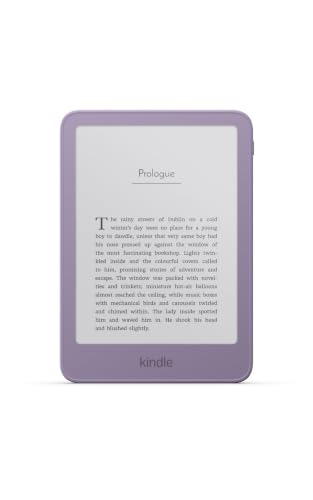
Pros
- Glare-free display with adjustable brightness
- Replaceable battery
- 16GB storage
Cons
- Page-turn remote sold separately
- Protective cover sold separately
- Who should skip it: readers who prefer larger screens
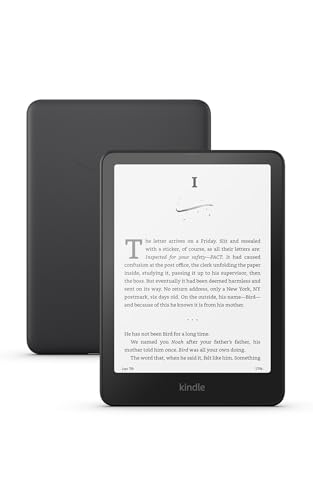
The Best Kindles for Kids by Use Case
Best Kid-Focused Bundle: Amazon Kindle Kids 16GB (2024 model)
Amazon Kindle Kids 16GB (2024 model) pairs a 6-inch glare-free display with a cover, six months of Amazon Kids+, and a two-year worry-free guarantee. Its Parent Dashboard lets adults add books, adjust age filters, view reading progress, and set device bedtime, making this a well-rounded choice for families who want child-focused controls from the start.
Reasons to buy:
- Parent Dashboard includes age filters, reading progress, and bedtime controls.
- Six months of Amazon Kids+ and a cover are included.
- The listing specifies up to six weeks of battery life and 16 GB storage.
Reasons to avoid:
- Amazon Kids+ renews automatically after the included six-month period unless canceled.
- The 6-inch screen is smaller than the 7-inch Paperwhite Kids models.
Who should skip it: Choose another model if you want a larger display or a longer included Kids+ subscription.
Best for Poolside Reading: Amazon Kindle Paperwhite Kids 16GB (2024 model)
Amazon Kindle Paperwhite Kids 16GB (2024 model) suits children who read near water or want a larger page area. Its 7-inch glare-free display is waterproof, and the listing specifies adjustable warm light, a kid-friendly cover, six months of Amazon Kids+, and a two-year worry-free guarantee.
Reasons to buy:
- Waterproof design suits reading by a pool or at the beach.
- The 7-inch screen gives more display area than the 6-inch Kindle Kids models.
- Parent Dashboard offers reading progress, age filters, book selection, and bedtime settings.
Reasons to avoid:
- The included Kids+ period is six months, shorter than the one-year subscriptions on some other picks.
- Waterproofing does not mean the device is suitable for every kind of liquid exposure; follow Amazon’s care instructions.
Who should skip it: Look at a 6-inch model if your child prefers a smaller reader or does not need waterproofing.
Best for a Longer Kids+ Trial: Amazon Kids Kindle Paperwhite 16GB (newest model)
Amazon Kids Kindle Paperwhite 16GB (newest model) is a 7-inch waterproof reader with adjustable warm light and a one-year Kids+ subscription. That longer included period may suit a family that wants time to explore the children’s book selection before deciding whether to keep a subscription. The listing also specifies up to 12 weeks of battery life.
Reasons to buy:
- One year of Kids+ is included, with books aimed at ages 6 to 12.
- Waterproof construction and a warm-light setting support different reading locations and times.
- Parents can follow reading, suggest books, and set bedtime hours from a phone.
Reasons to avoid:
- Kids+ renews automatically at the applicable rate unless canceled.
- The listing does not specify an included cover, so confirm what comes in the package before buying.
Who should skip it: Pick a 6-inch model if compact size matters more than a larger display or waterproofing.
Best for Growing Readers: Amazon Kids Kindle 16GB (newest model)
Amazon Kids Kindle 16GB (newest model) adds reading tools for children who are moving into harder books. The listing highlights definitions for difficult words and adjustable text size, along with a one-year Kids+ subscription, Bluetooth support for Audible books, and parental reading controls. Its 6-inch glare-free display keeps the device compact.
Reasons to buy:
- Word definitions and adjustable text size can help children navigate challenging reading.
- Kids+ includes Audible books that can be heard with Bluetooth headphones.
- Parents can suggest books and set device bedtime through the Parent Dashboard.
Reasons to avoid:
- The 6-inch display is smaller than the Paperwhite Kids screens.
- Listening to Audible books requires Bluetooth headphones, which are not listed as included.
Who should skip it: Choose a Paperwhite Kids model if waterproofing or a larger screen is a priority.
Best for Kids Who Prefer Warm Light: Amazon Kindle Paperwhite Kids 16GB (2024 model)
Amazon Kindle Paperwhite Kids 16GB (2024 model) also fits families who want an adjustable warm-light setting for evening reading alongside a waterproof 7-inch screen. This pick emphasizes the larger display and reading comfort across different lighting conditions. Its parental controls and included cover make it a ready-to-use option for a child’s own reading routine.
Reasons to buy:
Reasons to buy:
- Adjustable warm light supports reading after daylight fades.
- Waterproof design and glare-free display suit indoor and outdoor use.
- Includes a cover, six months of Kids+, and a two-year worry-free guarantee.
Reasons to avoid:
- The one-year Kids+ offer on another Paperwhite Kids model lasts longer.
- Families who do not need a 7-inch display may prefer a smaller Kindle Kids model.
Who should skip it: Consider a standard Kindle Kids model if your child reads mostly at home and does not need waterproofing.
Also Considered
Amazon Kindle 16 GB (2024 model) may suit a parent who wants a compact reader without the child-focused bundle, but its listing does not include the Kids+ subscription and Parent Dashboard features described for the Kids models.
Amazon Kindle 16GB (newest model), Now thinner is an option for families seeking a basic 6-inch Kindle with a replaceable battery, but the published listing does not describe a Kids+ bundle or child-specific parental controls.
Amazon Kindle Paperwhite 16GB (2024 model) offers a 7-inch waterproof screen and warm light for a parent or older reader, but the listing does not identify it as a Kids edition or include Kids+ and child-focused controls.
How to Choose the Best Kindle for Kids
Choose screen size around reading habits
The supplied Kids models use either a 6-inch or 7-inch display. A smaller screen can make a compact reader easier to carry, while the larger Paperwhite screen gives more display area. Screen size alone does not establish which device a child will find easier to read, so consider whether the child typically reads short sessions, longer chapters, or books with larger text.
Check the exact model name and screen size in the listing. Do not assume every Kindle with “Kids” in its name has the same display, lighting, or waterproofing. The standard Kindle Kids models here have 6-inch glare-free displays; the Paperwhite Kids options have 7-inch displays.
Compare the included subscription carefully
Amazon Kids+ is included for six months with some bundles and one year with others. The published listings describe access to thousands of age-appropriate books, with the one-year Paperwhite Kids listing describing books for ages 6 to 12. The 2024 Paperwhite Kids listing describes its subscription for ages 3 to 12. Check the age range and term attached to the specific offer, rather than assuming every bundle includes the same catalog or duration.
Some Kids+ subscriptions automatically renew after the included period. The listing says you can cancel through the Parent Dashboard or customer service for the six-month offer. Review the renewal terms before setup and note the end date if you do not want a continuing subscription. A longer trial provides more time to use the catalog, but does not guarantee that the books your child wants will be available.
Check parental controls and reading features
For a younger reader, look for controls that match how much oversight your family wants. The listed Kids models describe tools such as age filters, adding books from a parent account, reading-progress views, and bedtime settings. Check which controls appear for the exact model and how you access the Parent Dashboard.
Children advancing to harder books may benefit from the newest 6-inch Kids Kindle’s listed word definitions and adjustable text size. Audible support is also listed, but listening requires Bluetooth headphones, and the listing information does not say headphones are included. Confirm accessory needs before buying.
Match waterproofing and lighting to where your child reads
The Paperwhite Kids models listed here are waterproof, while the published descriptions for the 6-inch Kids models do not claim waterproofing. If your child reads by a pool, at the beach, or in the bath, waterproofing may be useful. It is not a reason to ignore care instructions: verify the manufacturer’s guidance for the specific device and do not assume waterproof means resistant to every liquid or situation.
Lighting also varies. The 2024 Paperwhite Kids listing specifies adjustable warm light, while the standard Kindle Kids listing highlights a glare-free screen and front light. If your child reads both during the day and at bedtime, check the exact lighting controls rather than relying on the Kindle or Paperwhite name alone.
Consider protection, battery claims, and what is in the box
Included covers differ by bundle, and some product names identify a particular cover design. The 2024 Kids bundles list a cover and a two-year worry-free guarantee; the newest Kids Kindle listing does not specify an included cover in the published details. Verify box contents and guarantee terms for the exact listing and seller before placing an order.
Battery claims also vary by model. The Kids Kindle listings specify up to six weeks, while the newest Paperwhite Kids listing specifies up to 12 weeks. Treat these as manufacturer-listed maximums, not a promise of the same result for every child; usage and settings can affect how often a device needs charging. If a longer gap between charges matters, compare the battery claim for the exact model.
For more context on dedicated e-readers versus general-purpose screens, see our tablet versus Kindle comparison. Families choosing among reading devices can also browse the Reading Tablets category and our guide to Kindle Paperwhite alternatives.
How We Compared
This comparison uses the published product listings, including screen size, lighting, storage, battery-life claims, waterproofing, included covers and subscriptions, parental controls, and listed guarantees. We also considered the customer-rating information available for each item, but the listings show no review totals, so ratings alone do not establish a pattern of owner experience. Recommendations focus on how documented features fit different family reading needs; details not provided, such as exact package contents for some models, are identified as points to verify.
Frequently Asked Questions
Is a Kindle Kids different from a regular Kindle?
The listed Kids bundles include child-focused features such as Amazon Kids+, parental controls, or a cover, depending on the model. Both Kids and standard Kindle descriptions emphasize reading without apps, videos, or games. Compare the exact bundle because included subscriptions, warranties, covers, and controls vary.
Which Kindle Kids models are waterproof?
The published descriptions identify the two Paperwhite Kids models as waterproof. The descriptions for the standard 6-inch Kindle Kids models do not make that claim. Check the specific product listing and follow its care instructions, especially around water.
Can parents control what a child reads?
The Kids models describe Parent Dashboard tools, including age filters and the ability to add books from a parent account. Other listed controls include viewing reading progress and setting device bedtime. Review the dashboard options for the exact edition, then adjust settings to suit your child.
Does Amazon Kids+ renew after its included period?
Some published listings state that Kids+ automatically renews after the included six-month or one-year period, at the applicable rate. The six-month listing gives a starting monthly rate, but costs can change and are not repeated here. Check current subscription terms and cancel through the stated account options if you do not want renewal.
Can a child listen to audiobooks on Kindle Kids?
The newest 6-inch Kindle Kids listing says Audible books are included with Kids+ and can be heard with Bluetooth headphones. The listing information does not identify headphones as an included accessory. Confirm the device and subscription support the titles you want, and account for the separate headphone requirement.


Write Your Review
No reviews yet. Be the first to share your experience!