

A laptop backpack can be comfortable for a commute yet too small for a larger computer, or roomy for travel but awkward to carry every day. This guide compares the best laptop backpack options by laptop-sleeve size, organization, carrying comfort, and travel features, so you can narrow the choice to your device and routine.

Pros
- Stands upright unsupported for simple packing
- Padded sleeves for both laptop and tablet
- Dual exterior pockets fit one-liter water bottles
- Ergonomic back panel endorsed by American Chiropractic Association
Cons
- Laptop sleeve does not fit larger machines
- Not intended for children age 12 and under

Pros
- Holds 16-inch laptops in separate compartment
- Built-in RFID pocket protects sensitive card data
- Integrated USB port enables mobile device charging
- Luggage strap secures pack to rolling bags
- Padded backrest reduces strain during commutes
Cons
- Power bank not included for USB charging
- Skip if needing storage for larger laptops
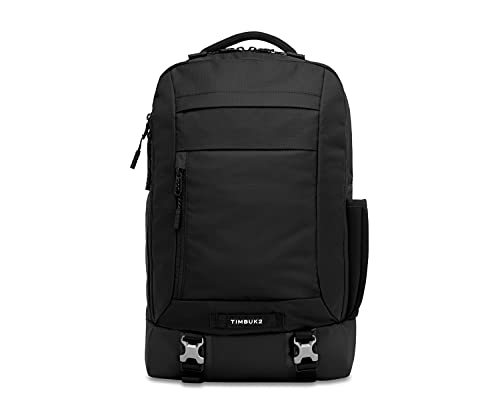
Pros
- Rear-access padded laptop sleeve
- Luggage pass-through for travel
- Padded straps and airmesh back panel
- Lifetime warranty for material or workmanship defects
Cons
- Who should skip it: Anyone needing more than 20 liters

Pros
- Separate compartment holds laptops up to 15.6 inches
- Sized for airline underseat personal item storage
- Built-in luggage strap simplifies suitcase transport
- Hidden back pocket adds anti-theft security
Cons
- Compartment capacity caps at 15.6 inch laptops
- Users with 17-inch laptops should skip

Pros
- Durable 600-denier water-repellent fabric
- Lightweight build under one pound
- Front utility pocket with integrated organizer
- Padded shoulder straps for carrying comfort
Cons
- Lacks dedicated laptop sleeve or padded device compartments
- Users needing multi-pocket compartmentalization should skip it

Pros
- Weighs only 1.74 pounds empty
- Includes dedicated shoe bag and wet pocket
- Lay-flat 180-degree opening for easy packing
- Fits under airline seats as personal item
Cons
- Cannot accommodate laptops larger than 15.6 inches
- Users carrying bulky travel gear should skip it
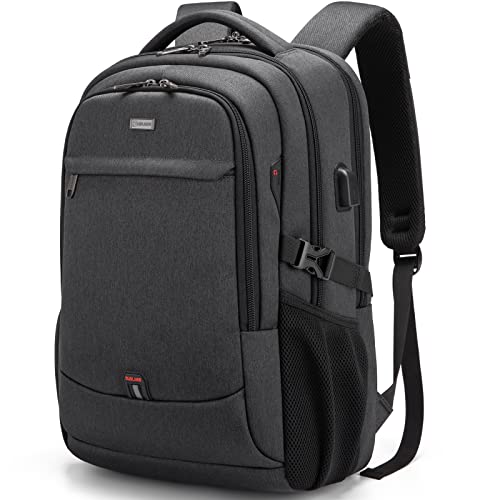
Pros
- Dedicated compartment fits laptops up to 17 inches
- Integrated USB pass-through port for portable charging
- Rear luggage strap and concealed anti-theft pocket
- Lightweight design weighing under two pounds
Cons
- Power bank not included for USB charging
- Skip if purchasing for children 12 and under

Pros
- Dedicated 15-inch laptop sleeve protects computer gear
- Two large compartments organize bulky everyday essentials
- Ergonomic S-curve shoulder straps enhance carrying comfort
- Lightweight construction weighs just one pound empty
Cons
- Requires hand washing for fabric maintenance
- Users needing machine-washable care should skip it

Pros
- TSA-friendly tech compartment opens flat up to 180 degrees
- Suitcase-style clamshell opening simplifies clothing packing
- Made with durable recycled PET fabric and YKK zippers
- Luggage pass-through strap enables easy roller bag mounting
Cons
- Usable capacity varies between 38 and 40 liters
- Bulky dimensions unsuitable as a compact daily commuter pack

Pros
- Spacious 50-liter capacity holds laptops up to 17 inches
- Twenty independent pockets provide organized gear storage
- Lay-flat opening unzips up to 180 degrees
- Padded back ventilation relieves shoulder pressure
Cons
- Large 50-liter footprint is bulky for light daily use
- Base weight of 2.8 pounds feels slightly heavy empty
The Best Laptop Backpacks by Use Case
Best for Everyday Commuting: THE NORTH FACE Vault Everyday Laptop Backpack
Laptop screen size and protection matter when you carry a computer to work or school. The THE NORTH FACE Vault Everyday Laptop Backpack pairs a 27-liter capacity with a padded laptop sleeve, tablet sleeve, and two bottle pockets. Its FlexVent suspension system has a flexible yoke, molded shoulder straps, padded back panel, and breathable lumbar panel, making this a sensible daily choice if you value carry comfort and accessible storage.
Reasons to buy:
- 27-liter main compartment and padded laptop sleeve.
- Two bottle pockets fit most 1-liter bottles, according to the listing.
- Stands unsupported and includes a sternum strap.
Reasons to avoid:
- The sleeve dimensions are listed as 11.5 by 11 inches, so check your laptop’s actual dimensions rather than relying only on its screen-size label.
- At 1 lb 11 oz, it is not the lightest listed option.
Skip it if you need a specified sleeve fit for a 17-inch laptop or a suitcase-style carry-on opening.
Best for Large Work Laptops: Timbuk2 Authority Laptop Backpack Deluxe 17 Inch
For a larger work computer and office essentials, the Timbuk2 Authority Laptop Backpack Deluxe 17 Inch offers a padded sleeve listed for most laptops up to 17 inches, with its own rear zipper. That separate access can make it easier to retrieve a computer without opening the main compartment. The 20-liter bag also has an organizer, airmesh back panel, luggage pass-through, removable sternum strap, and a water-resistant exterior.
Reasons to buy:
- Rear-access padded sleeve for laptops up to 17 inches, as specified by the listing.
- Luggage pass-through and reflective tape support commuting and travel.
- The listing specifies a lifetime warranty covering defects in materials or workmanship.
Reasons to avoid:
- Its 20-liter volume is smaller than the dedicated 40-liter travel pack in this guide.
- The side stretch pocket is specified for a bottle up to 24 oz, which may not suit larger bottles.
Skip it if you want a low-cost bag or need more space for clothing and bulky travel items.
Best Budget: MATEIN Travel Laptop Backpack
The MATEIN Travel Laptop Backpack covers common commuting and personal-item travel needs with a separate compartment listed for laptops up to 15.6 inches. Its 18-by-12-by-7.8-inch size is described as meeting most airline personal-item requirements, but airline rules vary, so confirm the current limit for your trip. A luggage strap, hidden back pocket, and front organizer make it a practical low-cost option for travelers who want basic organization.
Reasons to buy:
- Separate laptop compartment listed for 13-, 14-, 15-, and 15.6-inch laptops.
- Luggage strap and hidden back pocket add useful travel features.
- Front pockets include pen storage and a key hook.
Reasons to avoid:
- The listing does not specify a laptop sleeve’s internal dimensions, so verify fit for thick or unusually shaped devices.
- Its water-resistant fabric should not be treated as waterproof protection.
Skip it if you carry a laptop larger than 15.6 inches or need a stated capacity for multi-day packing.
Best for Carry-On Packing: tomtoc Travel Backpack 40L
When a trip calls for clothing as well as a computer, the tomtoc Travel Backpack 40L offers a stated usable capacity of 38 to 40 liters, depending on packing and minor size variation. It opens like a suitcase for packing, while its laptop compartment accommodates a laptop up to 17 inches and a 13-inch iPad with accessories, according to the listing. A 90-to-180-degree laptop-compartment opening is intended to help with security screening, and the bag includes a luggage pass-through.
Reasons to buy:
- Large main compartment opens like luggage for easier packing.
- Separate tech compartment is listed for a laptop up to 17 inches.
- The listing specifies recycled fabric made from post-consumer material and YKK zippers.
Reasons to avoid:
- Its 20.47-by-12.99-by-9-inch dimensions may exceed some carriers’ carry-on limits; check your airline’s rules.
- A 40-liter pack can be more bag than a simple daily commute needs.
Skip it if you want a compact work bag rather than a large travel pack.
Best for Separating Travel Gear: Taygeer Travel Laptop Backpack for Men
The Taygeer Travel Laptop Backpack for Men suits short trips where keeping shoes, wet items, and electronics apart is useful. Its 16.8-by-11-by-7-inch body has three main compartments, nine allocated inner and side pockets, and a laptop compartment listed for a 15.6-inch computer and a 12.9-inch iPad. The listing also describes a 180-degree opening, two padded handles, and shoulder straps, giving you options for carrying it as a bag or backpack.
Reasons to buy:
- Includes a shoe bag and a wet pocket for separating contents.
- Three main compartments and nine allocated pockets help sort travel items.
- Listed dimensions are intended to fit overhead or under-seat travel, subject to airline rules.
Reasons to avoid:
- The laptop compartment is specified for 15.6 inches, not larger computers.
- Confirm that the pack’s dimensions meet the specific carrier’s limits; “airplane approved” does not guarantee acceptance on every flight.
Skip it if you do not need the separate shoe and wet-item storage or need a larger laptop sleeve.
Best for a 17-Inch Laptop on a Budget: DUSLANG 17 inch Travel Laptop Backpack
The DUSLANG 17 inch Travel Laptop Backpack combines a sleeve listed for 17-, 15-, 14-, and 13-inch laptops with substantial day-to-day organization. It also has a separate compartment for a maximum 9.7-inch iPad, two mesh pockets, a hidden back pocket, and a luggage strap. Its built-in USB port connects to an internal cable, but the listing says the power source is not included, so you must provide a compatible power bank.
Reasons to buy:
- Specified laptop fit goes up to 17 inches.
- Separate tablet storage and numerous dedicated pockets help organize small items.
- USB charging access and a luggage strap suit commuters who also travel.
Reasons to avoid:
- A power bank is needed for the USB port and is not included.
- The product data does not provide the bag’s overall dimensions or volume.
Skip it if you want a confirmed carry-on size or do not want to supply a power bank for charging access.
Also Considered
The Swissdigital Design Backpack for Men & Women Fit may suit travelers who want a 16-inch laptop compartment, RFID protection pocket, USB port, and luggage strap, but the listing does not give overall dimensions or capacity. The JanSport SuperBreak One Backpacks – Durable is a lightweight, simple daypack with a 15-inch drop shoulder strap and front organizer, but its listed features do not specify a dedicated laptop sleeve. The JanSport Laptop Backpack adds a 15-inch laptop sleeve and two main compartments, though it has fewer travel-specific details than the selected commute and carry-on options. The SHRRADOO Extra Large Travel Laptop Backpack offers a 50-liter capacity, 20 pockets, and a combination lock, but its 19.5-by-15-by-11-inch dimensions make it a particularly large choice for everyday use.
How to Choose the Best Laptop Backpack
Check the laptop compartment, not only the screen-size label
“Fits a 15-inch laptop” is not a universal measurement. Laptop bodies differ in width, depth, thickness, and bezel size, while bag makers may describe fit by screen class rather than exact device dimensions. Compare your laptop’s physical measurements with the sleeve’s listed internal dimensions whenever those are available. The North Face Vault provides sleeve measurements, while several other listings state a maximum laptop screen size without giving the sleeve’s internal measurements. When the exact dimensions are missing, check the product listing and confirm the fit before relying on the bag for a close-fitting computer.
Match capacity to your daily load
A school or office commute may call for room for a laptop, charger, and a few personal items, while a weekend trip can need space for clothes and toiletries. Larger volume can help with packing, but it also creates a bulkier bag to carry when lightly loaded. The Timbuk2 Authority lists 20 liters, The North Face Vault lists 27 liters, and the tomtoc lists 38 to 40 liters of usable capacity. Consider what you carry on an ordinary day, not only what you might pack occasionally. If a listing omits capacity, as the DUSLANG listing does, do not assume its external size from its feature list.
Choose organization for the items you carry
Dedicated pockets can keep a charger, keys, bottle, or travel documents easy to find, but a long pocket list does not guarantee that every compartment will suit your belongings. Look for details that match your routine: the North Face Vault specifies two bottle pockets and a tablet sleeve, while the Taygeer includes a shoe bag and wet pocket. The Timbuk2 has a work-focused internal organizer, and the DUSLANG specifies many small-item pockets plus a tablet compartment. Check product photos and compartment descriptions to see whether pocket placement and openings make sense for the things you carry.
Assess carrying comfort and load support
Padding, breathable panels, adjustable straps, and a sternum strap may help when you carry a loaded bag for long periods. These features do not prove that one pack will feel comfortable for every body or load, so compare the design with your needs. The North Face Vault describes molded shoulder straps and a breathable lumbar panel; the Timbuk2 includes an airmesh back panel and removable sternum strap. For a lightweight option, the JanSport SuperBreak listing gives a 15-inch drop measurement for its padded shoulder straps, but it does not specify a laptop sleeve. Check strap adjustment and back-panel details if your commute involves walking or carrying a heavy load.
Verify travel rules and charging needs
A luggage pass-through makes a bag easier to carry with rolling luggage, and a wide-opening laptop compartment can help with security screening. Neither feature guarantees that an airline will accept a backpack as a personal item or carry-on. Compare the bag’s stated dimensions with your carrier’s current size limits, especially for the larger tomtoc and SHRRADOO options. USB ports on the Swissdigital and DUSLANG bags provide access to a power connection, but they do not generate power. The DUSLANG listing specifies an internal cable and says you need a power bank; check the setup and power-bank requirements before choosing any charging-port bag.
For related computer gear, compare the guide to USB-C docks for two laptops or the guide to portable monitors for MacBook Neo. Those accessories solve different setup needs, so verify port and device compatibility separately rather than assuming a backpack’s USB port supports a particular charging speed.
How We Compared
This comparison uses the published product listings, including stated laptop and tablet fits, capacities, dimensions, pocket layouts, carrying features, materials, and travel details. Customer feedback was considered only where supplied; no review count or customer experience is inferred from a rating alone. Recommendations reflect how the listed features match specific commuting, school, work, and travel needs. Where a listing omits a useful detail, such as internal sleeve dimensions or bag capacity, the guide identifies that as something to verify rather than filling the gap with an assumption.
Frequently Asked Questions
How do I know whether a laptop will fit?
Measure the laptop’s width, depth, and thickness, then compare those figures with the compartment’s internal dimensions if the listing provides them. A screen-size label is useful as a first check, but models with the same screen size can have different body dimensions. If a bag gives only a maximum screen-size claim, confirm fit with the seller’s current listing details before purchase.
Is a padded laptop sleeve enough protection?
A padded sleeve is intended to help cushion a laptop from bumps, but the published product information does not establish a particular level of impact protection. If your device needs more protection, check whether the sleeve is separate from other packed items and consider how tightly the laptop sits. Avoid treating water-resistant fabric as waterproof protection.
Can I use any of these backpacks as an airline personal item?
Do not assume that a bag labeled for air travel fits every airline’s personal-item rules. Compare its listed external dimensions with the current limits for the carrier and ticket you are using. The MATEIN listing describes its size as meeting most airline personal-item requirements, while other listings describe carry-on suitability; final acceptance depends on the airline’s rules.
Do backpacks with USB ports include a power bank?
The Swissdigital listing says a power bank is not included. The DUSLANG listing describes an outside USB port and internal cable but does not include a power bank in its stated features. In both cases, plan to connect your own power source and check the current listing for the exact arrangement before buying.
Which backpack makes more sense for travel with clothing?
The tomtoc is the clearest choice here for clothing-heavy packing because its listing specifies 38 to 40 liters of usable capacity and a suitcase-style opening. The Taygeer is a smaller alternative with a shoe bag and wet pocket for separating specific items. Compare each bag’s dimensions with your airline’s limits, and choose based on the amount and type of gear you expect to carry.
Is a larger backpack always more useful?
A larger bag can hold more, but it may be unnecessarily bulky for a laptop and a few daily items. Choose capacity based on your usual load and how often you travel. A 20- to 27-liter option may suit commuting needs, while the larger tomtoc or SHRRADOO models are intended for more substantial packing.




Write Your Review
No reviews yet. Be the first to share your experience!