

Choosing a printer under $200 can mean deciding between low-cost refillable ink, fast black-and-white pages, or an all-in-one device with more office features. This guide to the Best Printer Under $200 compares six models by printing needs, connectivity, and listed capabilities, so you can narrow down which compromises fit your home or workspace.

Pros
- Automatic duplex printing
- Wi-Fi, Ethernet, and USB connectivity
- 250-sheet paper tray
- Manual feed for envelopes and specialty paper
Cons
- Skip it if you need color printing
Pros
- Print, scan, copy, and fax functions
- Automatic duplex printing and ADF
- 225-sheet input tray
- 2.7-inch color touchscreen
Cons
- Instant Ink becomes paid after one year unless canceled
- Requires cartridges with original HP chips or circuitry
- Skip it if you want to use non-HP cartridges

Pros
- Up to 6,000 pages of included ink
- Cartridge-free refillable ink system
- Prints, scans, and copies
- Wireless and mobile printing
Cons
- Who should skip it: buyers needing specified print speeds or paper capacity

Pros
- High included-ink page estimates
- Refillable tanks with keyed bottles
- Built-in flatbed scanner
- Compact 12.5 x 14.2 x 6.4-inch dimensions
Cons
- Skip it if you need color output faster than 6 ISO ppm

Pros
- Lightweight, compact design
- Wireless Direct Mode works without a router
- Supports borderless prints
Cons
- Who should skip it: users needing over 50 sheets loaded
Pros
- Cartridge-free refillable ink tanks
- Wireless printing, scanning, and copying
- Flatbed scanner and copier
- Borderless photo printing
Cons
- Epson recommends genuine ink for optimal performance
- Skip if you prefer using non-genuine ink
The Best Printers by Use Case
Best for Fast Monochrome Documents: Brother HL-L2460DW Wireless Compact Monochrome
The Brother HL-L2460DW Wireless Compact Monochrome is a black-and-white laser printer suited to home offices and small teams that mainly produce documents. Its listed speed reaches 36 pages per minute, and automatic two-sided printing can reduce manual page handling and paper use. Dual-band Wi-Fi, Ethernet, and USB give you several connection options, while a 250-sheet tray supports larger print jobs.
Reasons to buy:
- Listed print speed of up to 36 pages per minute for monochrome documents.
- Automatic duplex printing and a 250-sheet paper tray.
- Dual-band Wi-Fi, Ethernet, USB, and mobile printing through Brother Mobile Connect.
Reasons to avoid:
- It prints only in black and white, so it cannot produce color reports or photos.
- It has no listed scan, copy, or fax functions.
Who should skip it: Choose another model if you need color or an all-in-one printer. The listing identifies Brother Genuine TN830 or TN830XL toner as replacement supplies, so check ongoing supply costs before choosing it for frequent printing. Name: our work-from-home monitor guide.
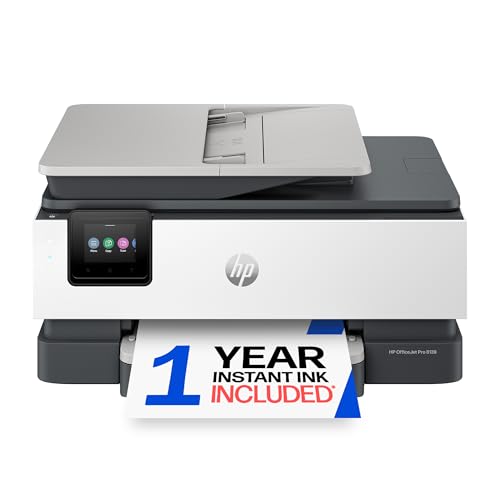
Best for Home Office Tasks: HP OfficeJet Pro 8139 Wireless All-in-One Color
The HP OfficeJet Pro 8139 Wireless All-in-One Color brings printing, scanning, copying, and faxing together for a home office. It has an automatic document feeder, automatic two-sided printing, and a 225-sheet input tray, which can help when you handle multipage paperwork. The listing specifies print speeds up to 20 pages per minute in black and 10 in color, plus a touchscreen for navigating settings.
Reasons to buy:
- Print, scan, copy, and fax functions, with an automatic document feeder.
- Automatic duplex printing and a 225-sheet input tray.
- Dual-band Wi-Fi and smartphone printing, scanning, copying, and faxing through the HP app.
Reasons to avoid:
- It uses ink cartridges rather than refillable tanks.
- The included Instant Ink trial becomes a paid monthly subscription after one year unless canceled.
Who should skip it: Look elsewhere if refillable ink tanks or subscription-free ink management matter more than an automatic document feeder and faxing. Review Instant Ink terms before activating the trial. For another home printing angle, see our guide to choosing a home photo printer.
Best for High-Volume Color Printing: HP Smart Tank 5003 Ink Tank Printer
The HP Smart Tank 5003 Ink Tank Printer is a cartridge-free color all-in-one built around refillable ink tanks. Its listing says the included ink can print up to 6,000 color or black pages, making this model worth considering for households that print regularly and want fewer cartridge changes. It also prints borderless pages and supports wireless and mobile printing, alongside scanning and copying.
Reasons to buy:
- Refillable, cartridge-free ink tanks with included ink rated for up to 6,000 color or black pages.
- Print, scan, copy, and borderless printing in one device.
- Wireless and mobile printing, with a bottle system designed for mess-free refilling.
Reasons to avoid:
- The listing does not specify print speed or paper-tray capacity.
- Ink yield is a manufacturer listing claim; your results depend on what and how much you print.
Who should skip it: Pick a laser model if your work is mostly monochrome and page speed matters more than color. Check the listed ink yield against your own print mix, especially if you print many photos or graphics.
Best for Long Ink Supply: Epson EcoTank ET-2900 Wireless All-in-One Color
The Epson EcoTank ET-2900 Wireless All-in-One Color is a refillable-tank printer for home users who want color, scanning, and copying without frequent cartridge replacement. Epson lists up to 3,600 black pages and 6,500 color pages from the included ink, as well as print speeds of 11 black and 6 color ISO pages per minute. Its 100-sheet tray and flatbed scanner suit ordinary home tasks, though the tray is smaller than the Brother model’s.
Reasons to buy:
- Included ink rated for up to 3,600 black pages or 6,500 color pages.
- Refillable tanks and keyed bottles intended to make refills straightforward.
- Wireless printing, scanning, copying, a 100-sheet tray, and a color display.
Reasons to avoid:
- Listed print speeds are 11 black and 6 color ISO pages per minute, below the Brother monochrome printer’s stated speed.
- The paper tray holds 100 sheets, which may mean more frequent refills for busy households.
Who should skip it: Consider a faster monochrome printer for document-heavy office work, or compare the HP tank model if its listed ink yield better matches your needs. Confirm whether its print and scan functions cover your workflow; faxing and an automatic document feeder are not listed.
Best for Printing Away from a Desk: Canon PIXMA TR160 Color Wireless Portable Printer
The Canon PIXMA TR160 Color Wireless Portable Printer is the only model here described as lightweight and portable, with a design that can fit into a bag or backpack. It prints documents and photos up to 8.5 by 11 inches and uses a five-color hybrid ink system. Wireless direct mode lets a compatible device connect without a wireless router, a useful option when you print away from a usual home network.
Reasons to buy:
- Portable format intended for carrying in a bag or backpack.
- Color printing up to 8.5 by 11 inches, including borderless and square prints.
- Canon PRINT app, Apple AirPrint, Mopria Print Service, and wireless direct mode are listed connection options.
Reasons to avoid:
- Its 50-sheet paper tray is smaller than the trays on the listed home-office models.
- The product information does not list scanning or copying.
Who should skip it: Choose an all-in-one if you need a scanner or copier, or a larger tray if you print long batches. Confirm that your phone or computer supports your preferred printing service before buying.
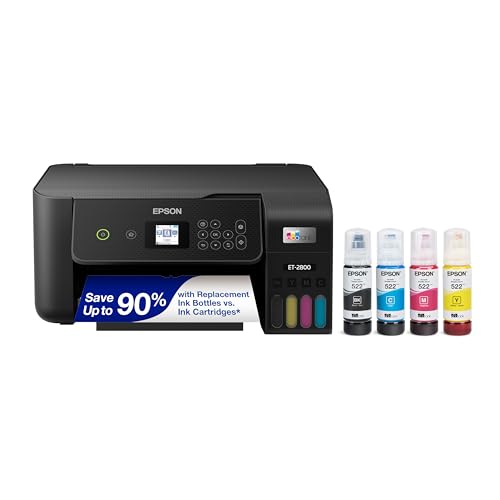
Best for Everyday Home Printing: Epson EcoTank ET-2800 Wireless Color All-in-One
The Epson EcoTank ET-2800 Wireless Color All-in-One combines refillable tanks with print, scan, and copy functions for routine home use. The listing states that included ink can produce up to 4,500 black pages and 7,500 color pages, and it supports borderless photo printing. Wi-Fi printing from computers, laptops, and smartphones makes it a flexible option for a household sharing print jobs across devices.
Reasons to buy:
- Cartridge-free tanks and included ink rated for up to 4,500 black or 7,500 color pages.
- Print, scan, and copy functions, plus borderless photo printing.
- Wireless printing from computers, laptops, and smartphones.
Reasons to avoid:
- The listing gives a speed of up to 10 pages per minute, which may not suit frequent large jobs.
- Epson recommends genuine ink and says non-genuine ink could cause damage not covered by the limited warranty.
Who should skip it: Consider a monochrome laser printer if speed and high-volume text printing are your priorities. Buyers who want faxing or an automatic document feeder should confirm those features elsewhere; neither is listed for this model.
How to Choose the Best Printer Under $200
Match the ink system to your print volume
Refillable tanks can make sense when you print often and want a large supply of ink included. The HP Smart Tank 5003, Epson EcoTank ET-2900, and Epson EcoTank ET-2800 list high page yields, but those figures are manufacturer claims, not a promise of your personal results. Page coverage, color use, and print frequency affect how quickly ink runs out. Check the replacement bottle type, stated yield, and any ink requirements in the listing before deciding.
Cartridge printers may be a better match if you print less often or need specific office features. The HP OfficeJet Pro 8139 includes an Instant Ink trial, but a monthly fee applies after its first year unless you cancel. Read subscription terms and confirm the replacement ink arrangement before enrolling.
Choose color or monochrome based on your documents
A monochrome laser printer can suit invoices, forms, schoolwork, and other text-first jobs. The Brother HL-L2460DW lists speeds up to 36 pages per minute, but it cannot print color. Color inkjets and tank printers can handle color documents and photos, though the listing information lists lower speeds for some models. If photos matter, compare print sizes and photo features; our home photo printer guide covers that decision in more detail.
Check paper handling and office functions
Tray capacity affects how often you reload paper. The Brother lists a 250-sheet tray, the HP OfficeJet Pro 8139 lists 225 sheets, the Epson EcoTank ET-2900 lists 100, and the Canon PIXMA TR160 lists 50. An automatic document feeder helps process multipage originals, while automatic duplex printing can print on both sides without turning pages by hand. Among these picks, the HP OfficeJet Pro 8139 lists both features; the Brother lists duplex printing.
Also check which functions you need beyond printing. The HP OfficeJet Pro 8139 lists faxing as well as scanning and copying. The HP Smart Tank 5003 and both Epson EcoTank all-in-ones list scanning and copying, while the Canon portable model’s listing information does not list either function.
Confirm connection options for your devices
Wireless support is useful when several people print from phones or computers, but connection methods vary. Brother lists dual-band Wi-Fi, Ethernet, USB, and its mobile app. The Canon offers Canon PRINT, Apple AirPrint, Mopria, and wireless direct mode, which can connect compatible devices without a router. The other listed models support wireless or Wi-Fi printing, but their published descriptions do not identify every supported operating system or connection detail. Check your device and network requirements in the product listing before buying.
Consider space, speed, and the jobs you repeat
A portable printer serves a different purpose from a home-office all-in-one. The Canon PIXMA TR160 is designed to travel, while the Brother prioritizes fast monochrome pages and a large tray. Tank printers suit users focused on included ink supply, and the HP OfficeJet Pro adds document-handling features. Compare the product’s listed format and functions with your available workspace and typical jobs; the listing information does not give exact dimensions for every model.
How We Compared
This comparison uses the published product listings, including stated print functions, ink systems, page yields, speeds, paper handling, and connection options. We considered how those details fit common home, office, and portable printing needs, and included limitations where the listing leaves useful information unspecified. No customer review feedback was supplied, so this guide does not draw conclusions from ratings or reported owner experiences.
Frequently Asked Questions
Should I choose a laser printer or an inkjet?
Choose a monochrome laser model when most of your jobs are black-and-white documents and the Brother’s listed speed and duplex printing fit your needs. Choose an inkjet or tank model if you need color, photos, or an all-in-one device. The right type depends on your work, not on a single printer category being best for everyone.
Are refillable ink tanks a good fit for occasional printing?
Tank printers offer large listed ink supplies, which may appeal to households that print regularly. If you print only occasionally, compare the printer’s ink system and refilling process with your needs, and check the manufacturer’s guidance for maintenance and ink. The published listings do not establish how a particular model performs after long periods without use.
Can I print from my phone?
Several models list mobile or wireless printing. The Brother names its Mobile Connect app, the HP OfficeJet Pro supports smartphone functions through the HP app, and the Canon lists Canon PRINT, Apple AirPrint, and Mopria. Confirm that your phone, operating system, and network support your chosen connection method.
Which model suits multipage office documents?
The Brother HL-L2460DW lists a 250-sheet tray and automatic duplex printing for black-and-white jobs. For color office paperwork, the HP OfficeJet Pro 8139 lists a 225-sheet tray, automatic duplex printing, and an automatic document feeder. Pick based on whether your documents need color, scanning, or faxing as well as print capacity.
Can the Canon PIXMA TR160 replace a home all-in-one?
It may work for portable color printing, but the listing information does not list scanning or copying, and its tray holds 50 sheets. Choose one of the listed all-in-ones if you need those additional functions or expect to print larger batches at home.





Write Your Review
No reviews yet. Be the first to share your experience!