

Streaming video can mean watching shows, joining calls, or broadcasting your own content, and those tasks do not call for the same equipment. This guide compares one laptop with two USB webcams, so you can see what each option covers and where you may need a separate device.
The HP model is the only laptop here. The other two products are webcams, not computers, so they can add camera features to a compatible setup but cannot replace a laptop. For more laptop comparisons, see our guides to laptops for graphic design and laptops for accounting.

Pros
- Plug-and-play setup requires no driver installation
- Included slide-on cover offers immediate physical privacy
- Integrated noise-reducing microphone clarifies spoken audio
- Automatic light correction adapts to changing room brightness
Cons
- Capped at 30 frames per second
- Buyers needing 4K resolution should skip this model

Pros
- Modern Wi-Fi 6 and Bluetooth 5.4 connectivity
- Generous port selection including USB-C and HDMI
- Includes one year of Microsoft 365 Personal
- Compact design with anti-glare display coating
Cons
- Limited 4GB RAM restricts intensive multitasking
- Low 1366 x 768 screen resolution
- Modest 128GB internal storage capacity

Pros
- 1080p at 60fps
- Face autofocus
- Built-in fill light
- Privacy cover
Cons
- Who should skip it: users needing more than 1.7 meters of cable reach
The Best Streaming Setup Products by Use Case
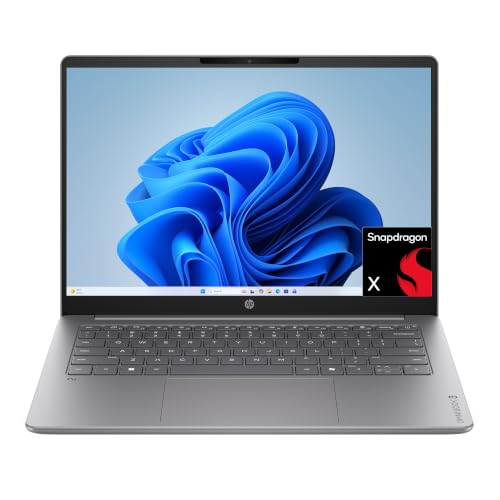
Best for Portable Everyday Streaming: HP 2026 Essential Laptop, Intel Processor
The HP 2026 Essential Laptop, Intel Processor is the sole computer in this group, and its listing describes it for web browsing, video streaming, email, and light productivity. Its Intel N150 processor, 4GB of LPDDR5 memory, and 128GB of UFS storage make it a basic everyday option rather than a clearly suited machine for demanding live production. The 14-inch, 1366 x 768 display keeps the laptop compact, while Wi-Fi 6 and an HDMI 1.4b port offer useful connection choices. See our student laptop guide if operating-system compatibility is also part of your decision.
Reasons to buy:
- The listing specifically includes video streaming among everyday tasks.
- At a listed 3.24 lb, it is designed for portability, with claimed video playback of up to 11 hours.
- HDMI 1.4b and USB-C with DisplayPort 1.2 support connecting an external display; verify your monitor and cable needs.
Reasons to avoid:
- The 4GB of memory and 128GB of storage leave less room for multitasking and locally saved media than higher-capacity setups.
- The HD display is 1366 x 768, not Full HD, and the listing does not establish performance for demanding streaming or editing software.
Skip it if you need a higher-resolution built-in screen, substantial memory for many simultaneous apps, or a laptop specifically suited to intensive live production. Compare MacBook options if you want to consider a different laptop family.
Best for a Simple USB Camera Upgrade: 1080P HD Webcam with Microphone
The Shcngqio 1080P HD Webcam with Microphone is an add-on camera for a laptop or desktop, not a computer for watching or broadcasting by itself. The listing specifies 1080p video at 30 frames per second, a wide-angle lens, automatic light correction, and a built-in noise-reducing microphone. Its privacy cover and plug-and-play USB connection make it a practical fit for calls or a straightforward streaming setup, provided your computer has a compatible USB port.
Reasons to buy:
- Full HD 1080p video at 30 fps is specified for calls, streaming, and everyday content creation.
- Automatic light correction adjusts exposure and color temperature to the surroundings, according to the listing.
- A sliding privacy cover, adjustable monitor clip, and 5-foot USB cable are specified.
Reasons to avoid:
- The listed frame rate is 30 fps, so consider the NBPOWER webcam if its specified 60 fps is more relevant to your motion-heavy content.
- The listing does not state a streaming platform certification or detailed operating-system version support; check your software and computer requirements.
Skip it if you need a laptop, a camera with a stated 60 fps mode, or more detailed compatibility information before purchase. The 1080P HD Webcam with Microphone adds a camera and microphone to a compatible computer, but it does not supply the computer or internet connection.
Best for Listed 60 FPS Capture: NBPOWER 1080P 60FPS Streaming Camera Webcam
The NBPOWER 1080P 60FPS Streaming Camera Webcam targets people who want an external camera for streaming, gaming, calls, or classes. Its listing specifies 1080p video at 60 fps, autofocus, a fill light, a noise-canceling microphone, and a privacy cover. It also names Zoom, YouTube, OBS, Microsoft Teams, and Skype, along with Windows and Mac compatibility, though the listing’s operating-system wording is imprecise. Confirm your exact computer and software support before relying on it.
Reasons to buy:
- The specified 1080p 60 fps mode offers a higher listed frame rate than the Shcngqio webcam’s 30 fps mode.
- Autofocus and an integrated fill light are listed features for changing focus and dimmer surroundings.
- The listing names popular video and streaming apps and specifies a 1.7-meter braided USB cable.
Reasons to avoid:
- The listing does not identify the fill light’s output or provide detailed image-quality measurements, so do not assume how it will look in your room.
- Its compatibility description includes unclear wording for Windows versions; verify your operating system and USB connection.
Skip it if you need a laptop, prefer a stated 30 fps webcam, or cannot confirm compatibility with your computer and streaming application.
How to Choose the Best Laptop for Streaming
Start with what you mean by streaming
Watching video, attending a video call, and broadcasting a game are different workloads. The HP listing identifies video streaming and light productivity as intended everyday tasks, but it does not provide evidence that the laptop is suited to demanding broadcasting software or gaming. If you plan to run a stream, a game, chat, and other apps together, compare memory and processor details carefully, then look for product information that explicitly addresses that workload.
For calls or broadcasts, a webcam can be a separate purchase. The two cameras here connect by USB and list built-in microphones; the NBPOWER model also specifies autofocus and a fill light. An external camera adds setup options, but it does not increase the laptop’s processing capability or provide internet access.
Check processor, memory, and storage together
A processor handles the computer’s work, memory supports active applications, and storage holds the operating system, software, and files. The HP listing specifies an Intel N150 processor, 4GB LPDDR5 memory, and 128GB UFS storage. Those figures describe an entry-level everyday setup; the listing does not establish how it performs with a particular streaming application or many simultaneous programs.
Before buying, check the software maker’s current system requirements and compare them with the laptop listing. Consider how much local video or other media you intend to keep. The listing mentions 1TB of cloud storage, but cloud space is not the same as built-in storage and depends on access to the service and an internet connection.
Match screen size and resolution to viewing habits
The HP has a 14-inch HD display with 1366 x 768 resolution, an anti-glare coating, 250-nit listed brightness, and 62.5% sRGB color accuracy. The compact size may suit travel and everyday viewing, while the resolution provides less screen detail than a Full HD panel. If you watch for long periods, work with multiple windows, or connect a larger monitor, compare resolution, brightness, screen size, and display connections rather than relying on the word “HD” alone.
Display preferences also depend on the room. An anti-glare coating can help reduce reflections, but the listing does not prove how a screen will appear under your lighting. Check brightness and panel details on each product page, and confirm that an external monitor accepts the laptop’s listed HDMI or USB-C video output.
Review ports, wireless connections, and camera needs
The HP listing specifies Wi-Fi 6, Bluetooth 5.4, one USB-C port rated for 10 Gbps with DisplayPort 1.2, two USB-A ports rated for 5 Gbps, HDMI 1.4b, a headphone and microphone combo jack, and an SD card reader. These details help you check whether a webcam, headset, monitor, or storage device can connect without an adapter. Do not assume every USB-C port supports the same video or data features: match the listed port capabilities to the accessory.
The Shcngqio webcam lists USB 2.0, 3.0, or 3.1 support, while the NBPOWER camera lists USB 2.0 and 3.0. Both advertise plug-and-play setup, but the published details do not establish compatibility with every computer, hub, or software version. Confirm the physical port, operating system, and app requirements, particularly if you plan to use a USB adapter or dock.
Use battery and portability claims as planning details
The HP listing claims up to 11 hours of video playback and 7.5 hours of wireless streaming, and gives a weight of 3.24 lb. Treat these as manufacturer-provided figures, not a guarantee for every viewing session. Screen brightness, wireless use, and active applications can affect how long a laptop lasts away from an outlet; plan for a charger if your schedule depends on uninterrupted use.
For frequent travel, the 14-inch screen and listed weight may be useful, but check dimensions against your bag and consider whether the screen size suits your viewing. A webcam is a peripheral rather than a portable computer, and its cable length and mounting arrangement matter at a desk. The Shcngqio listing gives a 5-foot cable, while NBPOWER specifies 1.7 meters.
How We Compared
This comparison uses the published product specifications, stated design features, listed intended uses, and available customer-feedback information. The product data reports zero reviews for the HP and Shcngqio listings, and zero reviews for NBPOWER as supplied, so there is no customer-review pattern to weigh. The products do not form a direct laptop-versus-laptop comparison: one is a laptop and two are webcams. Recommendations therefore focus on their distinct roles and on the limits of the published information.
Frequently Asked Questions
Can either webcam replace a laptop for streaming?
No. The Shcngqio and NBPOWER products are external webcams. They connect to a compatible computer, while the computer runs the streaming app and handles the connection to the internet.
Is the HP laptop suitable for watching streaming video?
The HP listing includes video streaming among its everyday uses and claims up to 7.5 hours of wireless streaming battery life. Its 14-inch display is 1366 x 768, so consider whether that resolution and screen size meet your viewing preferences. Actual battery life can vary with use.
What is the difference between the two webcams?
The Shcngqio model specifies 1080p at 30 fps, a wide-angle lens, automatic light correction, and a 5-foot USB cable. NBPOWER specifies 1080p at 60 fps, autofocus, a fill light, and a 1.7-meter cable. Both list a built-in microphone and privacy cover; check platform and computer support before choosing.
Will these USB webcams work with every laptop?
The listings describe broad USB and computer compatibility, but they do not establish support for every model, operating-system version, USB hub, or application. Check the webcam’s current product details against your laptop ports and software. The NBPOWER listing names Windows and Mac but contains unclear wording about Windows versions.
Does the HP USB-C port support an external monitor?
The published details specify DisplayPort 1.2 on the HP’s USB-C port, and the laptop also has HDMI 1.4b. Confirm your monitor’s inputs and the cable or adapter needed. Port features vary across computers, so do not assume another laptop’s USB-C port has the same video capability.
Which product should I choose for live broadcasting?
Choose based on the equipment you already own and the software you plan to run. The NBPOWER webcam lists 1080p at 60 fps, while the HP laptop’s listed use is everyday computing and video streaming, not a specific live-production workload. Verify your app’s computer requirements, camera compatibility, and internet connection before building a setup.




Write Your Review
No reviews yet. Be the first to share your experience!