

Getting through classes without hunting for an outlet can mean compromising on screen size, memory, or performance. This guide to the Best Laptop for Students with All-Day Battery Under $700 compares five listings by their stated battery claims, specifications, and student-focused features, while flagging details you should confirm before buying.

Pros
- Expandable storage up to 4TB M.2 SSD
- Memory expandable up to 64GB RAM
- Built-in fingerprint reader and webcam privacy shutter
- Convenient 65W USB-C Power Delivery charging
Cons
- Integrated graphics lack power for heavy 3D gaming
- Relies on older Wi-Fi 5 wireless standard
- Skip if requiring dedicated graphics for rendering
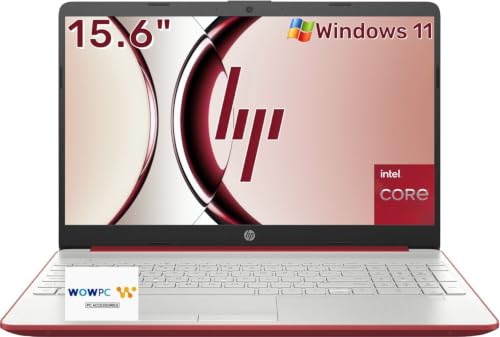
Pros
- Dedicated numeric keypad speeds data entry
- 128GB SSD offers fast boot times
- Claimed 10-hour battery supports mobile use
- Spacious 15.6-inch display for daily tasks
Cons
- 4GB RAM limits heavy multitasking capability
- 128GB storage fills quickly with large files
- Heavy multitaskers should skip modest Pentium configuration

Pros
- 15.6-inch full-HD display
- 32GB RAM
- USB-C, USB-A, and HDMI ports
- One-year Office 365 included
Cons
- 6 lb weight may not suit frequent carrying
- Who should skip it: buyers seeking a lighter laptop

Pros
- Expansive 17.3-inch Full HD IPS display
- Generous 16GB RAM for smooth multitasking
- Hardware privacy camera and fingerprint reader
- Included two-year warranty and 90-day return policy
Cons
- Entry-level processor unsuitable for demanding computing tasks
- Relatively heavy 4.6-pound chassis limits daily travel portability
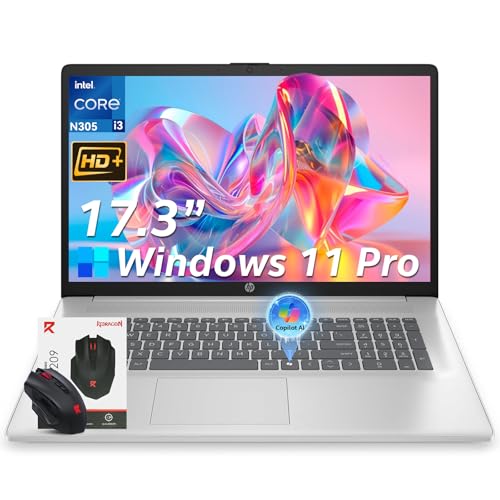
Pros
- Spacious 17.3-inch display for easy multi-window viewing
- Generous 16GB RAM supports smooth multitasking
- Fast 512GB PCIe solid-state storage
- Includes Windows 11 Pro with privacy shutter webcam
Cons
- Display resolution is limited to 1600x900 HD+
- Heavier 4.6-pound chassis limits comfortable travel
- Shoppers needing high-resolution screens should skip it
The Best Laptops for Students by Use Case
Best for Multitasking: NIMO 15.6" AMD Ryzen 5 Student Laptop 16GB RAM
The NIMO 15.6" AMD Ryzen 5 Student Laptop 16GB RAM is the strongest fit here for students who keep documents, browser tabs, video calls, and coding or creative apps open together. Its listing specifies 16GB of memory, a 512GB SSD, a 15.6-inch FHD IPS display, a backlit keyboard, and a fingerprint reader. The listing contains conflicting processor details: its title says Ryzen 5, while its feature text names Ryzen 5 6600H and also refers to Ryzen 5 3501U. Confirm the exact processor before purchase.
Reasons to buy:
- 16GB RAM and a 512GB SSD give you more room for simultaneous coursework and files than the 4GB, 128GB HP option.
- The 15.6-inch FHD IPS screen and backlit keyboard suit split-screen work and dim study spaces.
- The listing describes USB-C power delivery and a 15-minute charge providing up to two hours of use, but treat that as a manufacturer claim, not a guaranteed result.
Reasons to avoid:
- Conflicting processor names make the exact chip worth verifying with the seller.
- The listing provides no full-runtime battery estimate, so it cannot confirm all-day unplugged use.
Skip it if you need a clearly documented battery-runtime figure or want a laptop with an unambiguous processor listing. See the student laptop guide under $1,000 if your requirements extend beyond this selection.
Best for a Claimed Long Runtime: HP 15.6" Laptop, 4GB RAM, 128GB Storage
The HP 15.6" Laptop, 4GB RAM, 128GB Storage is the only option in this group whose listing states up to 10 hours of battery life. That figure may appeal if you want fewer charging interruptions during a school day, but actual runtime depends on use, and the listing does not establish how long it will last with demanding apps or high screen brightness. Its 4GB of RAM and 128GB SSD make it a better match for basic browsing, documents, email, and streaming than heavy multitasking.
Reasons to buy:
- The advertised battery life is the clearest runtime claim among these five listings.
- The 15.6-inch display and full-size keyboard with numeric keypad suit assignments and basic spreadsheet entry.
- At approximately 3.9 lb according to the listing, it is described as portable for travel between home, school, and the library.
Reasons to avoid:
- 4GB RAM can limit comfortable multitasking with many tabs or multiple apps open.
- 128GB storage leaves less room for locally stored coursework and media than the 512GB options.
Skip it if you regularly use demanding software, keep many browser tabs open, or need substantial built-in storage. For students weighing Windows against other formats, our laptop-versus-tablet comparison explains which device type fits different study routines.
Best for a Large FHD Workspace: HP 15.6" FHD Business & Student Laptop Computer
The HP 15.6" FHD Business & Student Laptop Computer is aimed at students who want a documented 1920 x 1080 screen and a broad selection of common ports. The published listing names 32GB RAM and 640GB total storage, described as 128GB UFS plus a 512GB SD card, and includes a docking hub. It also mentions a one-year Office 365 offer and Copilot AI, but does not supply a battery-life estimate or processor model in its technical details.
Reasons to buy:
- The listed 1920 x 1080 resolution gives text and documents a clearly specified Full HD workspace.
- 32GB RAM is ample on paper for students who work across several applications, though the listing does not explain memory upgradeability.
- USB-C, two USB-A ports, HDMI, and a headset combo jack support common peripherals and external displays.
Reasons to avoid:
- The listing does not state battery runtime or identify the processor model, important details for students prioritizing mobile study.
- Storage combines UFS capacity and an SD card, so verify how the included card is installed and presented to Windows.
Skip it if your decision depends on a known battery estimate, a clearly identified processor, or conventional SSD-only storage. Students comparing Windows models can also consult our Windows laptop selection guide.
Best for a Very Large Screen: NIMO 17.3" FHD IPS AI-Ready
The NIMO 17.3" FHD IPS AI-Ready suits students who do most work at a desk and prefer a large screen for documents, video, and multiple windows. Its listing specifies an Intel N100 processor, 16GB RAM, a 512GB SSD, Wi-Fi 6, and Bluetooth 5.2. It also lists a fingerprint reader, a hidden camera privacy feature, a backlit keyboard, and a two-year warranty, but gives no numeric battery-runtime claim.
Reasons to buy:
- The 17.3-inch FHD IPS display provides more viewing area than the 15.6-inch choices.
- 16GB RAM and a 512GB SSD provide a more generous listed memory and storage pairing than the basic HP model.
- The listing identifies a two-year warranty and 90-day return period; review the seller’s full terms before relying on either.
Reasons to avoid:
- The larger display favors desk use over carrying convenience, and the listing does not give a weight.
- No battery-runtime figure is provided, so all-day use away from an outlet remains uncertain.
Skip it if you carry your laptop across campus all day or need a stated runtime before deciding. For other student laptop options, see our guide to laptops under $800.
Best for Large-Screen Multitasking: HP 17.3" Laptop, Intel Core i3-N305, 16GB RAM
The HP 17.3" Laptop, Intel Core i3-N305, 16GB RAM combines a large display with an eight-core Intel Core i3-N305 processor, 16GB RAM, and a 512GB PCIe SSD according to its listing. The stated battery life is up to 9.5 hours, which makes it one of the more relevant options for students seeking a runtime estimate. Its 17.3-inch panel is HD+ at 1600 x 900, rather than Full HD, and the listed weight is approximately 4.6 lb.
Reasons to buy:
- The listing provides an up-to-9.5-hour battery claim alongside a 16GB RAM and 512GB SSD setup.
- USB-C, USB-A, HDMI, Wi-Fi 6, and Bluetooth 5.3 cover common connection needs.
- Windows 11 Pro, a webcam privacy shutter, and microphone mute are listed for school and video calls.
Reasons to avoid:
- The 1600 x 900 resolution is lower than the 1920 x 1080 screen listed for the HP 15.6-inch Full HD model.
- At approximately 4.6 lb, it is the heavier explicitly weighed option here, and its large screen takes up more bag space.
Skip it if you prioritize a lighter carry or a Full HD display for fine text and detailed work. Students who want a smaller Apple laptop can compare options in our MacBook buying guide.
How to Choose the Best Laptop for Students with All-Day Battery Under $700
Battery claims and charging
A listed maximum runtime is a claim, not a promise of a full day under every workload. Video calls, streaming, screen brightness, and open apps can change how often you need an outlet. Among these picks, HP’s 15.6-inch basic model lists up to 10 hours and the 17.3-inch Core i3 model lists up to 9.5 hours. The NIMO 15.6-inch listing describes a rapid-charge claim but does not give total runtime. Check the exact model listing for conditions, charger details, and any battery information that matters to your schedule.
Processor and memory for your coursework
Documents, email, and a few browser tabs need less memory than coding tools, video meetings, and a large collection of open research pages. The HP basic model’s 4GB RAM is the most restrictive listed amount; the other products list 16GB or 32GB. Processor details need particular care: the NIMO 15.6-inch listing names conflicting Ryzen 5 models, while the HP 15.6-inch model with 32GB RAM does not identify its processor in the published specifications. Confirm the exact CPU and memory details on the seller’s current listing before ordering.
Display size, resolution, and portability
A 17.3-inch screen can make split-screen study and spreadsheets more comfortable, but it takes up more room in a backpack. The HP Core i3 model is listed at approximately 4.6 lb, while the basic HP 15.6-inch model is approximately 3.9 lb. Resolution also matters for how much detail appears on screen: the HP 15.6-inch Full HD model lists 1920 x 1080, while the HP 17.3-inch model lists 1600 x 900. Compare both size and resolution, rather than assuming a larger display is automatically sharper.
Storage type, capacity, and software
A 512GB SSD appears in several listings and provides more stated capacity than the basic HP model’s 128GB SSD. The HP 15.6-inch business and student listing describes 640GB as 128GB UFS plus a 512GB SD card, which is different from a single 640GB SSD. Check whether your school software supports the listed Windows version and whether any bundled Office offer is useful to you. Do not assume that a software promotion or AI feature replaces applications required by your course.
Ports, wireless connections, and privacy
Check the specific ports you need for an external monitor, storage drive, or headset. The HP 15.6-inch business listing names USB-C, two USB-A ports, HDMI, and a headset combo jack; the HP 17.3-inch listing names USB-C, USB-A, and HDMI. The listings do not establish identical USB-C capabilities, so verify data, display, and charging support for your intended accessories. A webcam shutter or mute control may help with privacy, while Wi-Fi 6 or Bluetooth versions matter only if they suit your network and devices.
How We Compared
We compared the published product listings by their stated processors, memory, storage, display details, battery claims, ports, operating systems, and student-focused features. Customer ratings were provided without review text, so they do not support conclusions about recurring owner experiences. Some product details are incomplete or inconsistent, especially processor identification and battery runtime; those gaps appear in the relevant sections as points for buyers to verify.
Frequently Asked Questions
Can any of these laptops be expected to last through a full school day?
The HP 15.6-inch basic model lists up to 10 hours, and the HP 17.3-inch Core i3 model lists up to 9.5 hours. Those are manufacturer claims, not guaranteed real-world runtimes. Battery condition, brightness, video calls, and workload can affect how long a charge lasts, so consider your schedule and access to outlets.
Which option is better for carrying between classes?
The basic HP 15.6-inch listing gives a weight of approximately 3.9 lb, compared with approximately 4.6 lb for the HP 17.3-inch Core i3 model. The NIMO 17.3-inch listing does not provide a weight, so do not assume it is similarly portable. Screen size, bag space, and charger needs also affect what feels convenient to carry.
Is 4GB of RAM enough for college work?
It may suit basic documents, email, and light browsing, but 4GB leaves less room for numerous browser tabs and several apps running at once. The HP 15.6-inch basic model is the only listed option with 4GB RAM. If your classes use coding software, creative apps, or frequent video meetings, compare it carefully with the 16GB and 32GB alternatives.
Are the 17.3-inch models good choices for commuting students?
Their larger screens can help with documents and multiple windows, but they occupy more space than the 15.6-inch models. The HP Core i3 version is listed at approximately 4.6 lb; the NIMO 17.3-inch listing does not state its weight. Check your bag dimensions and preferred carry weight before choosing a large-screen laptop for daily travel.
Does every USB-C port support charging or an external display?
No. The published listings name USB-C ports, but they do not consistently specify each port’s data, charging, or display capabilities. Confirm the exact port functions for the model you choose, especially if you plan to connect a monitor or charge through USB-C.
What should I verify before buying the NIMO 15.6-inch model?
Confirm its exact processor because the published listing gives conflicting Ryzen 5 model names. Also check the current listing for battery-runtime details, memory type, upgrade terms, and the particular USB-C charging capabilities you need. The published description includes feature claims, but some specifications are not presented consistently.




Write Your Review
No reviews yet. Be the first to share your experience!