

Choosing between a large laptop for spreadsheets and a lighter computer for commuting can be difficult when both need to handle everyday work. This guide to the Best Laptop Under $1200 compares Windows and macOS options by display size, memory, storage, ports, and listed battery claims so you can match a machine to your routine.
The listed options include two HP 17-inch listings with matching stated specifications and a 13.6-inch Apple MacBook Air. Consider your software and workspace first: a large screen and numeric keypad suit desk-based tasks, while a smaller footprint and a manufacturer-rated battery claim may better suit classes or travel.

Pros
- Spacious 17.3-inch Full HD IPS anti-glare display
- Generous 32GB memory for seamless multitasking
- Pre-installed Windows 11 Pro operating system
- Rapid charging restores 50 percent in 45 minutes
Cons
- Large footprint limits easy backpack portability
- Uses DDR4 memory instead of newer DDR5
- Frequent commuters should skip due to wide dimensions
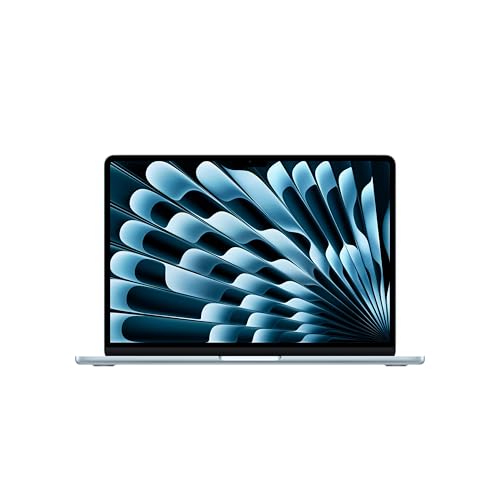
Pros
- Up to 18 hours of manufacturer-rated battery life
- Bright 13.6-inch Liquid Retina display with wide color
- Lightweight aluminum chassis weighs under 2.8 pounds
- Fast Wi-Fi 7 support and Thunderbolt 4 connectivity
Cons
- Only two Thunderbolt ports limit direct wired accessories
- External display output caps at two monitors
- Users needing broad port selections should skip it

Pros
- 32GB RAM and 1TB SSD
- Large Full HD IPS display
- Windows 11 Pro
- USB-C, USB-A, and HDMI
Cons
- 3.52 pounds is less convenient for frequent carrying
- Who should skip it: shoppers seeking a lightweight laptop
The Best Laptops by Use Case
Best for Spreadsheet Work: HP 17 Inch FHD Laptop Computer for Business
The HP 17 Inch FHD Laptop Computer for Business combines a 17.3-inch Full HD IPS display with a full-size keyboard and numeric keypad. Its listed 32GB of DDR4 memory, 1TB SSD, and Windows 11 Pro configuration suit people who keep multiple work apps open or enter figures frequently. The display gives documents more room than the MacBook Air’s 13.6-inch panel, but the larger format is less suited to compact bags.
Reasons to buy:
- Large 17.3-inch, 1920 x 1080 anti-glare IPS screen for spreadsheets and split windows.
- Numeric keypad supports frequent number entry.
- USB-C, USB-A, and HDMI are listed for common peripheral connections.
Reasons to avoid:
- Its 17.3-inch size favors desk use over frequent travel.
- The published information does not state a battery runtime or weight, so check those details if portability matters.
Skip it if you want a compact laptop for daily commuting or depend on macOS-only software.
Best for Classes and Travel: Apple 2026 MacBook Air 13-inch Laptop with M5
The Apple 2026 MacBook Air 13-inch Laptop with M5 is the compact choice in this group, with a 13.6-inch Liquid Retina display, 16GB unified memory, and 512GB SSD. Apple’s listing claims up to 18 hours of battery life; actual runtime depends on workload and settings, so treat that as a manufacturer claim rather than a guaranteed day-long result. macOS suits people already using Apple apps and services, while Windows-only programs may make the HP models a more direct fit.
Reasons to buy:
- Smaller 13.6-inch display makes the listed design more travel-oriented than either 17.3-inch HP.
- Two Thunderbolt 4 ports, MagSafe charging, and a headphone jack are specified.
- 12MP Center Stage camera and Wi-Fi 7 are listed for video calls and wireless networking.
Reasons to avoid:
- 16GB of unified memory is less than the HP listings’ 32GB, and it is a different memory design.
- The published details do not list USB-A or HDMI, so connecting those devices may call for compatible adapters or a dock.
Skip it if you need Windows-specific software, a built-in numeric keypad, or a large screen without an external monitor.
Best for Windows Business Features: HP 17 Inch FHD Laptop Computer for Business
This separate listing of the HP 17 Inch FHD Laptop Computer for Business carries the same stated processor, memory, storage, display, and operating system as the other HP listing. Its Ryzen 5 7430U is specified with six cores and 12 threads, and Windows 11 Pro may suit users who need Windows desktop applications or business-oriented management features. The source information does not establish a hardware difference between the two HP listings, so compare the seller’s exact configuration and terms before ordering.
Reasons to buy:
- Windows 11 Pro and the listed Ryzen 5 processor target Windows-based work tasks.
- 32GB DDR4 memory and 1TB SSD are specified for this listing.
- Wi-Fi 6, Bluetooth 5.4, and HDMI are listed alongside USB-C and USB-A.
Reasons to avoid:
- The available product details match the other HP entry, so they do not show a unique reason to choose this listing over it.
- Check the listing for the exact included configuration and seller details; published data does not establish differences beyond the separate ASIN.
Skip it if you want a clearly distinct feature set from the other HP listing or need a smaller travel laptop.
Best for a Large Windows Workspace: HP 17 Inch FHD Laptop Computer for Business
The first supplied HP listing is another route to a large-screen Windows laptop: the HP 17 Inch FHD Laptop Computer for Business lists a 17.3-inch anti-glare IPS panel, Windows 11 Pro, and numeric keypad. The product information also specifies HP Fast Charge, which the listing says can restore up to 50 percent battery in approximately 45 minutes. That claim may help when outlets are available between work sessions, but the published data does not give total battery runtime.
Reasons to buy:
- Full HD resolution and IPS viewing angles are specified for the large display.
- Dedicated Copilot key offers a direct keyboard shortcut to Microsoft’s assistant.
- Fast-charge claim provides a stated top-up figure for buyers who can plug in between tasks.
Reasons to avoid:
- This is not a distinct hardware recommendation from the second HP entry; published specifications are the same.
- Wi-Fi 6 is listed, not Wi-Fi 7, and the display is Full HD rather than a higher stated resolution.
Skip it if you need confirmed differences from the other HP offer, higher-resolution specifications, or compact travel dimensions.
How to Choose the Best Laptop Under $1200
Match the operating system to your software
Windows 11 Pro appears on both HP listings, while the MacBook Air runs macOS. Check the software you need for work, school, or creative tasks before choosing: a Windows-only application can rule out a Mac unless its maker offers a compatible version, and Apple-specific apps may make macOS convenient for people already using Apple devices. For more Apple comparisons, see our MacBook buying guide.
Also distinguish operating-system preference from feature claims. Windows 11 Pro is specified on the HP models, but the published details do not explain how a workplace manages its devices or whether a particular business tool is compatible. Confirm compatibility with your employer or school before relying on a laptop for required software.
Choose screen size for your usual workspace
The HP’s 17.3-inch Full HD IPS display gives more physical room for side-by-side windows and long spreadsheets. Its 1920 x 1080 resolution is explicitly listed, and the anti-glare finish may suit bright work areas. A larger screen also makes the laptop less convenient to carry than a smaller model, although the published data does not state either HP’s weight or dimensions.
The MacBook Air’s 13.6-inch Liquid Retina display makes for a smaller viewing area and a more compact listed screen size. Apple specifies support for one billion colors, but that specification alone does not establish color accuracy for professional work. If editing images is a priority, check the application and display requirements, and consider our guide to laptops for graphic design.
Read memory and storage as separate needs
The HP models list 32GB of DDR4 memory and a 1TB SSD. That combination gives more listed memory and storage capacity than the MacBook Air’s 16GB unified memory and 512GB SSD. Memory affects how many applications and large files you can keep active, while storage holds your files and installed apps. Neither specification alone proves how quickly a particular workload will run.
Unified memory on the Mac is not the same memory type as the HP’s DDR4 RAM, so comparing the numbers as if the designs were identical can mislead. Consider the size of your project files, the number of programs you use at once, and whether you keep files locally or in cloud storage. For growing photo or video libraries, verify your expected storage needs rather than assuming either drive will be sufficient indefinitely.
Check ports, monitors, and wireless needs
The HP listings specify USB-C, USB-A, HDMI, Wi-Fi 6, and Bluetooth 5.4. That mix can simplify connections to common workplace accessories and an HDMI display, but the published information does not state the USB-C port’s data rate, charging support, or video capabilities. Confirm those details if you plan to connect a particular monitor or charge through USB-C.
The MacBook Air lists two Thunderbolt 4 ports, MagSafe, a headphone jack, Wi-Fi 7, and Bluetooth 6. It is specified to support up to two external displays. Check the display’s connection type and any dock requirements before buying, especially because the listing does not list USB-A or HDMI ports. A newer Wi-Fi standard also depends on a compatible router to use its newer capabilities.
Weigh portability against battery claims
Apple’s listing claims up to 18 hours of battery life for the MacBook Air. Treat “up to” as a manufacturer estimate, not a promise for every workload; video calls, screen brightness, and active applications can affect runtime. The HP listing provides a fast-charge claim of up to 50 percent in approximately 45 minutes, but no total runtime is supplied. If you work away from outlets, compare detailed battery information for your expected use.
The 13.6-inch MacBook Air is the more obvious option here when a smaller screen is a priority, while the 17.3-inch HP options emphasize workspace and a numeric keypad. The product data does not provide weights, so check current listing details if you plan to carry your laptop daily. Students comparing other portable options can also browse our laptops for students.
How We Compared
We compared the published product specifications, design details, and available customer feedback. The assessment focuses on processor and memory descriptions, display size and type, storage capacity, operating systems, listed ports, wireless standards, and manufacturer battery or charging claims. The two HP entries have matching stated specifications, so they are treated as separate listings rather than as distinct laptop designs. No customer review details were supplied to support a broader judgment about owner experience.
Frequently Asked Questions
Which of these laptops is better for spreadsheets?
The HP listings have a 17.3-inch display and a full-size keyboard with numeric keypad, which may make spreadsheet navigation and number entry more comfortable. The MacBook Air can handle spreadsheet applications that are available for macOS, but its 13.6-inch screen provides less workspace.
Are the two HP listings different laptop configurations?
The published descriptions state the same processor, memory, storage, screen, operating system, ports, and wireless features for both HP ASINs. They do not identify a hardware difference. Check each live listing for configuration, seller, and purchase details rather than assuming one includes a feature that the other does not.
Can the MacBook Air connect to two external monitors?
Yes. The supplied Apple listing says the MacBook Air supports up to two external displays. Check the monitors’ connection requirements and whether you need compatible cables or a dock, since those details are not specified here.
Is 16GB of memory enough for everyday use?
The MacBook Air lists 16GB of unified memory, while the HP models list 32GB of DDR4 memory. Routine browsing, writing, and video calls may fit either type of laptop, but demanding projects and many simultaneous apps can call for more memory. Workload matters, and these memory types are not directly interchangeable.
Will USB-C accessories work with every listed laptop?
Both product descriptions mention USB-C connectivity in the HP listings, and the MacBook Air lists Thunderbolt 4 ports. That does not guarantee every accessory will work directly or provide the same speed or charging behavior. Check the accessory’s connection and power requirements, and verify the specific port capabilities before purchasing a dock or monitor.
Should I rely on the advertised battery life?
Use the listed figures as manufacturer claims, not guaranteed results. Apple states up to 18 hours for the MacBook Air, while HP describes a fast-charge figure but does not provide total battery runtime in the published information. Your applications, brightness, network use, and settings affect how long a charge lasts.




Write Your Review
No reviews yet. Be the first to share your experience!