

Direct sunlight can make a standard television difficult to see, but outdoor TVs also need to suit the amount of sun and exposure in your viewing area. This guide compares a full-sun model with a Samsung outdoor TV described as optimized for daylight, then explains what to check before you choose.

Pros
- Designed for outdoor daylight
- Anti-glare screen with wide viewing angle
- IP55 dust and water protection
- Tizen smart TV platform
Cons
- Designed for partial sun, not full-sun placement
- Who should skip it: shoppers needing a full-sun outdoor TV
Pros
- High stated brightness for full-sun viewing
- Google TV smart platform
- 4K UHD with HDR10 and Dolby Vision
- All-metal housing
Cons
- Skip if you only need an indoor TV
The Best Outdoor TVs by Use Case
Best for Full-Sun Viewing: SYLVOX Outdoor TV, 55" Full Sun Outdoor TVs
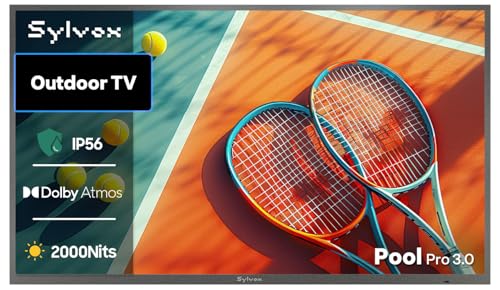
The SYLVOX Outdoor TV, 55" Full Sun Outdoor TVs is the more direct fit when your screen will sit in an unshaded backyard. Its listing specifies 2,000 nits of brightness, 4K UHD resolution, HDR10, and Google TV. The listing also describes Dolby Vision and Dolby Atmos, but buyers should confirm the exact supported formats and connections for their intended sources before purchase. Our guide to 55-inch TVs can help you weigh screen size against your viewing distance.
Reasons to buy:
- The listing specifies 2,000 nits and identifies the TV as suitable for full-sun viewing.
- Google TV provides access to apps and voice-assistant support, according to the listing.
- The listed ports include HDMI, USB, and VGA for connecting compatible devices.
Reasons to avoid:
- The product title states IP56, while the published feature details state IP55. Confirm the rating for the exact model before installation.
- The listing describes Dolby Vision and Dolby Atmos, but does not provide enough detail here to establish how those formats work with every input or app.
Skip it if your screen will be in a covered, shaded area and you do not need the model’s stated full-sun brightness.
Best for a Daylight Patio: SAMSUNG 75-inch Class QLED 4K The Terrace Partial
The SAMSUNG 75-inch Class QLED 4K The Terrace Partial is a 75-inch outdoor QLED television described as engineered for daylight. Samsung lists an anti-glare screen, a wide viewing angle, Tizen smart TV, Wi-Fi, Bluetooth, and Alexa built in. Its name identifies it as a partial-sun model, so it is a more natural match for a patio with some shade than for a screen exposed to direct sun all day.
Reasons to buy:
- The 75-inch screen offers a larger viewing area than the 55-inch option in this comparison.
- The listing specifies QLED 4K, Direct Full Array 16X, and Quantum HDR 32X.
- The anti-glare screen and wide viewing angle are relevant when people watch from different seats.
Reasons to avoid:
- This is identified as a partial-sun model, not a full-sun model. Check the expected sunlight at the mounting location before choosing it.
- The listing gives an IP55 rating, but does not state an operating temperature range in the published details.
Skip it if your viewing area receives strong, direct sunlight throughout the day or you need a smaller screen.
How to Choose the Best Outdoor TV for Full Sun
Match brightness to direct sunlight
Brightness matters because sunlight competes with the image on screen. The SYLVOX listing specifies 2,000 nits and explicitly describes full-sun use. Samsung describes The Terrace Partial as bright and daylight-optimized, but the listing information does not give a nit rating. That difference makes SYLVOX the clearer match when direct sun is unavoidable, while Samsung may suit a partly shaded location.
Do not treat a brightness number as a guarantee that every image will remain easy to see in every condition. Sun angle, reflections, placement, and shade affect viewing. Before buying, look for a brightness specification for the exact model and check whether the manufacturer labels it for full sun, partial sun, or shade. If a listing does not give a measurement, avoid assuming it matches a model that does.
Check the weather-resistance rating and installation conditions
Outdoor placement exposes a television to dust and moisture in ways an indoor installation may not. Samsung lists an IP55 rating for The Terrace Partial. SYLVOX’s published feature details also state IP55, although its product title says IP56. Because those descriptions conflict, confirm the rating on the exact unit and its current documentation before you buy.
An IP rating does not answer every installation question, and it should not be read as proof that a television can withstand every kind of water exposure. Check the manufacturer’s instructions for mounting, cable connections, and the location’s exposure. SYLVOX lists an operating temperature range of -22°F to 122°F, while the supplied Samsung details do not provide a temperature range. Verify that any stated range suits your local conditions.
Choose screen size for your seating area
The products compared here are 55 inches and 75 inches. A larger screen can be easier to view from a broad seating area, but it also takes more wall or mounting space. Measure the intended location and consider where viewers will sit before deciding. Do not choose a larger screen simply because it is available; the placement and viewing distance still need to work for your space.
For a poolside or patio setup with several viewing positions, the Samsung listing’s wide viewing angle may matter. For a smaller area, the SYLVOX’s 55-inch size may be easier to fit. The listing information does not give dimensions or weight for either model, so check the product documentation and mounting requirements rather than estimating from screen size alone.
Compare smart platforms, HDR, and connected devices
The Samsung runs Tizen and lists access to streaming services and smart home devices. It also lists Wi-Fi, Bluetooth, and Alexa built in, with Google Assistant and Bixby named as voice options. SYLVOX uses Google TV and lists app access, voice-assistant support, watchlists, and account switching. The listing information does not specify every available app, so check that your preferred services are supported in your region.
For picture formats, Samsung lists Quantum HDR 32X, while SYLVOX lists HDR10 and Dolby Vision. HDR support can matter when you watch compatible content, but the format name alone does not establish how a particular program or connected device will display. Confirm that your streaming source, apps, and external equipment support the format you plan to use. If you rely on a cable box or game console, also verify available inputs and the connection requirements.
Plan audio and daily operating hours
The SYLVOX listing names Dolby Atmos, but the published details do not explain the television’s speaker arrangement or how audio works with external equipment. Samsung’s published details do not specify speaker output. If sound needs to carry across a large patio, check the full audio specifications and supported output connections, then decide whether the television alone meets your needs.
SYLVOX describes the model as suitable for commercial use for 7 to 16 hours daily. Treat that as a manufacturer claim, not a guarantee of service life in a particular venue. Buyers planning long daily operating hours should confirm usage guidance, warranty coverage, and environmental limits with the seller or manufacturer. The published listing mentions a one-year warranty for SYLVOX; no warranty details were supplied for the Samsung model, so verify those separately.
How We Compared
This comparison uses the published product descriptions and listed features, including screen size, stated brightness, resolution, HDR formats, smart platforms, connectivity, and weather-resistance details. The product information contains a discrepancy between the SYLVOX title’s IP56 claim and its feature details’ IP55 claim, which we identify for buyers to verify. No customer review text was supplied, so this guide does not infer owner experiences or recurring reliability patterns.
These are two distinct use cases rather than interchangeable choices: one listing specifies full-sun brightness, while the other describes a larger partial-sun model. Compare them with other televisions in the TV category or browse the broader TV and home theater category if your needs include indoor viewing or other screen types.
Frequently Asked Questions
Can I use a partial-sun TV in direct full sun?
The Samsung model here is identified as a partial-sun outdoor TV, so it is not the clearest choice for a location exposed to direct sun all day. The SYLVOX listing specifies 2,000 nits and describes full-sun use. Check the manufacturer’s guidance for your exact placement, since sunlight and reflections vary by location.
Is IP55 the same as waterproof?
No. The published product details describe IP55 or, in the SYLVOX title, IP56, and use weatherproof language. Those claims should not be taken to mean protection from every kind of water exposure. Confirm the correct rating for the model and follow its installation and care instructions.
Which screen size should I choose, 55 inches or 75 inches?
Choose based on viewing distance, seating layout, and available mounting space. The 75-inch Samsung may suit a wider viewing area, while the 55-inch SYLVOX may fit a more compact location. Check the full product dimensions and mounting requirements because those details were not included in the published specifications.
Do both TVs support streaming apps?
Both listings describe smart TV platforms: Samsung uses Tizen, and SYLVOX uses Google TV. The listing information does not list every app or confirm availability in every region. Check the app catalog for your preferred services before buying.
Can I connect a game console or streaming device?
The SYLVOX listing names HDMI among its ports, while the supplied Samsung details do not enumerate ports. Confirm the number and type of inputs for the exact model, and check that the device you plan to connect supports the TV’s resolution and HDR formats. The supplied SYLVOX details state 4K UHD at up to 60 fps; no refresh-rate information was provided for Samsung.
Does the SYLVOX IP rating discrepancy matter?
It matters because the title states IP56 while the published feature details state IP55. Do not assume which figure is correct. Ask the seller or manufacturer to confirm the rating for the exact model and use that information when planning an exposed installation.


Write Your Review
No reviews yet. Be the first to share your experience!