

Art printing involves more than getting an image onto paper. You need to match print size, ink type, media support, and running costs to the work you make. The best printer for art prints depends on whether you prioritize pigment inks, affordable frequent printing, wide-format output, or transfers for crafts.
This guide compares dedicated photo printers, tank-based all-in-ones, and a dye-sublimation model. Check each printer’s supported media and connection details against your workflow before choosing, especially if you plan to sell prints or make products beyond paper artwork.

Pros
- Nine-color pigment ink system
- Dedicated matte black ink
- On-printer status and settings display
- Wireless connectivity
Cons
- Who should skip it: buyers needing a lightweight, portable printer
Pros
- Six-color ink system
- Wide-format printing up to 13 x 19 inches
- Print, scan, and copy
Cons
- Large 29.8 x 20.6-inch footprint
- Who should skip it: shoppers needing a compact printer

Pros
- Borderless prints up to 13 by 19 inches
- Eight-color dye ink system
- Color LCD shows ink levels and status
Cons
- 32-pound weight makes repositioning less convenient
- Skip it if you need a compact printer

Pros
- Cartridge-free refillable ink tanks
- Print, scan, copy, and fax
- ADF and Ethernet included
- Claimed high included-ink page yields
Cons
- 10 ppm stated print speed
- Epson recommends genuine ink
- Skip it if you prefer cartridges or need faster printing
Pros
- Borderless prints up to 13 by 19 inches
- Six-color photo ink system
- 50-sheet specialty media tray
- Automatic two-sided document printing
Cons
- Designed exclusively for Epson genuine cartridges
- Skip it if you need non-Epson ink support

Pros
- 17-inch print capability
- 11 pigment-based inks plus Chroma Optimizer
- Air feeding system helps prevent paper skew
- Includes print and workflow management tools
Cons
- 83 lb weight limits portability
- Who should skip it: buyers needing a lightweight printer

Pros
- Six-color photo ink
- Cartridge-free printing
- Print, scan, and copy
- Multiple connection options
Cons
- Large 24.1 x 15.9-inch footprint
- Who should skip it: buyers with limited desk space

Pros
- Four functions in one printer
- 200-sheet total capacity
- Auto two-sided printing
- Alexa ink notifications
Cons
- Skip it for workloads beyond its 1,000-page duty cycle

Pros
- Full set of genuine Epson sublimation inks included
- 150-sheet auto-feed tray
- Compact dimensions
- Auto-stop ink bottles
Cons
- Mobile device connections are not supported
- Who should skip it: users needing mobile printing
The Best Printers by Use Case
Best for Pigment-Based 13-Inch Prints: Canon imagePROGRAF PRO-310 Professional 13"
The Canon imagePROGRAF PRO-310 Professional 13" is a dedicated photo printer for artists who want pigment-based ink and prints up to 13 inches wide. Its nine-color system includes matte black, and Canon specifies LUCIA PRO II inks for gloss uniformity and scratch resistance. Anti-clogging and skew correction address routine printing concerns, while the color LCD provides printer-status and ink-level information. Browse more printer guides if you are comparing other printer types.
Reasons to buy:
- Nine-color pigment system with Chroma Optimizer.
- Matte black ink supports darker areas in matte-oriented artwork.
- Anti-clogging and skew-correction features support more consistent paper feeding.
Reasons to avoid:
- Its 13-inch format cannot make the 17-inch prints supported by the PRO-1100.
- The published information does not specify scanner or copier functions.
Skip it if you need an all-in-one, want to print wider than 13 inches, or primarily make sublimation transfers. Home-office gear guidance may also help if your printer will share space with other work equipment.
Best for 17-Inch Artwork: Canon imagePROGRAF PRO-1100
The Canon imagePROGRAF PRO-1100 is the option here for artists who need a wider print than a 13-inch model can produce. Its 17-inch format and 11 pigment-based inks, including Chroma Optimizer, are intended for broad color reproduction, gloss uniformity, and detailed dark areas. Canon also lists print-layout software and management tools for media configuration, color calibration, and accounting.
A workstation setup guide can help you plan desk connections, but confirm the printer’s specific connection requirements before buying.
Reasons to buy:
- 17-inch print format suits larger artwork than the 13-inch options.
- Eleven pigment inks support a broad color gamut, with Chroma Optimizer for gloss handling.
- Management tools include color-calibration and media-configuration functions.
Reasons to avoid:
- Its wide-format capabilities may be unnecessary for standard photo sizes.
- The published details do not describe scanner or copier functions.
Skip it if your artwork fits within 13 inches or you want a cartridge-free tank printer for mixed creative and household tasks.
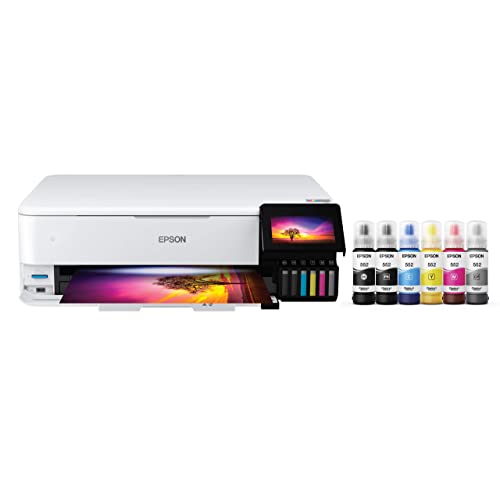
Best for Wide-Format Tank Printing: Epson EcoTank Photo ET-8550 Wireless Wide-Format
The Epson EcoTank Photo ET-8550 Wireless Wide-Format combines wide-format photo printing with scanning and copying. It prints up to 13 by 19 inches and uses six Claria ET Premium ink colors supplied through refillable tanks rather than cartridges. That setup can suit artists who print frequently and also want one device for scans, copies, and creative projects.
Epson’s listing gives an example of about 4 cents per 4-by-6-inch photo, compared with 40 cents using traditional cartridges. Treat that as a manufacturer-stated example, not a guaranteed cost for larger art prints, different paper, or changing ink use. See our computer accessories category for other workspace equipment.
Reasons to buy:
- Prints up to 13 by 19 inches and supports scanning and copying.
- Refillable ink tanks avoid routine cartridge replacement.
- Six-color photo ink supports photo and creative printing.
Reasons to avoid:
- The published information does not specify pigment ink, so buyers prioritizing pigment-based art printing should compare the Canon PRO models.
- Tank printers suit regular use better than buyers who only print occasionally; consider how often you will use the device.
Skip it if you need 17-inch output or specifically require a pigment-based ink system.
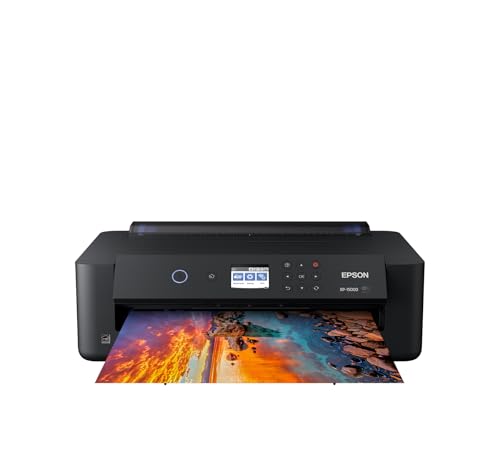
Best for Lower-Cost Wide-Format Entry: Epson Expression Photo HD XP-15000
The Epson Expression Photo HD XP-15000 offers 13-by-19-inch borderless printing in a wide-format inkjet design. Its six-color Claria Photo HD system includes red and gray inks, and its rear tray supports specialty media including cardstock. Automatic two-sided document printing and a 200-sheet front tray add everyday paper handling, though those document features do not determine art-print quality.
This model uses individual cartridges, unlike the EcoTank options. That difference matters if you make prints often: cartridge replacement may be less convenient than bottle refills for sustained output. Epson also says the printer is designed for genuine Epson cartridges, so check ink availability and ongoing supply costs before committing.
Reasons to buy:
- Supports borderless printing from 4 by 6 inches up to 13 by 19 inches.
- Red and gray inks extend its six-color photo ink set.
- A 50-sheet rear tray is specified for specialty media, including cardstock.
Reasons to avoid:
- Uses cartridges rather than high-capacity refillable tanks.
- Its published details do not list scanning or copying.
Skip it if you print at high volume and prefer refillable tanks, or if you need an all-in-one device.
Best for Sublimation Crafts: Epson SureColor F170 Dye-Sublimation Printer
The Epson SureColor F170 Dye-Sublimation Printer serves a different purpose from the photo printers above: it is designed for dye-sublimation transfers, not ordinary art prints on paper. The listing specifies sublimation ink for transfers to items such as textiles, apparel, mugs, and mousepads. A 150-sheet auto-feed tray and closed, dust-resistant paper tray suit craft or small-business workflows that involve preparing transfer sheets.
The published product information says MacOS and Windows setup is supported, while mobile-device connection is not supported. Confirm that your transfer blanks, heat-transfer process, and computer workflow match the printer before purchase. This model is sold through an Epson authorized partner according to the listing, which describes an Epson-manufactured product with manufacturer support.
Reasons to buy:
- Made for sublimation transfers rather than conventional paper photo printing.
- Includes a full set of Epson sublimation inks, according to the listing.
- Closed 150-sheet feeder helps keep transfer paper stored inside the printer.
Reasons to avoid:
- Mobile-device connection is not supported.
- It is not the right tool for standard gallery-style paper prints.
Skip it if you want to print art directly onto photo paper rather than make sublimation transfers.
Also Considered
The monitor category may help when planning a color-focused creative desk, but display choice is separate from printer output.
The portable monitor guide may suit artists who work away from a fixed desk. It is not a printer alternative, so it does not replace the picks above.
The following listed models are also worth considering for narrower use cases:
The external monitor guide covers another part of a creative setup, while the printers below differ in their balance of everyday functions and photo output.
Printer category readers can compare the laptop privacy screen guide for a separate mobile-work need.
How to Choose the Best Printer for Art Prints
Match ink type to your artwork and media
Pigment, dye-based photo, tank-based photo, and sublimation inks serve different workflows. The Canon PRO-310 and PRO-1100 specify pigment ink systems, while the PIXMA PRO-200S uses eight-color dye ink. Epson’s ET-8500 and ET-8550 use six-color Claria ET Premium inks. The F170 uses sublimation inks for transfers, not ordinary paper artwork.
Do not assume that similar color counts mean similar print characteristics. Check the printer listing for the ink system and confirm it matches your intended paper, finish, and artwork. If your work depends on a particular black ink or gloss appearance, compare the specified ink features rather than relying on broad marketing terms.
Choose a print size that fits your finished work
Maximum paper width can narrow your choice quickly. The PIXMA PRO-200S specifies borderless sizes up to 13 by 19 inches, and the XP-15000 also supports borderless printing up to 13 by 19 inches. The PRO-1100 supports 17-inch printing, while the ET-8550 lists a maximum of 13 by 19 inches.
Check whether the stated size is a printable borderless size or a paper format, and confirm that your chosen stock is supported. A larger maximum format is useful only if your artwork and workspace call for it. If your work stays at standard photo sizes, a 17-inch model may add capability you rarely use.
Estimate ink use and print frequency
Tank models such as the ET-8550, ET-8500, and ET-4800 use refillable ink bottles, while the XP-15000 uses individual cartridges. Tank systems can be appealing for frequent printing because they reduce cartridge changes, but the initial choice should also account for the specific printer’s photo features, media support, and stated ink system.
Estimate how many prints you make, their sizes, and how much coverage they contain. A manufacturer’s cost example for a small photo should not be treated as a precise estimate for large, ink-heavy art. Check the cost and availability of the correct replacement ink, and follow the manufacturer’s guidance about compatible supplies.
Decide whether you need an all-in-one
A scanner can help you digitize sketches or artwork, while a copier supports occasional document tasks. The ET-8550 and ET-8500 specify printing, scanning, and copying; the ET-4800 adds fax and an automatic document feeder. The PRO-310 and PRO-1100 product details focus on photo printing and do not specify scanner or copier functions.
If you already own a scanner, a dedicated photo printer may be a better fit. If one device must handle both art and household work, confirm that its print size and media handling still meet your creative needs. Do not infer an all-in-one feature from a product’s wireless or photo-printing description.
Check media handling and connection needs
Paper thickness, surface, and feed path affect whether a printer fits a particular project. The XP-15000 lists a rear tray for specialty media, including cardstock; the ET-8500 lists cardstock, envelopes, CDs, and DVDs among supported project media. Verify the exact paper type and size in the manufacturer’s current media guidance before buying.
Wireless capability is not the same as universal compatibility. The F170 listing specifically excludes mobile-device connection and describes MacOS and Windows setup. For other models, verify your computer or phone’s supported print method, the available connections, and any software needed for color-managed output.
How We Compared
We compared the published product specifications, ink systems, maximum print formats, listed media support, and stated multifunction features. The published data did not include substantive customer feedback, so recommendations rely on product details rather than claims about recurring owner experiences. Where a specification was not provided, such as scanner functions or mobile compatibility, we treat it as unknown and advise buyers to verify it with the manufacturer.
Frequently Asked Questions
Is a photo printer suitable for making art prints?
It can be, if its ink system, print size, and supported paper suit your work. The Canon PRO models specify pigment inks, while other listed photo printers use different ink systems. Confirm the printer’s paper compatibility and the finish you want before choosing.
Should I choose pigment ink or dye-based ink?
Choose based on the printer’s specified ink system and your intended output, not ink count alone. The PRO-310 and PRO-1100 list pigment systems, while the PIXMA PRO-200S lists dye-based ink. The published details do not provide a direct, measured comparison of their results, so check manufacturer guidance for your paper and artwork.
Do I need a 13-inch or 17-inch printer?
Choose 17-inch capacity if your finished artwork needs that width. If your largest planned prints fit within 13 inches, a 13-inch model may cover your needs. Confirm the maximum printable area and whether borderless output is supported at your chosen size.
Can I use a sublimation printer for regular art prints?
The F170 is specified for dye-sublimation transfers to materials such as textiles and mugs. It is not the right choice if you want a conventional photo printer for direct printing on art paper. Select a photo or wide-format printer for that purpose.
Are refillable tank printers better for artists?
They may suit artists who print frequently and want to avoid regular cartridge replacement. However, tank design alone does not establish print quality or media compatibility. Compare ink type, maximum size, paper handling, and the cost of replacement ink for your expected volume.
What should I verify before ordering art paper?
Confirm the paper’s dimensions, thickness, surface, and feed method against the printer’s supported media. Check whether the desired size can print borderless, and review the manufacturer’s guidance for specialty stock. The listed rear-tray or cardstock features do not mean every art paper will feed correctly.





Write Your Review
No reviews yet. Be the first to share your experience!