

Choosing a headset for PS5 Pro means deciding which matters most: low-latency wireless audio, clear team chat, long battery life, or connections to other devices. The best PS5 Pro headset for you depends on how you play and which features you will use, so this guide compares compatibility, connectivity, microphones, noise control, and battery claims across nine models.

Pros
- 2.4GHz and Bluetooth connectivity
- Up to five connected devices
- Up to four mixed audio sources
Cons
- Who should skip it: buyers who need stated battery life

Pros
- Wireless switching among up to four sources
- Simultaneous USB wireless and Bluetooth
- Two swappable batteries with charging dock
- Active noise cancellation
Cons
- No codec or frequency-response details provided
- Skip if you need published codec specifications

Pros
- 2.4GHz wireless and Bluetooth 5.2
- Listed 80-hour battery life
- Flip-to-mute microphone
- Mappable wheel and mode button
Cons
- Not compatible with Xbox; skip if Xbox support matters

Pros
- Headset and PS5 controller charge on one dock
- Claimed 120-hour battery life
- Bluetooth phone connection alongside PS5 audio
Cons
- Cannot charge while playing
- Dock does not charge Xbox controllers
- Who should skip it: Xbox players or users needing in-game charging

Pros
- 2.4 GHz and Bluetooth connections
- Up to 60 hours of claimed battery life
- Replaceable battery
- Customizable EQ and microphone settings
Cons
- Extra USB-C adapters sold separately for multi-console switching
- Skip it if you need one adapter for multiple consoles

Pros
- Low-latency 2.4 GHz wireless
- Detachable wideband microphone
- On-headset FPS audio profiles
- Noise-isolating memory foam earcups
Cons
- Listed weight is 1.59 pounds
- Who should skip it: buyers prioritizing a lighter headset

Pros
- Two-system connection and switching
- Hot-swappable battery design
- Simultaneous Bluetooth audio mixing
- Active noise cancellation with Transparency Mode
Cons
- Who should skip it: buyers prioritizing a lightweight headset

Pros
- Hybrid active noise cancellation
- Detachable full-band microphone
- Wireless and wired connection options
- Simultaneous game and Bluetooth audio
Cons
- THX Spatial Audio is limited to supported Windows systems
- Who should skip it: users seeking a simpler, single-platform headset
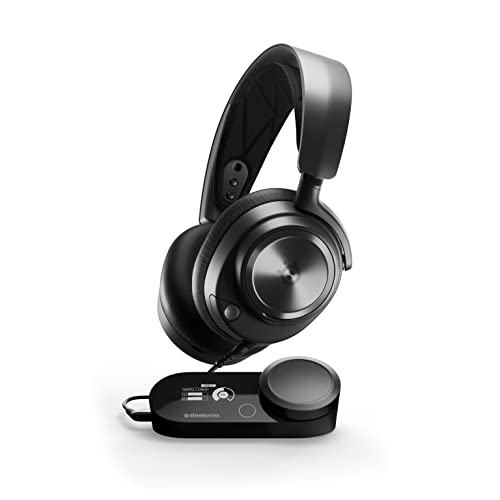
Pros
- Two-system connection and switching
- On-device audio controls and OLED display
- Retractable microphone
- Adjustable fit with glasses-friendly design
Cons
- Wired design
- Who should skip it: shoppers seeking a wireless headset
The Best PS5 Gaming Headsets by Use Case
Best for Long Battery Claims: Turtle Beach Stealth 600 Wireless Multiplatform
The Turtle Beach Stealth 600 Wireless Multiplatform suits players who want wireless play without frequent charging. Its listing specifies up to 80 hours of battery life, low-latency 2.4GHz wireless, and Bluetooth 5.2, with a QuickSwitch button for moving between wireless and Bluetooth. The flip-to-mute microphone and glasses-friendly memory foam cushions add practical touches for regular sessions.
Reasons to buy:
- Listed battery life reaches up to 80 hours, with quick charging also specified.
- 2.4GHz wireless and Bluetooth 5.2 support console and mobile listening.
- Flip-to-mute microphone, EQ modes, and a mappable wheel provide useful controls.
Reasons to avoid:
- The listing limits compatibility to PlayStation 5, PlayStation 4, PC, and mobile devices.
- It does not list active noise cancellation.
Skip it if you need ANC or want a headset explicitly listed for Xbox.
Best for PS5-Only Charging Setup: NUBWO G06 Pro Wireless Gaming Headset
The NUBWO G06 Pro Wireless Gaming Headset is aimed at players who want a headset and controller charging station in one PS5-focused setup. Its listing specifies 2.4GHz connection to PS4 and PS5, Bluetooth for a phone, and up to 120 hours of battery life. The dock charges the headset and PS5 controller, but the listing explicitly says the headset cannot charge while being used.
Reasons to buy:
- Charging station is designed to charge headset and PS5 controller together.
- Listed 120-hour battery claim may appeal to players who prefer fewer charging breaks.
- Bluetooth phone connection can be used alongside PS5 audio.
Reasons to avoid:
- The listing says it is only compatible with PS5, and specifies PS4 or PS5 connection through 2.4GHz rather than Bluetooth.
- Charging while playing is not supported.
Skip it if you need broad platform support or want to keep playing while charging.
Best for Multi-System Wireless: SteelSeries Arctis Nova Pro Wireless Multi-System
The SteelSeries Arctis Nova Pro Wireless Multi-System fits players who move between PlayStation and another gaming or computing system. The listing specifies connections to two systems at once, active noise cancellation, Transparency Mode, and simultaneous Bluetooth for calls or music. Two hot-swappable batteries, with the spare charging in the base station, are intended to reduce interruptions during long sessions.
Reasons to buy:
- Connects two systems and supports switching among PlayStation, PC, Switch, or Mac.
- Hot-swappable battery design keeps a charged spare available in the base station.
- ANC, Transparency Mode, and simultaneous Bluetooth cover different listening situations.
Reasons to avoid:
- The listing does not specify a numerical battery runtime.
- Its multiple connection and audio features may be unnecessary for someone using only one console.
Skip it if you want a basic single-platform headset without a multi-device base station.
Best for Competitive Audio Cues: RIG R8 SPECTRE PRO HS Dual Wireless Gaming Headset
The RIG R8 SPECTRE PRO HS Dual Wireless Gaming Headset targets PlayStation players who prioritize directional cues and concurrent phone audio. Its 40mm graphene drivers are specified for less than 0.5% total harmonic distortion, and the headset is tuned for Tempest 3D Audio on PlayStation. A 2.4GHz USB-C adapter handles console wireless audio, while Bluetooth can layer phone voice audio over game sound.
Reasons to buy:
- Designed around Tempest 3D Audio and a sound signature tuned for first-person shooters.
- 2.4GHz game audio can run alongside Bluetooth phone audio.
- Listing specifies up to 60 hours of battery life and a replaceable battery.
Reasons to avoid:
- Switching among multiple systems may require additional USB-C adapters, sold separately.
- The listing does not claim ANC.
Skip it if you need active noise cancellation or want all multi-system adapters included.
Best Value: Razer BlackShark V2 Pro Wireless PlayStation
The Razer BlackShark V2 Pro Wireless PlayStation is a lower-cost choice for players who want wireless play and a detachable microphone. Its listed features include 2.4GHz wireless, 50mm titanium-coated drivers, onboard FPS audio profiles, and up to 70 hours of battery life. The listing also names PS5, Switch 2, PC, Mac, Bluetooth, and USB support, making it more flexible than a console-only option.
Reasons to buy:
- Detachable wideband microphone is designed to capture voice detail.
- On-headset FPS profiles provide a way to change game audio without relying only on default tuning.
- Listed compatibility spans PlayStation, Switch 2, PC, Mac, Bluetooth, and USB.
Reasons to avoid:
- The listing describes noise-isolating earcups, not active noise cancellation.
- Confirm which connection mode supports each device and feature before purchase.
Skip it if you want ANC or simultaneous Bluetooth and game audio explicitly specified.
Also Considered
Turtle Beach Stealth Pro II Premium may suit players seeking Dolby Atmos, ANC, dual swappable batteries, and switching among up to four audio sources, but its listing describes a premium feature set that may exceed a straightforward PS5 setup.
SteelSeries Arctis Nova Pro Multi-System is worth considering if you prefer a wired headset with GameDAC Gen 2, adjustable settings, and two-system switching; it does not offer the wireless battery features of the wireless model.
SteelSeries Arctis Nova Pro Omni Gaming Headset may fit a complex setup, with listed support for up to five devices and mixing up to four audio sources, though its broad connectivity could be more than a single-console player needs.
Razer BlackShark V3 Pro Wireless ANC could appeal to competitive players who want ANC, simultaneous 2.4GHz and Bluetooth audio, and a detachable full-band microphone; its listed THX Spatial Audio feature is for supported Windows systems.
How to Choose the Best PS5 Pro Headset
Check PS5 connection and other device support
Wireless headsets commonly use a USB adapter or base station for console audio, while Bluetooth may serve a phone rather than the console. Check the product listing for the exact PS5 connection method and whether Bluetooth works simultaneously with game audio. For example, the NUBWO listing specifies 2.4GHz for PS4 and PS5, with Bluetooth reserved for phone connection. The SteelSeries wireless model lists two system connections plus simultaneous Bluetooth.
Do not assume that a headset’s Bluetooth support means it connects directly to every console feature you need. If you also play on PC, Switch, or Mac, verify those systems by name and check whether switching requires a dock, adapter, cable, or separately purchased accessory.
Match wireless latency and spatial audio to your games
For fast multiplayer games, a dedicated 2.4GHz connection is a relevant listed feature because it is intended for low-latency game audio. Spatial audio support can help present directional cues, but the feature name alone does not establish how well you will perceive them. The RIG model lists Tempest 3D Audio optimization, while the SteelSeries models also specify PS5 Tempest 3D Audio compatibility.
Look for the platforms and software tied to any surround or spatial-audio feature. Some features may depend on a particular system: the Razer BlackShark V3 Pro listing ties THX Spatial Audio to supported Windows systems. Check whether the headset’s console connection supports the particular audio mode you want.
Choose battery design for your play routine
Battery-hour figures are manufacturer listing claims, not a guarantee of the runtime you will get in every session. Volume, wireless modes, and other settings can affect use, so treat the number as a comparison point rather than a promise. Among these options, the listings specify up to 80 hours for Turtle Beach Stealth 600, 120 hours for NUBWO G06 Pro, and up to 60 hours for RIG R8 SPECTRE PRO HS.
Battery arrangement matters too. Swappable batteries can let you replace a depleted pack, while a charging dock may keep gear organized between sessions. Read the limits carefully: NUBWO says charging while playing is unsupported, and the SteelSeries wireless model describes a hot-swappable spare battery in its base station.
Consider microphone controls and noise reduction
For party chat, check whether the microphone flips to mute, detaches, retracts, or stays fixed. Noise reduction and microphone clarity are different features: a listing may describe an AI noise-reduction function without providing independent voice-quality results. The Turtle Beach Stealth 600 has a flip-to-mute mic, while the Razer BlackShark V2 Pro PlayStation model lists a detachable microphone.
Think about where you play. ANC reduces surrounding sound for the wearer, while microphone noise reduction is intended to limit background sound sent to teammates. Transparency Mode, listed for the SteelSeries wireless model, serves another purpose by letting outside sound through. Confirm which of these you need rather than treating them as interchangeable.
Weigh comfort, controls, and extra connections
Long sessions make fit and controls important, but the published listings do not give comparable weight or dimensions. Look for details that match your needs, such as glasses-friendly cushions, adjustable controls, or an app for EQ. The Turtle Beach Stealth 600 lists glasses-friendly memory foam cushions; RIG lists app-based EQ and microphone adjustments.
Extra inputs, docks, and simultaneous audio can help a multi-device household, but they add setup choices. If you only use one PS5, focus first on connection method, mic controls, battery approach, and comfort details. For broader audio buying advice, see our guides to wireless earbuds for gaming across PC and consoles and headphones for travel.
How We Compared
We compared the published product listings, focusing on stated platform compatibility, connection methods, driver details, battery claims, microphone features, noise control, and included charging or switching designs. Customer feedback was not available in the published product data, so this guide does not use review consensus to rank models. Feature claims are attributed to the listings, and recommendations reflect the stated use cases and trade-offs rather than measured performance.
Frequently Asked Questions
Will these headsets work with PS5 Pro?
The published listings name PS5 compatibility for the products in this guide, though connection methods and supported extra features differ. Check the exact model listing and confirm whether it uses a USB adapter, base station, wired connection, or another method before buying.
Can I use Bluetooth for PS5 game audio?
Do not assume that Bluetooth support means direct Bluetooth game audio from the console. Several models use 2.4GHz wireless for PlayStation and Bluetooth for a phone. Check the model’s stated connection path; some listings describe simultaneous Bluetooth phone audio and wireless game audio, while others do not.
Is active noise cancellation the same as microphone noise reduction?
No. Active noise cancellation reduces outside sound you hear through the headset. Microphone noise reduction is intended to reduce background sound in your transmitted voice. A model may offer one without the other, so check each feature separately.
Should I prioritize a removable battery or long battery life?
Choose based on how you handle charging. A long listed runtime may mean fewer charging breaks, while a swappable battery can offer a way to continue after one pack runs down. Verify whether the spare charges in a dock and whether the headset can be used while charging; the NUBWO listing says it cannot charge during play.
Does a larger driver guarantee better headset sound?
No. Driver size is only one specification, and it does not establish overall sound quality or positional accuracy on its own. Consider connection type, audio tuning, spatial-audio support, microphone needs, and the games you play, then treat listed performance language as a manufacturer claim.
Can I connect a headset to PS5 and my phone at the same time?
Some models explicitly list simultaneous Bluetooth and game audio, while others only describe switching between connection modes. Check the wording for your chosen model. The SteelSeries wireless listing specifies simultaneous Bluetooth for calls or music, and the RIG listing says phone voice audio can layer over 2.4GHz game audio.



Write Your Review
No reviews yet. Be the first to share your experience!