

TV speakers can make dialogue hard to hear and action scenes feel thin, but a larger surround system can bring extra speakers, wires, and setup demands. This best soundbar under $200 guide compares compact dialogue-focused bars with systems that add subwoofers or surround speakers, so you can choose based on your room, TV connections, and the shows, films, or music you play.
Check channel layout and connection type before choosing. A center channel can help separate speech, while a subwoofer adds a dedicated bass source; rear speakers can create a wider surround presentation but need suitable placement. The models below range from simple single-bar designs to multi-speaker systems.

Pros
- 3.1-channel design with built-in center speaker
- Wireless subwoofer with Bass Boost
- Bluetooth music streaming
- Dolby Atmos and DTS:X support
Cons
- Published specifications omit detailed input and compatibility information
- Skip it if you need detailed connection specifications before choosing

Pros
- Dedicated dialogue channel
- Built-in subwoofer
- Dolby Atmos and DTS:X support
- Four listening modes
Cons
- Skip if you want a separately placed subwoofer

Pros
- Four surround speakers included
- Wired 5.25-inch subwoofer
- Extensive app-based sound adjustment
Cons
- Multiple speakers and subwoofer require more setup space
- Skip it if you want a single-speaker system

Pros
- Dolby Atmos and up-firing drivers
- Two surround speakers and subwoofer
- Extensive app-based sound adjustments
Cons
- Not compatible with DTS
- Skip it if DTS support is essential

Pros
- 3.1-channel setup with dedicated center channel
- Wireless subwoofer
- LG TV integration features
Cons
- Who should skip it: buyers needing detailed connectivity specifications

Pros
- Includes wireless rear speakers
- Includes wireless subwoofer
- No separate receiver needed for rear speakers
- One-remote control with LG TVs
Cons
- Skip if you want a single-bar setup
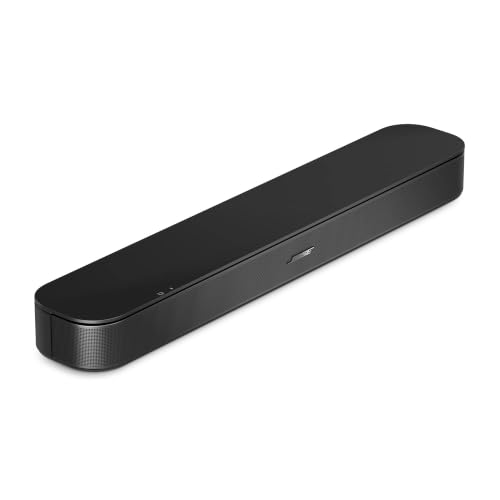
Pros
- Dialogue Mode for clearer speech
- HDMI cable included
- Bluetooth audio streaming
- Compact, low-profile design
Cons
- Optical audio cable sold separately
- Who should skip it: buyers needing an included optical cable
The Best Soundbars by Use Case
Best for a Traditional Rear-Speaker Setup: ULTIMEA 7.1ch Surround Sound System with Dolby
The ULTIMEA 7.1ch Surround Sound System with Dolby is a multi-speaker home theater option for people who want more than a single bar. Its listed layout includes three main channels, four surround speakers, and a wired subwoofer. The listing recommends it for rooms measuring 108 to 270 square feet, making room size and speaker placement important before you buy. Its app offers EQ presets and sound modes for listeners who want to tune playback.
Reasons to buy:
- Four surround speakers provide more speaker placement options than an all-in-one bar.
- The wired 5.25-inch subwoofer uses the listed BassMX technology for low-frequency playback.
- The app includes 121 EQ presets, 10-band control, and six named sound modes.
Reasons to avoid:
- Four surround speakers and a wired subwoofer need more placement and cable planning than a single bar.
- The rear right surround speaker connects wirelessly to the soundbar, but the product description also specifies wired front and rear surround speakers. Check the included connection arrangement and your room layout before ordering.
Skip it if you want a compact, one-piece setup or cannot position several surround speakers around your seating area.
Best for Height Effects and Rear Speakers: ULTIMEA 5.1.2ch Sound Bar with Dolby Atmos
The ULTIMEA 5.1.2ch Sound Bar with Dolby Atmos targets viewers seeking a surround setup with up-firing drivers. The listing describes two rear surround speakers, up-firing Atmos drivers, and a subwoofer, with HDMI eARC for lossless audio transmission. It may suit film and game playback where compatible content and a compatible TV connection can make use of immersive audio formats. One important limitation: the listing says this system is not compatible with DTS.
Reasons to buy:
- Up-firing drivers and rear speakers offer a more expansive speaker arrangement than a soundbar alone.
- HDMI eARC is specified for lossless audio transmission and CEC control.
- The app provides a 10-band graphic EQ, level adjustments, and preset sound settings.
Reasons to avoid:
- The system is not compatible with DTS, which matters if your content or setup depends on that format.
- Rear speakers and up-firing drivers need suitable placement; a listing cannot guarantee the same perceived height effects in every room.
Skip it if DTS compatibility is essential or you want to avoid arranging rear speakers.
Best All-in-One for Fire TV: Amazon Fire TV Soundbar Plus (newest model)
The Amazon Fire TV Soundbar Plus (newest model) combines a 3.1-channel layout with built-in bass, a dedicated dialogue channel, Dolby Atmos, and DTS:X. Because its bass is built into the bar, it avoids the separate subwoofer placement needed by several other picks. The listing specifies HDMI eARC/ARC setup with the included HDMI cable and says select Fire TV models can use one remote and Fire TV audio settings. Verify your TV model if those controls matter to you.
Reasons to buy:
- Built-in bass keeps the system to one soundbar rather than adding a separate subwoofer.
- A dedicated center dialogue channel is designed to clarify conversations.
- Movie, Music, Sports, and Night modes give you content-specific listening options.
Reasons to avoid:
- It does not list separate rear speakers, so it is not the choice for a multi-speaker rear surround layout.
- Fire TV remote and settings integration applies to select models, not every TV.
Skip it if you want a separate subwoofer or physical rear speakers, or if you need Fire TV integration with a model that is not confirmed compatible.
Best for LG TV Integration: LG S60T 3.1 ch. Soundbar with Wireless Subwoofer
The LG S60T 3.1 ch. Soundbar with Wireless Subwoofer pairs a three-channel bar with a wireless subwoofer. Its center channel is intended to make voices clearer, and AI Sound Pro adjusts audio for different content, according to the listing. Owners of compatible LG TVs can also consider WOW Orchestra and WOW Interface, which are described as ways to use and control the soundbar alongside an LG TV. These LG-specific features make TV compatibility worth checking before purchase.
Reasons to buy:
- The center channel focuses on dialogue, while the wireless subwoofer adds a separate bass unit.
- WOW Orchestra is listed for use with an LG TV, and WOW Interface supports control with one remote.
- The LG Soundbar App offers three-band equalizer adjustments.
Reasons to avoid:
- The enhanced TV features depend on using an LG TV; verify which functions work with your particular model.
- The listed format is Dolby Audio, not Dolby Atmos, so do not choose it expecting Atmos playback.
Skip it if you want Atmos or plan to rely on LG TV features with a non-LG television.
Best for a Compact Dialogue-Focused Setup: Bose TV Speaker (2nd Gen)
The Bose TV Speaker (2nd Gen) is a compact single soundbar with Bluetooth and HDMI-ARC connectivity. Its center tweeter and Dialogue Mode are designed to make speech stand out, while angled left and right speakers aim to create a wider soundstage. The listing says the bar stands just over 2 inches tall, a useful detail if space below your TV is tight. It does not include a separate subwoofer in the published product details.
Reasons to buy:
- Dialogue Mode targets speech-heavy shows and films.
- The compact height may fit where a taller soundbar would obstruct the screen or sensor.
- Bluetooth supports music, audio, and podcast streaming from a paired device.
Reasons to avoid:
- The listed setup uses HDMI-ARC, or optical audio with a cable sold separately; confirm your TV has a suitable connection.
- Adding a compatible Bose bass module or Lifestyle Ultra Subwoofer involves a separate purchase and connection cable.
Skip it if you want rear speakers, a separate subwoofer included in the system, or a listed HDMI eARC connection.
Also Considered
The TV buying guide may help if you are also choosing a display. The 55-inch TV comparison covers another common home theater decision, while the Soundbars category collects related audio guides.
The LG S40TR adds wireless rear speakers and a wireless subwoofer, making it worth considering for LG-focused buyers who want surround placement, but its published details list Dolby Digital and DTS Digital rather than Atmos. The TCL S60K offers a 3.1-channel bar, wireless subwoofer, Dolby Atmos, DTS:X, and AI Sonic Auto Room Calibration, but it is not among the main picks because the available product information gives less detail about TV integration and app control than some alternatives.
For details, see the TV and Home Theater category and the TV category.
How to Choose the Best Soundbar Under $200
Choose channel layout for your room
Channel numbers describe the speaker layout, not a guarantee that every room will sound the same. A 3.1 system, such as the Amazon Fire TV Soundbar Plus and LG S60T, includes a center channel and bass channel. That arrangement can suit viewers who mainly want clearer dialogue and fuller TV audio without setting up rear speakers. A 4.1 or 5.1.2 system adds more channels or speakers, but those speakers need appropriate placement to contribute to surround playback.
Before buying, compare the listed channel layout with your seating position and available floor or shelf space. The ULTIMEA 7.1ch listing gives a recommended room area and describes four surround speakers, so it is the most placement-dependent option here. The Bose bar is simpler to position but does not list separate rear speakers.
Check TV connections and audio formats
HDMI ARC and eARC can carry TV audio to a soundbar, but you must connect to the matching TV port and check support for the audio formats you intend to use. The Amazon model specifies HDMI eARC/ARC, while the ULTIMEA 5.1.2ch model specifically lists HDMI eARC for lossless transmission. The Bose listing specifies HDMI-ARC and optical audio, with the optical cable sold separately. Confirm the ports on your TV and whether your preferred connection is included before ordering.
Format support is not interchangeable. The ULTIMEA 5.1.2ch listing says it is not compatible with DTS, while the Amazon bar lists both Dolby Atmos and DTS:X. The LG S60T lists Dolby Audio. If you use a game console, streaming box, or disc player, check how that source sends audio through your TV and whether the soundbar supports the format you want.
Decide whether you need a separate subwoofer
A separate subwoofer can provide a dedicated place for bass playback, but it also needs a suitable location and a connection to power. The TCL S60K and LG S60T list wireless subwoofers; the ULTIMEA 7.1ch system lists a wired subwoofer. By contrast, the Amazon Fire TV Soundbar Plus specifies built-in bass, avoiding an extra subwoofer unit. The published information does not establish which one will sound strongest in your room, so use layout and space as the practical deciding factors.
If you watch dialogue-heavy TV and have limited space, a single-bar design may be easier to accommodate. If you want a separate bass unit, check where it can sit and whether the product calls for a wired or wireless connection. Wireless subwoofer does not mean it needs no power connection, so review the setup instructions for the specific model.
Match dialogue tools and sound modes to what you watch
A center channel, dialogue mode, or voice feature can help when speech gets lost among effects, but each product describes its own approach. The Bose TV Speaker has Dialogue Mode, while the LG S40TR lists Clear Voice Plus and a center speaker. Amazon specifies a dedicated center dialogue channel. Consider which controls you will use most, then check whether they are available on the remote, through a TV interface, or in an app.
Sound modes can be useful if you switch between films, music, sports, and late-night viewing. Amazon lists Movie, Music, Sports, and Night modes; LG lists AI Sound Pro on the S60T. ULTIMEA provides app-based EQ and presets on its two systems. More adjustment choices may help you tailor playback, but they also mean more settings to manage.
Check ecosystem features and physical setup
Some convenience features depend on the TV brand or model. LG describes WOW Orchestra and WOW Interface for use with LG TVs, while Amazon says Fire TV remote control and audio settings apply to select models. Treat those as compatibility checks, not universal features. Look up your TV model and confirm the specific feature is supported before making it a deciding reason to buy.
Also consider whether you can place speakers around the room and route any required cables. The ULTIMEA 7.1ch setup lists wired front and rear surround speakers, with the rear right surround speaker pairing wirelessly with the bar. The LG S40TR describes wireless rear speakers, while a single soundbar such as Bose keeps the speaker layout simpler. Choose the arrangement that fits your room rather than relying on channel count alone.
How We Compared
This comparison uses the published product listings, including channel layouts, connection types, supported audio formats, speaker arrangements, dialogue features, app controls, and stated TV integrations. We considered how those listed details relate to common needs, such as hearing speech clearly, adding bass, placing rear speakers, or keeping setup compact. The published ratings are not treated as proof of consistent performance, and the product data does not include detailed customer feedback that would support broader ownership claims. Recommendations therefore focus on stated features and practical fit, with compatibility checks noted where the listing limits a feature to select TVs.
Frequently Asked Questions
Will any soundbar work with my TV?
Not necessarily. Check the soundbar’s listed inputs against your TV’s available ports. HDMI ARC or eARC is specified for several models here, while the Bose TV Speaker also lists optical audio, with an optical cable sold separately. Confirm the connection and audio format support for your TV and any connected streaming or gaming device.
Is a 3.1 soundbar better for dialogue than a 2.1 model?
A 3.1 layout includes a center channel, which the published listings describe as supporting clearer dialogue. That can be useful for films and shows with speech mixed alongside sound effects. It does not guarantee a particular result in every room, and these product descriptions do not provide a direct comparison with a 2.1 model.
Do Dolby Atmos soundbars need rear speakers?
Not every Atmos-labeled soundbar uses the same speaker arrangement. The ULTIMEA 5.1.2ch model lists up-firing drivers and two rear speakers, while other listed Atmos products use different layouts. Check the exact product description, connection needs, and supported formats rather than assuming the Atmos label means every system includes rear speakers.
Does a wireless subwoofer need no cables?
Wireless describes its audio connection to the soundbar, not necessarily its power supply. The product information identifies wireless subwoofers on several models, but does not give a complete cable inventory for each one. Check the setup guide and included-items list for power and connection requirements before choosing a location.
Can I play music through these soundbars?
Bluetooth music streaming is listed for the TCL S60K, Amazon Fire TV Soundbar Plus, and Bose TV Speaker. Check the individual listing for the model you choose, since Bluetooth support is not specified in the published details for every product. Bluetooth is useful for streaming from a phone or tablet, but it does not replace checking TV audio connections.





Write Your Review
No reviews yet. Be the first to share your experience!