

Choosing a streaming device can be less straightforward than it looks: some TVs need only basic HD apps, while others can use 4K video, HDR, or voice search. This guide to the Best Streaming Device Under $50 compares five models by resolution, streaming platform, setup details, and features that matter for everyday viewing.

Pros
- Compact, portable design
- TV-powered setup with included USB-C cable
- Alexa voice search and remote controls
- Bluetooth headphone listening
Cons
- Who should skip it: viewers seeking 4K streaming
- Some content requires paid subscriptions

Pros
- 4K Ultra HD and HDR10+ support
- Alexa voice search across apps
- Access to free, ad-supported content
Cons
- 4K and HDR10+ benefit requires a compatible TV
- Some content and cloud gaming require subscriptions
- Who should skip it: viewers without a 4K TV seeking no Alexa features

Pros
- Chromecast built in
- Voice control from remote
- Access to thousands of apps
Cons
- Who should skip it: viewers seeking 4K streaming

Pros
- Compact HDMI stick
- Can draw power from TV
- Voice search and TV controls in one remote
- Access to free and live content
Cons
- HD streaming, not 4K
- Skip it if you need 4K streaming
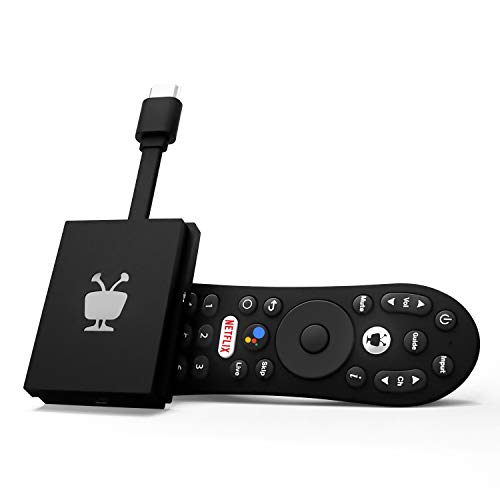
Pros
- Centralized search and watch lists
- Google Assistant voice control
- Dolby Vision and Dolby Atmos support
- Includes popular streaming apps
Cons
- Who should skip it: viewers seeking a television, not a streaming device
The Best Streaming Devices by Use Case
Best for 4K TVs: Amazon Fire TV Stick 4K Select
The Amazon Fire TV Stick 4K Select suits a 4K television owner who wants 4K Ultra HD streaming and HDR10+ support in a compact streaming stick. Its listing also describes Alexa voice search, broad app access, and a refreshed Fire TV interface, so it can suit viewers who want to search across services rather than open apps one by one. Our guide to TVs under $300 can help if you are also comparing screens.
Reasons to buy:
- Supports 4K Ultra HD and HDR10+.
- Alexa voice search can find and launch shows across apps.
- The listing names major services and free, ad-supported content.
Reasons to avoid:
- 4K and HDR10+ benefits depend on having a compatible TV and suitable content.
- Cloud gaming needs a subscription and compatible controller, sold separately.
Skip it if your television is HD-only and you do not expect to upgrade, or if you want a platform other than Fire TV.
Best for HD portability: Amazon Fire TV Stick HD (newest model)
The Amazon Fire TV Stick HD (newest model) is aimed at viewers with an HD television or people who want a slim stick to take on trips. The listing specifies Full HD streaming, Wi-Fi 6 support, and direct power from the TV through the included USB-C cable. Its Alexa remote has power and volume buttons for compatible TVs, soundbars, and receivers, though compatibility should be checked for your particular equipment.
Reasons to buy:
- Full HD resolution fits HD screens without paying for unused 4K capability.
- Portable stick design connects to an HDMI port and is described as not blocking neighboring ports.
- TV-powered setup avoids a separate wall adapter, according to the listing.
Reasons to avoid:
- It is an HD model, not a 4K streaming option.
- Verify that the TV can provide the stated power through the included cable.
Skip it if you want 4K playback or need a device whose power arrangement is confirmed for a specific hotel or travel TV.
Best for a simple Roku interface: Roku Streaming Stick HD with Voice Remote
The Roku Streaming Stick HD with Voice Remote is a straightforward choice for an HD television and viewers who prefer a dedicated Roku home screen. The listing highlights a simple-to-navigate interface, voice search, free and live content, and a remote that controls compatible TV power and volume. It also says the stick can draw power from the TV, which may reduce cable clutter, but check your TV’s available HDMI and power setup.
Reasons to buy:
- Roku home screen is presented as simple and uncluttered.
- Voice remote combines streaming search with compatible TV power and volume controls.
- Compact design is described as leaving neighboring HDMI ports clear.
Reasons to avoid:
- This is an HD device, so it is not the fit for 4K playback.
- Travel use may depend on the TV and streaming-service sign-in needs at your destination.
Skip it if you want HDR or 4K support, or prefer the Fire TV or Android TV platforms.
Best for Chromecast and Android TV: ONN Android TV 2K FHD Streaming Stick with Remote
The ONN Android TV 2K FHD Streaming Stick with Remote suits people who want Android TV and built-in Chromecast. The listing specifies 2K resolution and says you can cast photos, videos, and music from a phone, tablet, or PC. A microphone button provides voice control, and Play Store app access gives Android TV users another way to choose apps. The listing does not identify supported phone operating systems or detailed app availability, so confirm compatibility with your devices and services.
Reasons to buy:
- Built-in Chromecast supports casting from a phone, tablet, or PC.
- 2K resolution offers an option beyond standard Full HD, subject to TV and content support.
- Voice input is available through the remote’s microphone button.
Reasons to avoid:
- The listing does not specify HDR formats or Wi-Fi generation.
- Check that your preferred streaming apps and casting devices work with this Android TV model.
Skip it if you need confirmed 4K or HDR playback, or want a listing that clearly specifies network and format support.
Best for cross-app discovery: TiVo Stream 4K – Every Streaming App and Live TV
The TiVo Stream 4K – Every Streaming App and Live TV is designed for viewers who want recommendations and search across streaming apps in one place. Its listing specifies 4K UHD, Dolby Vision HDR, Dolby Atmos, Android TV, and integrated Google Assistant. These format and platform details make it worth considering for a compatible 4K setup, but the listing does not describe every app’s availability or guarantee that all content uses these formats.
Reasons to buy:
- Cross-app search, recommendations, and watch lists are central features.
- Supports 4K UHD, Dolby Vision HDR, and Dolby Atmos according to the listing.
- Google Assistant voice control can launch apps and control compatible smart-home functions.
Reasons to avoid:
- Its listed rating is lower than the other options in this comparison, though supplied review data gives no written feedback to explain ratings.
- Dolby formats require compatible equipment and content; confirm support across your setup.
Skip it if you do not care about cross-app discovery or your TV and audio equipment cannot use its listed video and sound formats.
How to Choose the Best Streaming Device Under $50
Match resolution and HDR to your TV
Start with your television’s resolution. An HD set will not display 4K detail, so the Fire TV Stick HD or Roku HD may cover your needs without adding a 4K feature you cannot use. For a 4K television, the Fire TV Stick 4K Select and TiVo Stream 4K list 4K support; the Fire model specifies HDR10+, while TiVo lists Dolby Vision HDR. Check the TV’s supported formats and the formats offered by the content you watch. A higher resolution does not by itself guarantee a better picture.
Choose a platform that fits your apps and habits
Fire TV, Roku, and Android TV organize apps and discovery differently. The Fire models emphasize Alexa search and Fire TV recommendations, Roku highlights a simple home screen, and TiVo centers on searching and recommending across apps. ONN uses Android TV and built-in Chromecast. Make a list of services you use, then confirm that each is available on the particular device. App access does not mean subscriptions are included; the Fire listings explicitly note that some content may require subscription fees.
Check the connection, power, and remote
Every stick needs a compatible HDMI connection, but power arrangements differ. The Roku listing says it can draw power from the TV, and the newest Fire TV Stick HD includes a USB-C cable for direct TV power without a wall adapter. The published information does not establish that every TV provides suitable power, so check the manufacturer’s setup guidance for your television. Remote features also vary: Fire and Roku list TV power and volume controls for compatible equipment, while voice functions depend on each device’s platform.
Consider casting, sound, and smart-home needs
If you often send photos or videos from a mobile device to your TV, ONN’s built-in Chromecast may be useful; confirm that your devices and apps support the casting method. For a sound system, TiVo’s Dolby Atmos listing may matter, but only if your receiver or soundbar and content support it. Fire TV models list Alexa smart-home controls, while TiVo lists Google Assistant. Choose according to the voice assistant you already use, and verify compatibility for specific smart-home devices rather than assuming every feature works with every product.
How We Compared
We compared the published product specifications, platform descriptions, setup and remote details, resolution and HDR claims, app and casting features, and listed customer ratings. The provided rating data includes no written customer feedback, so it cannot show why buyers assigned those scores. Recommendations reflect the features stated in each listing and the needs they appear to serve; missing details are identified as points to verify rather than treated as confirmed capabilities.
Frequently Asked Questions
Will a 4K streaming stick work with an HD television?
A 4K stick may connect to a TV with a compatible HDMI input, but the screen cannot show 4K detail if it is HD-only. Check the device and TV setup requirements before buying, and consider an HD model if you do not need 4K features.
Do these streaming devices include streaming subscriptions?
The product data lists access to apps and content, not included paid subscriptions. The Fire TV listings state that subscription fees may apply. Check each service’s terms and whether you already have an account.
Can I power a streaming stick from my TV?
The Roku listing describes TV-powered operation, and the newest Fire TV Stick HD includes a cable for direct TV power. This does not confirm that every television supplies adequate power. Check the setup instructions for the exact TV and streaming stick.
What is the difference between casting and streaming apps?
Streaming apps run on the device and connect to their services. Casting sends supported content from another device to the TV. ONN lists built-in Chromecast, but the published details do not specify every compatible phone, computer, or app. Verify the casting support you need.
Which option suits travel?
The Fire TV Stick HD listing describes the stick as ultra-portable, and Roku says its device can be taken along when traveling. Travel use still depends on an available HDMI port, suitable power, Wi-Fi access, and your streaming accounts. Check the destination TV and network rules before relying on a stick away from home.


Write Your Review
No reviews yet. Be the first to share your experience!