

A streaming stick can add apps to an older TV, but resolution, smart platform, and remote features vary across models. This guide to the best streaming stick compares options for 4K and HD screens, voice search, casting, cross-app recommendations, and travel.

Pros
- Compact design avoids blocking neighboring HDMI ports
- Powers from the TV alone
- Voice remote controls TV power and volume
Cons
- Who should skip it: buyers seeking details on HDR formats beyond HDR10+
Pros
- 4K Ultra HD and HDR10+ support
- Alexa voice search across apps
- Access to free, ad-supported content
Cons
- 4K and HDR10+ benefit requires a compatible TV
- Some content and cloud gaming require subscriptions
- Who should skip it: viewers without a 4K TV seeking no Alexa features

Pros
- Chromecast built in
- Voice control from remote
- Access to thousands of apps
Cons
- Who should skip it: viewers seeking 4K streaming

Pros
- Compact HDMI stick
- Can draw power from TV
- Voice search and TV controls in one remote
- Access to free and live content
Cons
- HD streaming, not 4K
- Skip it if you need 4K streaming

Pros
- 4K streaming with Dolby Vision and HDR10+
- Wi-Fi 6 support
- Voice search and TV controls on one remote
Cons
- Refurbished device, not new
- Some streaming services require subscriptions
- Who should skip it: buyers who want a new device
Pros
- Centralized search and watch lists
- Google Assistant voice control
- Dolby Vision and Dolby Atmos support
- Includes popular streaming apps
Cons
- Who should skip it: viewers seeking a television, not a streaming device
Pros
- 4K and Dolby Vision support
- Compact design keeps neighboring HDMI ports accessible
- Long-range Wi-Fi receiver
Cons
- Who should skip it: viewers without a 4K HDR-compatible TV
The Best Streaming Sticks by Use Case
Best for Simple 4K Streaming: Roku Streaming Stick Plus with Voice Remote
The Roku Streaming Stick Plus with Voice Remote pairs 4K resolution and HDR color with a compact design that can draw power from the TV, according to the listing. Its voice remote can control TV power and volume as well as search and playback, which may reduce remote switching. The Roku platform also offers popular apps and free, live content. Our 55-inch TV guide can help if you are also choosing a screen for 4K viewing.
Reasons to buy:
- Supports 4K and HDR color for compatible TVs and content.
- Can power from the TV, avoiding a separate wall outlet according to the listing.
- Voice remote handles TV power, volume, search, and playback.
Reasons to avoid:
- The listing specifies HDR but does not name Dolby Vision support.
- Check your TV’s HDMI and power arrangements before choosing a stick-powered setup.
Skip it if you specifically need Dolby Vision, which the published listing does not specify for this model.
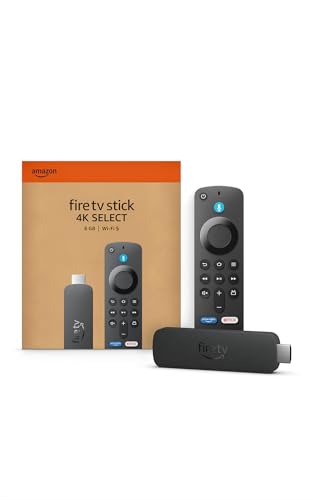
Best for Alexa and Cloud Gaming: Amazon Fire TV Stick 4K Select
The Amazon Fire TV Stick 4K Select suits viewers who want 4K streaming with Alexa voice search and access to cloud gaming services. Its listing specifies HDR10+ and describes a Fire TV interface with app categories and personalized recommendations. Gaming access depends on separate services and equipment: Xbox Game Pass and a compatible controller are required for Xbox cloud gaming, and subscriptions and controllers are sold separately.
Reasons to buy:
- Supports 4K Ultra HD and HDR10+.
- Alexa can search for and launch shows across apps.
- Cloud gaming is available through Xbox Game Pass and Luna, subject to service and controller requirements.
Reasons to avoid:
- Cloud gaming is not a console-free, cost-free package; required subscriptions and compatible controllers are separate.
- The listing emphasizes Alexa and Fire TV recommendations, so buyers who prefer another smart platform may want a different interface.
Skip it if you do not want Alexa features or have no interest in the Fire TV app layout.
Best for Casting from Android Devices: ONN Android TV 2K FHD Streaming Stick with Remote
The ONN Android TV 2K FHD Streaming Stick with Remote is a fit for a 2K or Full HD screen and viewers who want Chromecast built in. The listing describes casting photos, videos, and music from a phone, tablet, or PC, plus voice control through the remote and access to apps in the Play Store. Its resolution is lower than the 4K options here, so it makes more sense when the TV does not support 4K or when 4K playback is not a priority.
Reasons to buy:
- Supports 2K streaming rather than requiring a 4K television.
- Chromecast built in supports casting from phones, tablets, and PCs, according to the listing.
- Includes a voice-control feature and access to apps through the Play Store.
Reasons to avoid:
- It is not listed as a 4K streaming device.
- The published details do not identify HDR formats, so verify format needs if HDR is important.
Skip it if your main goal is 4K playback or a specified Dolby Vision experience.
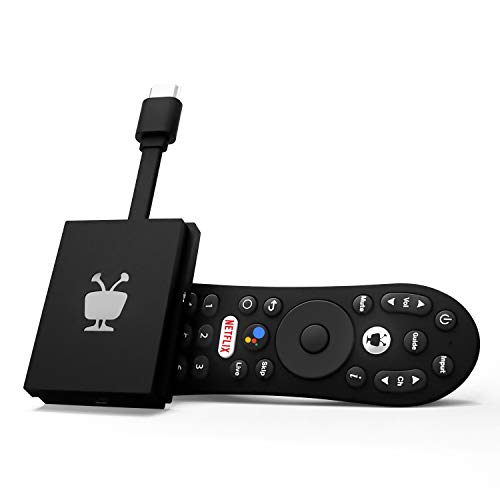
Best for Cross-App Discovery: TiVo Stream 4K – Every Streaming App and Live TV
The TiVo Stream 4K – Every Streaming App and Live TV focuses on searching and browsing across apps in one place. Its listing specifies 4K UHD, Dolby Vision HDR, Dolby Atmos, Android TV, and Google Assistant. The centralized watch lists and recommendations may appeal to viewers who use multiple services, although app availability and subscriptions still depend on each service.
Reasons to buy:
- Supports 4K UHD, Dolby Vision HDR, and Dolby Atmos, as specified in the listing.
- Search, browse, and watch lists span apps through the TiVo interface.
- Google Assistant supports voice search and smart-home commands, according to the listing.
Reasons to avoid:
- The listing does not specify Wi-Fi standards or long-range reception details.
- Verify that the apps and services you use are supported in the device’s current app environment.
Skip it if you want a device with clearly specified Wi-Fi 6 or Roku’s simpler home-screen approach.
Also Considered
The TV options in our under-$300 guide may help if you need a screen as well as a streamer. For an HD-only TV, the TCL TV comparison offers another way to explore display choices.
The Streaming Devices category collects related device guides.
The Roku Streaming Stick HD with Voice Remote could suit a Full HD television, but the published details do not specify 4K or HDR support, so it is less versatile for a 4K screen.
The Like-New Amazon Fire TV Stick 4K (newest model) could suit buyers open to a refurbished, tested, and certified device with Wi-Fi 6, Dolby Vision, HDR10+, and Dolby Atmos; its listing identifies it as refurbished, which some buyers may prefer to avoid.
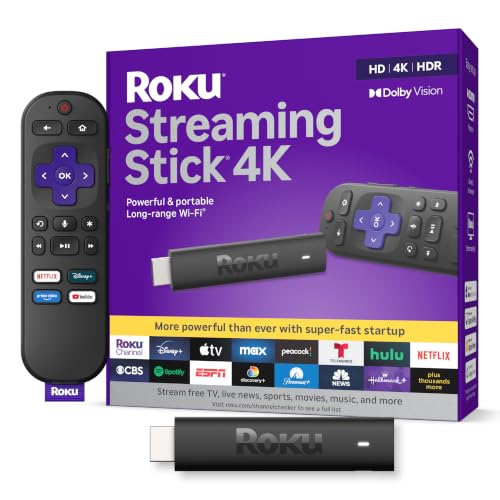
The Roku Streaming Stick 4K with Voice Remote could suit viewers seeking Roku, Dolby Vision, HDR10+, and long-range Wi-Fi; it missed the main picks because the other selected products map more distinctly to the guide’s use cases.
How to Choose the Best Streaming Stick
Match resolution and HDR to your TV
Start with the screen you own. A 4K stick can send 4K content to a compatible 4K TV, while the ONN model is specified for 2K streaming and may be a reasonable fit for a lower-resolution screen. A 4K label alone does not guarantee that every show is available in 4K; the TV, app, content, and subscription may all matter.
HDR support also differs. The Fire TV Stick 4K Select specifies HDR10+, the TiVo specifies Dolby Vision HDR, and the Roku Streaming Stick Plus listing describes HDR without naming a format. Compare the device’s supported format with your TV’s specifications. If the listing does not name a format you need, verify it rather than assuming compatibility.
Choose an interface that fits your viewing habits
Streaming sticks organize apps and recommendations in different ways. Roku emphasizes an uncluttered home screen and access to popular apps and free content. Fire TV places Alexa search and recommendations at the center. TiVo aims to combine searching and watch lists across apps, while Android TV on the ONN model brings Chromecast casting and Play Store apps.
Think about how you find programs. If you usually open one or two familiar apps, a simple home screen may matter more than cross-app recommendations. If you often forget which service has a show, compare the TiVo and Fire TV search descriptions, then check whether your preferred services are available. App access does not mean every title is included in a subscription.
Check audio formats and connected equipment
Audio format support matters when a soundbar or receiver is part of your setup. The supplied TiVo and refurbished Fire TV listings specify Dolby Atmos. The other product descriptions do not provide the same audio-format detail, so check their current listings and your audio equipment’s compatibility if Atmos is a requirement.
Do not treat a format label as a guarantee that every program will use it. The content and playback chain also need to support the format. If your TV sends audio to a separate device, check the TV and audio system specifications as well as the stick’s listing.
Consider Wi-Fi, power, and where the stick will go
Wi-Fi matters because a stick depends on your home network for streaming. The refurbished Fire TV listing specifies Wi-Fi 6, while the Roku Streaming Stick 4K listing describes a long-range Wi-Fi receiver. These descriptions do not guarantee reception in every room; router placement, walls, and network conditions affect the result. If the TV is far from your router, look for model-specific connectivity details and assess your home network.
Also check how the device is powered and how it fits around the TV. The Roku Streaming Stick Plus and Roku Streaming Stick HD listings say they can draw power from the TV, and describe a design intended not to block nearby HDMI ports. The ONN listing includes a power adapter. Confirm the published listing’s power requirements and the available HDMI space before ordering, especially if other devices already occupy nearby ports.
Match voice features and extras to your needs
Voice search can save time when you browse across several services. Roku’s listed remote handles voice search, TV power, and volume. Fire TV uses Alexa, and the ONN and TiVo descriptions list voice-assistant features. These ecosystems differ, so consider which assistant you already use and whether you want the stick to control other devices.
Gaming claims also have conditions. The Fire TV Stick 4K Select listing describes cloud gaming through Xbox Game Pass and Luna, with a compatible controller and service requirements. The refurbished Fire TV listing also identifies Xbox cloud gaming and says Xbox Game Pass is required. Check service availability, subscriptions, controller compatibility, and network needs before treating cloud gaming as a replacement for a console.
How We Compared
This comparison uses the published product listings, including stated resolution, HDR and audio formats, smart platforms, voice features, casting, power details, and connectivity claims. Where descriptions omit a specification, such as an HDR format or Wi-Fi standard, the guide identifies that information as something to verify rather than filling the gap with an assumption. Customer feedback data available for these products did not include review text, so recommendations rely on listed features and use-case fit.
Frequently Asked Questions
Will a 4K streaming stick work with an HD TV?
A 4K stick may connect to a TV with a compatible HDMI input, but the display cannot show 4K detail if it is an HD screen. Check the TV’s resolution and the stick’s compatibility details. If you do not plan to upgrade the TV, an HD or 2K model may cover your viewing needs.
Do streaming sticks include access to every show in an app?
No. A device may provide access to apps without including their paid plans or every title they offer. The Fire TV listing notes that subscription fees may apply. Check each service’s plan and content availability separately.
Can I cast videos from my phone to any of these sticks?
The ONN listing specifically names Chromecast built in and casting from a phone, tablet, or PC. The other published descriptions do not make the same casting claim. If casting is essential, verify the exact device and app support rather than assuming that all streaming sticks behave alike.
What is the difference between HDR10+ and Dolby Vision?
They are different HDR formats, and device support varies across these picks. The Fire TV Stick 4K Select specifies HDR10+, while the TiVo and refurbished Fire TV listings specify Dolby Vision. Check which formats your TV supports and whether the content you watch is available in them.
Do voice remotes control TV volume and power?
The two supplied Roku listings for the Streaming Stick Plus and Streaming Stick HD say their remotes can control TV power and volume. The other descriptions emphasize voice search or assistant features without making the same remote-control claim. Check the specific listing and your TV compatibility if you want to replace multiple remotes.
Is a streaming stick suitable for travel?
The Roku Streaming Stick Plus and Roku Streaming Stick HD listings describe taking the device along when traveling. You still need a compatible TV input, network access, and any required account sign-in. Check the lodging network’s connection process and the device’s setup needs before relying on it away from home.






Write Your Review
No reviews yet. Be the first to share your experience!