

A gaming CPU cooler must fit your processor socket and case while keeping heat under control during demanding play. Air coolers avoid a radiator, while all-in-one liquid coolers add a pump and radiator that need room inside the case.
This guide compares air and liquid designs, socket support, cooling features, and setup considerations to help you choose the best CPU cooler for your build. For more components and peripherals, browse our gaming guides and computer accessories coverage.

Pros
- Supports LGA1851, LGA1700, AM4, and AM5
- Integrated VRM fan
- Concealed radiator-fan cabling
Cons
- Who should skip it: builders who prefer air cooling

Pros
- Customizable LCD with live monitoring options
- Magnetic fans simplify assembly
- Embedded fan targets motherboard VRM cooling
Cons
- Skip if you do not need LCD monitoring or customization
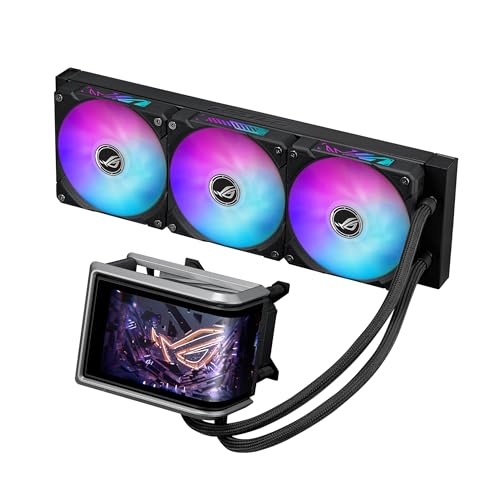
Pros
- Large customizable AMOLED display
- Daisy-chained fans simplify cable routing
- Pre-applied thermal paste
Cons
- Skip if your case cannot fit a 360 mm radiator

Pros
- Offset mounting for Intel and AMD
- Integrated VRM fan
- Radiator fan cables integrated into hose sheathing
Cons
- Skip if your CPU socket is not listed
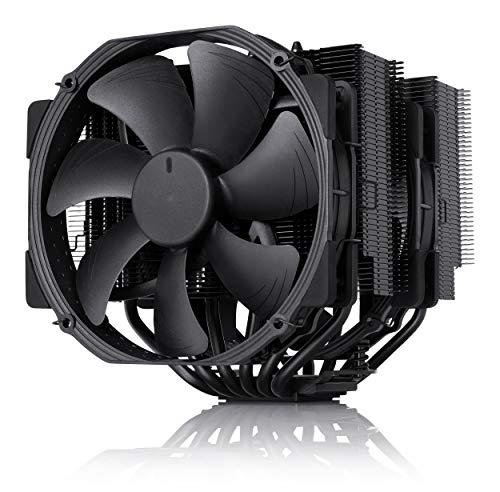
Pros
- Two 140 mm PWM fans included
- NT-H1 thermal paste included
- Six-year manufacturer warranty
Cons
- Skip if your case lacks 168 mm clearance

Pros
- Three fans included and pre-installed
- Broad listed Intel and AMD socket support
- Reinforced, sleeved 400mm tubing
- Aura Sync support
Cons
- Skip if case cannot fit 397 x 120 mm radiator

Pros
- 120mm radiator format
- PWM fan control
- 5V 3-pin ARGB synchronization
- Broad listed socket compatibility
Cons
- Skip it if your case cannot fit a 120mm radiator

Pros
- Six heat pipes
- Two PWM fans included
- ARGB lighting
- Supports AMD AM4 and AM5
Cons
- Skip it if your case cannot fit its 6.1-inch height

Pros
- Six heat pipes
- Two 120 mm PWM fans
- Intel and AMD mounting hardware included
Cons
- Skip if your case cannot fit its 6.1-inch height
- AMD installation requires original motherboard backplate

Pros
- Customizable LCD with system monitoring
- Single-frame RGB radiator fan
- Pre-applied thermal paste
- Broad listed socket compatibility
Cons
- Skip if your case cannot accommodate a 360 mm radiator
The Best CPU Coolers by Use Case
Best Air-Cooling Value: Thermalright Peerless Assassin 120 SE CPU Cooler
The Thermalright Peerless Assassin 120 SE CPU Cooler is a dual-tower air cooler with six heat pipes and two 120 mm PWM fans. Its 155 mm height and support for Intel LGA 1851, LGA 1700, LGA 1200, and AMD AM4 and AM5 make it a strong option for builders who want a substantial air cooler without a radiator. The listing gives a stated fan noise level of no more than 25.6 dB(A), but that figure is a specification, not a guarantee of noise in your case. Our gaming audio guide covers another part of a quiet PC setup, though cooler noise still depends on your complete system.
Name: gaming systems can benefit from the straightforward air-cooling design, but check case clearance and the motherboard’s memory layout before buying. The product listing notes that AMD installation uses the motherboard’s original backplate, which is not included.
Reasons to buy:
- Dual-tower heatsink, six heat pipes, and two PWM fans.
- Listed support for current Intel LGA 1851 and AMD AM5 sockets.
- No liquid loop or radiator to position in the case.
Reasons to avoid:
- At 155 mm tall, it needs enough case clearance.
- The AMD mounting process uses the motherboard’s original backplate.
Skip it if your case cannot fit a 155 mm cooler or you specifically want radiator-mounted cooling.
Best for Quiet-Focused Air Builds: Noctua NH-D15 chromax.Black
The Noctua NH-D15 chromax.Black is a large dual-tower cooler with six heat pipes and two 140 mm fans. Its published features include PWM fan control and low-noise adapters, giving builders options to prioritize quieter operation or stronger airflow. Noctua lists compatibility with Intel LGA 1851, LGA 1700, LGA 1200, and LGA 115x, plus AMD AM5 and AM4. That makes it a good fit for buyers who prefer air cooling and want broad socket support.
The main consideration is physical space: the cooler stands 168 mm tall, and its wide heatsink may affect access to nearby components. Check the case’s maximum CPU-cooler height and the motherboard layout before choosing it. The included thermal paste and SecuFirm2 mounting system are listed accessories, while the six-year manufacturer warranty is a stated warranty, not proof of expected lifespan.
Reasons to buy:
- Two 140 mm PWM fans, low-noise adapters, and six heat pipes.
- Supports listed Intel and AMD sockets, including LGA 1851 and AM5.
- Includes NT-H1 thermal paste and SecuFirm2 mounting hardware.
Reasons to avoid:
- Its 168 mm height rules it out for some cases.
- A large air cooler can make fit and component clearance more important than with a compact cooler.
Skip it if your case has limited cooler clearance or you want a screen or radiator-based design.
Best for RGB on a Value Air Cooler: Thermalright Peerless Assassin 120 SE ARGB CPU Air
The Thermalright Peerless Assassin 120 SE ARGB CPU Air pairs a dual-tower heatsink and six heat pipes with two PWM fans and ARGB lighting. Its listed dimensions are 125 × 135 × 155 mm, and the product supports Intel LGA 1851, LGA 1700, LGA 1200, and AMD AM4 and AM5. Choose it when you want an air cooler with synchronized lighting, rather than paying for a pump, radiator, or display.
The listing specifies a 120 to 245 W TDP range, but that specification alone cannot establish temperatures with a particular CPU, case, or fan curve. Confirm that your motherboard has a compatible 5 V, 3-pin ARGB connection if you want motherboard lighting synchronization. At 155 mm tall, it also needs suitable case clearance. It shares a similar cooling layout with the non-ARGB Peerless Assassin model, so the lighting and fan details are key distinctions to compare.
Reasons to buy:
- Six heat pipes and dual 120 mm PWM fans in a dual-tower layout.
- ARGB lighting supports synchronization through a 5 V, 3-pin motherboard connection.
- Supports listed modern Intel and AMD sockets.
Reasons to avoid:
- Requires room for a 155 mm-tall heatsink.
- Lighting synchronization depends on a compatible motherboard connection.
Skip it if you want a plain, unlit cooler or your system lacks the space or lighting connection it needs.
Best for a 360 mm AIO Without a Display: ARCTIC Liquid Freezer III Pro 360
The ARCTIC Liquid Freezer III Pro 360 is a 360 mm all-in-one liquid cooler with three 120 mm fans. It supports Intel LGA 1851 and LGA 1700, plus AMD AM4 and AM5. The published features include native offset mounting for Intel and AMD, intended to align the cold plate more closely with the CPU hotspot, and an integrated PWM-controlled fan for cooling motherboard voltage converters.
Its integrated cable management routes radiator-fan PWM cables through the hose covering, leaving one visible cable connection to the motherboard, according to the product listing. That may appeal to builders who want a large radiator but do not need a screen or lighting. Before buying, verify that your case supports a 360 mm radiator in your intended mounting position and that its thickness and fan placement clear nearby components. The published information does not specify radiator thickness.
Reasons to buy:
- Three 120 mm radiator fans and listed support for LGA 1851 and AM5.
- Offset mounting and an integrated VRM fan are included features.
- Fan PWM cables are integrated into the hose covering.
Reasons to avoid:
- A 360 mm radiator needs a compatible case mounting position.
- The listing does not specify radiator thickness, so check case clearance with the manufacturer.
Skip it if your case cannot accommodate a 360 mm radiator or you prefer an air cooler with no pump.
Best for a Large Customizable Display: NZXT Kraken Elite 360 RGB – 360mm AIO CPU Cooler
The NZXT Kraken Elite 360 RGB – 360mm AIO CPU Cooler combines a 360 mm radiator with an LCD on the pump. Its listing specifies a 2.72-inch, 640 × 640 IPS display with a 60 Hz refresh rate, and support for GIFs, images, and real-time system information. It also lists compatibility with AMD AM5 and AM4, plus Intel LGA 1851, LGA 1700, LGA 1200, and LGA 115X. This model suits a build where screen customization and synchronized RGB matter as much as cooling hardware.
NZXT lists pre-applied thermal paste, a single breakout cable, and tool-free mounting brackets. The listing also describes integration with Google Photos, Spotify, and YouTube, so check the current CAM software and service requirements if those functions matter to you. Like other 360 mm AIOs, it needs compatible radiator space. Its display and software features add setup considerations that a basic air cooler avoids.
Reasons to buy:
- High-resolution LCD supports images, GIFs, and system information.
- Includes a 360 mm radiator and an integrated RGB fan design.
- Lists support for current Intel LGA 1851 and AMD AM5 sockets.
Reasons to avoid:
- Requires case space for a 360 mm radiator.
- Display customization and listed service integrations rely on software.
Skip it if you want a simpler cooler, have no use for a screen, or cannot fit a 360 mm radiator.
Also Considered
The ARCTIC Liquid Freezer III Pro 360 A-RGB could suit buyers who want the same listed 360 mm ARCTIC features with A-RGB lighting; it missed the main list because the non-RGB version covers the same cooling design. The ASUS TUF Gaming LC III ARGB 360mm AMD/Intel offers pre-installed fans, reinforced 400 mm tubing, and TUF software, but the listing gives fewer distinctive fit advantages than the selected AIOs. The ASUS ROG Ryujin III ARGB Extreme 360mm AMD/Intel may fit a display-focused build, with a 3.5-inch LCD and VRM fan, but it adds a different screen and software feature set. The ASUS ROG Ryuo IV ARGB 360mm AMD/Intel stands out for its movable 6.67-inch AMOLED screen and pre-assembled fans, but its display-first approach may be more than many buyers need.
How to Choose the Best CPU Cooler
Match the socket and mounting hardware
Socket compatibility is the first filter: a cooler must include a mount for your motherboard’s CPU socket. Check the exact socket on the product listing and compare it with your processor and motherboard specifications. The selected models list support for combinations including Intel LGA 1851 and AMD AM5, but support varies by cooler. Also check mounting details: the non-ARGB Peerless Assassin 120 SE listing says AMD installation uses the motherboard’s original backplate.
Measure case and component clearance
Air coolers need enough height and clearance around the socket. The Noctua NH-D15 chromax.Black is 168 mm tall, while both Peerless Assassin models listed here are 155 mm tall. Compare those measurements with your case’s CPU-cooler clearance and check motherboard and memory placement. For an AIO, confirm that your case supports the radiator size and mounting location. A 360 mm radiator is larger than a 120 mm radiator, and case support can differ by position.
Choose air or liquid for your build
Air coolers use a heatsink and fans, so you do not need to find a radiator mount. They can be a practical fit for builds where a large tower cooler clears the case. An AIO places fans on a radiator and includes a pump, which can suit a build designed around radiator mounting. Do not assume a larger radiator alone proves better results for your specific CPU. The published listings do not provide directly comparable temperature or noise measurements.
Decide whether lighting, a screen, or extra controls matter
ARGB lighting and pump displays can shape a build’s appearance, but they add compatibility and setup questions. The Thermalright ARGB cooler lists a 5 V, 3-pin lighting connection; check your motherboard before counting on synchronized lighting. NZXT and ASUS display models list customizable content or system information, which involves software. If you want cooling without those extras, the ARCTIC Liquid Freezer III Pro 360 and Noctua air cooler offer more direct feature sets.
Read fan and cable details in context
Fan counts, sizes, and stated noise figures help you compare designs, but they do not establish how loud a finished PC will be. Case airflow, CPU load, fan curves, and nearby components all affect the result. Check whether fans are included and how they connect. The ARCTIC cooler routes radiator-fan cables through its hose covering, while NZXT lists a single breakout cable. These details can affect assembly and cable management, not just cooling.
How We Compared
We compared the published product specifications, design details, socket lists, dimensions, fan and radiator information, and listed software or display features. The published product data reports no customer-review text to assess, so these recommendations rely on the listed features and stated claims, not a pattern of owner feedback. Where a listing leaves out a detail, such as radiator thickness, the guide tells you to verify fit rather than assume compatibility.
Frequently Asked Questions
How do I know whether a cooler fits my CPU?
Check the socket on your motherboard and compare it with the cooler’s supported socket list. A processor family name alone is not enough to confirm mounting support. Also verify that the required brackets or backplate are included or available.
Will a 360 mm AIO fit in any gaming PC case?
No. Case support depends on radiator size, mounting position, and clearance around nearby parts. Check your case manual for 360 mm radiator support at the intended location, then confirm fan and radiator clearance with the cooler’s full dimensions.
Should I choose an air cooler or an AIO?
Choose an air cooler if its height fits your case and you want to avoid radiator placement. Consider an AIO if your case supports its radiator size and you want features such as an integrated VRM fan, cable routing, lighting, or a display. The published data does not establish which design will deliver lower temperatures in every build.
Do I need an ARGB header for the Thermalright ARGB cooler?
The listing specifies a 5 V, 3-pin ARGB connection for lighting synchronization. Check your motherboard’s manual for a matching header before purchase. Do not confuse it with a different type of RGB connector.
Does a cooler’s listed noise figure predict how loud my PC will be?
Not by itself. The figures provided describe manufacturer-listed fan noise, while actual system sound depends on load, fan speeds, case airflow, and other components. A PWM fan can adjust speed, but your motherboard or software settings determine the fan curve.






Write Your Review
No reviews yet. Be the first to share your experience!