

A 75-inch TV can make movies, sports, and games more immersive, but screen size alone does not tell you which model fits. Panel and backlight technology, HDR formats, refresh rate, smart platform, and room lighting all affect the choice. This guide compares the best 75 inch TV options in the supplied lineup, with picks for everyday streaming, fast-action viewing, and glare-prone rooms.
The three models use different approaches: Samsung pairs QLED color with its Tizen-based smart experience, while TCL and Hisense list Mini LED backlighting and native 144Hz refresh rates. Compare the features you will use, then verify ports, app support, and current model details on the product listing before buying.

Pros
- 75-inch QLED screen
- 4K upscaling
- HDR10+ support
- More than 2,700 free channels
Cons
- Refresh rate and HDMI version are not specified
- Who should skip it: shoppers requiring those specifications before choosing
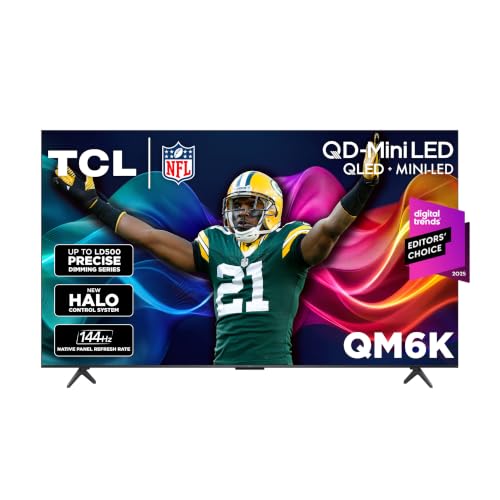
Pros
- 144Hz native refresh rate
- Four major HDR formats supported
- Google TV with Gemini
- Mini LED local dimming
Cons
- HDMI version not specified
- Who should skip it: buyers needing confirmed HDMI details

Pros
- Native 144Hz refresh rate
- Four supported HDR formats
- Built-in subwoofer
- Fire TV with Alexa+
Cons
- Who should skip it: buyers needing confirmed HDMI version details
The Best 75-Inch TVs by Use Case
Best for Streaming and Everyday Viewing: Samsung 75-Inch Class QLED Q7F Series Samsung
The Samsung 75-Inch Class QLED Q7F Series Samsung suits households that want a large-screen TV for mixed viewing and built-in content options. Its listing specifies Quantum Dot color, 4K upscaling, HDR10+ dynamic tone mapping, Samsung TV Plus, and Alexa built in. Samsung also lists Knox Security protection for TV experiences and connected IoT devices, a useful consideration if you use the TV as part of a connected home.
Its appeal is broad rather than gaming-specific: the published details do not state a native refresh rate or HDMI port specifications. Check the listing for port count, eARC support, and gaming features if you plan to connect several devices or a high-refresh-rate console. For a wider look at the platform, see our Roku TV comparison, which covers a different smart TV ecosystem.
Reasons to buy:
- Quantum Dot technology is specified for a broad range of colors at different brightness levels.
- HDR10+ tone mapping and 4K upscaling target contrast and lower-resolution content.
- Samsung TV Plus offers listed free channels, with Alexa built in.
Reasons to avoid:
- The published features do not state a native refresh rate, so verify gaming requirements before purchase.
- Port details and supported external audio connections are not included in the published information.
Who should skip it: Look elsewhere if a clearly stated 144Hz refresh rate or Mini LED backlight is central to your decision.
Best for Fast Sports and Gaming: TCL 75 Inch QM6K Series QLED Mini LED 4K HDR
The TCL 75 Inch QM6K Series QLED Mini LED 4K HDR is the clearest match here for viewers focused on fast motion. Its listing specifies a native 144Hz refresh rate, Mini LED backlighting, Quantum Dot color, and Google TV. It also lists Dolby Vision, HDR10+, HDR10, and HLG support, giving buyers several HDR formats to consider when choosing streaming services and sources.
That feature set may suit sports and gaming, but a 144Hz panel alone does not confirm that every input supports that rate. Check the listing and manufacturer documentation for HDMI port capabilities, supported resolutions at high refresh rates, variable refresh rate support, and console compatibility. The listing also mentions Google TV with Gemini; verify local availability and the functions you expect before relying on voice discovery.
Reasons to buy:
- Native 144Hz refresh rate is specified for fast-moving sports and gaming content.
- Mini LED backlighting and TCL Halo Control are listed for local dimming and contrast control.
- HDR format support includes Dolby Vision, HDR10+, HDR10, and HLG.
Reasons to avoid:
- Port details are absent from the published data, so verify connections and high-refresh-rate support for your devices.
- Some listed smart features may depend on service availability and setup; confirm the functions you plan to use.
Who should skip it: Choose another option if you prefer Fire TV or want the listing to specify a glare-free screen.
Best for Bright Rooms: Hisense 75″ U6 Pro Series Mini‑LED ULED 4K UHD HDR
The Hisense 75″ U6 Pro Series Mini‑LED ULED 4K UHD HDR stands out for its stated anti-reflection, glare-free display, making it worth considering for rooms with substantial ambient light. Its listing also specifies Mini LED backlighting, Hi-QLED color, a native 144Hz refresh rate, Fire TV, and Alexa+. Dolby Vision IQ, Dolby Atmos, and HDR10+ are included in the listed feature set.
The glare-related description is a manufacturer listing claim, not a guarantee that reflections disappear in every room. Placement, windows, lamps, and viewing angles can still affect what you see. The product listing describes a built-in subwoofer, but it does not provide detailed audio outputs or port specifications, so check those details if you plan to connect a soundbar, receiver, or several gaming devices.
Reasons to buy:
- The listing specifies an anti-reflection, glare-free display for brighter viewing spaces.
- Native 144Hz refresh rate and Mini LED backlighting target fast motion and contrast control.
- Fire TV, Alexa+, Dolby Vision IQ, and a built-in subwoofer are listed features.
Reasons to avoid:
- Port details are not included in the published information; verify connections for consoles and audio gear.
- Confirm the exact model year and feature set on the listing, since the published product title identifies this as a 2026 model.
Who should skip it: Look elsewhere if you want Google TV or Samsung’s listed free-channel experience.
How to Choose the Best 75 Inch TV
Match the backlight and screen to your room
Backlight type can influence contrast and brightness, but the published product details do not provide comparable measured brightness or contrast results. Samsung lists Quantum Dot color, while TCL and Hisense list Mini LED backlighting combined with QLED color. Those descriptions help identify each model’s approach, but they do not establish that one will look better in every room.
For a bright room, the Hisense listing specifically claims an anti-reflection, glare-free display. If reflections are a concern, consider where windows and lamps sit relative to the screen, and check return terms before buying. For evening movie viewing, compare the stated local-dimming features and HDR formats, then look for independent picture-quality measurements if precise performance matters to you.
Check refresh rate against your sources
TCL and Hisense list native 144Hz refresh rates. This can be relevant for compatible gaming devices and fast-action content, but the source device, cable, input, and TV settings all affect the signal a screen can display. Samsung’s published feature list does not specify a refresh rate, so do not assume it matches the other two models.
Before buying for gaming, confirm the number and type of HDMI ports, supported resolution and refresh rate per port, and whether the features your console needs are supported. The published information does not specify HDMI 2.1, variable refresh rate, or automatic low-latency mode for these models. Treat those as items to verify, not features to assume from a high refresh-rate claim.
Compare HDR formats and available content
HDR format support matters only when your streaming service, disc player, or game supplies content in a compatible format. TCL lists Dolby Vision, HDR10+, HDR10, and HLG. Hisense lists Dolby Vision IQ and HDR10+, while Samsung lists HDR10+. The published details do not establish which services or devices you use, so check the formats offered by your sources before treating one list as a deciding factor.
HDR labels also do not tell you how bright a TV gets or how accurately it displays every scene. If you watch mostly standard-definition or HD video, Samsung’s listed 4K upscaling may be relevant. Upscaling raises the output resolution of lower-resolution sources, but it does not add original detail that was never in the source.
Choose a smart platform that fits your routine
The listed models offer different smart TV ecosystems: Samsung includes Samsung TV Plus and Alexa, TCL lists Google TV, and Hisense lists Fire TV and Alexa+. Platform preference affects navigation, voice controls, and how you access streaming apps. The published data does not give a complete app list for each TV, so confirm that your essential services are available in your region.
Do not assume that a named voice assistant provides every feature in every country or account setup. Check network needs, account requirements, and privacy controls for services you intend to use. Buyers comparing Roku-based sets can also visit our guide to Roku TVs; shoppers considering another TCL model can read our TCL TV comparison.
Verify connections and plan for sound
The published product descriptions do not specify port counts, USB functions, eARC, optical audio, or headphone outputs. Check the full listing or manufacturer specifications against your devices before choosing. Count the HDMI inputs you need for a console, streaming device, and receiver, and confirm whether the TV supports the audio connection your setup requires.
Built-in sound features differ in the published descriptions. Samsung lists Object Tracking Sound Lite, TCL lists Dolby Atmos audio, and Hisense lists Dolby Atmos plus a built-in subwoofer. These descriptions do not provide comparable audio measurements, and they cannot establish how any TV will sound in your room. If clear dialogue or stronger bass matters, check the available audio outputs and consider whether you plan to use external speakers.
How We Compared
This comparison uses the published product descriptions, listed specifications, design details, and customer-feedback information. Product-specific statements are based on the published listings, including their stated display technologies, HDR formats, refresh rates, smart platforms, and audio features. The published rating fields show no customer reviews, so this guide does not use customer reports to establish reliability or recurring performance. Missing details, including port specifications and measured picture performance, are identified as items for buyers to verify rather than filled in with assumptions.
For more screen-size comparisons, see our 55-inch TV guide. If you are comparing a smaller set or a tighter budget, our TVs under $300 roundup covers a different buying need.
Frequently Asked Questions
Is a 75-inch TV suitable for gaming?
It can be, if the screen size suits your room and the TV supports your console’s output. TCL and Hisense list native 144Hz refresh rates, but the published details do not confirm port-level support, variable refresh rate, or compatibility with specific consoles. Verify those features against the TV’s full specifications and your gaming system before buying.
Which of these TVs is a better choice for a bright room?
Hisense is the only one of the three whose published description specifically claims an anti-reflection, glare-free display. That wording does not guarantee a reflection-free picture in all conditions. Check the room’s light sources and screen placement, and confirm the model details before purchase.
What is the practical difference between QLED and Mini LED?
QLED refers here to Quantum Dot color technology, while Mini LED describes a backlighting approach. TCL and Hisense list both technologies; Samsung lists Quantum Dot color without Mini LED in the published feature details. Those labels describe design choices, not a complete picture-quality ranking. Brightness, dimming behavior, room lighting, and source content also matter.
Do all three TVs include the same streaming apps?
No app-by-app comparison is included in the published data. Samsung lists Samsung TV Plus and free channels, TCL uses Google TV, and Hisense uses Fire TV. Check each platform’s current app availability in your region, especially if you rely on a particular streaming service.
Can I connect a soundbar or receiver to these TVs?
The published product details do not list HDMI eARC, optical output, or port counts for these models. Check the full specification sheet for an audio connection that matches your soundbar or receiver. Also confirm how many HDMI inputs remain for consoles and other devices.
Which TV should I choose for everyday streaming?
Samsung may suit viewers who want its listed Samsung TV Plus channels, Quantum Dot color, HDR10+, and 4K upscaling. TCL may suit households that prefer Google TV and want the listed 144Hz refresh rate and broad HDR format support. Hisense may appeal to viewers who prefer Fire TV or need the listed anti-reflection feature. Pick by platform and room needs, then verify app support and connections.


Write Your Review
No reviews yet. Be the first to share your experience!