

Bright color alone does not tell you which QLED television fits your room. Screen size, refresh rate, HDR format, and smart TV interface can matter more, depending on whether you watch movies, play games, stream casually, or follow sports.
This guide compares six models from TCL, Roku, Samsung, and Hisense. Use it to weigh gaming features against streaming simplicity, Dolby Vision support, screen size, and Mini LED backlighting before choosing the best QLED TV for your setup. For more options, browse our guides to 55-inch TVs, Roku TVs, and TCL TVs.

Pros
- 4K resolution with QLED color technology
- Native 120Hz panel refresh rate
- Broad HDR format support
- Google TV with Chromecast and AirPlay 2
Cons
- HDMI version not specified
- Who should skip it: buyers requiring documented HDMI version

Pros
- 4K QLED display with HDR10
- Built-in Roku streaming platform
- Bluetooth headphone listening mode
- Voice remote with lost-remote finder
Cons
- Skip if you need confirmed refresh-rate or HDMI-version details

Pros
- Native 144Hz refresh rate
- Broad HDR format support
- Four HDMI inputs, one with eARC
- Google TV platform
Cons
- HDMI versions are not specified
- Skip it if setup requires confirmed dimensions

Pros
- 75-inch QLED screen
- 4K upscaling
- HDR10+ support
- More than 2,700 free channels
Cons
- Refresh rate and HDMI version are not specified
- Who should skip it: shoppers requiring those specifications before choosing

Pros
- Mini LED display with 4K resolution
- 750+ subscription-free Samsung TV Plus channels
- Gaming Hub and DLG 120Hz feature
Cons
- Native refresh rate and HDMI version aren't specified
- Skip if confirmed HDMI version or native refresh rate matters
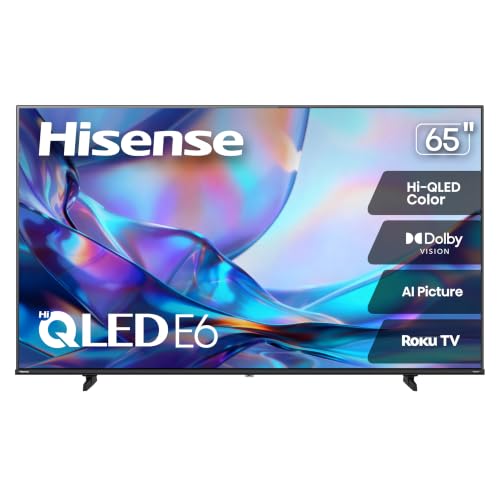
Pros
- 65-inch 4K QLED display
- Supports Dolby Vision, HDR10, and HLG
- Includes VRR and ALLM gaming features
Cons
- Skip if you need specified refresh rate or HDMI version
The Best QLED TVs by Use Case
Best for 55-Inch Gaming: TCL 55 Inch T7 Series 4K 120Hz QLED Smart Google
The TCL 55 Inch T7 Series 4K 120Hz QLED Smart Google suits buyers who want a mid-size screen with a specified native 120Hz panel. Its listing also names VRR and Game Accelerator 240, features aimed at smoother gameplay with compatible gaming devices. Dolby Vision, HDR10+, HDR10, and HLG support give you several HDR formats for movies and shows.
Reasons to buy:
- Native 120Hz refresh rate and listed VRR support.
- Dolby Vision, HDR10+, HDR10, and HLG support.
- Google TV, Wi-Fi 5, and voice control compatibility with Alexa, Google Assistant, and Apple HomeKit.
Reasons to avoid:
- The published details do not specify HDMI port count or which ports support gaming features, so verify before connecting multiple devices.
- At 55 inches, it may not suit a large room where viewers sit far from the screen.
Skip it if you want a larger screen or prefer Roku’s simpler app-focused interface. The TVs category includes more screen-size options.
Best for High-Refresh-Rate Gaming: TCL 65 Inch T7 Series 4K 144Hz QLED Smart Google
The TCL 65 Inch T7 Series 4K 144Hz QLED Smart Google pairs a larger 65-inch screen with a listed native 144Hz refresh rate. That combination is relevant to PC players seeking support beyond 120Hz, while Dolby Vision and HDR10+ add format flexibility for streaming. Its adjustable feet may also help when fitting the TV onto furniture or making room for a soundbar.
Reasons to buy:
- Native 144Hz panel, with VRR listed for gaming.
- 65-inch screen and adjustable feet for different furniture arrangements.
- Dolby Vision, HDR10+, HDR10, and HLG support.
Reasons to avoid:
- The listing does not provide HDMI port specifications or identify which connections support the highest refresh rate.
- A 144Hz panel does not make every game or connected device output at 144 frames per second; confirm your source device’s capabilities.
Skip it if you mostly stream films or shows and do not need the higher refresh rate. The 55-inch T7 offers a native 120Hz panel for a smaller-screen gaming setup.
Best Budget Choice: Roku 55-Inch Select Series Smart TV 2026-4K
The Roku 55-Inch Select Series Smart TV 2026-4K is the lowest-priced model in this comparison, making it a practical choice for everyday streaming on a 55-inch screen. Its listed features include 4K resolution, QLED color, HDR10, and Roku’s simple home screen. The voice remote, free streaming options, and Apple AirPlay support may suit households that value easy navigation over advanced gaming specifications.
Reasons to buy:
- Roku interface with voice search and access to free streaming content.
- Apple AirPlay support and voice control compatibility with Siri, Alexa, and Google Assistant.
- Bluetooth headphone mode is listed for private listening.
Reasons to avoid:
- The published listing specifies HDR10 but does not list Dolby Vision or a high-refresh-rate panel.
- Check whether your preferred services and devices work as expected with the Roku interface.
Skip it if you need a specified 120Hz or 144Hz panel for gaming, or Dolby Vision for compatible movie streams.
Best for a Large Screen: Samsung 75-Inch Class QLED Q7F Series Samsung
The Samsung 75-Inch Class QLED Q7F Series Samsung is the largest display in this comparison. Its 4K upscaling, Q4 AI Gen1 processor, and HDR10+ support are aimed at improving picture presentation across different content, while Samsung Vision AI and Tizen features provide access to Samsung’s smart TV services. The large screen is worth considering for a spacious living room, but the published information does not specify a high-refresh-rate panel.
Reasons to buy:
- 75-inch screen for viewers seeking a larger display.
- HDR10+ support and listed 4K upscaling.
- Samsung TV Plus channels and Knox Security features are listed.
Reasons to avoid:
- The published details do not list Dolby Vision support or a native panel refresh rate.
- Measure your viewing area and furniture before choosing a 75-inch television.
Skip it if you need a specified high refresh rate for gaming or want Dolby Vision playback. The TCL models list both Dolby Vision and higher refresh rates.
Best for Dolby Vision and Roku: Hisense 65″ Class E6SR Series Hi-QLED 4K UHD
The Hisense 65″ Class E6SR Series Hi-QLED 4K UHD combines a 65-inch 4K display with Dolby Vision and Roku TV. Its listing also names Game Mode Plus, VRR, and ALLM, which may appeal to console players who want gaming-oriented features without choosing a model based on a 120Hz or 144Hz panel. DTS Virtual:X and Apple AirPlay are additional listed features.
Reasons to buy:
- Dolby Vision support for compatible HDR content.
- Roku platform, Apple AirPlay, and compatibility with Alexa and Google Assistant.
- Game Mode Plus, VRR, and ALLM are listed.
Reasons to avoid:
- The published details do not specify a native refresh rate or HDMI port capabilities.
- The listing names HDR10 and HLG as well as Dolby Vision, but does not list HDR10+.
Skip it if you want a stated 120Hz or 144Hz panel. Consider a TCL T7 instead, after checking its connection specifications against your devices.
Also Considered
The TV and home theater section may help you compare broader setup options. We left the Samsung Mini LED model out of the main picks because its listing gives a 65-inch screen and DLG 120Hz, but does not specify a native refresh rate or Dolby Vision support: our guide to TVs under $300 offers another way to compare budget-focused choices.
The Samsung 65-Inch Class M70H Series, Mini LED, 4K is also worth a closer look if you want Mini LED backlighting and a 65-inch Samsung smart TV. Its listing specifies Mini LED dimming, HDR, and Motion Xcelerator with DLG 120Hz, but buyers should confirm the refresh-rate behavior and supported connections for their intended devices.
How to Choose the Best QLED TV
Match screen size to your room
Screen size affects how easily you can see detail from your usual seat, and whether the TV fits your furniture and room. This group includes 55-, 65-, and 75-inch options. Measure the available space, account for the stand or wall mounting arrangement you plan to use, and check the seating distance before choosing by size alone. The Samsung Q7F is the largest option here; the Roku Select and 55-inch TCL T7 suit buyers who need a smaller display.
Check refresh rate and gaming features
A higher refresh rate can display more frames each second when the TV and source device both support it. The 55-inch TCL T7 specifies a native 120Hz panel, and the 65-inch version specifies a native 144Hz panel. Hisense lists VRR and ALLM, while Samsung M70H lists DLG 120Hz; that description is not the same as a stated native 120Hz panel. Check the manufacturer’s connection information for HDMI port count, supported refresh rates, and which port to use with your console or PC.
Choose HDR formats for your content
HDR format support matters when a streaming service, disc player, or game supplies content in a particular format. The TCL T7 models list Dolby Vision, HDR10+, HDR10, and HLG; Hisense lists Dolby Vision, HDR10, and HLG. Roku Select lists HDR10, while Samsung Q7F lists HDR10+. Samsung does not list Dolby Vision for the models in this guide. Check both the TV’s supported formats and the formats offered by your preferred services. HDR labels alone do not establish measured brightness or picture quality.
Understand QLED and Mini LED backlighting
QLED describes a quantum-dot layer used to produce color in an LCD television; it does not, by itself, identify the backlight type or guarantee a particular contrast level. The Samsung M70H listing adds Mini LED backlighting and Mini LED dimming, while the other published listings do not specify Mini LED. This can be a useful distinction if you are comparing backlight designs, but the published data does not give dimming-zone counts or independent measurements. Verify those details if local dimming performance is central to your choice.
Pick a smart platform and verify connections
Roku TV and Google TV organize apps and content differently. Roku models list voice search and a straightforward home screen, while the TCL sets use Google TV and support voice control. Samsung uses its own smart TV platform and includes Samsung TV Plus features. Check that the services and voice assistants you use are supported, and review the listing for HDMI, audio output, Bluetooth, and Wi-Fi details that matter to your setup. Product descriptions do not provide complete port specifications for every model, so confirm these before purchase.
How We Compared These TVs
We compared the published product specifications and feature descriptions, including screen size, resolution, stated refresh rates, HDR formats, backlighting details, smart platforms, audio features, and listed gaming functions. We also considered the available customer rating figures as supplied, but no review text or review counts were provided, so those figures cannot establish recurring owner experiences. Where connection details or native refresh-rate information were missing, we identify that as something to verify rather than assuming a capability.
Frequently Asked Questions
Does QLED mean a TV has a 120Hz refresh rate?
No. QLED refers to quantum-dot color technology, not a particular refresh rate. The TCL T7 listings specify native 120Hz and 144Hz panels, respectively, while the Roku Select listing does not provide a refresh-rate figure. Check the exact model specifications instead of relying on the QLED label.
Which models in this comparison support Dolby Vision?
The published descriptions list Dolby Vision for both TCL T7 models and the Hisense E6SR. The Roku Select lists HDR10, and the Samsung Q7F lists HDR10+. The Samsung M70H description mentions Mini LED HDR but does not list Dolby Vision. If your streaming service or device uses a specific HDR format, confirm the TV supports it.
Is a 120Hz TV useful if I mostly stream movies?
It may be useful, but it is not essential for every movie viewer. A higher refresh rate is more relevant to compatible gaming devices and fast-moving sports. If you mainly watch streaming shows, compare HDR formats, screen size, smart platform, and room fit as well. The published listings do not give complete motion measurements, so a refresh-rate label alone cannot predict how every scene will look.
Can I connect a game console or PC to any of these TVs?
The product listings describe these as smart TVs, and several list gaming features, but the published data does not give full HDMI port specifications for every model. Check the manual or manufacturer product page for port count, supported resolutions and refresh rates, VRR support by port, and any limits that apply to your console or PC. Do not assume every HDMI port supports every advertised gaming feature.
Does a Mini LED QLED TV always have better contrast?
Mini LED backlights can use smaller light sources and local dimming, but the QLED and Mini LED labels do not establish a specific result for every scene. The Samsung M70H listing names Mini LED dimming and deeper blacks as manufacturer claims, but published information does not include independent measurements or zone counts. Consider the feature as a design difference, and look for model-specific evidence if dark-room contrast is a priority.


Write Your Review
No reviews yet. Be the first to share your experience!