

Home alarm kits differ in more than sensor count. Some focus on broad door and window coverage, while others offer cellular connectivity, touchscreen controls, or app alerts without a monthly subscription. The best smart home security system for your home depends on which of those features you need and which connectivity limits you can accept.
This guide compares seven wireless kits by included sensors, network support, app and voice control, and stated monitoring options. Use the product sections to narrow your choices, then check the listing for current compatibility and any service or SIM requirements before buying.

Pros
- Eight Contact Sensors included
- Two Keypads included
- Expandable with separately sold sensors and accessories
- Ring app notifications
Cons
- Remote arming and Alexa control require separate subscription
- Professional monitoring requires separate subscription
- Who should skip it: Buyers seeking subscription-free remote control or monitoring

Pros
- 24-piece system
- Factory-pre-paired accessories
- Touchscreen controls
- No monthly fee
Cons
- Supports 2.4GHz Wi-Fi, not 5GHz
- SMS and voice-call alerts require a GSM card
- Who should skip it: people needing 5GHz Wi-Fi support
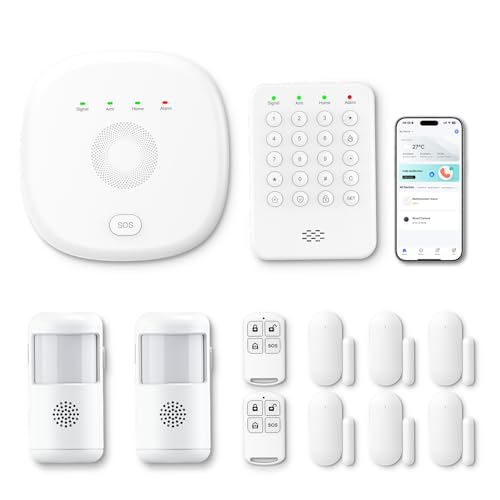
Pros
- Includes four door and window sensors
- Two motion detectors included
- Supports Smart Life and Tuya apps
- Expandable sensor coverage
Cons
- Cameras sold separately
- Who should skip it: buyers wanting included cameras

Pros
- No monthly fee
- Includes ten door sensors
- Expandable sensor and control capacity
- Alexa compatibility
Cons
- Skip if your Wi-Fi only supports 5 GHz

Pros
- Includes keypad, base station, and three sensors
- App control and mobile alerts
- Expandable with additional sensors and devices
- Alexa-compatible mode controls
Cons
- Requires 2.4 GHz Wi-Fi
- Skip if network only supports 5 GHz

Pros
- Touchscreen control panel
- Motion and door/window sensors included
- Remote controls and RFID tags included
- WiFi and GSM/SMS listed
Cons
- Skip if you need multiple motion or contact sensors

Pros
- No monthly security subscription fee
- Six door/window sensors and three motion detectors
- Touchscreen control with SOS mode
- Includes wired 120dB siren
Cons
- Does not support 5GHz WiFi
- SIM card and cellular plan sold separately
- Skip if you need 5GHz WiFi or included cellular service
The Best Home Security Systems by Use Case
Best for Multi-Room Coverage: Ring Alarm 14-Piece Kit (newest model)
Ring’s 14-piece kit is aimed at two- to four-bedroom homes and includes a base station, two keypads, eight contact sensors, two motion detectors, and a range extender. That mix suits households that want sensors for several entry points and more than one place to arm or disarm the alarm. The listing describes mobile alerts and optional Ring Protect features, including remote arming, Wi-Fi backup, and 24/7 professional monitoring. The Ring Protect plan is sold separately. Find it as Ring Alarm 14-Piece Kit (newest model).
Reasons to buy:
- Eight contact sensors and two motion detectors cover more zones than the smaller kits here.
- Two keypads provide separate physical controls.
- Expandable with additional Ring Alarm sensors and accessories sold separately.
Reasons to avoid:
- Remote arming, Wi-Fi backup, and professional monitoring depend on a compatible paid plan.
- Check whether Ring’s app and service terms fit your preferred setup before choosing it.
Skip it if you want the listed features without an ongoing plan or need a very small starter kit.
Best for Cellular Fallback: PGST Home Security Systems 12-Piece Kit
PGST’s kit combines 2.4 GHz Wi-Fi with 4G, and its listing says the system switches to 4G when Wi-Fi disconnects. It includes four door or window sensors, two motion detectors, a keypad, and two remote controls, with app control through Smart Life or Tuya. This makes it a candidate for buyers who want an alternate network path and a kit sized for the maker’s stated three- to five-bedroom use case. The listing claims no subscription or monthly charges, but cellular service details should be confirmed before purchase. See PGST Home Security Systems 12-Piece Kit.
Reasons to buy:
- Wi-Fi and 4G connectivity are specified, with automatic switching described by the listing.
- Smart Life and Tuya app control is included without extra charges according to the product information.
- Stay, away, and emergency modes are available through the keypad.
Reasons to avoid:
- The listing does not explain what 4G access, coverage, or service conditions apply.
- Professional monitoring is mentioned, but its operating terms are not detailed.
Skip it if you need clearly documented cellular service costs and monitoring arrangements before committing.
Best for Renters and Smaller Spaces: X-Sense Smart Home Security System
The X-Sense five-piece set has two door sensors, one motion sensor, a keypad, and a base station. The listing describes adhesive or screw installation, app control, scheduled Home and Away modes, and Alexa compatibility. Those features make it a practical smaller setup for an apartment, bedroom, or rental where you want a modest sensor set and the option of less permanent mounting. It only supports 2.4 GHz Wi-Fi, so check your router and app needs first. Product link: X-Sense Smart Home Security System.
Reasons to buy:
- Adhesive mounting is offered alongside screws, giving renters an alternative to permanent installation.
- Scheduled modes can automate when the system is armed.
- The product information says the system can expand to six keypads and 44 additional devices.
Reasons to avoid:
- It is incompatible with 5 GHz Wi-Fi.
- The included set has fewer entry sensors than the larger kits in this comparison.
Skip it if your network only offers 5 GHz access or you need a large set of included sensors.
Best for Touchscreen and Sensor Variety: Hapippofa GEN 2 Wireless Home Security System
Hapippofa’s GEN 2 kit pairs a touchscreen hub with six door or window sensors, three motion detectors, two remote controls, two RFID key fobs, an SOS button, and a wired siren. It is suited to households that want several ways to control the alarm, rather than relying on an app or keypad alone. The listing specifies 2.4 GHz Wi-Fi and optional 4G for calls and SMS; the SIM card and cellular plan are sold separately. Find details at Hapippofa GEN 2 Wireless Home Security System.
Reasons to buy:
- Touchscreen, remotes, RFID tags, and SOS button give users several control options.
- Six contact sensors and three motion detectors provide broad included coverage.
- Optional cellular calls and texts add a path beyond app alerts, with a separate SIM and plan.
Reasons to avoid:
- 5 GHz Wi-Fi is not supported.
- Cellular alerts require a compatible SIM card and paid cellular plan, neither included.
Skip it if you want cellular service included or prefer a simpler kit with fewer controls and accessories.
Best for Many Entry Sensors: 15-Piece WiFi Home Security System
This tolviviov kit includes ten door sensors, one motion sensor, a keypad, two remote controls, and a Wi-Fi base station. The unusually large number of included door sensors makes it a fit for homes with many doors and windows to cover, while app alerts and Alexa compatibility add remote and voice control. The listing specifies a 120 dB siren and says the system can expand to 20 sensors and five remote controls or keypads. It only supports 2.4 GHz Wi-Fi, and the listing describes no monthly fee. See 15-Piece WiFi Home Security System.
Reasons to buy:
- Ten included door sensors suit buyers prioritizing entry-point coverage.
- Expandable up to 20 sensors and five remote controls or keypads according to the listing.
- App alerts and Alexa compatibility are listed without a required monthly fee.
Reasons to avoid:
- It does not support 5 GHz Wi-Fi.
- Only one motion sensor is included, so buyers focused on room motion coverage may prefer another kit.
Skip it if you need cellular backup or several included motion detectors.
Also Considered
The DEEPVIGLX Home Security System, Alarm System for Home may suit buyers who want a small kit with a touchscreen, remote controls, RFID tags, and a siren, but the supplied details give limited information about app functions and sensor expansion.
The RenseCum Home Security Systems Alarm System for Home could suit households that value a larger touchscreen and SOS controls; its 2.4 GHz Wi-Fi limitation and need for a GSM card for calls are important checks.
How to Choose the Best Smart Home Security System
Count entry points and motion zones
Count the doors and windows you want monitored, then consider whether you also need motion detection in hallways or shared rooms. Contact sensors report an opening at a fitted entry point, while motion detectors cover movement in an area; one type does not replace the other. The tolviviov kit includes ten door sensors but one motion sensor, while Hapippofa includes six contact sensors and three motion detectors. Compare the included mix with your floor plan instead of judging by the piece count alone.
Check Wi-Fi bands and backup connections
Several kits here require 2.4 GHz Wi-Fi and do not support 5 GHz. Confirm that your router can provide the required band and that setup through the maker’s app suits your household. If continued connectivity matters when home internet drops, compare the listed cellular options carefully: PGST describes automatic Wi-Fi-to-4G switching, while Hapippofa needs a separate SIM card and plan for cellular calls and texts. The supplied details do not establish identical service terms, so verify coverage, fees, and activation with the seller or service provider.
Understand alerts, subscriptions, and monitoring
App notifications, a siren, cellular messages, and professional monitoring are different services. A phone alert does not itself dispatch emergency responders. Ring lists 24/7 professional monitoring and other remote features through a compatible Ring Protect plan sold separately. Other listed kits emphasize no monthly fees, but that does not establish that they include staffed monitoring. Read the service terms to learn what happens after an alarm and whether any paid plan is needed for the features you expect.
Match controls and smart-home compatibility
Decide whether your household prefers a keypad, touchscreen, remote control, RFID tag, phone app, or voice command. Ring, X-Sense, PGST, and tolviviov list Alexa compatibility, but the exact supported commands and any account or subscription requirements can vary. PGST and RenseCum list Smart Life or Tuya app support, while X-Sense uses its own app. Check app availability and the features exposed to your preferred assistant before buying. For broader ecosystem planning, see our guides to the best smart home hubs without a subscription and smart home hubs versus Wi-Fi.
Review installation, expansion, and included accessories
Wireless kits can reduce wiring work, but mounting methods and included controls still affect setup. X-Sense lists adhesive tape or screws, while Hapippofa says its accessories arrive pre-paired. Check which sensors, keypads, remotes, sirens, and power components the exact kit includes, and confirm whether later expansion uses compatible accessories sold separately. If you rent, consider whether adhesive installation suits your lease and surfaces; do not assume every sensor or hub is removable without marks.
How We Compared
This comparison uses the supplied product listings, including stated sensor counts, control methods, app support, connectivity, expansion options, and monitoring or subscription claims. Customer feedback information supplied for these products does not provide substantive individual experiences to assess, so the recommendations rely on listed features and clearly stated limitations rather than claims about owner consensus or real-world results.
Frequently Asked Questions
Will these alarm systems work with 5 GHz Wi-Fi?
The X-Sense, tolviviov, and Hapippofa listings specify 2.4 GHz Wi-Fi and exclude 5 GHz. PGST lists 2.4 GHz Wi-Fi plus 4G, and RenseCum also specifies 2.4 GHz Wi-Fi. Check the exact product listing and your router settings before setup.
Does no monthly fee mean professional monitoring is included?
No. A no-monthly-fee claim may refer to app control and alerts, not a staffed service that contacts emergency responders. Ring explicitly ties professional monitoring to a compatible paid plan. Check each seller’s service terms and distinguish self-monitoring from professional monitoring.
Which kit offers cellular connectivity?
PGST lists Wi-Fi and 4G with automatic switching when Wi-Fi disconnects. Hapippofa lists optional 4G for calls and SMS, but requires a compatible SIM card and separate cellular plan. RenseCum lists GSM calls with a GSM card. Confirm network support, service costs, and coverage before relying on cellular alerts.
Can I use these systems in an apartment or rental?
X-Sense specifically describes use in apartments and rentals and offers adhesive mounting as an alternative to screws. Other kits are wireless, but their listings do not establish that every mounting option is suitable for every rental. Check the installation method and property rules before attaching sensors.
Do Alexa-compatible systems offer the same voice features?
No specific feature set should be assumed from compatibility alone. The listings mention voice control for arming or disarming on some products, and Ring ties voice arming and disarming to a Ring Protect subscription. Review the exact Alexa functions and account requirements for the model you choose.


Write Your Review
No reviews yet. Be the first to share your experience!