

Connecting every smart plug, light bulb, and motion sensor directly to your wireless router can create network congestion. As your collection of smart gear expands, standard routers often struggle to manage dozens of simultaneous wireless connections, leading to delayed responses and dropped signals.
The choice between a smart home hub vs Wi-Fi setup comes down to how many accessories you plan to install, whether you want automations to run during internet outages, and how you prefer to control your home. This guide evaluates 2 distinct approaches from Google, AEOTEC to help you build a responsive, dependable smart network.

Pros
- Hands-free control with built-in Google Assistant
- Compact footprint fits easily on counters and nightstands
- Integrates with over 200 smart home devices
- Voice Match delivers personalized user routines
Cons
- Modest 1024x600 display resolution limits fine visual detail
- Users wanting high-definition video displays should skip it
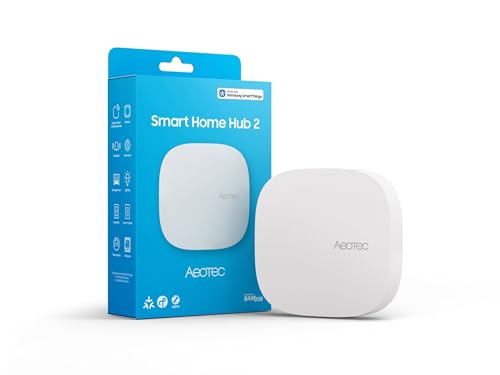
Pros
- Supports modern Matter and Zigbee device protocols
- Local automation execution works during internet outages
- Flexible setup via Wi-Fi or wired Ethernet
Cons
- Lacks Z-Wave support for legacy smart devices
- Users with existing Z-Wave setups should skip it
Smart Home Hub vs Wi-Fi Buying Guide
Network Congestion and Wireless Protocols
Standard home accessories connect over 2.4 GHz wireless networks. When dozens of accessories communicate over the same channels as your laptops and streaming devices, network responsiveness slows down. Dedicated hubs offload this burden by creating independent mesh networks using specialized protocols such as Zigbee and Matter. A dedicated unit like the AEOTEC Aeotec Smart Home Hub2 – V4 keeps sensor traffic completely off your primary wireless network, preserving bandwidth for personal computers and phones.
Local Automation Processing
Direct Wi-Fi devices depend almost entirely on cloud servers to trigger routines. For instance, when a sensor detects motion, it sends a signal to a remote server, which then tells a light switch to turn on. If your internet service experiences an outage, those automated routines fail to run. A dedicated smart hub executes automation logic locally on the device itself. This local execution ensures your lighting schedules and security sensors continue working smoothly even when external broadband drops.
Interface Style: Touchscreens vs Background Bridges
Smart home controllers serve two distinct functional roles. Display devices such as the Google Google Nest Hub (1st Gen) emphasize visual interaction, offering a central countertop touch screen for glanceable weather updates, timers, photo displays, and voice commands. In contrast, headless bridges are designed to sit quietly in a media cabinet or near your network router. The trade-off comes down to whether you need hands-on visual access in common rooms or background radio routing for low-power sensors.
Ecosystem and Voice Assistant Compatibility
Buying standalone Wi-Fi accessories often forces you to manage multiple third-party smartphone apps to adjust schedules and settings. Consolidating your accessories under a unified platform simplifies daily control. A display hub integrates with the Google Assistant platform to tie into hundreds of compatible partner brands through voice. Meanwhile, platforms powered by SmartThings allow you to combine Matter and Zigbee gear alongside Amazon Alexa or Google Assistant voice control.
Installation Flexibility and Power Options
Consider where your controller will physically sit and how it connects to your home network. Units that offer both wired Ethernet and wireless connection options provide flexibility. A wired Ethernet port guarantees a steady, low-latency connection right next to your modem. Controllers limited strictly to wireless connections allow placement anywhere within router range, but they remain susceptible to dead zones and wireless signal interference throughout the house.
How We Compared These Products
Our editorial assessment evaluates published manufacturer specifications, supported communication protocols, setup procedures, and available user feedback. We analyzed how each device handles wireless signals, smart home voice integration, physical connectivity options, and routine management to determine which model best matches typical household requirements.
Which Option Fits Your Needs?
For smart home builders who want multi-protocol automation without network clutter: Aeotec Smart Home Hub2 – V4 operates as a SmartThings controller with native support for Matter and Zigbee accessories. It connects through either wired Ethernet or wireless networks and processes automations locally for reliable scheduling during internet outages. Pros include fast local processing, support for thousands of compatible accessories, and dual network connectivity options. Cons include the lack of Z-Wave support and the absence of a built-in display. Who should skip it: Homeowners looking for a bedside screen or those with an existing collection of legacy Z-Wave switches.
For countertop voice management and multimedia playback: Google Nest Hub (1st Gen) combines a 7-inch color touchscreen with voice control powered by Google Assistant. It links with over 200 compatible smart devices across 50 brands while streaming music and video from YouTube and Spotify. Pros include a clear display for recipes and calendar entries, personalized voice recognition, and hands-free media playback. Cons include a reliance on Wi-Fi and Bluetooth without dedicated Zigbee or Matter radios, as well as dependence on an active internet connection for voice queries. Who should skip it: Advanced users who want to run low-power battery sensors or manage complex offline automations.
Frequently Asked Questions
Does a smart home hub replace an existing Wi-Fi router?
No. A smart hub works alongside your current wireless router. It plugs into the router using an Ethernet cable or joins your wireless network, acting as a translator for low-power smart protocols rather than supplying internet access to your personal computers and phones.
Can Wi-Fi smart accessories work without a central hub?
Yes. Standalone Wi-Fi accessories connect straight to your home router and use their manufacturer cloud servers for mobile app control. A dedicated hub becomes helpful when you add numerous accessories or want to combine multiple brands into one automated system.
Why should you choose Zigbee or Matter instead of direct Wi-Fi?
Zigbee and Matter over Thread operate on lightweight wireless signals designed for minimal energy consumption. This allows small door sensors and temperature monitors to run on coin batteries for long periods while forming a reliable mesh that keeps traffic off your main router.
Do smart display screens function as full network mesh hubs?
Not always. Many display units rely solely on standard Wi-Fi and Bluetooth radios. While they send voice commands to cloud-linked appliances, they cannot connect directly to low-power mesh sensors unless they include dedicated radio hardware for those protocols.
What happens to automated routines when the internet goes down?
If your accessories depend on cloud services, schedules and triggers pause until internet connectivity is restored. Controllers equipped with local execution continue triggering pre-programmed lighting rules and sensor alerts independently of external broadband service.
Can a smart hub control accessories from multiple brands together?
Yes. Central controllers unify equipment from varied manufacturers under one software interface, allowing you to create combined routines where a single command or sensor triggers actions across different brands simultaneously.


Write Your Review
No reviews yet. Be the first to share your experience!