

Wireless CarPlay adapters can remove the need to plug in your iPhone for every drive, but they do not add CarPlay to a car that lacks factory-wired CarPlay. The best wireless CarPlay adapter for your setup depends on your vehicle’s existing system, phone, USB port, and whether you want iPhone-only support or a claimed Android Auto option.
This guide compares compatibility notes, pairing, automatic reconnection, update support, and physical design. Check your car and phone requirements before choosing, especially when a listing makes broad compatibility claims.

Pros
- USB and USB-C plug options
- Compact, space-saving design
Cons
- Requires factory wired CarPlay in a car from 2016 or later
- Firmware updates may be needed to prevent connection issues
- Who should skip it: drivers with incompatible iOS versions

Pros
- Automatic reconnection after initial pairing
- USB-A and USB-C ports
- Supports several in-car control methods
Cons
- Requires factory-wired CarPlay
- Not compatible with Android phones
- Skip if your vehicle lacks factory-wired CarPlay

Pros
- Compact USB-port design
- Supports automatic reconnection
- USB-A and USB-C port compatibility
- One-year warranty and lifetime firmware updates
Cons
- Skip if your car lacks wired Apple CarPlay

Pros
- Keeps factory CarPlay features available wirelessly
- Automatic reconnection after initial setup
- Compact, out-of-the-way design
Cons
- Requires factory-wired CarPlay
- Not compatible with BMW or modified cars
- Supports one connected phone at a time
Pros
- Compact mini USB design
- Automatic reconnection after pairing
- Supports common CarPlay functions
Cons
- Requires factory-installed wired CarPlay
- Not compatible with Android
- Who should skip it: Android users or cars without wired CarPlay

Pros
- Supports both Apple CarPlay and Android Auto
- Includes USB-A and USB-C adapters
- Compact listed dimensions
Cons
- Requires OEM wired CarPlay or Android Auto and touchscreen
- Does not support cars with OEM wireless CarPlay
- Who should skip it: drivers without compatible factory-wired systems
Pros
- Compact dimensions
- Auto-reconnect function
- Supports core CarPlay features
Cons
- Skip if your car lacks factory-wired CarPlay
The Best CarPlay Adapters by Use Case
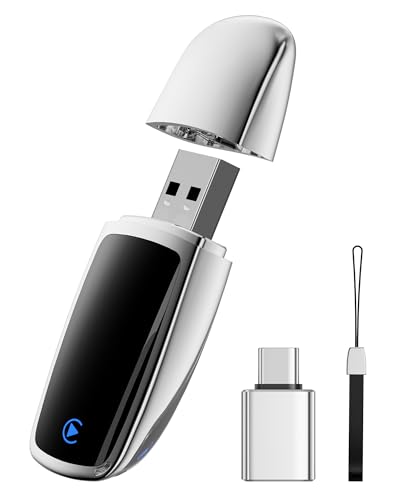
Best for Updating Compatibility: Aimoon 2026 Upgraded Wireless CarPlay Adapter
Aimoon 2026 Upgraded Wireless CarPlay Adapter stands out for buyers who are willing to manage firmware updates as phone software changes. The listing specifies iPhone support on iOS 10 or later, USB-A and USB-C plug options, and updates through a web portal. It also calls out an important exception: the listing says it is not compatible with iOS 18.4.0 or iOS 26 and advises updating to iOS 18.4.1 or later.
Reasons to buy:
- Includes USB-A and USB-C plug options for different vehicle ports.
- Offers web-based firmware updates, which may help address compatibility changes.
- Uses a compact aluminum casing, according to the listing.
Reasons to avoid:
- The listing gives specific iOS version exclusions, so verify your current version and update path before buying.
- Firmware upkeep may not suit buyers who want a device with no update steps.
Skip it if you use Android, need video playback, or cannot meet the listed iOS version requirements.
Best for Straightforward iPhone Pairing: Wireless CarPlay Adapter for iPhone
Wireless CarPlay Adapter for iPhone suits drivers who want a simple plug-in-and-pair setup without a companion app or update process. CAENEEDER says the adapter reconnects automatically after initial pairing and supports steering-wheel controls, the touchscreen, voice control, and knob operation. Its listing limits compatibility to factory-wired CarPlay and iPhones, so Android users should choose another option.
Reasons to buy:
- No app or update is required according to the listing.
- USB-A and USB-C connections are specified.
- Supports common vehicle controls, including steering-wheel buttons and knobs.
Reasons to avoid:
- It does not support Android phones.
- It works only with vehicles that already have factory-wired CarPlay.
Skip it if you need Android Auto support or firmware-update options.
Best for Warranty and Update Support: Wireless CarPlay Adapter for iPhone
Lincisoonic’s Wireless CarPlay Adapter for iPhone is a reasonable fit for buyers who value stated after-sales support. The listing specifies a one-year warranty and free lifetime firmware updates, alongside an included USB-A/USB-C adapter. It describes Bluetooth 5.3 and 5.8 GHz Wi-Fi, but those listed features do not establish how the connection will perform in every vehicle.
Reasons to buy:
- Lists a one-year warranty and free lifetime firmware updates.
- Includes a USB-A/USB-C adapter for different port types.
- Describes automatic reconnection after initial pairing.
Reasons to avoid:
- It is intended for iPhones and wired Apple CarPlay, not Android Auto.
- Confirm that your vehicle’s port placement leaves room for the adapter.
Skip it if you need a confirmed Android-compatible adapter or your car lacks wired CarPlay.
Best for iPhone and Android Auto Households: 2-in-1 Wireless CarPlay Adapter for Apple CarPlay
BSUBSU’s 2-in-1 Wireless CarPlay Adapter for Apple CarPlay is the only pick here whose listing explicitly claims support for both iPhone CarPlay and Android Auto on Android 11 or later. That makes it worth considering when drivers share a car across phone platforms. The listing says the vehicle must have OEM wired CarPlay or Android Auto and a touchscreen, and it excludes cars that already have OEM wireless CarPlay.
Reasons to buy:
- Claims compatibility with iPhones on iOS 10 or later and Android phones on Android 11 or later.
- Includes USB-A and USB-C adapters.
- Lists automatic reconnection, lifetime updates, and a 180-day warranty.
Reasons to avoid:
- The listing requires an OEM touchscreen and wired CarPlay or Android Auto, and excludes cars with factory wireless systems.
- Confirm that your specific vehicle and phone combination is supported before purchase.
Skip it if your car has no factory-wired system or you want a CarPlay-only adapter with simpler compatibility requirements.
Also Considered
Wireless CarPlay Adapter for Apple iPhone 2026 may suit iPhone owners looking for a compact metal adapter and Bluetooth 5.3, but its listed features overlap with other iPhone-only choices.
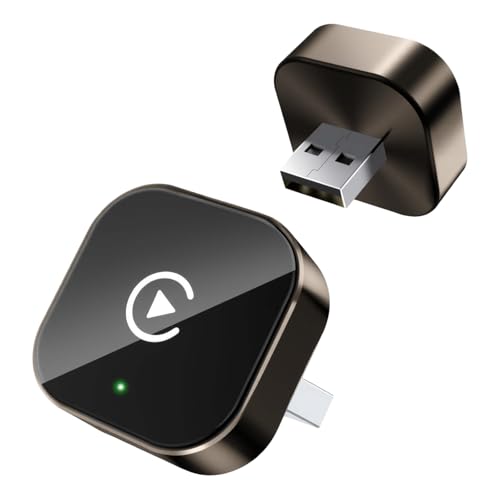
Wireless Carplay Adapter could suit drivers who want automatic reconnection and a compact design, but its listing excludes BMW and modified cars.
Yizro 2026 Wireless CarPlay Adapter for iPhone may appeal to buyers seeking lifetime firmware updates, but its title mentions Android while its feature details specify eligible iPhones only. Confirm Android support with the seller before relying on it.
How to Choose the Best Wireless CarPlay Adapter
Confirm factory-wired CarPlay first
These adapters convert an existing wired connection to wireless. They do not add CarPlay to a vehicle that lacks factory CarPlay, and a USB port alone does not confirm compatibility. Check your owner’s manual, vehicle settings, or manufacturer information for your model year and trim. Also confirm that CarPlay works when the iPhone is connected by cable before considering a wireless adapter.
Some listings cite compatibility with a large share of vehicles, but broad percentages are not a substitute for checking your specific car. BSUBSU also specifies an OEM touchscreen and wired CarPlay or Android Auto. Pluvixa excludes BMW and modified cars, while Aimoon gives specific iOS-version exclusions. Treat these notes as purchase requirements, not minor details.
Match phone platform and software version
Most products here are described as iPhone-only. CAENEEDER and APROO explicitly say their adapters do not support Android, while BSUBSU claims both CarPlay and Android Auto support. Yizro’s product title refers to iPhone and Android, but its feature details specify iPhones running iOS 10 or later. That inconsistency makes seller confirmation especially important if you use Android.
Check both the phone model and operating-system version against the listing. Aimoon’s stated iOS exclusions show why a general claim such as “iOS 10 or later” may not tell the whole story. If your phone runs a version named in an exclusion, do not assume a firmware update will fix compatibility unless the seller confirms it.
Check the USB port and adapter placement
USB-A and USB-C describe connector shapes, not guaranteed data speeds or features. For this purchase, match the adapter’s supplied plug options to the port used for wired CarPlay in your vehicle. Aimoon and CAENEEDER specify USB-A and USB-C options, while Lincisoonic and BSUBSU list an adapter for both port types.
Physical size matters when a port sits in a tight console or beside other connections. Several products describe a mini design, but the published information does not give exact dimensions. Look at your vehicle’s port location and check the product listing for a fit illustration or measurements before ordering. A compact body can reduce cable clutter, but it should not block a neighboring port or interfere with the console cover.
Compare setup, reconnection, and update needs
Most listed adapters use Bluetooth pairing and then reconnect automatically when the car starts. CAENEEDER says no app or updates are required, while Aimoon relies on a web portal for firmware updates. Lincisoonic and Yizro list ongoing firmware updates, and BSUBSU also claims lifetime updates. Decide whether you prefer no update steps or want an available update route if compatibility changes.
“Plug and play” still involves an initial pairing process, and the vehicle may need to select the adapter as its CarPlay connection. Keep Wi-Fi and Bluetooth enabled when the instructions call for them. If several phones regularly use the car, check how the adapter handles multiple paired devices; Pluvixa says it connects to one phone at a time, while the other published listings do not clearly explain multi-phone switching.
Read limits and support terms closely
Do not treat claims such as “no latency” or broad vehicle coverage as guarantees for every setup. Actual compatibility depends on the car’s factory system, the phone, and software versions. Focus on specific stated requirements, exclusions, connection instructions, and support terms. Lincisoonic lists a one-year warranty; BSUBSU lists a 180-day warranty. Warranty periods and update policies differ, so confirm the current terms and how to contact support before buying.
These products are intended to provide phone functions through the vehicle’s CarPlay or Android Auto interface. Use voice commands and vehicle controls where possible, and do not handle the phone while driving. An adapter does not make video playback safe or appropriate while a vehicle is moving.
How We Compared
This comparison uses the published product listings, including their stated phone and vehicle compatibility, port options, pairing steps, automatic reconnection, firmware support, design details, warranties, and exclusions. Customer-review totals supplied for these products were zero, so they provide no reported buyer experiences to summarize. Manufacturer claims about connection speed, stability, or broad compatibility are presented as listing claims rather than independently established results.
Frequently Asked Questions
Will a wireless CarPlay adapter work in any car with a USB port?
No. Your car must already support factory-wired CarPlay through the port you plan to use. A USB port used only for charging does not establish CarPlay compatibility. Check your vehicle manual or connect an iPhone by cable to confirm the factory system works.
Can I use an iPhone-only adapter with an Android phone?
Do not assume so. CAENEEDER and APROO explicitly exclude Android, and several other listings describe iPhone support only. BSUBSU claims Android Auto support for Android 11 or later, but your car must also have factory-wired Android Auto. Verify the exact phone and vehicle combination.
Does an adapter add wireless CarPlay to a car with no CarPlay?
No. The products in this guide are designed to convert factory-wired CarPlay to a wireless connection. They are not described as a way to add CarPlay to a car without the factory system.
Do I need to pair the phone every time I start the car?
The listings generally describe automatic reconnection after initial pairing. The first setup still involves connecting the adapter and pairing the phone, and behavior can depend on the car and phone. Check the product’s instructions for steps such as keeping Bluetooth and Wi-Fi enabled.
Should I choose USB-A or USB-C?
Choose the connector that fits the vehicle port used for wired CarPlay. Some listings include options for both USB-A and USB-C, but confirm what is included with the exact product version. Connector type alone does not confirm that a port supports CarPlay.
Can I watch YouTube or Netflix through these adapters?
Do not buy one expecting video playback. Aimoon explicitly says its adapter does not support YouTube or Netflix video playback, and the other listings focus on navigation, calls, music, and messaging through CarPlay or Android Auto. Keep attention on driving and follow your vehicle’s rules for screen use.






Write Your Review
No reviews yet. Be the first to share your experience!