

Choosing between an Amazon Echo Show 8 and a Google Nest Hub starts with your existing smart home, not just screen size. The assistant, supported services, camera features, and included accessories can matter more than a display’s headline specifications.
This comparison covers five models, from a 7-inch Google display to an Echo Show 8 with spatial audio and smart home controls. Use it to match a device to your preferred assistant, household routines, video calls, and entertainment habits, and check variant details before buying.

Pros
- Hands-free control with built-in Google Assistant
- Compact footprint fits easily on counters and nightstands
- Integrates with over 200 smart home devices
- Voice Match delivers personalized user routines
Cons
- Modest 1024x600 display resolution limits fine visual detail
- Users wanting high-definition video displays should skip it

Pros
- Stand enables 40-degree tilt and 360-degree swivel
- Built-in smart home hub for streamlined device management
- Spatial audio delivers room-filling sound for media playback
Cons
- Requires commitment to the Amazon Alexa ecosystem
- Users wanting Google Assistant or Siri should skip it

Pros
- Compact 7-inch footprint fits small tabletops
- Hands-free voice control via Google Assistant
- Dual Wi-Fi and Bluetooth connectivity
- Multilingual support with international power adapter
Cons
- Requires continuous corded electric wall power
- Single speaker provides basic audio performance
- Users needing portable battery operation should skip it
Pros
- Includes universal power adapter for international wall outlets
- Multilingual interface supports English, Japanese, French, and Spanish
- Generous 10-inch screen fits countertops and shelves
Cons
- Japan import model may complicate domestic warranty coverage
- Requires continuous wall connection without internal battery
- Who should skip it: shoppers wanting native domestic variants

Pros
- Built-in hub manages compatible smart devices directly
- Auto-framing centered camera with 3.3x zoom
- Spatial audio with enhanced bass output
- Physical privacy controls for camera and microphone
Cons
- Substantial footprint requires dedicated counter space
- Households invested in competing ecosystems should skip it
The Best Smart Displays by Use Case
Best for Google Assistant Basics: Google Nest Hub (1st Gen)
The Google Nest Hub (1st Gen) suits homes that use Google Assistant for voice requests, reminders, and compatible smart home devices. Its 7-inch, 1024 x 600 touchscreen displays weather, calendars, YouTube videos, and Google Photos. The listing also specifies Voice Match for personalized calendar, commute, and reminder information, making it a practical fit for shared routines.
It supports music and video services including YouTube, Spotify, and Pandora, and the listing describes compatibility with more than 200 devices from over 50 brands. That breadth may help if your household already uses Google services, but it does not establish compatibility with every device or feature. Confirm that your specific lights, cameras, and thermostats work with Google Assistant.
Reasons to buy:
- Google Assistant supports hands-free questions, reminders, and smart home control.
- The 7-inch screen shows common glanceable information and Google Photos.
- The listing names YouTube, Spotify, and Pandora among supported entertainment services.
Reasons to avoid:
- The screen is smaller than the 8.7-inch Echo Show 8 displays and the 10-inch Nest Hub Max.
- Verify compatibility for each smart home device and service you plan to use.
Skip it if you want a built-in camera for video calls or prefer Alexa as your main voice assistant.
Best for Adjustable Viewing: Amazon Echo Show 8 (2025 release)
The Amazon Echo Show 8 (2025 release) is listed as a bundle with an Amazon Adjustable Stand. Its 8.7-inch HD touchscreen provides more viewing area than the 7-inch Nest Hub models in this guide, while the stand adds 40-degree tilt and 360-degree swivel. Those adjustments can help position the screen for recipes, video calls, or watching shows from different spots in a room.
The listing specifies Alexa+, a built-in smart home hub, and room-filling spatial audio. It also describes Alexa+ as handling multiple requests in one conversation and providing personalized responses. These are manufacturer-listed capabilities, so check current service availability and the functions you expect before choosing this model. The bundle’s stand is a notable distinction from the newest Echo Show 8 listing, which does not specify an included stand.
Reasons to buy:
- The supplied adjustable stand supports 40-degree tilt and 360-degree swivel.
- The 8.7-inch HD screen is larger than the 7-inch Google Nest Hub displays in this guide.
- The listing specifies Alexa+, a built-in smart home hub, and spatial audio.
Reasons to avoid:
- Its Alexa experience may be less suitable if your home relies on Google Assistant routines and services.
- Check which Alexa+ functions and smart home devices are supported in your region.
Skip it if you want a Google Assistant display or do not need the included adjustable stand.
Best for Google’s Second Generation: Google Nest Hub 7” Smart Display with Google
The Google Nest Hub 7” Smart Display with Google is a second-generation Nest Hub offered as a bundle with a universal power adapter and quick-start guide. Its listing highlights support for English, Spanish, French, and Portuguese, along with language settings that can be changed. That may appeal to multilingual households or buyers who need the listed international-language options.
The product information describes a 7-inch speaker display for a tabletop, with Wi-Fi connectivity and a power cable included. It does not give a full feature comparison with the first-generation Nest Hub, so do not assume that every feature or performance difference is documented here. Check the exact generation, adapter plug, power requirements, and supported Google services for your location before ordering a bundle marketed for global use.
Reasons to buy:
- The listing identifies this as the second-generation Google Nest Hub.
- Language support includes English, Spanish, French, and Portuguese.
- The bundle specifies a universal power adapter and a quick-start guide.
Reasons to avoid:
- The published feature details do not explain how this generation differs in daily use from the first-generation model.
- Confirm adapter compatibility and the exact bundle contents for your country.
Skip it if you need a larger screen, a listed video-call camera, or clearly documented smart home features in the product details.
Best for a Larger Google Display: Google Nest Hub Max, Japan Model
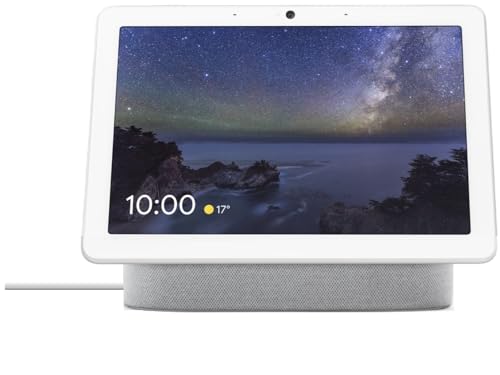
The Google Nest Hub Max, Japan Model is the larger Google option in this selection, with a 10-inch display identified in its listing. Its bundle description names English, Spanish, and Japanese language compatibility, plus a universal power adapter and quick-start guide. Consider it if a larger screen and the listed language options fit your home better than a 7-inch display.
The listing provides limited detail about features beyond the display and language bundle. It does not specify camera capabilities, supported streaming services, or a complete smart home compatibility list, so those details should not be assumed from the model name. Buyers outside Japan should verify the adapter, power plug, regional service support, and return terms before choosing an imported model.
Reasons to buy:
- The listed 10-inch screen is larger than the other Google displays included here.
- The bundle names English, Spanish, and Japanese language compatibility.
- A universal power adapter and quick-start guide are listed as bundle items.
Reasons to avoid:
- The provided details do not establish camera, streaming, or smart home functions.
- As a Japan model, it warrants careful checking of regional power and service compatibility.
Skip it if you want a clearly described camera, entertainment lineup, or broad compatibility details before purchase.
Best for Alexa Entertainment and Calls: Amazon Echo Show 8 (newest model)
The Amazon Echo Show 8 (newest model) combines an 8.7-inch HD touchscreen with Alexa, spatial audio, and a centered camera. The listing specifies auto-framing, 3.3x zoom, and noise reduction for video calls, as well as live view for checking in on family or pets. Those listed camera features make it the clearest choice here for buyers who expect to use a smart display for calls.
Its smart home features include a built-in hub and control for compatible Alexa devices, with routines that the listing says can respond to temperature, presence, or visual ID detection. It also names Prime Video and Netflix, among other services, and describes privacy controls that include a microphone and camera disable button. Check device compatibility, service availability, and whether the stated routine triggers suit your setup.
Reasons to buy:
- The listing specifies a centered, auto-framing camera with 3.3x zoom and noise reduction.
- Alexa-compatible smart home control does not need a separate smart home hub, according to the listing.
- On-device microphone and camera disable controls are specified.
Reasons to avoid:
- Its smart home and voice features center on Alexa, which may not suit a Google-based home.
- The listing does not specify an adjustable stand as included, unlike the 2025 bundle above.
Skip it if you do not plan to use the camera, Alexa, or the listed smart home routines.
How to Choose an Amazon Echo Show 8 vs Google Nest Hub
Start with your voice assistant and connected devices
Choose around the ecosystem you already use. The Nest Hub listings center on Google Assistant, while both Echo Show 8 models center on Alexa. This affects how you give voice commands, manage routines, and connect smart home devices. The first-generation Nest Hub listing names compatibility with more than 200 devices from over 50 brands, while the Echo Show 8 listings describe Alexa control for compatible devices. Neither statement confirms that a particular product in your home will work.
Before buying, check the device maker’s compatibility information for your exact lights, cameras, thermostat, and other connected equipment. You can also review our guide to smart home hubs for the Google ecosystem if central control across Google-compatible devices is a priority. For broader system questions, see our overview of smart home hubs and gateways.
Match screen size and stand arrangement to the room
A 7-inch screen can suit a counter or bedside table where you mainly check a calendar, weather, or a short video. An 8.7-inch Echo Show 8 provides a larger listed screen, and the 2025 bundle adds a stand that tilts and swivels. The Japan-model Nest Hub Max has a listed 10-inch display, but its published feature information is thinner. Think about where you will place the display and whether you need to angle it toward multiple viewing positions.
Screen size alone does not establish brightness, viewing quality, or how comfortable a display will be from across a room. Check the product listing for the exact model and included stand or adapter. Do not assume that accessories listed for one Echo Show 8 bundle come with another version.
Decide whether you need a camera
The newest Echo Show 8 listing explicitly describes a camera for video calls, auto-framing, zoom, and live view. The published details for the other models do not establish that they include a camera, so verify the exact product listing if calls or remote viewing are important. A display without a clearly specified camera may still fit a household that mainly wants voice control, media, or glanceable information.
Camera access is also a privacy decision. The newest Echo Show 8 listing specifies a camera and microphone disable button and camera controls on the device and in the app. If you prefer not to have a camera in a shared room, consider whether those controls meet your needs and how you plan to position the display.
Compare the entertainment services you actually use
The first-generation Nest Hub listing names YouTube, Spotify, and Pandora. The newest Echo Show 8 listing names Prime Video and Netflix, along with music and show discovery features associated with Alexa+. These examples are not a complete catalog of supported services. Confirm that your preferred music, video, and photo services are available on the precise model and in your region.
Audio claims also differ by listing: both Echo Show 8 descriptions specify spatial audio, while the Nest Hub information emphasizes its speaker and supported services. These descriptions do not provide comparable listening measurements. If music matters, compare the services and listening features you will use rather than treating marketing descriptions as a direct performance ranking.
Check regional language and power details
The second-generation Nest Hub bundle names English, Spanish, French, and Portuguese support, while the Japan-model Nest Hub Max listing names English, Spanish, and Japanese. Both list a universal power adapter. Buyers should verify plug compatibility, power requirements, language options, and regional access to voice assistant features before ordering, especially for an international bundle.
Also confirm the precise generation and package contents. The Google products here include different model generations and bundle details, and the Echo listings are not identical packages. Product titles can look similar while accessories or regional terms differ.
How We Compared
We compared the published product descriptions and listed specifications, including display size and resolution where provided, voice assistant, named services, smart home features, camera details, privacy controls, language support, and bundle contents. We also considered the customer feedback information supplied with each listing, which shows no review entries for these products. Where descriptions do not establish a feature, such as camera support on a particular Google model, this guide identifies that information as something to verify rather than filling the gap with an assumption.
Frequently Asked Questions
Should I choose Alexa or Google Assistant for a smart display?
Start with the assistant and smart home devices you already use. Choose an Echo Show 8 if Alexa is central to your routines or you want the listed Echo camera and Alexa features. Choose a Nest Hub if Google Assistant and Google services better match your household. Check compatibility for each specific device before deciding.
Which product in this comparison has the largest listed screen?
The Google Nest Hub Max, Japan Model has a listed 10-inch display. The Echo Show 8 models specify an 8.7-inch display, and the two smaller Google Nest Hub listings specify 7-inch screens. Screen size does not alone establish viewing quality, so consider placement and the features you need too.
Which model has the clearest listed video-call features?
The Amazon Echo Show 8 (newest model) listing describes a centered camera, auto-framing, 3.3x zoom, and noise reduction for video calls. The published details for the other products do not provide comparable camera specifications. Verify camera support for any alternative before buying if calls are a key use.
Do all Echo Show 8 versions include an adjustable stand?
No. The Amazon Echo Show 8 (2025 release) listing explicitly describes a bundle with an Amazon Adjustable Stand, including tilt and swivel. The Amazon Echo Show 8 (newest model) listing does not specify that stand as included. Check the exact package listing rather than assuming the accessory carries across versions.
Can an international Nest Hub bundle work in the United States?
The supplied Google bundle listings describe universal power adapters and international language support, but those details do not confirm every regional service or outlet requirement. Verify adapter compatibility, power specifications, available assistant functions, and the seller’s terms for the exact bundle. This is particularly relevant to the Japan-model Nest Hub Max.
Do these smart displays need Wi-Fi?
The Google Nest Hub (1st Gen) and second-generation Nest Hub bundle list Wi-Fi connectivity. The published details do not state complete network requirements for every product or feature. Check each model’s setup information and confirm your home network supports the services and smart home devices you plan to connect.


Write Your Review
No reviews yet. Be the first to share your experience!