

Building an automated living space around Google Assistant often introduces a tricky dilemma. Some setups rely strictly on Wi-Fi gadgets, while others incorporate low-power sensors and switches that require dedicated radios. Finding the best smart home hub for Google depends on whether you need a visual interface for day-to-day interactions or an automation bridge that links external communication standards.
Smart displays provide glanceable controls, photo frames, and clear speaker feedback, but dedicated protocol gateways handle background routines across varied device types. Understanding whether your setup benefits from a dedicated screen or a multi-protocol bridge will help you pick the right central unit without buying unnecessary hardware. If you are weighing different device roles, our breakdown of a smart home hub vs bridge covers how these pieces fit together.

Pros
- Compact footprint fits easily on crowded nightstands or desks
- Voice and touchscreen controls for compatible smart devices
- Built-in Google Assistant handles reminders, timers, and streaming
Cons
- Ships in bulk packaging rather than retail box
- Korean spec model requires language reconfiguration during setup
- Skip if you need an out-of-the-box English configuration

Pros
- Large 10-inch display for easy viewing
- Built-in Google Assistant for voice control
- Sub-one-pound build simplifies placement
Cons
- Four-inch depth requires substantial counter clearance
- Not ideal for tight spaces

Pros
- Compact 7-inch footprint fits small tabletops
- Hands-free voice control via Google Assistant
- Dual Wi-Fi and Bluetooth connectivity
- Multilingual support with international power adapter
Cons
- Requires continuous corded electric wall power
- Single speaker provides basic audio performance
- Users needing portable battery operation should skip it
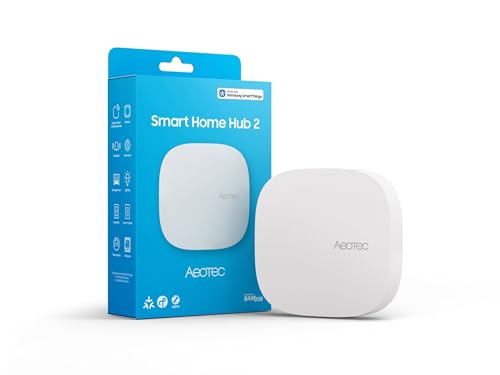
Pros
- Supports modern Matter and Zigbee device protocols
- Local automation execution works during internet outages
- Flexible setup via Wi-Fi or wired Ethernet
Cons
- Lacks Z-Wave support for legacy smart devices
- Users with existing Z-Wave setups should skip it
How to Choose the Best Smart Home Hub for Google
Voice and Touchscreen Displays Versus Headless Gateways
A major design choice centers on whether your control unit includes a physical display. Smart displays like the Google Nest Hub series let you view security cameras, track kitchen timers, and touch digital sliders to dim lamps. They serve as interactive stations for shared family spaces. In contrast, a headless controller stays tucked away near your router, operating purely as a wireless coordinator. If you want direct visual feedback on a nightstand or kitchen counter, a display model is preferable, while those who manage everything through phone routines or voice prompts might favor a dedicated radio hub.
Protocol Support: Zigbee, Matter, and Wi-Fi
Smart devices communicate across distinct wireless frequencies. Many standard accessories link directly to your home Wi-Fi network, which works well for small installations. As you add door sensors, motion detectors, and wall switches, routing dozens of devices through your Wi-Fi router can congest local bandwidth. Radios for Matter and Zigbee offload this traffic onto dedicated frequencies. Exploring the trade-off in our guide on smart home hub vs Wi-Fi illustrates how separate radios prevent network clutter. If your planned system includes non-Wi-Fi accessories, ensure your controller carries the appropriate Zigbee or Matter radios.
Local Processing and Offline Reliability
Standard voice commands sent to Google Assistant process via cloud servers, meaning an internet outage temporarily halts spoken commands. Dedicated automation controllers frequently offer local execution for time-based or sensor-triggered actions. For instance, motion-activated hallway lights can execute instantly on a local hub even if the broadband provider suffers an outage. If uninterrupted reliability for door sensors and basic switches is an absolute priority, select a controller designed to store and run local automation rules independently of the wider web.
Audio Output and Room Placement
The physical footprint of your controller influences where it fits in the home. A compact seven-inch display fits neatly on a bedside table or office desk without crowding the surface, functioning effectively as an alarm clock or desk assistant. Larger ten-inch displays require more counter space but house larger speaker drivers capable of filling open-concept kitchens or living rooms with music. Consider the primary room where the device will reside, ensuring the screen dimensions and speaker output match the space without causing physical clutter.
How We Evaluated These Products
Our evaluation relies on analyzing published manufacturer specifications, supported communication protocols, hardware dimensions, and verified buyer feedback. We examined features including voice assistant integration, Matter support, Zigbee compatibility, audio performance indicators, and local automation tools across the category of smart home hubs. By comparing real-world utility against connectivity capabilities, we compiled recommendations that match common living space requirements and network setups.
Which Option Fits Your Needs?
If you need deep device integration across Zigbee and Matter without adding another screen to your counter, look at the Aeotec Smart Home Hub2 – V4. It bridges directly into Google Assistant while operating on the SmartThings platform, handling local automations even when internet connectivity drops. It includes both Wi-Fi and wired Ethernet options for stable router placement. Who should skip it: Anyone wanting a direct voice speaker or touchscreen interface, as this unit lacks microphones, speakers, and Z-Wave support.
For rooms where screen size and audio presence matter most, the Google Nest Hub Max 10″ Smart Display with Google serves as an expansive kitchen or living room centerpiece. Its 10-inch screen offers clear visibility across large spaces for checking calendars, viewing compatible camera feeds, and playing media. Who should skip it: Buyers looking for a compact bedside clock or those working within tight tabletop dimensions.
If you prefer a balanced bedside or desk companion, the Google Nest Hub 7” Smart Display with Google provides a compact footprint with straightforward voice control. It includes global language support and a single-speaker setup tailored for personal listening and daily reminders. Who should skip it: Homeowners needing to connect low-power Zigbee sensors directly without intermediate third-party bridges, or those needing a large display for viewing across wide rooms.
Frequently Asked Questions
Do Google Nest Hubs support Zigbee devices directly?
Standard Google Nest Hub displays do not feature built-in Zigbee radios. To control Zigbee light bulbs or motion sensors with Google Assistant, you must connect those accessories to a compatible third-party bridge or multi-protocol hub that links with the Google Home application.
What is the difference between a smart display and a dedicated hub?
A smart display provides an interactive touchscreen, internal microphones, and speakers for direct voice feedback, video streaming, and touch controls. A dedicated hub is a network box that translates wireless languages such as Zigbee or Matter, focusing on reliable communication between sensors and your home network rather than media playback.
Can these controllers operate during an internet outage?
Voice commands through Google Assistant require an active internet connection to interpret speech. However, multi-protocol hubs supporting local processing can continue running pre-configured routines, like turning on lights when a motion sensor triggers, even while the broadband connection is down.
Do smart home hubs require paid monthly subscriptions?
Standard smart home controllers and displays function without recurring subscription fees for basic control, scheduling, and voice interaction. Optional subscriptions usually apply only to cloud video storage for security cameras or premium music streaming platforms. You can learn more about subscription-free choices in our review of the best smart home hub without subscription options.
Where is the best place to position a smart display?
Kitchen counters, entryway tables, and nightstands are practical locations. Positioning the device in central areas makes voice pick-up consistent, while ensuring the screen remains easily viewable for setting timers, checking the weather, or managing connected lights.


Write Your Review
No reviews yet. Be the first to share your experience!