

Smart home setups often stall when choosing the right control device. Many buyers struggle with the choice of a smart home hub vs gateway when trying to connect sensors, switches, and smart bulbs from different brands. The fundamental difference comes down to protocol translation versus central rule execution.
A gateway bridges specific hardware to your internet router, while a hub coordinates rules across brands, manages multi-step routines, and runs automations locally. This guide breaks down those trade-offs using 1 featured device from AEOTEC to help you identify the right gear for your home network.
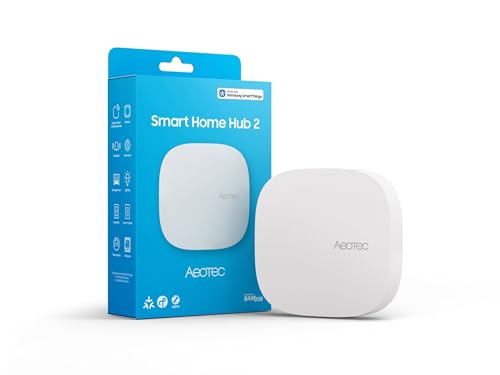
Pros
- Supports modern Matter and Zigbee device protocols
- Local automation execution works during internet outages
- Flexible setup via Wi-Fi or wired Ethernet
Cons
- Lacks Z-Wave support for legacy smart devices
- Users with existing Z-Wave setups should skip it
Protocol Translation vs Central Automation
A gateway translates one communication protocol into another. For example, a single-brand gateway translates proprietary radio signals into local network data so your router can communicate with smart plugs or lights. In contrast, a hub manages complex automation rules across diverse standards like Zigbee, Matter, and Wi-Fi. If you want motion sensors from one brand to trigger wall switches from another, a dedicated hub provides the necessary coordination.
Local Processing and Offline Reliability
Cloud-dependent gateways stop processing commands if your home broadband goes down. When an outage occurs, security sensors may fail to trigger alarms and scheduled lighting stops working. Many modern smart home hubs run automations locally on their internal processors. Units like the Aeotec Hub2 store routines directly on the device, allowing scheduled actions and sensor triggers to function even during an internet disruption.
Wireless Protocol Support and Limitations
Wireless radios establish which accessories can connect to your system. Most smart home accessories communicate via Zigbee, Matter, Thread, or Z-Wave. Dedicated gateways usually carry a single radio built solely for that manufacturer’s line. Multi-protocol hubs unite multiple wireless standards under one controller. However, you must verify radio support before buying. For example, the Aeotec Smart Home Hub2 supports Zigbee and Matter, but it omits Z-Wave radios entirely.
Network Connectivity: Ethernet vs Wi-Fi
How your controller links to your router affects placement and overall network reliability. Connecting via Wi-Fi lets you place the controller centrally in your home, which helps Zigbee or Thread mesh signals reach distant rooms. A wired Ethernet connection offers lower latency and avoids wireless traffic jams. For deeper insight into connection methods, review our guide on smart home hub vs WiFi performance.
Ecosystem Compatibility and Platform Freedom
Gateways typically restrict device management to the maker’s proprietary app. In contrast, multi-ecosystem hubs integrate smoothly with voice assistants and broader platforms like Amazon Alexa, Google Assistant, or Samsung SmartThings. Adopting universal standards like Matter ensures broader compatibility across your entire smart home without locking you into a single equipment brand.
How We Evaluated These Products
Our evaluation relied on published technical specifications, manufacturer documentation, verified protocol certifications, and owner feedback. We assessed wireless radio selections, local routine capabilities, network connection options, and ecosystem compatibility to determine how well these devices manage connected accessories.
Which Option Fits Your Needs?
If you are building an automation setup around Samsung SmartThings, the Aeotec Smart Home Hub2 – V4 is a strong candidate. It connects via Wi-Fi or wired Ethernet, bridges Zigbee and Matter accessories, and processes supported routines locally during broadband outages.
Who should skip it: Anyone who relies on legacy Z-Wave switches, locks, or sensors should avoid this model, as it does not include Z-Wave hardware. For households with existing Z-Wave setups, choosing an older multi-radio hub or looking into a smart home hub vs bridge comparison will help identify the right hardware.
If you only plan to install smart bulbs from a single vendor, an inexpensive manufacturer gateway is generally sufficient. If your goal is cross-brand automation with local processing, an open smart hub is the better long-term choice.
Frequently Asked Questions
What is the core difference between a hub and a gateway?
A gateway translates communication protocols so isolated devices can reach your local network or the internet. A hub goes further by connecting multiple radio protocols and running multi-device automation logic on a unified system.
Can a smart home hub operate without an active internet connection?
Hubs with local processing continue running pre-programmed automations and direct sensor-to-switch actions even during an internet outage. However, remote app access, voice assistant commands, and cloud integrations will pause until connectivity returns.
Does the Aeotec Smart Home Hub2 – V4 support Z-Wave accessories?
No. The Aeotec Smart Home Hub2 – V4 supports Zigbee and Matter protocols over Wi-Fi and Ethernet, but it does not include a Z-Wave radio.
Why choose Ethernet instead of Wi-Fi for controller setup?
A wired Ethernet connection eliminates wireless interference from neighboring networks, provides lower latency for automation triggers, and keeps controller traffic off your home Wi-Fi bands.
Can a gateway completely replace a smart home hub?
A gateway can only replace a hub if all of your smart accessories come from the same brand ecosystem and your automations do not require linking disparate communication standards.


Write Your Review
No reviews yet. Be the first to share your experience!