

A 98-inch TV can make a living room feel like a theater, but its size also makes picture differences hard to ignore. Backlight design, HDR format support, refresh rate, and smart platform all affect whether a model fits your room and viewing habits.
This guide compares the best 98 inch TV options among eight listed models, from direct-lit QLED sets to Mini LED televisions. Use the comparison to narrow choices for movies, sports, gaming, or everyday streaming, then check room access, mounting plans, and device connections before buying.

Pros
- 98-inch 4K Mini LED display
- 144Hz native refresh rate
- Fire TV and Apple AirPlay 2
- Onkyo 2.1 speaker system with subwoofer
Cons
- 88.75-inch width requires substantial room
- Skip it if space cannot accommodate a 98-inch TV

Pros
- 98-inch screen
- 144Hz motion feature
- AI picture and sound processing
- More than 750 free Samsung TV Plus channels
Cons
- Requires substantial space and careful placement
- Who should skip it: buyers without room for 98 inches
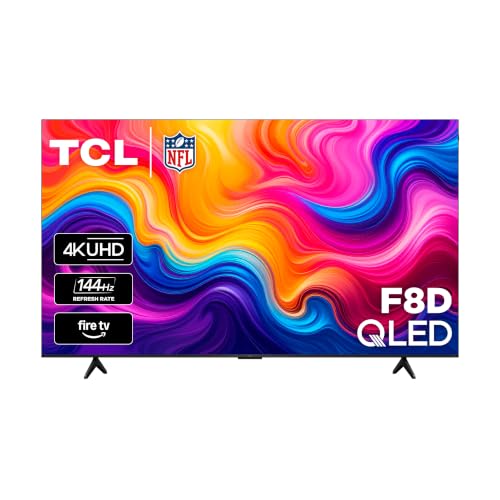
Pros
- 98-inch 4K QLED display
- Native 144Hz refresh rate
- Four HDMI 2.1 inputs
- Broad HDR format support
Cons
- Who should skip it: buyers without room for its 85.75-inch width
- 104.28-pound weight may complicate placement

Pros
- 98-inch 4K screen
- 144Hz native refresh rate
- Support for four HDR formats
- Google TV with Gemini
Cons
- Skip it if your room cannot accommodate a 98-inch screen
- At 117.51 pounds, placement may require careful planning

Pros
- Large 98-inch 4K display
- 144Hz refresh rate
- Google TV with Gemini
- Dolby Vision IQ and Dolby Atmos
Cons
- Skip if you lack space for a 98-inch screen
- 123.5-pound weight complicates placement and handling

Pros
- 98-inch 4K screen
- Up to 2,100+ local dimming zones
- 144Hz display with AMD FreeSync Premium Pro
- Google TV with Gemini
Cons
- Who should skip: buyers without room for a 98-inch TV

Pros
- Large 98-inch 4K screen
- 144Hz VRR support
- Filmmaker Mode
- webOS streaming platform
Cons
- Who should skip it: buyers without room for a 98-inch TV
- Listed weight is 116.4 pounds

Pros
- 98-inch 4K screen
- Mini LED backlighting
- 120 Hz refresh rate
- Google TV with AirPlay 2 and Google Cast
Cons
- 152.1 pounds, so plan placement carefully
- Who should skip it: shoppers without room for a 98-inch TV
The Best 98-Inch TVs by Use Case
Best for Dark-Room Movies: TCL 98 Inch QM8L Series SQD-Mini LED QLED 4K
The TCL 98 Inch QM8L Series SQD-Mini LED QLED 4K pairs Mini LED backlighting with a stated 7000:1 static contrast ratio and up to 4,000-plus dimming zones. Its listing also claims peak brightness up to 6,000 nits, and names Dolby Vision IQ, Dolby Atmos, and IMAX Enhanced support. Those features make it a strong fit for viewers who prioritize HDR movies and want local dimming control across a very large screen. The specifications are manufacturer claims, not independently verified performance measurements.
Reasons to buy:
- Mini LED with up to 4,000-plus discrete dimming zones, according to the listing.
- Dolby Vision IQ and IMAX Enhanced support for compatible content.
- Google TV with Gemini and Bang & Olufsen audio features.
Reasons to avoid:
- Its premium positioning may not make sense if you mostly watch standard cable or casual daytime TV.
- Confirm the listed peak brightness and dimming-zone figures for the exact model before purchase.
Skip it if you want a lower-cost large screen and do not need Mini LED dimming or the listed HDR features. See the TCL TV comparison for more models from the brand.
Best for Mixed Streaming and Gaming: TCL 98 Inch QM7L Series SQD-Mini LED QLED 4K
The TCL 98 Inch QM7L Series SQD-Mini LED QLED 4K offers a more midrange Mini LED feature set in this group. Its listing specifies up to 2,100-plus local dimming zones, an HVA 2.0 Pro anti-reflective panel, and an AIPQ Pro processor for picture adjustments and upscaling. Game Accelerator 288 VRR and AMD FreeSync Premium Pro may appeal to gaming households, while Google TV provides the smart platform. Check the particular game system and input requirements before assuming a specific resolution and refresh combination.
Reasons to buy:
- Mini LED dimming and an anti-reflective panel are specified for varied room conditions.
- Game Accelerator 288 VRR and AMD FreeSync Premium Pro are listed gaming features.
- Expandable home theater audio options include an optional wireless subwoofer and satellite speakers.
Reasons to avoid:
- The listing does not provide a peak brightness figure for this model.
- Optional audio components are not described as included.
Skip it if you want a listed peak brightness figure or prefer a simple TV-only purchase without considering optional audio components.
Best for Console and PC Gaming: TCL 98-Inch F8D Series 144Hz 4K UHD QLED
The TCL 98-Inch F8D Series 144Hz 4K UHD QLED lists a native 144Hz refresh rate, VRR, and ALLM, plus Game Accelerator 288. Its connectivity details are unusually specific: four HDMI 2.1 inputs, with two supporting 4K at 144Hz and one designated for eARC. This makes it a practical option when you need to connect gaming devices and a soundbar, although buyers should verify which ports suit their setup. Its direct LED backlight is not described as Mini LED or local dimming, so movie viewers focused on dark-scene contrast may prefer a model with specified dimming zones.
Reasons to buy:
- Native 144Hz refresh rate, VRR, and ALLM are listed.
- Four HDMI 2.1 inputs, with two specified for 4K at 144Hz.
- Dolby Vision, HDR10+, HDR10, and HLG support are specified.
Reasons to avoid:
- The listing specifies direct LED, not Mini LED local dimming.
- Only two HDMI inputs are specified for 4K at 144Hz, so plan device connections around that limit.
Skip it if deep local-dimming control is more important to you than the listed gaming connections and refresh features.
Best for Bright-Room Viewing and Built-In Sound: TCL 98 Inch M9LF Series Mini LED 4K HDR Smart Fire
The TCL 98 Inch M9LF Series Mini LED 4K HDR Smart Fire combines Mini LED local dimming with a QLED panel and a stated native 144Hz refresh rate. It stands out for its specified Onkyo 2.1 speaker system with subwoofer, useful if you want more built-in audio hardware than a basic TV speaker setup. The listing also names Dolby Vision, Dolby Atmos, HDR10, and Alexa+ support. It does not provide a brightness measurement or HDMI port details, so check those details if they matter to your room or equipment.
Reasons to buy:
- Mini LED local dimming and QLED color are both specified.
- Onkyo 2.1 speaker system with subwoofer is listed.
- Dolby Vision and Dolby Atmos support are specified.
Reasons to avoid:
- The listing does not state dimming-zone count or peak brightness.
- Port count and detailed HDMI capabilities are not included in published specifications.
Skip it if you need confirmed port details before choosing or want a model with a published dimming-zone count.
Best for Picture Upscaling: Sony BRAVIA 5 98 Inch TV, Mini LED
The Sony BRAVIA 5 98 Inch TV, Mini LED uses Sony’s XR Processor with AI technology to enhance color, contrast, and clarity, according to the product listing. The listing also specifies XR Backlight Master Drive, XR Triluminos Pro, Dolby Vision, and studio-calibrated picture modes for selected streaming services. These features may suit viewers who watch a mix of streaming content and want processing and picture presets emphasized. Its 120Hz specification is lower than the 144Hz figures on several alternatives, and the published information does not list HDMI port details.
Reasons to buy:
- XR Processor with AI technology is listed for real-time image enhancement.
- Mini LED backlighting and Dolby Vision support are specified.
- Google TV, Apple AirPlay 2, and Google Cast are listed.
Reasons to avoid:
- The specified refresh rate is 120Hz, not 144Hz.
- Published data does not detail HDMI ports or VRR support.
Skip it if you need confirmed high-refresh PC gaming support or want a lower-priced option in this comparison.
Also Considered
The best 55-inch TV options may suit smaller rooms, while these remaining 98-inch models fit more specific priorities: the Samsung 98-Inch Class U9000H Series Crystal UHD lists 144Hz motion, VRR, and AI upscaling, but published data does not specify its HDR formats or backlight dimming; the TCL 98 Inch QM6K Series QLED Mini LED 4K HDR offers Mini LED, local dimming, and Google TV, but its published specifications do not state a zone count; the LG 98 inch Class LG NANO 4K UHD AI NU85 4K lists VRR 144Hz and webOS, but HDR10 Pro is its only specified HDR format and local dimming details are not provided.
How to Choose the Best 98 Inch TV
Match Backlight and Dimming to Your Room
Mini LED uses many small backlights and can pair them with local dimming to control light across parts of the screen. That can be useful for dark movies, where bright subtitles or highlights sit against dark backgrounds. Models in this guide list different levels of detail: the QM8L states up to 4,000-plus zones, while the QM7L specifies up to 2,100-plus. Do not treat zone count alone as proof of picture quality, because the published data does not compare real-world performance.
For a bright room, look for a published brightness claim and consider reflective surfaces, windows, and seating angles. The QM7L listing calls out an anti-reflective panel, while the F8D lists a high-brightness direct LED backlight but no numeric brightness figure. Confirm that the exact product page matches the model number you plan to order.
Check HDR Formats Against Your Streaming Services
HDR support matters only when the TV, streaming service, and video all use compatible formats. Dolby Vision appears in specifications for the TCL models and Sony BRAVIA 5. Samsung’s published product details do not name HDR formats, so check the current listing if this is a deciding factor. The F8D names Dolby Vision, HDR10+, HDR10, and HLG, covering several commonly used formats according to its product data.
Do not assume that a label such as QLED or Mini LED guarantees a particular HDR experience. Those terms describe display or backlight approaches, while HDR format support is a separate specification. If you watch mostly standard cable or older video, prioritize the processing features and input quality you use rather than paying for formats you rarely encounter.
Match Refresh Rate and Ports to Your Devices
A higher native refresh rate can be useful for fast games and sports, but check supported connections as well as the panel figure. Several TCL products specify 144Hz, and some name VRR or Game Accelerator 288. The F8D provides the clearest port information in the published data: two HDMI inputs support 4K at 144Hz, and another supports eARC. Confirm the exact port assignment and compatible signal for each console, PC, and sound system.
VRR can help match screen refresh to changing game frame rates, while ALLM can select a low-latency mode automatically when supported devices communicate. A feature listed by the TV does not prove every connected device or input supports the same mode. Check the TV’s detailed manual and your source device’s output specifications before relying on a particular gaming setup.
Choose a Smart Platform and Audio Plan
Fire TV, Google TV, and webOS offer different interfaces and app ecosystems. TCL M9LF and F8D list Fire TV, while the QM series and Sony BRAVIA 5 list Google TV; LG NU85 lists webOS. Check for the apps and voice features you use, and remember that product listings do not establish how every app will work in your region or over your network.
Built-in speakers may be convenient, but a large screen does not guarantee room-filling sound. The M9LF lists an Onkyo 2.1 speaker system with subwoofer, and the QM8L lists Bang & Olufsen audio features. The F8D identifies an eARC HDMI input, which can connect compatible audio equipment. For other models, verify eARC or audio output details in the full specifications before choosing a soundbar or receiver.
Plan Delivery, Placement, and Mounting
A 98-inch television needs more than an available wall. Measure the intended furniture or wall space, and check doorways, stairs, elevators, and turns along the delivery route. The published product data does not provide dimensions or weight for these models, so consult the exact product specifications before arranging delivery or installation.
If you plan to mount the TV, verify the model’s mounting pattern, weight, and the mount’s stated capacity. Use an installation approach suited to the wall structure rather than relying on drywall alone. You can also browse the broader TV category or TV and home theater category for related buying guides.
How We Compared These TVs
We compared the published product specifications and design details, including backlight type, listed local dimming, refresh rate, HDR formats, smart platform, gaming features, and audio connections. We used manufacturer-described features as claims rather than measured results. The supplied customer feedback data does not provide substantive review details, so this guide does not treat ratings as evidence of recurring ownership experiences.
Frequently Asked Questions
How far should you sit from a 98-inch 4K TV?
There is no single distance that suits every room or viewer. A closer seat makes the screen feel more immersive, while a farther seat makes it less dominant. Consider your room layout and viewing comfort, and arrange seating so you can see the full screen without turning your head constantly.
Do all 98-inch TVs support 4K at 120Hz or 144Hz?
No. Refresh rate and input support vary by model. The published data lists 144Hz for several TCL models and the LG NU85, while the Sony BRAVIA 5 is specified at 120Hz. Check the exact HDMI input capabilities and source-device support before buying, especially for PC gaming.
Is Mini LED worth choosing over direct LED?
Mini LED may be worth considering if local dimming and dark-scene contrast are priorities, but the published descriptions do not establish comparative measured picture quality. The F8D is described as direct LED, while the M9LF and several other options specify Mini LED. Compare the stated features, HDR support, and price on the retailer listing against how you watch TV.
Do these TVs support both Dolby Vision and HDR10+?
Support varies. The F8D listing specifies Dolby Vision and HDR10+, and the QM6K listing also names both. The M9LF lists Dolby Vision and HDR10, but its published details do not name HDR10+. Check each model’s current specifications rather than assuming all TCL or Mini LED televisions support the same formats.
Can you use a soundbar with a 98-inch TV?
Yes, if the television and soundbar have compatible connections. The F8D lists an HDMI eARC input, while published details for other models may not specify audio ports. Confirm eARC or another suitable audio connection on both devices before purchase, and check whether any listed audio accessories are included or sold separately.
What should you verify before ordering a 98-inch TV?
Confirm the exact model number, screen dimensions, weight, port layout, and mounting details on the product listing or manual. Measure the delivery path and intended installation area. For gaming, check supported resolution and refresh rate per HDMI input; for streaming, verify the apps and HDR formats you use.


Write Your Review
No reviews yet. Be the first to share your experience!