

Small keys and complicated menus can make everyday calling frustrating, but not every senior needs the same kind of phone. This Best Big Button Phone guide compares a mobile phone with landline options, focusing on dialing, call alerts, sound controls, emergency shortcuts, and service compatibility.
Start by deciding whether the user needs a phone that travels or one that stays at home. Then check the phone line or wireless carrier, and match its controls to the user’s eyesight, hearing, memory, and dexterity.

Pros
- Eight one-touch photo speed-dial buttons
- Adjustable ringer and earpiece volume
- Hands-free calling and flashing call alert
Cons
- PSTN landline service required
- No caller ID, voicemail, or answering machine
- Who should skip it: internet-phone users or callers needing caller ID

Pros
- Two cordless handsets included
- Large display and big buttons
- Blocks up to 1,000 numbers
- Volume Boost up to 12 dB
Cons
- Supports up to three Favorites contacts
- Who should skip it: households needing more than two handsets

Pros
- Physical backlit buttons
- Includes charging dock
- SOS calling and messages
- Voice time announcement
Cons
- No internet browsing; skip it if you need web access
- Not compatible with AT&T or CDMA carriers
Pros
- Up to 25 minutes of answering-system recording
- Large, tilting backlit display
- Oversized, high-contrast buttons
- Speakerphone and temporary audio boost
Cons
- Corded design limits mobility during calls
- Who should skip it: callers wanting cordless mobility

Pros
- Large, easy-to-press buttons
- Speakerphone with volume control
- Ten two-touch memory options
- Incoming-call light indicator
Cons
- Who should skip it: people needing a cordless phone

Pros
- Large, clearly marked number keys
- Three one-touch keys, including SOS
- Adjustable ringer and handset volume
- No batteries required
Cons
- No internet, voicemail, or answering machine
- Skip if you need cordless calling

Pros
- Eight photo speed-dial buttons
- Spoken number announcements
- Flashing visual ringer
- No AC power needed for basic calls
Cons
- Who should skip it: people seeking a cordless phone
The Best Big Button Phones by Use Case
Best for a Mobile Connection: artfone C1+4G Cell Phone for Seniors
The artfone C1+4G Cell Phone for Seniors is a basic mobile phone for someone who needs calls and messages away from home, not smartphone apps or web browsing. Its listing specifies raised, backlit buttons, large screen text, a charging dock, speed dialing, and an SOS button that can call five emergency numbers and send messages. It supports several 2G, 3G, and 4G LTE networks, but carrier fit is a firm limitation: the listing recommends T-Mobile and compatible virtual operators, and says it is not for Verizon, Boost, PagePlus, or AT&T.
Reasons to buy:- Mobile calls and messaging suit users who need communication outside the house.
- Dedicated SOS, speed-dial keys, and voice time announcement offer direct shortcuts.
- Charging dock and USB-C charging set are listed as included accessories.
- Carrier compatibility is limited. Confirm the exact carrier and service before purchase.
- It does not support internet browsing, so it is not a smartphone substitute for apps.
Skip it if the user needs AT&T or Verizon service, or wants a touch-screen smartphone with web access.
Best for Photo-Based Calling: VTech SN1117 Corded Senior Phone for Elderly
The VTech SN1117 Corded Senior Phone for Elderly is a landline choice for someone who recognizes people more easily than phone numbers. Its eight photo speed-dial buttons let a caregiver attach pictures to contacts, while talking digits announce numbers as they are dialed. A visual ringer, adjustable earpiece and speakerphone volume, and full-duplex speakerphone add useful cues for people who have difficulty seeing or hearing an incoming call.
Reasons to buy:- Eight photo speed-dial keys make saved contacts easy to identify.
- Spoken digit announcements provide feedback while dialing.
- Basic calls use landline power, with no AC power needed according to the listing.
- It is a corded landline phone, not a mobile device for carrying outside.
- Check whether the home has a compatible landline service before ordering.
Skip it if the user needs a cordless handset or a phone that works without a landline.
Best for Multiple Rooms: Panasonic Cordless Phone
The Panasonic Cordless Phone fits a home where users want to answer from more than one room. It includes two cordless handsets, a 2.1-inch display, large buttons, and a Favorites key that can register up to three contacts and flash for incoming or missed calls. The listing also specifies volume boost up to +12 dB, a built-in flashlight, and call-blocking features, including a one-touch block button for up to 1,000 numbers.
Reasons to buy:- Two handsets can be placed in separate parts of the home.
- Favorites key gives quick access to up to three saved contacts.
- Call-blocking options and volume boost suit users who want more controls than a basic phone offers.
- It is a home cordless phone, not a cellular phone for travel.
- Its favorite-contact shortcut covers three contacts, fewer than photo-dial models in this guide.
Skip it if the user needs one-touch photo dialing for a larger set of contacts or does not have a landline.
Best for Answering Messages: AT&T CD4930 Black Corded Phone with
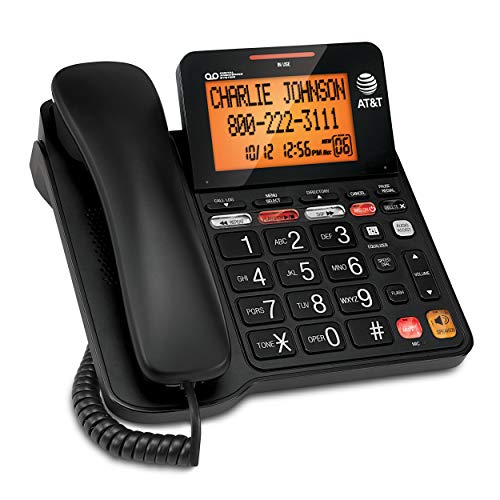
The AT&T CD4930 Black Corded Phone with suits households that want a corded phone with a built-in answering system rather than a simple calling-only model. Its listing specifies up to 25 minutes of message, announcement, and memo recording, plus playback controls on the handset or base. The large buttons, tilting backlit display, hands-free speakerphone, Audio Assist, extra-loud ringer, and flashing visual indicator support different ways of noticing and handling calls.
Reasons to buy:- Built-in digital answering system records up to 25 minutes of messages and memos.
- Tilting backlit display shows caller ID information, time, and date.
- Audio Assist, speakerphone, and visual call alert give users several calling aids.
- The listing does not specify cordless handsets, so choose it only if a corded setup fits.
- Confirm that the home phone service supports the features you want to use.
Skip it if the user wants a portable handset or needs photo-based speed dialing.
Best for One-Touch Home Calling: Uvital Big Button Phone for Seniors
The Uvital Big Button Phone for Seniors is a corded landline for users who benefit from calling saved contacts with a single button press. It has eight one-touch buttons that can display photos, one SOS button, hands-free calling, an incoming-call LED, and adjustable ringer and earpiece volume. The listing specifies a ringer of up to 120 dB and earpiece volume of up to 90 dB; these are stated product figures, not a guarantee of how loud the phone will seem in every room.
Reasons to buy:- Eight photo buttons support quick calls to frequently contacted people.
- Hands-free calling can help users who have difficulty holding a handset.
- It connects to an RJ11 telephone line and needs no batteries or external power, according to the listing.
- It is designed for PSTN landline service only.
- The listing says it lacks caller ID, a display, voicemail, and an answering machine.
Skip it if the user relies on voicemail or caller ID, or has internet-based phone service rather than a compatible PSTN line.
Also Considered
The Big Button Phone for Wall or Desk with Speaker could suit someone who wants a simple corded phone with speakerphone, LED call alerts, and ten two-touch memory slots, but its speed dialing takes two key presses. The Large Button Landline Phone for Seniors may fit users who prioritize very large number keys and a stated 110 dB ringer, though it has only two one-touch memory keys plus one SOS button.
How to Choose a Big Button Phone
Choose cellular or landline service first
A cellular phone travels with its user, while a corded or cordless home phone depends on a compatible telephone service at home. For the artfone, the carrier list matters: verify that the intended carrier uses supported T-Mobile service, and do not assume an unlocked label means it works with every network. For landline models, check whether the home has an RJ11 connection and the type of phone service each model supports. The Uvital listing specifically says PSTN service only.
If the user is considering a touch-screen smartphone instead, compare options in our senior smartphone guide. That category can offer different capabilities, but the phones here focus on large physical buttons and straightforward calling.
Match shortcuts to the user’s memory and vision
Large, high-contrast keys help users see and press numbers, but saved-contact shortcuts can reduce the need to read or remember a full number. Photo buttons on the VTech and Uvital identify contacts visually. The artfone offers number-based speed dialing, while Panasonic’s Favorites key supports up to three contacts. Check how many contacts need shortcuts, whether photos are useful, and whether the user can manage the phone’s setup.
Look at both sound and visual alerts
A loud ringer can help someone hear incoming calls, while a flashing light can help when a room is noisy or hearing is limited. For conversations, look for separate handset or speaker volume controls, volume boost, or hands-free calling. The listed decibel figures for Uvital and Sacumea are manufacturer specifications; they do not establish how audible a call will be in the user’s home. If hearing is a concern, check which controls adjust the ringer and which affect the conversation volume.
Users comparing wider phone options can also browse our smartphones category. A conventional smartphone may be a better fit when apps and internet access matter more than a physical keypad.
Decide whether answering messages matters
Some simple phones focus on placing and receiving calls, while others add an answering system. The AT&T CD4930 listing specifies message recording and playback; the Uvital listing explicitly says it does not support an answering machine or voicemail. Do not treat those functions as interchangeable: check whether calls need to be recorded on the device, handled by a separate service, or answered in real time.
Check power and setup expectations
Corded landline phones in this group are described as drawing power from the phone line for basic calls, while the mobile artfone uses a rechargeable battery and includes a charging dock. The Panasonic is cordless, so check its setup and charging needs in the full product listing. A phone that can operate during a power outage may still depend on the telephone service itself, so confirm how the household’s service works during an outage before relying on that feature.
For related options aimed at limited budgets, see our smartphones under $200 guide. Compare those models only if the user is comfortable with a smartphone interface and its service requirements.
How We Compared
We compared the published product descriptions and listed specifications, including phone type, button and shortcut design, calling and alert features, power needs, and stated compatibility. Customer feedback was not supplied for these products, so recommendations rely on the provided product information rather than claims about user experiences. Each pick is matched to a distinct calling need, and compatibility details that could affect a purchase are called out for buyers to verify.
Frequently Asked Questions
Is a big button mobile phone the same as a senior smartphone?
No. The artfone in this guide is a basic cellular phone for calls and messages and does not support internet browsing. Senior smartphones use a touch screen and may offer apps and web access, so compare the user’s comfort with menus and touch controls before choosing.
Will an unlocked senior phone work with any carrier?
No. “Unlocked” does not mean universally compatible. The artfone listing names supported T-Mobile-based services and excludes AT&T and several CDMA carriers. Confirm the exact carrier and network support with the seller or carrier before purchase.
Can a corded landline phone work during a power outage?
Some published listings say their corded phones need no external power for basic calling and can keep working during an outage. This depends on the phone service and household setup. Confirm outage behavior with the service provider, especially if the home uses internet-based phone service.
What is the difference between photo dialing and speed dialing?
Photo dialing puts a picture on a dedicated contact button, which can help users identify whom to call. Speed dialing stores a number behind a key or key combination. Check the number of saved contacts and whether each shortcut uses one press or several.
Do these phones provide emergency service?
Some models include an SOS button that can call preset numbers, and the artfone listing says its SOS function can also send distress messages. These are device features, not a guarantee that emergency services will connect. Check how the phone handles SOS calls, enter suitable contacts, and confirm cellular or landline service is active.


Write Your Review
No reviews yet. Be the first to share your experience!