

Video calls can feel awkward on tablets with small screens, unclear camera details, or interfaces that are difficult for family members to navigate. This guide to the best tablet for video calls compares five options by their listed camera specifications, display size, connectivity, and intended users, so you can match a device to your household and calling habits.
Pros
- Expansive 15.6-inch Full HD IPS screen
- Substantial 12GB RAM for multitasking
- Widevine L1 support for HD media playback
- Large 12000mAh internal battery capacity
Cons
- No cellular data or SIM card support
- Slow 15W charging for large battery
- Large footprint limits handheld portability

Pros
- Simplified interface with highlighted essential buttons
- Adjustable interface zoom feature for better visibility
- Google Play Store access for additional apps
- Dual cameras for video calls and photos
Cons
- Modest 32 GB internal storage capacity
- Heavier chassis at nearly 2.3 pounds
- Skip if you need a lightweight handheld device

Pros
- Runs modern Android 15 operating system
- Bundled protective case and stylus pen
- Dual-band Wi-Fi 6 wireless support
- Large 6000mAh internal battery capacity
Cons
- Modest 32GB base internal storage capacity
- Hardware RAM limited to 3GB physical memory
- Low-resolution 2MP front camera for calls

Pros
- Sharp 11-inch 1920x1200 display with Widevine L1
- Substantial 8000mAh battery capacity
- Storage expandable up to 2TB via microSD
- Quad stereo speakers provide balanced sound
- Modern WiFi 6 and Bluetooth 5.0 connectivity
Cons
- Unisoc T606 processor tailored for basic daily workloads
- Demanding gamers requiring top-tier graphics should skip it

Pros
- Built-in parental management software for screen boundaries
- Protective EVA case included in the box
- MicroSD storage expandable up to 1TB
- Both 3.5mm jack and Bluetooth 5.0 audio options
Cons
- Base internal storage is limited to 32GB
- Up to 6 hours video battery runtime
- Older kids needing high-demand gaming should skip it
The Best Tablets by Use Case
Best for Seniors: Pix Star Touch Easy to Use Tablet for Seniors
Pix Star’s senior-focused tablet puts interface simplicity ahead of headline specifications. Its 10.1-inch screen, zoom feature, and interface designed for beginners may help users enlarge controls and find common tasks such as email and video conferencing. The listing specifies front and rear cameras, 32GB of storage, a USB-C port, and the ability to install apps through Google Play Store. The broader tablet category can help if you want to compare this simpler approach with more general-purpose devices.
Reasons to buy:
- Zoom feature can enlarge or reduce the interface.
- Beginner-focused layout highlights important app buttons.
- Front and rear cameras support video conferencing and photos.
Reasons to avoid:
- The listing does not specify camera resolution, processor, or battery capacity.
- Confirm that preferred calling apps are available and work with this tablet before buying.
Skip it if you need detailed camera specifications or want a device chosen for a particular processor or battery capacity.
Best Budget: 10 Inch Android 15 Tablet
WUIUHOU’s Android tablet is the lowest-priced option in this group and lists a 2MP front camera for video calls. Its 10-inch HD IPS screen gives callers a larger viewing area than a phone, while dual-band Wi-Fi 6 is specified for network access. It includes a case and stylus, which can also suit basic note-taking or study tasks between calls. The tablets for students category offers more options if note-taking and school use matter as much as calls.
Reasons to buy:
- The listing specifies a 2MP front camera and an 8MP rear camera.
- Includes a protective case and stylus.
- Lists a 6000mAh battery and dual-band Wi-Fi 6.
Reasons to avoid:
- 32GB of built-in storage leaves less room for apps and downloaded files than the larger-capacity options here.
- The listing describes 8GB RAM as 3GB plus 5GB extended memory, so do not treat all 8GB as physical RAM.
Skip it if you want more built-in storage or a higher-specified front camera.
Best for Large, Shared Viewing: Azeyou 11 Inch Android Tablet FHD 1920×1200
Azeyou’s 11-inch tablet pairs a 1920×1200 display with quad speakers, making it a reasonable fit when several people may view a call or video together. The listing specifies Wi-Fi 6, Bluetooth 5.0, 128GB of storage, and microSD expansion up to 2TB. Its front-camera resolution is not provided, so the large screen and speaker setup are clearer reasons to consider it than any assumption about call-image quality. For pen-focused alternatives, see our guide to tablets for handwritten notes.
Reasons to buy:
- 11-inch 1920×1200 display gives more room for viewing people and shared content.
- Quad speakers are listed for built-in audio.
- Storage can be expanded with a microSD card, according to the listing.
Reasons to avoid:
- The front-camera resolution is not specified.
- Its 11-inch screen may be less convenient to carry than smaller tablets.
Skip it if front-camera resolution is a deciding factor or you prefer a compact tablet for frequent travel.
Best for Kids: SVITOO Kids Tablet 10.1″ Android 16
SVITOO’s tablet is designed for children ages 3 to 12, with parental controls for content filtering, screen-time limits, and switching between learning and play modes. Those controls may make it easier for a parent to manage a child’s use before or after a family video call. The listing specifies a 10.1-inch IPS screen, dual cameras, a 6000mAh battery, and an EVA case. It also claims up to six hours of local video playback, which is not a stated video-call runtime.
Reasons to buy:
- Parental mode includes website filtering and time limits.
- Includes an EVA case, screen protector, charging cable, and OTG cable.
- Lists dual-band Wi-Fi and a 3.5mm headset connection.
Reasons to avoid:
- The listing does not provide camera resolution.
- The six-hour figure applies to local video playback, not video calls.
Skip it if you need an adult-focused interface or want documented front-camera resolution.
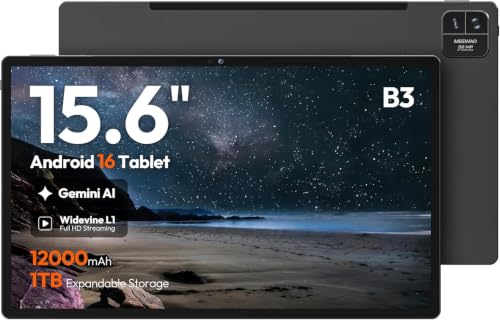
Best for a Large Home Display: 15.6-Inch Android 16 Tablet,Helio G99,12GB
MESWAO’s 15.6-inch tablet has the largest screen in this group, making it suited to a stationary spot at home where callers want a roomy view. The listing specifies a 1920×1080 FHD IPS display, Helio G99 processor, 128GB storage, and 12000mAh battery. It also names video calls as a use, but does not state the camera resolution, so buyers should verify camera details if image quality is a priority. This Wi-Fi-only tablet does not support SIM cards, cellular data, or phone calling.
Reasons to buy:
- 15.6-inch screen offers the most viewing area among these picks.
- 128GB storage provides room for apps and downloaded files.
- Widevine L1 is listed for HD playback on compatible streaming apps and content.
Reasons to avoid:
- The large screen may be cumbersome to carry or hold during calls.
- Camera resolution is not provided, and cellular data is unsupported.
Skip it if portability or cellular calling is more important than a spacious home display.
How to Choose the Best Tablet for Video Calls
Check the front camera details
The front camera faces you during most calls, so its listed resolution is more relevant than the rear camera’s. WUIUHOU provides a 2MP front-camera specification; the other listings name cameras but do not state front-camera resolution. A resolution figure alone cannot establish image quality, but it lets you compare what each listing actually discloses. Check the full specifications and product details for camera placement, resolution, and any compatible calling-app requirements.
Match screen size to where you call
A 10-inch-class tablet is easier to carry around than a 15.6-inch model, while a larger screen can make faces and shared content easier to see from a fixed spot. Pix Star and WUIUHOU list screens around 10 inches; Azeyou and SVITOO list 11-inch and 10.1-inch screens, respectively. MESWAO’s 15.6-inch display suits a desk or table better than a device you plan to hold for every call. Screen resolution also matters for reading text, but it does not by itself prove the camera produces a clear image.
Confirm calling apps and connectivity
A tablet needs a reliable internet connection and an app both callers can use. The published listings describe Wi-Fi connectivity, but they do not confirm compatibility with every video-call service. Pix Star specifies app installation through Google Play Store; check that your preferred service supports the device’s software and is available to install. If you expect to call away from Wi-Fi, note that MESWAO explicitly does not support cellular data or SIM cards. For other models, verify cellular support rather than assuming it is included.
Choose an interface and controls the caller can manage
For a person who is new to tablets, a simple layout can matter more than extra processing or storage. Pix Star lists a beginner-oriented interface and zoom controls, which may make buttons easier to see. For a child’s device, SVITOO lists parental controls for content filtering and time limits. Check whether the controls suit the intended user and whether the calling app can be reached easily. Do not assume that parental controls or an easy interface automatically configure a calling account.
Consider battery, audio, and storage as supporting features
Battery capacity can help you compare listed hardware, but it does not tell you how long a tablet will last during video calls. MESWAO lists a 12000mAh battery, Azeyou lists 8000mAh, and WUIUHOU and SVITOO each list 6000mAh. SVITOO’s stated playback figure is for local video, not calls. For sound, Azeyou specifies quad speakers and SVITOO lists dual speakers plus wired and Bluetooth audio options. Storage matters if you plan to keep photos, apps, or downloads; Azeyou and MESWAO also specify expansion or larger built-in capacity than the 32GB models.
How We Compared
This comparison uses the published product listings, including their stated screen sizes, display details, camera specifications, connectivity, storage, battery capacities, and intended-use features. We also considered the listed interface and parental controls because those can affect who can manage calls. Some listings omit camera resolution or other details, and the guide treats those omissions as reasons to verify specifications rather than evidence of a particular level of performance. No customer feedback was supplied for this comparison.
Frequently Asked Questions
Can any of these tablets make video calls without Wi-Fi?
The listings describe Wi-Fi tablets. MESWAO explicitly states that it does not support SIM cards or cellular data. For the other models, confirm cellular support in the full product details rather than assuming they can connect without Wi-Fi. A Wi-Fi tablet can still make calls over a suitable Wi-Fi connection when the chosen app supports the device.
Which option lists a front-camera resolution?
WUIUHOU specifies a 2MP front camera and an 8MP rear camera. The other published descriptions mention cameras without giving front-camera resolution. If camera details matter, check the listing for any additional specifications and confirm that your calling app supports the tablet.
Is a larger tablet automatically better for video calls?
No. A large screen can make faces and shared content easier to view, especially when the tablet stays on a table. It may be less convenient to carry or hold. Choose screen size based on where calls happen most often, and consider camera details separately because display size does not indicate camera quality.
Can a child use the SVITOO tablet for family calls?
The listing identifies video calls as an intended use and specifies dual cameras, Wi-Fi, and parental controls. It does not state camera resolution or provide a video-call runtime. A parent should confirm app compatibility, set up the account, and review the available content and time controls before handing the tablet to a child.
Does a listed battery capacity show how long calls will last?
No. Battery capacity is a specification, not a video-call runtime. Video-call duration can differ from local video playback, and SVITOO’s listing specifically describes up to six hours of local video playback. Check whether a manufacturer provides a separate call-use estimate before relying on a tablet for long calls away from an outlet.





Write Your Review
No reviews yet. Be the first to share your experience!