

A prebuilt gaming PC can save setup time, but the right choice depends on more than its graphics card. Your display resolution, preferred games, storage needs, and budget all affect whether an entry-level system or a higher-end build makes more sense. This guide to Best Black Friday Prebuilt Gaming PC Deals compares five desktops, from a Ryzen 5 and RTX 3050 combination to systems with newer Ryzen 7 processors and more powerful graphics options.

Pros
- 32GB DDR5-6000 memory
- 2TB Gen4 NVMe SSD
Cons
- Graphics card brand may vary
- Skip if you need Wi-Fi 6 or a fixed GPU brand

Pros
- Ryzen 7 9850X3D processor
- RX 9070 XT with 16GB GDDR6
- 32GB DDR5 memory
- 2TB Gen4 NVMe SSD
Cons
- Graphics card brand may vary
- Wi-Fi 5, not a newer wireless standard
- Who should skip it: buyers requiring a specific GPU brand or newer Wi-Fi
Pros
- RTX 5080 with 16GB GDDR7
- 32GB DDR5-6000 memory
- 2TB NVMe SSD
- One-year parts and labor warranty
Cons
- Wi-Fi 5, not a newer wireless standard
- Graphics card brand may vary
- Skip if you need Wi-Fi 6 or fixed GPU brand

Pros
- RTX 3060 Ti graphics
- 16GB RAM and 512GB SSD
- Windows 11 pre-installed
- WiFi 6 and Ethernet
Cons
- 512GB SSD may limit large game libraries
- Who should skip it: buyers needing more storage
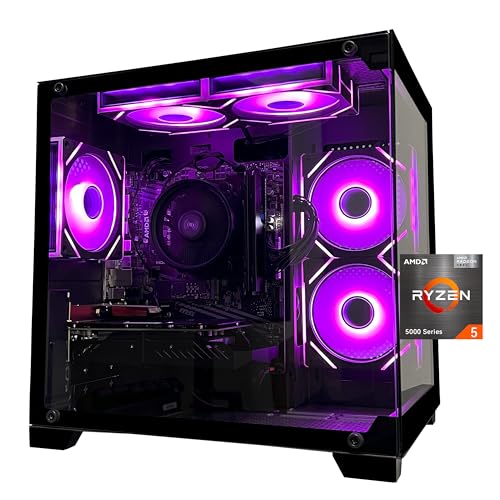
Pros
- 32GB DDR4 RAM
- 1TB NVMe SSD
- Prebuilt desktop system
Cons
- RTX 3050 has 6GB of dedicated memory
- Who should skip it: buyers seeking higher-end graphics
The Best Prebuilt Gaming PCs by Use Case
Best Budget: SKYESEV Prebuilt Gaming Desktop PC
The SKYESEV Prebuilt Gaming Desktop PC is the lowest-cost option among these picks and combines a Ryzen 5 5600 processor with an RTX 3050 6GB graphics card. Its 32GB of DDR4 memory and 1TB NVMe SSD give you a useful starting point for gaming, streaming, and editing without immediately needing to add memory or storage. It suits buyers who want a ready-to-use Windows desktop and are comfortable choosing a more modest graphics tier. Compare gaming monitors under $500 to make sure your display choice fits the system.
Reasons to buy:
- 32GB of DDR4 memory is included for multitasking.
- The 1TB NVMe SSD provides more storage than the 512GB drive in the other budget pick.
- Wi-Fi is included, alongside an air-cooled design with ARGB lighting.
Reasons to avoid:
- The RTX 3050 has 6GB of dedicated memory, making this a less capable graphics option than the RTX 3060 Ti and newer cards in this roundup.
- The system uses DDR4 rather than the DDR5 memory found in the higher-end Skytech desktops.
Skip it if you want a higher-tier graphics card for demanding games or plan to prioritize high-resolution gaming.
Product link: SKYESEV Prebuilt Gaming Desktop PC
Best for 1440p Entry-Level Gaming: Olialia Gaming PC Prebuilt, RTX 3060 Ti
The Olialia Gaming PC Prebuilt, RTX 3060 Ti pairs an AMD Ryzen 5 5500 with an RTX 3060 Ti, 16GB of RAM, and a 512GB SSD. Olialia positions it for 1080p gaming and smooth 60-plus-frame-per-second play at 1440p in supported titles with DLSS; treat those as manufacturer claims rather than a guarantee for every game or setting. It is a more graphics-focused budget choice than the SKYESEV, while offering less memory and storage.
Reasons to buy:
- The RTX 3060 Ti is a higher graphics tier than the RTX 3050 in this guide.
- Wi-Fi 6 is specified, and Windows 11 is preinstalled.
- The case includes six adjustable RGB fans and dual tempered-glass panels.
Reasons to avoid:
- 16GB of RAM and a 512GB SSD offer less room for multitasking and a large installed game library than the SKYESEV’s memory and storage.
- The Ryzen 5 5500 is a 6-core processor, rather than the Ryzen 7 chips in the Skytech options.
Skip it if your priority is a larger SSD and more included memory, or you want one of the higher-tier graphics cards in this comparison.
Product link: Olialia Gaming PC Prebuilt, RTX 3060 Ti
Best for NVIDIA-Focused 1440p Gaming: Skytech Gaming PC Desktop, Ryzen 7 9800X3D
The Skytech Gaming PC Desktop, Ryzen 7 9800X3D combines an AMD Ryzen 7 9800X3D with an NVIDIA GeForce RTX 5070 Ti 16GB graphics card. Its 32GB of DDR5-6000 memory and 2TB Gen4 NVMe SSD give you a stronger foundation for a sizable game library and demanding multitasking than the budget systems. Skytech describes this build for ultra settings at 1440p with 60-plus FPS, but actual frame rates depend on the game, settings, and display.
Reasons to buy:
- The RTX 5070 Ti has 16GB of GDDR7 graphics memory.
- It includes a 2TB Gen4 NVMe SSD and 32GB of DDR5 memory.
- A 360mm AIO cooler and 850W Gold ATX 3 power supply are specified.
Reasons to avoid:
- Wi-Fi 5 is specified, an older wireless generation than Wi-Fi 6 on the Olialia PC.
- The graphics card brand may vary, so check the exact card and outputs before purchase if you need a particular model or connection.
Skip it if you mostly play less demanding games at 1080p and would rather keep your build simple and less costly.
Product link: Skytech Gaming PC Desktop, Ryzen 7 9800X3D
Best for Radeon Graphics: Skytech Gaming PC Desktop, Ryzen 7 9850X3D
This Skytech Gaming PC Desktop, Ryzen 7 9850X3D pairs the Ryzen 7 9850X3D with an AMD Radeon RX 9070 XT 16GB graphics card. It has 32GB of DDR5-5600 memory, a 2TB Gen4 NVMe SSD, and a 360mm AIO cooler. The Radeon GPU makes this the AMD graphics choice in the roundup; Skytech describes it as suitable for ultra settings at 4K with 60-plus FPS, though results vary by title and settings.
Reasons to buy:
- The RX 9070 XT has 16GB of GDDR6 graphics memory.
- A 2TB Gen4 NVMe SSD and 32GB of DDR5 memory are included.
- The Azure case has tempered glass, and the system includes a 360mm AIO cooler.
Reasons to avoid:
- Its DDR5 memory is rated at 5600, while the RTX 5080 Skytech option uses DDR5-6000.
- Wi-Fi 5 is listed, so wired Ethernet may be preferable if your network setup supports it and wireless latency is a concern.
Skip it if you specifically want an NVIDIA graphics card or a system with the RTX 5080.
Product link: Skytech Gaming PC Desktop, Ryzen 7 9850X3D
Best for a High-End NVIDIA Build: Skytech Gaming PC Desktop, Ryzen 7 9850X3D
This Skytech Gaming PC Desktop, Ryzen 7 9850X3D is the RTX 5080 variant, with a Ryzen 7 9850X3D processor, 32GB of DDR5-6000 memory, and a 2TB NVMe SSD. It is the most graphics-focused configuration here and the clearest fit for shoppers building around an NVIDIA GPU and a 4K display. Skytech promotes it for 4K gaming at ultra settings and 60-plus FPS, but performance is game-dependent; do not treat that claim as a fixed result across every title.
Reasons to buy:
- The RTX 5080 has 16GB of GDDR7 graphics memory.
- DDR5-6000 memory, a 2TB NVMe SSD, and an 850W Gold ATX 3 power supply are specified.
- The King 95 case, 360mm AIO cooler, and included gaming keyboard and mouse make it a substantial ready-to-set-up package.
Reasons to avoid:
- This is a high-end system that may be unnecessary if you play at 1080p or mostly run less demanding games.
- Wi-Fi 5 is specified, and the graphics card brand may vary, so verify the exact component details you need.
Skip it if you want an affordable first gaming PC or prefer the Radeon-based Skytech alternative.
Product link: Skytech Gaming PC Desktop, Ryzen 7 9850X3D
How to Choose Among Best Black Friday Prebuilt Gaming PC Deals
Match the graphics card to your monitor
The graphics card has a major role in how well a gaming PC handles demanding visual effects and higher display resolutions. A 1080p player with a modest monitor may find the RTX 3050 or RTX 3060 Ti systems a more sensible fit than paying for an RTX 5080 configuration. If you plan to play at 1440p or 4K, compare the GPU tier and graphics memory, then look for the game-specific settings you actually expect to use. Our guides to 240Hz gaming monitors and ultrawide gaming monitors can help you plan the display side too.
Consider the processor and memory together
The processor affects more than game performance: it can also matter when you stream, edit, or keep several applications open. The Ryzen 5 5500 and Ryzen 5 5600 systems are the lower-tier processor choices here, while the Skytech desktops use Ryzen 7 X3D processors. Memory capacity also affects multitasking, but capacity alone does not make one PC faster in every game. Check both the amount and generation: the budget systems use DDR4, while the Skytech options use DDR5.
Choose storage for your game library
Modern game libraries can fill a drive quickly, so compare the included SSD capacity with the games and applications you expect to keep installed. The SKYESEV has a 1TB NVMe SSD, the Olialia has 512GB, and all three Skytech desktops have 2TB SSDs. An NVMe drive supports quick system access, but capacity is the practical difference to focus on when deciding how often you want to remove and reinstall games. Check the exact storage type and capacity before ordering.
Check wireless, ports, and display connections
Wireless standards differ across these systems: the Olialia specifies Wi-Fi 6, while the Skytech models specify Wi-Fi 5. If you use Ethernet, Wi-Fi may matter less, but confirm that the PC has the connections your desk and network need. Display outputs also deserve a careful check: graphics-card models can vary, and the Skytech notes that additional ports may vary. Connect your monitor to the graphics card’s outputs rather than assuming a motherboard video connection is the right one. For a full setup, see our guide to gaming desks for PC setups.
Weigh the cooling design and included extras
The three Skytech builds specify 360mm AIO liquid coolers, while the Olialia and SKYESEV use air-cooling designs. An AIO is a different cooling approach, not a guarantee of a particular temperature or noise level. Consider the space available in your setup and whether you prefer liquid or air cooling. Also check the practical extras: Skytech specifies a keyboard and mouse on two builds, while the Olialia highlights its glass panels and RGB fans. Do not assume that accessories or case features transfer between models.
How We Compared
We compared the processor, graphics card, memory, SSD capacity, wireless standard, cooling approach, and included features listed for each desktop. The recommendations reflect how those differences may suit common gaming setups, from entry-level 1080p use to a build centered on 4K play. Manufacturer performance claims are presented as claims, not as guaranteed frame rates; game, settings, and display choices affect actual results. Check the exact component variant and available connections before buying, especially where graphics card brands or ports may vary.
Frequently Asked Questions
Which PC in this guide makes sense for a first gaming setup?
The SKYESEV is the lowest-cost pick and includes 32GB of RAM and a 1TB SSD, making it a practical starting point if you do not need a higher-tier graphics card. The Olialia has an RTX 3060 Ti and Wi-Fi 6, but its 16GB of RAM and 512GB SSD leave less room for a large library. Think about your monitor and game choices before deciding which compromise fits you.
Is an RTX 5070 Ti or RTX 5080 better for my games?
The RTX 5080 Skytech is the higher-tier NVIDIA graphics option in this roundup, while the RTX 5070 Ti system may be a more measured choice if you do not need the highest graphics tier here. The right fit depends on resolution, game demands, settings, and budget. Compare performance claims cautiously and check independent game-specific results if a particular title or frame-rate target is important to you.
Should I choose the Radeon RX 9070 XT or an NVIDIA card?
The Skytech with the RX 9070 XT is the AMD graphics option, while the other Skytech systems in this group use NVIDIA GPUs. Choose based on the games and graphics features you care about, along with the monitor resolution you plan to use. Compare the exact card model and the features supported by your games rather than assuming the brand alone determines the better experience.
Can these desktops connect to a 1440p or 4K monitor?
The Skytech descriptions position their higher-tier systems for 1440p or 4K gaming, and the Olialia description discusses 1440p play. Monitor compatibility also depends on having the right output and cable, and the Skytech product details note that additional ports can vary. Verify the specific graphics-card outputs and your monitor’s connection requirements before ordering.
Is 16GB of RAM enough for a gaming PC?
It may be enough for some gaming setups, but your needs depend on the games and other applications you run at the same time. In this group, the Olialia includes 16GB, while the other four desktops include 32GB. If you stream, edit, multitask heavily, or want more room for future games, the 32GB options may suit you better. Confirm whether memory upgrades are supported before relying on an upgrade later.
What should I check before setting up a prebuilt gaming PC?
Check that you have a monitor cable that matches the graphics card and display, a suitable place for the tower, and access to your preferred network connection. Connect the display to the graphics card ports; the Olialia specifically notes that its display cable should connect to the lower GPU ports. After setup, confirm Windows is ready and install or update the games and software you plan to use.



Write Your Review
No reviews yet. Be the first to share your experience!