

Affordable dash cams can differ sharply in what they record: some focus on a discreet front view, while others add rear, cabin, or side cameras. This guide to the best dash cam under $100 compares camera coverage, listed video resolution, phone connectivity, included memory cards, and parking-mode requirements so you can match a model to your car and routine.
Check whether you need front-only recording or evidence from more directions, and whether you are prepared to add a hardwire kit or memory card. The published product listings describe features, but they do not establish how footage will look in every car or lighting condition.

Pros
- Four-channel coverage
- GPS route and speed recording
- 128GB card included
- App-based video access
Cons
- Parking mode requires separately sold hardwire kit
- Skip if you need parking monitoring without hardwiring

Pros
- Includes 32GB microSD card
- Parking-mode motion and impact detection
- Wi-Fi phone setup and downloads
- Thermal protection and supercapacitor
Cons
- GPS alerts require optional antenna
- Skip it if built-in GPS alerts matter

Pros
- Compact, discreet design
- 1080p video recording
- Voice control
- Windshield glare-reducing lens
Cons
- Parking alerts and remote viewing require paid Vault access and Wi-Fi
- Skip it if you need subscription-free remote features

Pros
- 4K front and 2K rear recording
- 64GB memory card included
- Built-in GPS
- G-sensor event locking
Cons
- Parking monitoring requires separately sold hardwiring kit
- Skip if you need parking monitoring without hardwiring

Pros
- Front and rear video recording
- Built-in GPS with journey playback
- 64GB card included
- 3.59-inch IPS screen
Cons
- Skip if you require specified safety certifications

Pros
- Four-channel camera coverage
- 64GB card included
- Built-in GPS and Wi-Fi
Cons
- Parking mode requires a separately purchased hardwire kit
- Skip if you need parking mode without separate hardwiring

Pros
- 4K front and 1440P rear recording
- 64GB card included
- Built-in GPS
- Supports microSD cards up to 1TB
Cons
- Skip it if you want parking mode without hardwiring
- Parking mode requires a hardwire installation kit

Pros
- Four-direction recording
- Includes 128GB card
- Loop recording with incident lock
Cons
- GPS logger sold separately
- Parking mode requires optional ACC hardwire kit
- Who should skip it: drivers seeking built-in GPS

Pros
- 4K front and 1080p rear recording
- Wide-angle front and rear coverage
- Supercapacitor instead of lithium battery
Cons
- No SD card included
- Skip it if you need included storage

Pros
- 4K front and 1080P rear recording
- GPS data embedded in video
- Supports memory cards up to 512GB
- 18-month warranty
Cons
- Memory card not included
- Hardwire kit required for parking mode
- Skip it if you need included memory or parking wiring
The Best Dash Cams by Use Case
Best for Multi-Direction Coverage: Icesky 4K Dash Cam Front and Rear Left Right
The Icesky 4K Dash Cam Front and Rear Left Right records 4K video from the front and 1080p video from rear, interior, left, and right cameras, making it a fit for drivers who want more than road-facing footage. Its 3-inch display supports multi-view, while built-in GPS records speed, route, location, and time. The package includes a 128GB card, so you can start recording without sourcing one separately.
Reasons to buy:
- Four camera views capture front, rear, cabin, and both sides.
- Built-in GPS and 5.8GHz Wi-Fi 6 support route playback and phone transfers.
- Included 128GB card and independently controlled side-camera infrared lights add practical flexibility.
Reasons to avoid:
- The listing says 24-hour parking mode needs a separately purchased hardwire kit.
- Four camera views may take more installation planning than a single front camera.
Who should skip it: Drivers who want a small, simple front-only camera should consider a less involved setup.
Best for a Front and Rear Pair: FAIMEE 4K Dash Cam Front and Rear, Night Vision
The FAIMEE 4K Dash Cam Front and Rear, Night Vision pairs a listed 4K front camera with a 2K rear camera. Its 170-degree lenses, WDR, and night-vision features suit drivers who want two-direction coverage without adding interior or side cameras. Built-in GPS records speed, route, and location, and the listing specifies a 64GB card in the package.
Reasons to buy:
- Front and rear recording covers traffic ahead and behind.
- Built-in GPS and dual-band 2.4GHz/5.8GHz Wi-Fi support trip data and app access.
- The listing specifies an 18-month warranty and 24/7 technical assistance.
Reasons to avoid:
- Parking monitoring needs a hardwire kit, which is not included.
- Confirm that 2K rear recording meets your needs; listed resolution alone does not establish real-world plate readability.
Who should skip it: Choose another option if you specifically need cabin or side-camera footage.
Best for a Discreet Install: Garmin Dash Cam™ Mini 3, Ultracompact 1080p HD
The Garmin Dash Cam™ Mini 3, Ultracompact 1080p HD is a key-sized front-facing camera for drivers who prefer a low-profile unit over a screen-equipped multi-camera system. It records 1080p video with a 140-degree field of view and has a polarizer lens intended to reduce windshield glare. Voice commands can save video or start and stop audio recording in supported languages.
Reasons to buy:
- Compact design is intended to stay inconspicuous on the windshield.
- Voice control offers hands-free clip saving and audio control.
- The Garmin Drive app and online Vault offer clip access, with some remote features tied to a paid subscription and active Wi-Fi.
Reasons to avoid:
- It records 1080p from one camera, not front-and-rear or 360-degree coverage.
- Remote live view and parking notifications have stated subscription, power, and Wi-Fi requirements.
Who should skip it: Drivers needing a rear camera, included memory card, or built-in display should look elsewhere.
Best for Low-Light Front and Rear Recording: 4K Dual Dash Cam Front and Rear, Free 64GB Card
The 4K Dual Dash Cam Front and Rear, Free 64GB Card lists 4K front and 1440p rear recording, plus a 170-degree front and 150-degree rear field of view. Its listing describes a starlight-grade sensor, an f/1.5 aperture, and WDR for low-light and high-contrast scenes. Built-in GPS, a 3-inch screen, and a 64GB card make it a feature-rich two-camera choice for drivers who want local controls as well as app access.
Reasons to buy:
- Front and rear channels record at different listed resolutions, with rear resolution higher than 1080p.
- GPS and 5.8GHz Wi-Fi support location data and app-based video access.
- The included 64GB card and screen provide storage and on-device viewing from the start.
Reasons to avoid:
- The listing says parking mode requires a hardwire installation kit sold separately.
- Check the app and phone compatibility details before relying on wireless clip transfers.
Who should skip it: Drivers who do not need rear recording or a display may prefer a simpler, smaller camera.
Also Considered
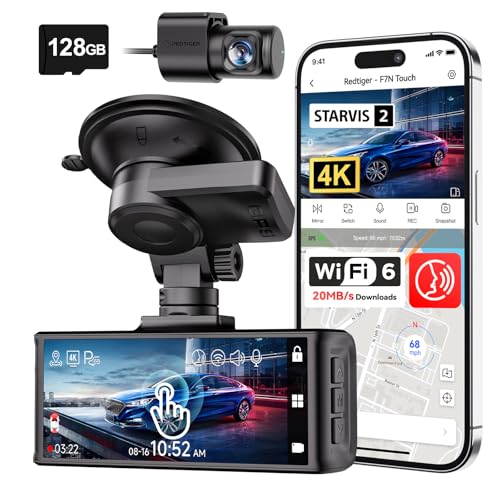
The Thinkware Dash Cam, F70 PRO – 1080p FHD, Wi-Fi may suit drivers prioritizing parking features and heat-related design details, but it records 1080p and lists GPS as an optional add-on. The Affver 4K+2.5K Dash Cam Front and Rear includes GPS, a 64GB card, and a larger screen, though its listing describes an update dated June 1, 2026, so verify the exact version and rear-camera specification before ordering. The BOTSLAB G300H Plus 4K STARVIS 2 Dual Dash Cam offers 4K front and 1080p rear recording with a supercapacitor, but it does not include an SD card. The REDTIGER F7N 4K Dash Cam Front and Rear lists 4K/1080p recording, GPS, and fast Wi-Fi, but also requires a separately sourced memory card.
How to Choose the Best Dash Cam Under $100
Camera coverage and resolution
Start with what you need to document. A front-only unit like the Garmin is compact, while a front-and-rear pair records traffic behind you. Four-channel models add cabin and side views, which may matter for rideshare driving or documenting activity around the vehicle. More cameras also mean more wiring, camera placement, and footage to manage.
Compare each channel separately, not just the largest resolution in the product name. The Icesky listing specifies 4K front and 1080p on three other views, while the FAIMEE listing specifies 4K front and 2K rear. Resolution does not by itself prove that plates will be readable in motion, at night, or through glare, so treat image-quality language as a manufacturer claim.
Power and parking recording
Parking mode can help capture events while a car is parked, but it may need a separate hardwire kit and a connection to the vehicle’s power system. The FAIMEE, Icesky, and 4K Dual Dash Cam listings all describe additional hardwire requirements for parking functions. Check whether the kit is included, whether it matches your vehicle and camera, and how the maker describes the parking modes before planning installation.
Some models also offer time-lapse recording or impact-triggered clips. These are different recording approaches, so confirm what the camera captures and how it saves files. Follow the vehicle and camera makers’ installation instructions, and seek qualified help if you are unsure about wiring. Local rules may govern recording audio or filming people, so check applicable laws.
Memory cards and protected clips
Loop recording overwrites older unlocked footage when the card fills, while a G-sensor can lock a clip after an impact. A locked file can still occupy storage, so check how the device manages protected files and how you can save important footage elsewhere. Included cards vary: the Icesky listing specifies 128GB, and the FAIMEE and 4K Dual Dash Cam listings specify 64GB. Garmin and REDTIGER listings do not specify an included card in the listing information.
Also check the stated maximum card capacity and any speed or card-type requirements on the product listing or manual. A larger supported card can hold more footage, but it does not replace reviewing important clips before they are overwritten. If the package includes a card, confirm its capacity and whether it meets the maker’s stated requirements.
GPS, Wi-Fi, and app access
GPS can add speed, time, or location information to a recording, depending on the model. Built-in GPS is listed for Icesky, FAIMEE, and the 4K Dual Dash Cam. By contrast, the Thinkware F70 PRO lists an optional GPS antenna. Verify whether you want location data embedded in video, route playback in an app, or both.
Wi-Fi can make it easier to view or transfer clips without removing the card, but the connection depends on the camera’s app and your phone. The Garmin’s remote access features have stated conditions, including a paid Vault subscription for certain functions. Check which app works with your phone, whether internet access is needed, and whether advertised remote features require a subscription.
How We Compared
This guide compares the published product listings, including their stated camera counts, channel resolutions, fields of view, GPS and Wi-Fi features, storage included in the package, and parking-mode requirements. We also considered listed setup details, warranty statements, and customer feedback information where provided. Product descriptions are manufacturer-published claims, and the published rating data does not include written review details that support broader conclusions about reliability or image quality.
Frequently Asked Questions
Can I use these dash cams without hardwiring my car?
The listings describe standard recording with included or supplied power connections on some models, but parking-mode features may need a separate hardwire kit. Check the specific camera’s instructions and included accessories. Do not assume that a parking feature will work from the included power cable alone.
Is a front-and-rear dash cam better than a front-only model?
A rear camera records behind the vehicle, which a front-only camera cannot capture. It also adds a camera and installation steps. Choose front-only if a discreet, simpler setup matters more than rear footage; choose dual-channel coverage if documenting traffic behind you is a priority.
Do dash cams include memory cards?
Some listings specify an included card and capacity, while others do not. The Icesky listing specifies 128GB, and FAIMEE and the 4K Dual Dash Cam list 64GB. Check the exact package details for the model and version you intend to buy, along with its supported card type and capacity.
Does 4K guarantee that a dash cam will capture license plates?
No. Resolution is one specification, not a guarantee of readable plates. Lighting, glare, movement, camera angle, and compression can affect recorded detail. Compare sample footage from the exact model when available, and avoid treating a resolution label as proof of performance in every condition.
What should I check before buying a dash cam for my car?
Confirm that the camera’s mounting and power setup suit your vehicle, that the app supports your phone, and that the memory card is included or available separately. If you want parking monitoring, verify the hardwire-kit requirement and installation instructions. Check local rules for video and audio recording before using those features.




Write Your Review
No reviews yet. Be the first to share your experience!