

A dash cam can record only the road ahead, or cover the rear, cabin, and sides too. More cameras may capture more context, but can add wiring and setup steps; higher resolution also does not replace useful low-light performance or a suitable viewing angle. This guide compares the best dash cam options by coverage, recording features, phone access, and parking-monitoring requirements.
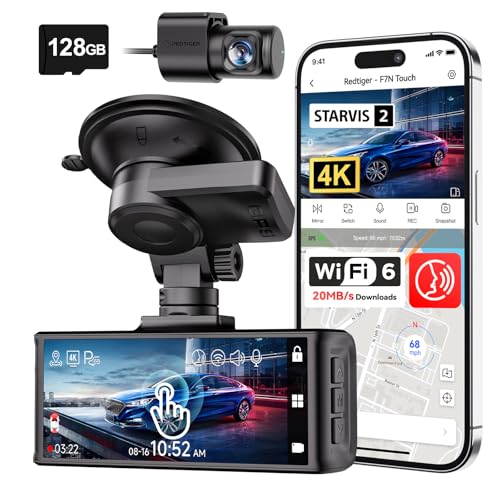
Pros
- 4K front and 1080p rear recording
- 128GB card included
- Built-in GPS
- Touchscreen, voice, and button controls
Cons
- Parking monitoring requires a separate hardwire kit
- Who should skip it: drivers unwilling to hardwire parking mode

Pros
- 4K recording from front and rear cameras
- Built-in GPS trip information
- 128GB card included
- Phone access over 5.8GHz WiFi
Cons
- Skip if you need parking monitoring without a separate hardwire kit

Pros
- Four-channel coverage
- GPS route and speed recording
- 128GB card included
- App-based video access
Cons
- Parking mode requires separately sold hardwire kit
- Skip if you need parking monitoring without hardwiring

Pros
- 4K front camera with 1080p rear camera
- Large 12-inch split-screen display
- GPS and 5.8GHz Wi-Fi connectivity
Cons
- Skip it if you need parking monitoring without hardwiring
- Improper installation may affect warranty coverage

Pros
- 1440P front and rear recording
- HDR support on both channels
- Voice controls and GPS data
- Three parking mode options
Cons
- MicroSD card sold separately
- HK4 hardwire cable sold separately for parking mode
- Skip it if you need 60fps front recording with HDR enabled

Pros
- Front and rear video recording
- Built-in GPS with journey playback
- 64GB card included
- 3.59-inch IPS screen
Cons
- Skip if you require specified safety certifications

Pros
- Four-direction recording
- Includes 128GB card
- Loop recording with incident lock
Cons
- GPS logger sold separately
- Parking mode requires optional ACC hardwire kit
- Who should skip it: drivers seeking built-in GPS

Pros
- Front, cabin, and rear recording
- Two recording-mode options
- Built-in GPS and Wi-Fi
- Includes 64GB card
Cons
- Parking monitoring requires extra hardwire kit
- Who should skip it: drivers unwilling to add hardwire kit for parking modes

Pros
- 4K front and rear recording
- 128GB card included
- Built-in GPS
- Three-year guarantee
Cons
- Parking monitoring requires separately sold hardwire kit
- Skip it if you need parking monitoring without hardwiring
The Best Dash Cams by Use Case
Best for 360-Degree Side Coverage: Icesky 4K Dash Cam Front and Rear Left Right
The Icesky 4K Dash Cam Front and Rear Left Right records 4K from the front and 1080P from rear, interior, left, and right cameras. That layout suits drivers who want side views as well as road and cabin footage, including rideshare drivers who need a broader record of an incident. Its listing specifies a 3-inch display, built-in GPS, 128GB card, and support for cards up to 512GB.
Reasons to buy:
- Four-camera layout records front, rear, cabin, and both sides.
- Built-in GPS records speed, route, location, and time.
- Eight IR lights support low-light recording for the left and right cameras.
Reasons to avoid:
- Parking mode needs a separately sold hardwire kit.
- Four camera views and wiring may take more setup than a front-only unit.
Who should skip it: Drivers who only need a simple front-and-rear setup should consider a two-camera model instead.
Best for 4K Front and Rear Video: JOCRELA 4K+4K Dash Cam Front and Rear
The JOCRELA 4K+4K Dash Cam Front and Rear records 4K video from both road-facing cameras, making it a fit for drivers who want equal stated resolution ahead and behind. A 3.39-inch IPS screen helps with setup and playback, while built-in GPS adds trip details to recordings. The included 128GB card means it can record without an immediate separate memory-card purchase.
Reasons to buy:
- Both front and rear cameras record at listed 4K resolution.
- Built-in GPS captures route, speed, and location information.
- 5.8GHz Wi-Fi app connection supports video preview, playback, downloads, and sharing.
Reasons to avoid:
- The listing says parking monitoring and time-lapse need a compatible hardwire kit, sold separately.
- 4K recording from two cameras may call for regular footage management; verify card compatibility and retention needs.
Who should skip it: Choose another layout if you need cabin or side-camera coverage.
Best for Low-Light Dual Recording: VIOFO A229 Plus Dash Cam Front and Rear
The VIOFO A229 Plus Dash Cam Front and Rear uses STARVIS 2 sensors in both cameras and records at 1440P front and rear. Its listing describes HDR recording on both channels and three parking options: event detection with buffered footage, time-lapse, and low-bitrate recording. This combination suits drivers who value night-scene detail and want choices for how the camera records while parked.
Reasons to buy:
- Dual STARVIS 2 sensors and front-and-rear HDR are specified.
- Front recording can reach 60 fps when HDR is off.
- Four-satellite-system GPS support records location, speed, and time.
Reasons to avoid:
- Front 1440P at 60 fps is unavailable with HDR enabled.
- The HK4 hardwire cable is required for parking modes and sold separately.
Who should skip it: Drivers wanting 4K front footage or an included memory card should compare other listings.
Best for Rideshare Cabin Recording: REDTIGER F17 4K 3CH Dash Cam
The REDTIGER F17 4K 3CH Dash Cam records the front in 4K and the cabin and rear in 1080P. The interior camera makes it relevant to rideshare drivers or families who want a record inside the vehicle, while the rear camera adds context behind it. Its listing also describes a mode that turns off the cabin camera to allow 4K front and 1080P rear recording.
Reasons to buy:
- Three channels cover front, cabin, and rear views.
- STARVIS 2 front sensor, WDR, and HDR are specified for low-light and mixed-light recording.
- Includes GPS and supports 5GHz and 2.4GHz Wi-Fi.
Reasons to avoid:
- The included card is 64GB, less than the 128GB cards supplied with several alternatives.
- Parking monitoring needs an extra hardwire kit.
Who should skip it: Drivers who do not need cabin footage may prefer a simpler two-channel camera.
Best for a Mirror-Style Display: WOLFBOX G840S 12″ 4K Mirror Dash Cam Backup Camera
The WOLFBOX G840S 12″ 4K Mirror Dash Cam Backup Camera combines a 12-inch mirror display with a 4K front camera and 1080P rear camera. Its split-screen view can show both camera feeds, while the rear camera also serves as a display-based view when reversing. GPS antenna and a 32GB card are listed as included, a smaller starting card than the 128GB bundles in this roundup.
Reasons to buy:
- Large mirror display and split-screen view show front and rear feeds together.
- Wi-Fi app access supports viewing, playback, and sharing.
- Time-lapse parking monitoring is specified when connected with a hardwire kit.
Reasons to avoid:
- Parking monitoring requires a separately purchased hardwire kit.
- Check mirror fit and rear-camera cable routing for your vehicle before buying.
Who should skip it: Drivers who prefer a compact windshield-mounted screen or do not want a mirror display should look elsewhere.
Also Considered
REDTIGER 4K STARVIS 2 Dashcam Front Rear may suit drivers seeking a touchscreen, voice control, GPS, and 4K front plus 1080P rear recording, but its rear resolution is lower than the dual-4K choice.
Affver 4K+2.5K Dash Cam Front and Rear offers a listed 4K front and 2.5K rear setup with a 3.59-inch screen, but its product details describe an upgrade dated June 1, 2026, so confirm the version and included card before purchase.
360 View 4 Channel Dash Cam Front and Rear Left records four 1080P views and may suit drivers who prioritize coverage on a lower stated resolution, but GPS requires a separately sold logger.
Terunsoul 4K+4K Dash Cam, Free 128GB Card may appeal to drivers seeking dual 4K, GPS, and a stated three-year guarantee, though the published rating is lower than several selected alternatives and does not establish comparative performance.
How to Choose the Best Dash Cam for Your Car
Match camera coverage to the incidents you want recorded
A front camera records the road ahead, while a rear camera can capture a rear impact or following traffic. Three-channel models add the cabin, and four-channel systems may add side views. Decide whether those extra angles matter for your driving: a rideshare driver may value interior footage, while a commuter may prefer fewer cameras and less wiring.
Check each camera’s stated resolution and field of view separately. The Icesky model, for example, specifies 4K front and 1080P for rear, interior, and side cameras; that is not equivalent to four 4K views. Also confirm that mounting positions can capture the areas you care about without obstructing your view.
Read resolution alongside frame rate and HDR details
Resolution describes image dimensions, not every aspect of evidence quality. Lens field of view, exposure handling, sensor details, and recording frame rate also affect what appears in a clip. A wider view records more of the scene but spreads the image across more area; consider whether you prioritize context or detail in a narrower view.
Look for exact recording modes, not only the largest resolution in a listing. The VIOFO A229 Plus lists 1440P front recording up to 60 fps, but says that rate is unavailable when HDR is enabled. The REDTIGER F17 also has a mode choice: disabling its cabin camera permits 4K front and 1080P rear recording.
Check storage, loop recording, and protected clips
Loop recording normally replaces older unlocked footage when the card fills. A G-sensor can lock a clip after an impact, but locked files still use card space, so review important footage and manage storage rather than assuming every event remains saved indefinitely. Compare the included card size and maximum supported capacity, then verify the required card type and speed in the full product documentation.
Included capacities vary across these picks: several list 128GB, the WOLFBOX lists 32GB, and the REDTIGER F17 lists 64GB. The Icesky and Terunsoul listings specify support up to 512GB. These are different starting points and stated limits, not a guarantee of a particular recording duration.
Understand parking-mode power and installation
Parking features do not necessarily work from the standard driving power connection after the engine is off. Several listings explicitly require a separately purchased hardwire kit for parking monitoring or time-lapse. Before choosing a model, confirm which kit is compatible with that exact camera and vehicle, how it connects, and whether its parking modes match your needs.
Hardwiring involves a vehicle electrical connection. Follow the manufacturer and vehicle instructions, and use a qualified installer if you are uncertain about the connection. Do not assume a parking mode will prevent battery discharge or record continuously without limits; check the camera and hardwire-kit documentation for operating conditions.
Consider screen, app, GPS, and privacy needs
A built-in screen helps with framing and local playback, while app access can make it easier to retrieve a clip without removing the card. Wi-Fi speed claims are manufacturer specifications, not a guarantee of transfer speed in every setting. Check that the app supports your phone’s operating system and that you are comfortable with the connection and account requirements described by the manufacturer.
GPS can add location, speed, route, and time information to footage, which may provide context when reviewing a trip. Confirm whether GPS is built in or requires an accessory: it is built into several listed models, but the 360 View 4 Channel Dash Cam Front and Rear Left requires a separately sold GPS logger. Cabin cameras also record people inside the vehicle, so consider consent and local privacy rules before using one.
How We Compared
This comparison uses the published product listings, including camera count, stated resolutions, viewing angles, GPS and Wi-Fi features, included cards, parking-mode requirements, and warranty information where provided. We used the published ratings as listing context, not as independently verified performance evidence. Recommendations reflect how those listed features fit different driving needs, and any missing compatibility or installation detail should be confirmed with the manufacturer before purchase.
Frequently Asked Questions
Do I need a front-and-rear dash cam?
A front camera can document events ahead, while a rear camera adds a view of traffic behind the vehicle. If rear impacts or tailgating are a concern, a dual-camera model may be useful. Check how the rear camera mounts and how its cable reaches the front unit in your vehicle.
Is 4K better than 1440P for every driver?
Not automatically. A higher stated resolution provides more image pixels, but camera angle, exposure, frame rate, and recording mode also matter. Compare the actual front and rear specifications, and note any limitations such as the VIOFO A229 Plus front-camera frame-rate change when HDR is enabled.
Can a dash cam record while the car is parked?
Some models list parking modes, including impact detection or time-lapse recording, but several require a separate hardwire kit. Confirm the exact kit requirement and supported mode for the camera you choose. Parking recording also depends on power and storage, so review the manufacturer instructions for your vehicle and setup.
Does built-in GPS track a car in real time?
In these listings, GPS records trip details such as location, route, speed, or time for later video review. That is not the same as a live vehicle-tracking service. Check the product description for the recorded data and the app or software needed to view it.
Which dash cam is suitable for rideshare driving?
A model with an interior camera can record the cabin as well as the road. The REDTIGER F17 lists front, cabin, and rear recording; the Icesky model adds left and right cameras. Consider passenger privacy and applicable local rules, and check whether the additional camera wiring suits your vehicle.
How much memory card capacity should I choose?
There is no single capacity that fits every setup: retention depends on camera count, resolution, recording settings, and how much footage is protected from overwriting. Compare the included card with the camera’s supported maximum, and confirm the recommended card specifications in the manual. Save important clips elsewhere promptly rather than relying on loop recording to preserve them.




Write Your Review
No reviews yet. Be the first to share your experience!