

360 cameras let you record first and choose framing later, but models differ in resolution, single-lens modes, stabilization features, and included accessories. This guide to the Best 360 Camera options compares three models so you can match their stated features to action sports, casual shooting, and motorcycle footage.

Pros
- 5.7K 360 video with reframing
- 4K single-lens video option
- FlowState Stabilization and Horizon Lock
Cons
- Skip it if you want fixed framing without app editing

Pros
- Captures spherical video for flexible reframing
- Includes Enduro battery and lens caps
- Supports pole-mounted footage with stitched-out pole
Cons
- Single-lens video tops out at 1440p
- Who should skip it: Buyers needing higher-resolution single-lens video
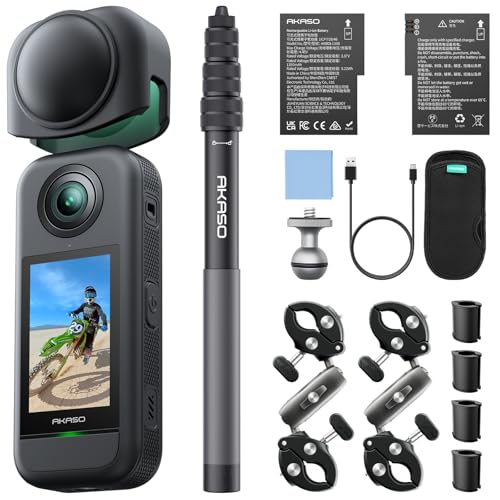
Pros
- 5.7K 360 video
- Invisible selfie stick included
- 360° Horizon Lock
- Two rechargeable batteries included
Cons
- Reframing is part of the 360-footage workflow
- Who should skip it: buyers wanting ready-framed footage
The Best 360 Cameras by Use Case
Best for Flexible Action Footage: Insta360 X3, 360 Action Camera with 5.7K 360
The Insta360 X3, 360 Action Camera with 5.7K 360 pairs 5.7K 360 Active HDR video with a separate 4K single-lens mode, making it a versatile choice if you want both immersive capture and conventional wide-angle footage. Its listing also specifies FlowState Stabilization and Horizon Lock, plus app-based reframing for selecting an angle after recording. This combination suits riders, winter-sports users, and vloggers who want options without carrying a separate action camera.
Reasons to buy:
- Offers 5.7K 360 Active HDR and 4K single-lens recording in one camera.
- Supports reframing in the Insta360 app after capture.
- FlowState Stabilization and Horizon Lock are specified for keeping footage smooth and level.
Reasons to avoid:
- The published information does not give battery runtime, so check expected recording time for your outings.
- Confirm that the app editing workflow and phone compatibility fit your sharing habits.
Skip it if you mainly want a camera with an included invisible selfie stick, or you prefer the GoPro Quik editing workflow.
Best for GoPro Quik Editing: GoPro MAX, Waterproof 360 + Traditional Action
The GoPro MAX, Waterproof 360 + Traditional Action records spherical video at 5.6K30 and includes a 3K60 mode for 2x slow motion, according to its listing. Its GoPro Quik app can reframe footage, track a subject, and add transition effects, which may suit users who want to choose a standard view from a 360 recording on their phone. It also has a single-lens HERO mode for conventional clips, photos, and time lapses.
Reasons to buy:
- Quik offers subject tracking and reframing tools for turning spherical footage into standard video.
- 3K60 capture supports the listed 2x slow-motion option.
- The box listing includes an Enduro Battery, protective lens caps, mounting buckle, thumb screw, and USB C-C cable.
Reasons to avoid:
- Single-lens video tops out at the listed 1080p or 1440p modes, which may not suit buyers seeking higher-resolution conventional footage.
- The listed 360 video mode is 5.6K30, rather than 5.7K capture.
Skip it if you need 4K single-lens recording or want 5.7K 360 capture from the stated specifications.
Best for Included Third-Person Mounting: AKASO 360 Action Camera Motorcycle Combo
The AKASO 360 Action Camera Motorcycle Combo is listed with 5.7K 360 video, dual 1/2-inch 48MP sensors, AI subject tracking, and 360° Horizon Lock. Its package name and listing call out an invisible selfie stick, making it a relevant option for riders or creators seeking third-person-style framing without another person operating the camera. The listing also specifies two rechargeable batteries, though it does not state recording time per battery.
Reasons to buy:
- The included invisible selfie stick supports the listed third-person capture approach.
- AI subject tracking is designed to keep a selected subject centered during reframing.
- Two rechargeable batteries are listed in the combo, useful if you want a spare available.
Reasons to avoid:
- The listing does not specify single-lens video resolution, limiting direct comparison with the X3 and MAX in that mode.
- Check what mounting hardware fits your vehicle and shooting position before relying on the included stick for a particular setup.
Skip it if you need clearly stated single-lens video modes or prefer an editing app ecosystem documented in the published details.
How to Choose a 360 Camera
Compare resolution and frame rate by shooting mode
Look at 360 and single-lens recording separately. A camera can offer a high-resolution spherical mode while using a different resolution for conventional video. The X3 lists 5.7K 360 capture and 4K30 single-lens video, while the MAX lists 5.6K30 spherical video and 1080p or 1440p single-lens video. AKASO specifies 5.7K 360 video but the published details do not state its single-lens modes.
Frame rate matters when you want slow motion or smoother-looking action, but the available mode can also affect resolution. The MAX listing describes 3K60 footage for 2x slow motion. Check the exact resolution and frame rate you intend to use in the current product listing, rather than assuming every mode shares the headline resolution.
Think about reframing and editing
Capturing everything around the camera can make framing easier during fast activity, but you still need a way to select the view you want afterward. The X3 lists AI-powered reframing through the Insta360 app; the MAX listing names GoPro Quik features such as subject tracking and transition effects; and AKASO specifies AI subject tracking. These feature descriptions do not establish that each app works equally well on every phone.
Before buying, confirm app support for your phone and review how footage transfers, edits, and exports. If you regularly publish standard widescreen clips, prioritize the editing tools you will use, not only the camera’s spherical resolution. For a separate filming accessory, our guide to smartphone tripods for content creators covers another way to stabilize phone-based shoots.
Match stabilization to the movement you record
Action footage can include bumps, turns, and changes in camera orientation. The X3 lists FlowState Stabilization and Horizon Lock, while the MAX describes stabilization and the AKASO lists 360° SuperSmooth and 360° Horizon Lock. These are manufacturer-stated features, not a promise that every clip will look identical across activities or settings.
Consider the motion you expect: a fixed scenic view places different demands on footage than a camera mounted during a ride. Check whether the mode you plan to use supports the stabilization feature you want. If level framing matters, note that both X3 and AKASO specifically list horizon-related stabilization, while GoPro’s published information describes stabilization without naming a horizon-lock feature.
Check mounting approach and included accessories
Accessories can affect how quickly you can begin shooting and whether a camera fits your existing setup. AKASO’s listing includes an invisible selfie stick, and GoPro lists 1/4-20 mounting threads, a curved adhesive mount, mounting buckle, and thumb screw. The X3 supplied box information lists a charge cable, protective pouch, lens cloth, and user guide.
Do not assume that one camera’s mount or accessory works with another. Verify the exact mount, grip, or vehicle attachment needed for your setup, especially if you already own accessories. A mounting option that creates a third-person view may be useful for solo footage, while a conventional mount may better fit a fixed point-of-view recording.
Verify battery needs and water-use details
Battery runtime is not provided for these products, so the number of batteries alone cannot tell you how long a shoot will last. AKASO lists two rechargeable batteries, and GoPro includes an Enduro Battery; the supplied X3 box details list a charge cable but do not state battery runtime. If you record long sessions, check current manufacturer information for runtime under the modes you plan to use and whether spare batteries are available.
The product titles and descriptions use waterproof language for the X3 and MAX, but the published information does not state a depth rating or conditions. Confirm the manufacturer’s exact water-use limits and any required covers before taking a camera into water. Do not treat a general waterproof claim as proof that every activity or exposure is supported.
How We Compared
We compared the published product specifications, listed recording modes, stabilization and editing features, stated mounting details, and included accessories. The descriptions provide some useful distinctions, but they do not include battery runtime, detailed phone compatibility, or complete recording-mode information for every model. Recommendations therefore focus on features explicitly stated in the published listings and identify details buyers should verify for their own setup.
Frequently Asked Questions
What does a 360 camera do differently from a regular action camera?
A 360 camera records a spherical view so you can choose a viewing angle later, rather than framing only one direction before recording. These models also offer different conventional single-lens options: the X3 lists 4K video, and the MAX lists 1080p or 1440p modes. Check which mode fits your final video before choosing.
Can I reframe footage after recording?
Yes, each published listing describes a way to choose or track a view after capture. The X3 names the Insta360 app, the MAX names the GoPro Quik app, and AKASO lists AI subject tracking. Confirm app compatibility with your phone and the export options you need, since the published product details do not list every supported device or workflow.
Which option suits motorcycle footage?
The AKASO Motorcycle Combo is the clearest match if an included invisible selfie stick and AI subject tracking fit your intended framing. The X3 listing also names motorcycle use and offers 360 capture, stabilization, and 4K single-lens video. Choose based on your desired mount and editing routine, and verify that the mounting parts suit your vehicle.
Does higher 360 video resolution guarantee better footage?
No. Resolution is one part of the comparison, and it does not by itself describe image quality in every scene or the final quality after reframing. Consider the recording mode, frame rate, stabilization, editing tools, and the output format you plan to share. The listed 5.7K and 5.6K figures describe different models and should be compared alongside those other needs.
What should I check before using one in water?
Check the manufacturer’s current water-use instructions, including any depth limit, required accessories, and restrictions for your planned activity. The published information calls the X3 and MAX waterproof but does not provide a rating or depth limit. Do not infer a specific level of water protection from the product title alone.
Which camera is the best fit for ordinary wide-angle clips?
The X3 has the highest explicitly listed single-lens video resolution among these published details, at 4K30. The MAX offers a dedicated HERO mode but lists 1080p and 1440p resolutions. AKASO’s provided specifications do not state single-lens video resolution, so verify that detail if conventional clips are your main use.






Write Your Review
No reviews yet. Be the first to share your experience!