

A case for the Galaxy S26 Ultra can add drop protection and useful extras, but features like magnetic mounts, built-in stands, camera covers, and screen protectors can add bulk or affect charging. This guide compares the best Galaxy S26 Ultra case options by design and use, so you can focus on the features that fit your daily routine.

Pros
- Rotating stand doubles as a grip
- Flush-folding stand supports wireless charging
- Raised bezels protect screen and camera
Cons
- Who should skip it: owners of other phone models

Pros
- Two front-frame options
- Ring and camera-cover stands
- Removable rotating belt clip
- Compatible with magnetic accessories
Cons
- Fingerprint reset recommended after installation
- Who should skip it: owners of other Galaxy models
Pros
- Supports RokLock mounting system
- Compatible with MagSafe accessories
- Includes non-magnetic plug
Cons
- Wireless charging compatibility may vary
- Skip if you want S Pen use without changing the plug
Pros
- Three built-in stand positions
- Magnetic accessory alignment
- Clear, slim design
- Raised screen and camera edges
Cons
- Skip if you own Galaxy S26 or S26 Plus

Pros
- Built-in rotating ring stand
- Sliding camera cover
- One tempered glass protector included
- Magnetic accessory support
Cons
- Wireless charging is not recommended
- Skip it if wireless charging is essential

Pros
- Dual-layer construction
- Rubber-grip edges
- Built-in charging magnets
Cons
- Who should skip it: buyers needing independently verified drop protection

Pros
- Slim hybrid PC and TPU construction
- Raised screen and camera edges
- MagSafe accessory compatibility
- Fast wireless charging support
Cons
- Who should skip it: owners of other phone models

Pros
- Built-in kickstand for hands-free viewing
- Raised screen and camera edges
- MagSafe accessory compatibility
Cons
- Who should skip it: buyers who do not want a built-in kickstand
The Best Galaxy S26 Ultra Cases by Use Case
Best for a Rotating Stand: TORRAS Q3 Spin for Samsung Galaxy S26 Ultra Case
The TORRAS Q3 Spin combines a built-in ring stand, grip, and magnetic accessory support. Its stand rotates 360 degrees and holds the phone upright at 90 degrees, which suits video calls, desk viewing, or adjusting the screen angle while watching in landscape. The listing specifies an 18N magnetic holding force and MIL-STD-810G 516.6 certification; those are manufacturer claims, not a guarantee of results in every setup. Our smartphone tripod guide covers a separate option for creators who want a dedicated stand.
Reasons to buy:
- Rotating stand provides portrait and landscape viewing positions.
- The ring can serve as a grip when carrying the phone.
- Built-in magnets support compatible magnetic accessories.
Reasons to avoid:
- The listing does not specify a built-in screen protector or camera cover.
- Check that your magnetic accessories work with the case and your charging setup.
Skip it if you want an enclosed camera cover or a front frame with a screen protector.
Best for Full-Body Coverage: TONGATE Magnetic Stand for Samsung Galaxy S26
The TONGATE Magnetic Stand for Samsung Galaxy S26 includes a camera cover, two interchangeable front frames, and a removable belt clip. One front frame has a built-in screen protector, while the other does not, giving you a choice about front coverage. Its magnetic ring also folds into a stand and supports compatible magnetic accessories, making this a feature-rich option for outdoor work or users who want several protective elements in one case. Our guide to phones under $700 offers more context if you are comparing phone purchases as well as accessories.
Reasons to buy:
- Includes one front frame with a screen protector and one without.
- The camera cover also functions as a stand.
- A removable, 360-degree belt clip supports belt or bag carry.
Reasons to avoid:
- The clip and multiple protective parts may not suit buyers who want a slim case.
- The listing advises resetting fingerprint recognition after installation for better sensitivity.
Skip it if you prefer a minimal case without a belt clip, camera cover, or front-frame options.
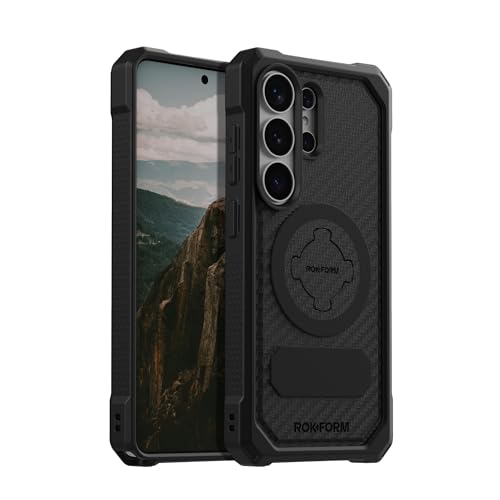
Best for Rokform Mounts: Samsung Galaxy S26 Ultra Rugged Phone Case
Rokform’s Samsung Galaxy S26 Ultra Rugged Phone Case stands out for its twist-lock connection to Rokform mounts for cars, motorcycles, and bikes. It also works with MagSafe-compatible and Rokform magnetic accessories, giving riders and drivers a mounting option beyond a standard magnetic attachment. Wireless charging with products other than Rokform may vary, and the listing says you may need to remove the magnetic plug or use the included non-magnetic plug. The plug also affects S Pen use, so check the case instructions before choosing this design.
Reasons to buy:
- RokLock twist-lock compatibility supports mounting on cars, motorcycles, and bikes.
- Works with MagSafe-compatible accessories and Rokform magnetic accessories.
- The listing specifies a two-year warranty.
Reasons to avoid:
- Wireless charging compatibility with products outside the Rokform system may vary.
- The magnetic plug may need removal for wireless charging or S Pen use.
Skip it if you need confirmed compatibility with a particular third-party wireless charger and do not want to check plug requirements.
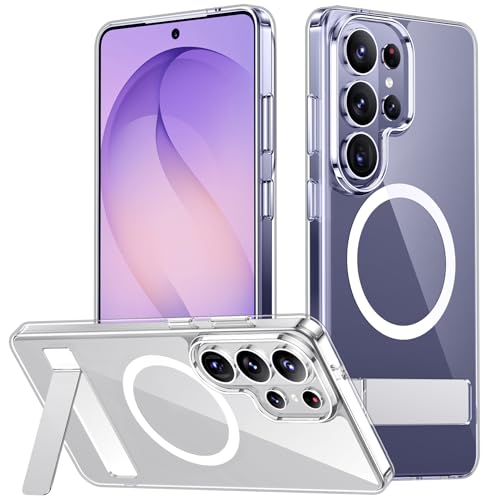
Best for a Clear Case with a Stand: SPIDERCASE for Samsung Galaxy S26
The SPIDERCASE for Samsung Galaxy S26 pairs a clear design with a fold-out stand and a built-in magnetic ring. Its stand supports portrait, landscape, and conference-call viewing, which can help when you want hands-free viewing without carrying a separate prop. The listing describes a PC back, flexible rubber bumpers, raised screen and camera edges, and drop protection up to 12 feet. That figure is a manufacturer claim, not a prediction of how a phone will fare in every fall.
Reasons to buy:
- Clear back keeps the phone’s appearance visible.
- Built-in stand supports several viewing orientations.
- Magnetic ring is designed for magnetic chargers and accessories.
Reasons to avoid:
- There is no built-in screen protector or camera cover listed.
- Confirm the phone model carefully: this case is for the S26 Ultra, not the S26 or S26 Plus.
Skip it if you want a fully enclosed case or prefer an opaque back.
Best Budget Pick with a Camera Cover: JAME for Samsung Galaxy S26 Ultra Case with Ring
The JAME for Samsung Galaxy S26 Ultra Case with Ring adds a rotating ring stand, sliding camera cover, and one tempered-glass screen protector. Its stand can fold flat when unused, while the cover helps shield camera lenses from dust and scratches. The listing says its passive metal plates support magnetic wallets and car mounts, but wireless charging is not recommended. That makes it a lower-cost choice for buyers who value grip, viewing support, and lens coverage more than charging through the case.
Reasons to buy:
- Includes one tempered-glass screen protector.
- Sliding cover protects the camera area when closed.
- Ring rotates 360 degrees and folds flat.
Reasons to avoid:
- The listing does not recommend wireless charging.
- Its passive metal plates support magnetic accessories, but the description does not specify a magnetic charging system.
Skip it if wireless charging through the case is important to your routine.
Best for Everyday Grip: OtterBox Samsung Galaxy S26 Ultra Commuter Series
The OtterBox Samsung Galaxy S26 Ultra Commuter Series is a dual-layer case with a rigid shell, rubber interior, and rubber-grip edges. It is designed for a snug profile and combines everyday handling features with magnetic fast-charge support. The listing describes its protection as three times military-standard durability, but buyers should treat that as an OtterBox claim rather than a guarantee against damage. This pick suits someone who wants familiar side grip and a protective, form-fitting design without a built-in stand.
Reasons to buy:
- Rubber-grip edges are designed to improve hold.
- Dual-layer construction pairs a rigid shell with a rubber interior.
- Built-in magnets support the listed magnetic fast-charge feature.
Reasons to avoid:
- No kickstand, camera cover, or screen protector is specified.
- Buyers seeking a clear case or a belt clip should consider another design.
Skip it if you want a built-in viewing stand or a case that includes front-screen protection.
Also Considered
The Spigen for Galaxy S26 Ultra Case with Ultra Hybrid MagFit may suit buyers who want a clear, slim case with magnetic accessory support, but it does not list a stand or camera cover. The Spigen for Galaxy S26 Ultra Case with Tough Armor MagFit adds a kickstand and magnetic accessory support, but its listing provides fewer extra coverage features than the selected full-body and camera-cover options.
How to Choose the Best Galaxy S26 Ultra Case
Match the case to your phone model
Case cutouts and dimensions are made for a specific phone, so check the product listing for the exact Galaxy S26 Ultra model before ordering. Do not assume a case for the Galaxy S26 or S26 Plus will fit. The SPIDERCASE listing explicitly warns that its case is only for the S26 Ultra; other listings also specify S26 Ultra compatibility. If a listing uses a model year or screen size, confirm those details against your phone’s model information.
Decide which magnetic features you need
Magnetic accessory support does not mean every case handles charging the same way. The TORRAS, TONGATE, SPIDERCASE, OtterBox, and Spigen listings describe magnetic accessory or charging compatibility, while JAME specifically says wireless charging is not recommended. Rokform says compatibility with wireless charging products outside its own line may vary and notes that its magnetic plug may need removal. Check the exact case and accessory combination if you rely on a wireless charger, wallet, or car mount.
Choose useful protection, not just a drop claim
Look for the protection elements that match your habits: raised edges, reinforced corners, a camera cover, or a screen protector. The TONGATE includes alternate front frames, and JAME includes one tempered-glass protector; most other cases in this guide do not list a screen protector. Several products make drop-protection claims, but their listed claims use different descriptions and are not directly comparable. Consider whether you also want coverage against scratches and lens contact during everyday use.
Consider stand, grip, and carry features
A ring stand can help with one-handed grip as well as hands-free viewing, while a rotating stand gives you more ways to position the screen. TORRAS focuses on a rotating stand; TONGATE adds a camera-cover stand and belt clip; and JAME pairs a ring with a sliding camera cover. Each extra part can affect how the case feels in a pocket or how you carry it. If you rarely watch videos hands-free, a simpler case may be easier to handle.
Check S Pen and charging details
Accessory features can affect other phone functions. Rokform’s listing connects its magnetic plug to S Pen use and wireless charging, so check whether you will need to remove it. TONGATE says to reset fingerprint recognition after installing its screen-protector frame to maintain sensitivity. For any case with added front coverage or a magnetic part, review the maker’s installation notes and confirm that essential features work with your chosen setup.
How We Compared
This comparison uses the published product listings, including their stated materials, design features, compatibility notes, protection claims, and included accessories. We focused on differences that could change a buying decision, such as magnetic charging support, stand design, camera and screen coverage, mount compatibility, and carry options. The published ratings are listed as context, but no customer feedback details were provided to establish a pattern of reported experiences.
Frequently Asked Questions
Will these cases fit the Galaxy S26 or S26 Plus?
These products are listed for the Galaxy S26 Ultra, not automatically for the Galaxy S26 or S26 Plus. SPIDERCASE explicitly says its case does not fit those other models. Confirm the exact phone name in the listing before buying.
Can I use magnetic accessories and wireless charging with any case here?
No. Compatibility differs by case. JAME does not recommend wireless charging, and Rokform says third-party wireless charging compatibility may vary. Other listings describe magnetic accessory or charging support, but you should still confirm your specific charger or mount is compatible.
Which case includes a screen protector?
TONGATE includes two front frames, one with a built-in screen protector and one without. JAME includes one tempered-glass screen protector. The other product details in this guide do not specify an included screen protector.
Which case is better for hands-free viewing?
TORRAS has a rotating stand that supports upright and landscape viewing positions. TONGATE’s magnetic ring and camera cover also serve as stands, while SPIDERCASE and JAME include built-in stands or rings. Choose based on whether you want adjustable rotation, a camera-cover stand, or a simpler fold-out support.
Does a military drop claim guarantee that my phone will not break?
No. Drop-protection descriptions and certification claims come from product listings and cannot predict the result of every impact. A phone can still be damaged depending on the landing surface, impact angle, and other circumstances. Use the listed features to compare case designs, not as a promise that damage cannot occur.
Can a case with a magnetic plug affect S Pen use?
Rokform’s listing says to use the included non-magnetic plug or remove the plug altogether for S Pen use. Check the product instructions for the precise setup before relying on both the case’s mounting features and the S Pen.


Write Your Review
No reviews yet. Be the first to share your experience!