

A keyboard can make the iPad Mini more useful for email, notes, and document editing, but it also adds bulk and changes how you hold the tablet. This guide to the Best iPad Mini Case with Keyboard compares model compatibility, detachable designs, trackpads, viewing positions, and listed battery details so you can choose a case that fits your routine.
All eight options here list support for the iPad Mini 6 and Mini 7, but confirm your tablet’s model number before ordering. Features vary: some cases include trackpads or rotating hinges, while others favor a detachable keyboard or a simpler protective cover.

Pros
- Detachable keyboard
- Three adjustable viewing angles
- Seven backlight colors
- Built-in pen slot
Cons
- Fits only specified iPad mini 6 and 7 models
- Pen and tablet not included
- 50-hour runtime claim excludes backlighting

Pros
- 360° rotating hinge
- Multi-touch trackpad
- Seven backlight colors
- USB-C rechargeable
Cons
- USB-C charging cable not included
- Skip if your iPad is not Mini 6 or 7

Pros
- Multi-touch trackpad with gesture support
- Eleven backlight colors and three brightness levels
- Shortcut row for brightness, volume, and media
Cons
- Who should skip it: owners of other iPad models

Pros
- Detachable backlit keyboard
- Seven backlight colors
- Built-in Pencil holder
- Rechargeable keyboard battery
Cons
- Limited to specified iPad mini 6 and 7 models
- Skip it if you use another iPad model

Pros
- Detachable, seven-color backlit keyboard
- Built-in holder for compatible Apple Pencil models
- Claimed 40 to 80 hours per charge
Cons
- Limited to specified iPad mini 6 and mini 7 models
- Who should skip it: owners of other iPad models

Pros
- Keyboard and trackpad in one case
- Seven rotating viewing modes
- Eleven backlight colors
- Pencil holder included
Cons
- Adds 1.3 lb to iPad mini
- Who should skip it: users wanting a lighter, keyboard-free case
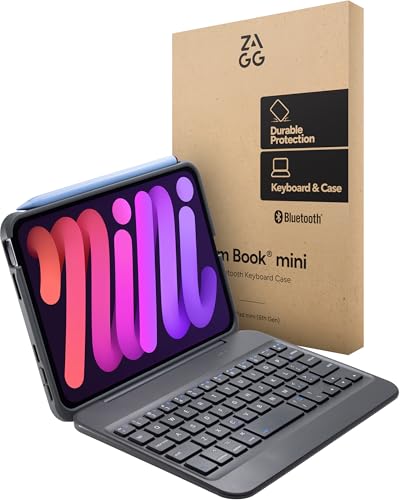
Pros
- Detachable Bluetooth keyboard
- Multiple viewing angles
- Compact, travel-friendly design
- Protective case included
Cons
- No trackpad included
- Who should skip it: shoppers needing an integrated trackpad

Pros
- Trackpad with gesture support
- Adjustable viewing angle
- Eleven backlight colors
Cons
- Who should skip it: owners of other iPad models
The Best iPad Mini Keyboard Cases by Use Case
Best Value: Cousper for iPad mini 7 Keyboard Case A17 Pro/Mini
The Cousper for iPad mini 7 Keyboard Case A17 Pro/Mini pairs a protective cover with a magnetically detachable keyboard, seven backlight colors, and a built-in Pencil holder. The listing specifies compatibility with iPad Mini 7 models A2993, A2995, and A2996, and iPad Mini 6 models A2567, A2568, and A2569. It also claims 40 to 80 hours of continuous keyboard use per charge, though actual runtime will depend on use and backlight settings. This is a practical fit if you want a compact typing setup that can separate into tablet and keyboard modes.
Name your iPad model before purchasing, since the listing says this case does not fit other models. The Cousper listing also says its holder supports Pencil 2nd generation, Pencil USB-C, and Pencil Pro, including charging for Pencil Pro and Pencil 2nd generation.
Reasons to buy:
- The keyboard detaches magnetically, so you can remove it when touch use suits you better.
- Seven backlight colors support typing in dim rooms.
- The listing claims 40 to 80 hours of use per charge and includes a Pencil holder.
Reasons to avoid:
- The listing does not describe a trackpad, so this is not the clear pick for cursor-led work.
- Compatibility is limited to the listed Mini 6 and Mini 7 model numbers.
Skip it if you want an integrated trackpad or need a case for another iPad model.
Best for Trackpad Navigation: ZYNTHRALIX Ultra Magic for iPad mini 7 (A17 Pro)
The ZYNTHRALIX Ultra Magic for iPad mini 7 (A17 Pro) adds a multi-touch trackpad, 11 backlight colors, and three brightness levels. Its listing describes a magnetic backplate and an adjustable hinge that opens to 130 degrees, with a design intended to keep the setup stable while typing. A separate shortcut row provides quick access to functions such as brightness, volume, and media controls. These details make it a sensible choice if you expect to move between typing and cursor navigation on the Mini.
This product name covers both white and black variants in the listed options. The black listing costs less than the white listing, but the shared feature descriptions do not establish a functional difference between colors. Check that the selected listing matches your preferred finish and your iPad’s model number.
Reasons to buy:
- The touchpad supports cursor control and gesture navigation.
- Eleven backlight colors and three brightness levels offer lighting choices.
- The magnetic attachment and adjustable hinge support flexible viewing angles.
Reasons to avoid:
- The compact layout has 60 keys, which may feel cramped if you prefer a full-size keyboard.
- The published details do not state keyboard battery life.
Skip it if you prefer a larger key layout or do not need a trackpad.
Best for Rotating Positions: typecase Keyboard Case for iPad mini 7/6 8.3-inch
The typecase Keyboard Case for iPad mini 7/6 8.3-inch is designed around a 360-degree rotating hinge and seven usage modes, including typing, reading, watching, presenting, and tablet use. It also includes a multi-touch trackpad, 11 backlight colors, three brightness levels, and a Pencil holder. The listing says the swivel hinge is rated for 20,000 cycles, and it includes a 12-month warranty and lifetime technical support. That combination suits people who switch between work and media viewing in different positions.
The rotating mechanism provides more orientation options than the fixed-angle details listed for several alternatives, but the available information does not give the case’s weight or dimensions. If you carry the Mini in a small bag, check the listing for those details before deciding. The case is listed for iPad Mini 7 and Mini 6 models only.
Reasons to buy:
- The 360-degree hinge supports seven listed modes for varied tasks.
- A multi-touch trackpad and backlit keys support cursor work in dim settings.
- The listing specifies a 12-month warranty and lifetime technical support.
Reasons to avoid:
- Weight and overall dimensions are not provided in the published details.
- The rotating hinge may be more than you need if you use one viewing position.
Skip it if you want the simplest, least feature-heavy case or need confirmed travel dimensions before purchase.
Best for a Detachable Keyboard: ZAGG Slim Book mini iPad Mini (A17 Pro)/ (Gen 6)
The ZAGG Slim Book mini iPad Mini (A17 Pro)/ (Gen 6) combines a protective case with a Bluetooth keyboard that can detach from the case. Its magnetic hinge offers multiple viewing angles, and the keyboard can sit separately when you want to type at a distance. The listing emphasizes a slim, compact form and responsive keys, making this option worth considering if separation between tablet and keyboard matters more than trackpad control.
Unlike the ZYNTHRALIX, typecase, and GreenLaw options, the published feature list explicitly says this model does not include a trackpad. That is a meaningful limitation for people who rely on a cursor, but it also keeps the feature set focused on typing and flexible placement. Confirm your Mini generation and model before buying.
Reasons to buy:
- The Bluetooth keyboard detaches for separate placement or case-only use.
- The magnetic hinge supports multiple viewing angles.
- The listing describes a slim, travel-friendly design and protective case.
Reasons to avoid:
Reasons to avoid:
- The listing explicitly says a trackpad is not included.
- Battery runtime and backlighting are not specified in the published features.
Skip it if you need a built-in trackpad for editing, browsing, or cursor navigation.
Best for a Keyboard and Mouse Bundle: EAMPANG Case with Keyboard Mouse for iPad Mini
The EAMPANG Case with Keyboard Mouse for iPad Mini stands out by listing a mouse along with a detachable Bluetooth keyboard and protective case. It has seven-color rainbow backlighting, three viewing angles at 100, 110, and 120 degrees, and a built-in pen slot. The listing claims up to 50 hours of keyboard use without backlighting and says the keyboard can enter sleep mode when idle. This bundle may suit someone who prefers a separate mouse over a touchpad.
The product description identifies a USB-C charging connection for the keyboard, but does not specify the mouse’s connection or battery details. Verify what the selected listing includes and how the mouse connects before purchase. Its compatibility is limited to the listed iPad Mini 6 and Mini 7 models.
Reasons to buy:
- The listing includes a mouse as well as a detachable keyboard.
- Three anti-slip grooves provide stated viewing positions.
- The case has a pen slot, and the listing claims up to 50 hours of keyboard use without backlighting.
Reasons to avoid:
- Mouse connection and battery details are not provided in the published information.
- The 50-hour figure is a listing claim for keyboard use without backlighting, not a guaranteed runtime for every setup.
Skip it if you want a built-in touchpad instead of a separate mouse.
Also Considered
The iPad Air and iPad Pro comparison may help if you are still deciding which Apple tablet suits your work, while these three remaining cases serve narrower preferences.
The Cousper for iPad mini 7 Keyboard Case A17 Pro/Mini in Mulberry offers the same listed detachable, backlit design as the purple option, but its published feature set does not provide a distinct use-case advantage.
The GreenLaw 360° Rotating Keyboard Case for iPad mini may suit buyers seeking a rotating hinge and multi-gesture touchpad, but its listed keyboard runtime wording is unclear, so verify the battery claim on the product listing.
The ZYNTHRALIX Ultra Magic for iPad mini 7 (A17 Pro) in white shares the black version’s listed trackpad, hinge, and backlighting features. Choose it if you prefer the white finish; the published details do not establish other feature differences.
How to Choose the Best iPad Mini Case with Keyboard
Check the exact iPad model number
Case fit comes first because these products are not universal iPad covers. The listed compatible numbers are A2993, A2995, and A2996 for iPad Mini 7, and A2567, A2568, and A2569 for iPad Mini 6. Check the model number in your iPad’s settings or on the device, then compare it with the listing rather than relying on a general label such as “iPad Mini.” The Cousper, EAMPANG, typecase, ZAGG, ZYNTHRALIX, and GreenLaw descriptions all name those Mini generations, but none claims broad support for other iPad sizes.
Decide whether you need a trackpad, mouse, or neither
A trackpad can help when you edit text, browse sites, or navigate apps with a cursor. The ZYNTHRALIX, typecase, and GreenLaw listings specify touchpad or trackpad support. EAMPANG lists a mouse, while ZAGG explicitly excludes a trackpad. Cousper’s published description does not state that it has one. If you mainly type short notes, a trackpad may add little; if you regularly move between documents and apps, cursor input can matter more than extra lighting effects.
Match the hinge and keyboard layout to your routine
Detachable keyboards let you remove the typing surface when you want to hold or read from the tablet. Cousper, EAMPANG, and ZAGG describe detachable designs. For changing screen orientation or using several positions, typecase and GreenLaw list 360-degree hinges, while ZYNTHRALIX specifies an adjustable hinge up to 130 degrees. These designs can offer flexibility, but hinge movement and a separate keyboard can make the overall setup less simple than a fixed cover. Check product images and stated viewing positions against how you work at a desk, on a lap, or while traveling.
Read battery claims with their conditions
Battery figures are manufacturer listing claims, not guaranteed results. Cousper specifies 40 to 80 hours of continuous use, EAMPANG claims up to 50 hours without backlighting, and GreenLaw’s published description gives confusing wording about runtime with and without lighting. Backlighting, charging habits, and use patterns can affect how often you recharge. If keyboard runtime is a priority, look for a clear claim on the exact color and model listing, including whether it applies with the backlight on.
Check Pencil storage and charging details
A Pencil holder can keep a stylus close by, but storage does not automatically mean the case supports charging every Pencil model. Cousper names Pencil 2nd generation, Pencil USB-C, and Pencil Pro, and specifically describes charging support for Pencil Pro and Pencil 2nd generation. EAMPANG and typecase list a Pencil holder without the same charging detail. If you rely on a particular stylus, confirm its exact compatibility and charging position in the selected listing before buying.
For related tablet decisions, see our guides to drawing tablets under $100 and tablets for students. A keyboard case changes how you use a Mini, but it does not change the tablet’s display, processor, storage, cameras, or operating system.
How We Compared
We compared the published product descriptions, including model compatibility, keyboard attachment, hinge positions, trackpad or mouse features, backlighting, Pencil storage, and stated battery claims. We also considered the listed warranty and support details where supplied. Customer feedback was not provided in the product information, so this guide does not use review trends or user reports to rank the cases.
Frequently Asked Questions
Will these keyboard cases fit every iPad Mini?
No. The published listings specify iPad Mini 6 and iPad Mini 7 compatibility, with model numbers A2567, A2568, A2569, A2993, A2995, and A2996. Check your device’s model number and the exact listing before ordering. Do not assume a case for another Mini generation will fit.
Does a detachable Bluetooth keyboard work without its case?
The Cousper, EAMPANG, and ZAGG descriptions say their keyboards detach. ZAGG specifically describes placing its Bluetooth keyboard separately, and EAMPANG says its keyboard can be used alone. The published information does not describe every pairing or setup step, so consult the product instructions for connection details.
Which options include a trackpad?
ZYNTHRALIX and typecase specify a trackpad, and GreenLaw lists a multi-gesture touchpad. ZAGG says its keyboard case does not include one. EAMPANG lists a mouse instead. The Cousper description does not identify a trackpad, so do not assume one is included.
Can I use these cases with Apple Pencil?
Compatibility varies by case and stylus. Cousper names Pencil 2nd generation, Pencil USB-C, and Pencil Pro, and describes charging support for Pencil Pro and Pencil 2nd generation. EAMPANG and typecase list a pen or Pencil holder, but the published details do not specify the same range of Pencil compatibility. Confirm both fit and charging support for your stylus.
Do backlit keyboards last as long as non-backlit keyboards?
Battery life depends on the specific case and usage. EAMPANG’s listing states up to 50 hours without backlighting, while Cousper gives a 40-to-80-hour claim without specifying the same condition. GreenLaw’s runtime wording is unclear in the published information. Treat these as listing claims, and check the current product description for conditions such as lighting level and use pattern.
Is a rotating hinge worth choosing over a detachable keyboard?
A rotating hinge suits people who want to change the tablet’s orientation or use several viewing modes; typecase and GreenLaw list 360-degree rotation. A detachable keyboard suits people who want to remove the keys and use the tablet separately, as described for Cousper, EAMPANG, and ZAGG. Choose based on how you position the screen most often, and check the product listing for the keyboard and hinge details that matter to you.


Write Your Review
No reviews yet. Be the first to share your experience!