

Choosing a gaming tablet means weighing screen smoothness and size against processor details, app access, and portability. This guide compares options for casual games, streaming, school, and larger-screen play, while noting where the published specifications leave performance questions unanswered.
The Best Tablet for Gaming depends on the games you play and the features you need around them. Refresh rate and screen resolution can shape the visual experience, but neither alone proves how demanding games will run. Check compatibility, physical memory, storage, and connectivity before choosing.

Pros
- Generous 256GB storage paired with 8GB RAM
- Fluid 11-inch display with 90Hz refresh rate
- Immersive quad speakers with Dolby Atmos
- Slim 0.27-inch profile weighing 1.05 pounds
Cons
- Power users needing workstation performance should skip it
- Large 11-inch footprint limits easy one-handed operation

Pros
- Crisp 10.1-inch 1080p Full HD screen
- Expandable storage up to 1 TB via microSD
- Durable build using strengthened aluminosilicate glass
- Built-in parental controls through Amazon Kids
Cons
- Compatible stylus pen sold separately
- May arrive in generic Amazon packaging
- Amazon Kids+ content requires paid subscription

Pros
- Sharp 11-inch 2.5K display with 90Hz refresh rate
- Included Tab Pen stylus and folio case
- Large 256GB internal storage and 8GB memory
- Quad speakers tuned with Dolby Atmos
Cons
- 20W wired charging speed limits quick battery refills
- Demanding 3D gamers should skip entry-level graphics chip

Pros
- Large 13-inch 1920x1200 IPS display
- Comprehensive accessory bundle with keyboard and mouse
- Generous 256GB internal storage with expansion support
- Substantial 10000mAh battery capacity
Cons
- Total RAM relies heavily on virtual memory expansion
- Unisoc T615 processor limits demanding productivity workloads
- Heavy users and high-end gamers should skip it
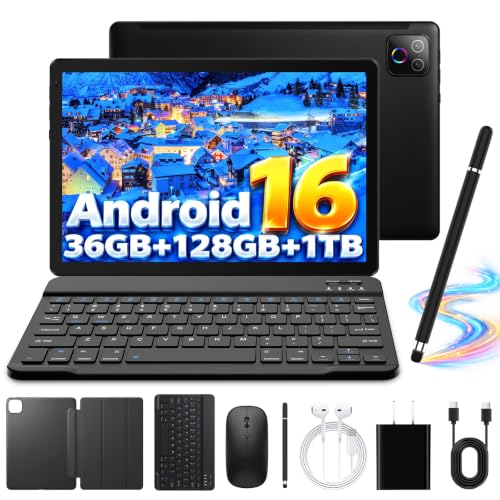
Pros
- Fast Wi-Fi 6 and Bluetooth 5.4 wireless connectivity
- Generous 128GB base storage with 1TB expansion support
- Bundled keyboard, mouse, case, and stylus included
- Modern Android 16 operating system with Play Store
Cons
- Low 1280x800 display resolution reduces text clarity
- Advertised 36GB memory relies heavily on slower virtual RAM
- Power users wanting high-resolution graphics should skip device
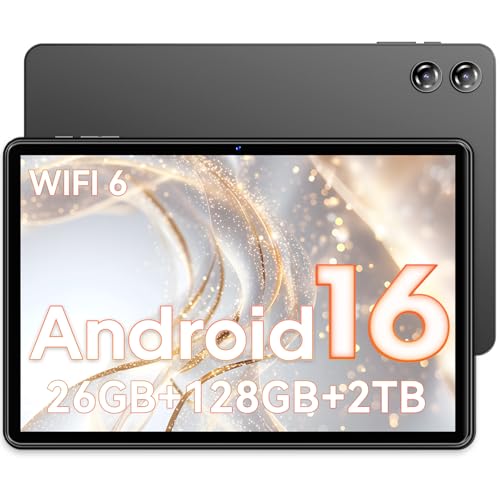
Pros
- Large 7000mAh battery capacity
- MicroSD expansion up to 2TB
- Includes 3.5mm headphone jack and Bluetooth 5.4
- Pre-installed Google Play with GMS certification
Cons
- Modest 1280x800 display resolution
- Limited to 2.4GHz Wi-Fi connectivity
- Basic 2MP front and 5MP rear cameras

Pros
- Large 13.4-inch display with smooth 120Hz refresh rate
- Integrated 4G LTE and GPS for mobile connectivity
- Expandable storage up to 1TB via microSD card
- Includes 3.5mm headphone jack and factory-installed screen protector
Cons
- Relatively heavy at 1.59 pounds for handheld use
- Who should skip: buyers needing a compact, lightweight tablet

Pros
- Spacious 13.4-inch display with smooth 120Hz refresh
- Built-in 4G LTE and GPS for travel
- Storage expandable up to 2TB
- Includes 3.5mm jack for wired headphones
Cons
- Heavy 720g weight limits comfortable one-handed use
- Advertised 26GB memory relies on 20GB virtual RAM

Pros
- 128GB internal storage expandable up to 2TB
- Modern Wi-Fi 6 and Bluetooth 5.4 connectivity
- Octa-core processor handles everyday media streaming
- 6000mAh battery supports multi-hour media playback
Cons
- 1280x800 resolution lacks sharpness for small text
- Users needing demanding 3D gaming should skip it
The Best Tablets by Use Case
Best for Students Who Game: Lenovo Idea Tab – College Tablet
The Lenovo Idea Tab – College Tablet combines an 11-inch 2.5K IPS touchscreen with a 90Hz refresh rate and a MediaTek Dimensity 6300 processor. It suits students who want one tablet for coursework and entertainment, with 8GB memory, 256GB storage, a Tab Pen, and folio case listed. The display resolution is higher than the HD panels on several alternatives, but that does not by itself establish gaming frame rates. See more tablets for students.
Reasons to buy:
- 2.5K screen and 90Hz refresh rate suit detailed visuals and smoother interface motion.
- Listed 8GB memory and 256GB storage offer room for apps and school files.
- Pen and folio case support note-taking and carrying the tablet for study.
Reasons to avoid:
- The published data does not identify a graphics benchmark or gaming results.
- Confirm that your games and preferred accessories work with this Android tablet.
Who should skip it: Players who need documented performance for demanding games should compare game-specific requirements before buying.
Best for Streaming and Casual Games: Amazon Fire HD 10 tablet, built for relaxation
The Amazon Fire HD 10 tablet, built for relaxation is a refurbished, certified Like-New Fire tablet with a 10.1-inch 1080p Full HD screen and an octa-core processor. Its listing positions it for streaming, reading, and gaming, and specifies 32GB or 64GB storage with microSD expansion up to 1TB. Fire OS and Amazon Kids features may appeal to households already using Amazon services, but check whether the games you want are available in its app store before choosing it over a Google Play tablet.
Reasons to buy:
- The 1080p display gives games and video a clearly specified Full HD resolution.
- MicroSD expansion supports up to 1TB, with card sold separately.
- Amazon Kids parental controls suit family use.
Reasons to avoid:
- This is a refurbished Like-New device, not a new unit.
- App access differs from tablets with Google Play, so verify game availability and services.
Who should skip it: Choose another option if a specific game is unavailable for Fire OS or Google Play access is essential.
Best for a Large, Smooth Screen: TECLAST 13 inch Tablet Android 16 26GB RAM 128GB
The TECLAST 13 inch Tablet Android 16 26GB RAM 128GB has a 13.4-inch 1920×1200 IPS touchscreen, a stated 120Hz refresh rate, and an octa-core processor with an A75-based design and clock speed up to 2.2GHz. Its large screen and high listed refresh rate may suit players who value expansive visuals and smooth scrolling, as well as people who stream or read on the same device. The 26GB figure combines 6GB physical RAM with 20GB extended memory, so do not treat all 26GB as physical RAM.
Reasons to buy:
- 13.4-inch screen offers more viewing area than compact 10- and 11-inch options.
- 120Hz refresh rate is specified for smoother scrolling and interface motion.
- 4G LTE, dual-band Wi-Fi, GPS, and storage expansion up to 2TB support travel and media use.
Reasons to avoid:
- The listing does not provide game benchmarks or establish that games render at 120 frames per second.
- At 13.4 inches and a listed 720g, it is a larger device to carry and hold for long sessions.
Who should skip it: Players who prioritize a smaller, lighter tablet should consider an 11-inch or 10-inch option.
Best for Family Use and Dolby Atmos Audio: Samsung Galaxy Tab A11+ 8GB RAM, 256GB Storage
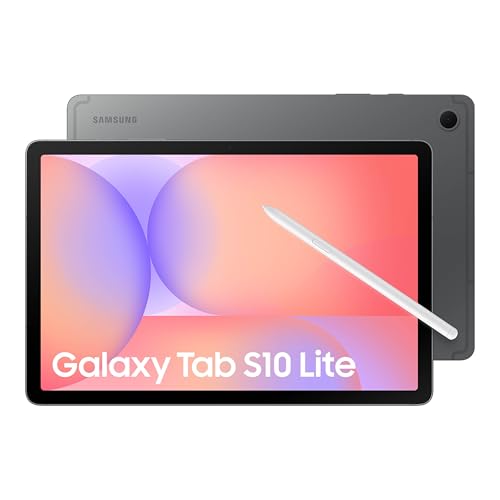
The Samsung Galaxy Tab A11+ 8GB RAM, 256GB Storage pairs an 11-inch display with a refresh rate up to 90Hz, an upgraded chipset, and quad speakers powered by Dolby Atmos. Those features make it a considered pick for families sharing games, video, and general tablet tasks. The listing does not name the chipset model, screen resolution, or battery capacity, so buyers comparing demanding games should verify those details and game compatibility before deciding.
Reasons to buy:
- Up to 90Hz refresh rate supports smoother motion than a standard 60Hz screen when content supports it.
- Listed 8GB memory and 256GB storage support multitasking and a sizable app library.
- Quad Dolby Atmos speakers suit shared entertainment without relying only on headphones.
Reasons to avoid:
- The published feature details do not identify the chipset or display resolution.
- Check the exact model’s memory and storage variant, plus game requirements, before purchase.
Who should skip it: Buyers who need detailed chipset or resolution specifications to compare game capability should seek confirmation first.
Best Value for Google Play Basics: COTGOD Tablet, 10.1 inch Android 16 Tablet
The COTGOD Tablet, 10.1 inch Android 16 Tablet is a lower-cost Android option with Google Play, a 10.1-inch 1280×800 IPS screen, and a T606 octa-core processor. Its listed 26GB memory consists of 6GB physical RAM plus 20GB extended memory, and it supports up to 2TB of TF-card expansion. This makes it a candidate for casual games and everyday apps, not a proven choice for graphics-intensive titles. The maker lists up to five hours of video or four hours of gaming, figures that will vary by use.
Reasons to buy:
- Google Play access provides a direct route to Android apps, subject to individual app compatibility.
- Wi-Fi 6 and Bluetooth 5.4 are specified for wireless connections.
- Listed 6000mAh battery capacity and up to 2TB TF-card expansion support everyday use and extra file storage.
Reasons to avoid:
Reasons to avoid:
- 1280×800 resolution is lower than the Full HD and 2.5K displays in this guide.
- The battery duration is a manufacturer claim, not a guarantee for every gaming session.
Who should skip it: Look elsewhere if you want a high-resolution display or documented performance for demanding games.
Also Considered
The business-focused guide may help if productivity matters as much as play; the remaining options are more specialized or have less gaming-specific detail.
The 13 Inch Tablet with Keyboard – Android 16 Tablet could suit buyers who want a large screen and included keyboard, mouse, stylus, and case, but its listing emphasizes work and study more than gaming detail.
The Android 16 Tablet 10 Inch, Octa-Core includes a keyboard, mouse, and stylus, but its 1280×800 screen and missing processor model leave game capability uncertain.
The Tablet 10 inch, Android 16 Tablet offers Google Play and expandable storage, but its listing gives limited display and processor detail for comparing games.
The TECLAST T65 13.4" Android16 4G Tablet shares a large 120Hz screen and LTE support, but the published listing offers less specific gaming context than the other large-screen pick.
How to Choose a Tablet for Gaming
Match processor details to your games
Processor names and game requirements are more useful than broad claims such as “smooth gaming.” Of these picks, the Lenovo listing names a MediaTek Dimensity 6300, while one COTGOD model lists a T606 and the large TECLAST lists an A75-based octa-core processor. These labels still do not provide comparable benchmark results. Check the game publisher’s operating system and device requirements, and look for the exact processor model on the product listing when a game is demanding.
Read refresh rate and resolution together
A higher refresh rate can make supported motion and scrolling look smoother, while resolution describes the number of pixels in the display. The TECLAST 13-inch model lists 120Hz and 1920×1200; Lenovo lists 90Hz and 2.5K; the Fire HD 10 lists 1080p. Neither resolution nor refresh rate confirms game frame rates or overall display quality. Check both specifications and consider whether your games can make use of the refresh rate.
Check app access before choosing an operating system
Several Android models in this guide specify Google Play, but the Fire HD 10 uses Amazon’s Fire tablet ecosystem. Search for your games, subscriptions, and required services in the relevant store before buying. Also verify parental controls or family settings if children will share the tablet. For broader media use, our tablet streaming comparison covers another common reason to choose a tablet.
Separate physical RAM from extended memory
Some listings advertise combined memory figures that include virtual or extended memory. For example, the 26GB COTGOD and TECLAST listings describe 6GB physical RAM plus 20GB extended memory; the Evermyth listing describes 6GB physical plus 30GB virtual RAM. Compare physical RAM separately, because the larger combined number is not the same as installed physical memory. Check how much internal storage remains available and whether a microSD or TF card is sold separately.
Consider screen size, battery claims, and wireless needs
A 13.4-inch display gives games and video more room, but the TECLAST listing also specifies a 720g body, which may feel less convenient to hold than an 11-inch tablet. Battery capacity is not the same as runtime: COTGOD lists up to four hours of gaming for one model, while Lenovo claims up to 12 hours of YouTube viewing, which is a different use. Check whether Wi-Fi, Bluetooth, or cellular data fits your setup. LTE support does not establish that a tablet works with every carrier, so verify network bands, SIM requirements, and service compatibility.
For a stylus-focused option, see our guide to the best budget tablets with pen support. Pen features do not improve game performance, but may matter if one tablet must handle drawing or notes too.
How We Compared
This comparison uses the published product listings, including stated screen size, resolution, refresh rate, processor, memory, storage, battery capacity or runtime claims, operating system, connectivity, and included accessories. We considered customer feedback only where supplied, but the available rating information did not include review details to support broader claims about owner experience. Recommendations therefore reflect listed features and stated use cases, not measured game performance. Buyers should confirm current model variants, app access, and network compatibility on the product page.
Frequently Asked Questions
Is a 120Hz tablet automatically better for gaming?
No. A 120Hz screen can show supported motion more frequently, but game frame rate also depends on the processor, graphics capability, and game settings. The TECLAST 13-inch model lists a 120Hz display, but its listing does not demonstrate that particular games run at 120 frames per second.
Can these tablets run every Android game?
No product listing establishes compatibility with every game. Check the game’s operating system, processor, memory, and store requirements. Fire tablets use a different app ecosystem from Android tablets with Google Play, so confirm availability there before choosing the Fire HD 10.
Is 26GB of RAM the same as 26GB of physical RAM?
Not for the models described here. The COTGOD and TECLAST 13-inch listings state that their 26GB totals combine 6GB physical RAM with 20GB extended memory. Treat physical and extended memory as separate details when comparing tablets.
Should I choose a 10-inch or 13.4-inch gaming tablet?
A smaller screen may be easier to carry and hold, while a 13.4-inch screen provides more viewing area for compatible games and media. The larger TECLAST model is listed at 720g, so consider how you will use it, including whether it will sit on a stand or be held during play.
Do these tablets support cellular gaming away from Wi-Fi?
Some listings specify 4G LTE, including the TECLAST 13-inch models, but that does not confirm compatibility with every carrier or plan. Verify supported bands, SIM or eSIM requirements, and carrier support. Online games may also use mobile data, so check the game’s connection needs and your data plan.



Write Your Review
No reviews yet. Be the first to share your experience!