

A thermostat that works with your phone can make everyday temperature changes easier, but not every Nest model offers the same learning features or room-sensing options. This best Nest thermostat guide compares the standard Nest Thermostat with Nest Learning models so you can match your choice to your HVAC system, preferred controls, and smart-home setup.

Pros
- Includes a second-generation temperature sensor
- Supports several voice assistants
- No C wire needed in most homes
- Matter compatible
Cons
- Who should skip it: Homes without a compatible 24V system
Pros
- App scheduling and remote temperature control
- Automatic adjustment when you leave
- HVAC alerts and maintenance reminders
Cons
- Some systems require a C wire or compatible power accessory
- Who should skip it: buyers whose HVAC system is incompatible

Pros
- Remote control through the Google Home app
- Away detection and programmable schedules
- Works with Google Assistant and Matter-certified voice assistants
Cons
- Some HVAC systems require a C wire or compatible power accessory
- Who should skip it: buyers whose HVAC system is incompatible

Pros
- Includes a room temperature sensor
- Supports major voice assistants
- C wire not required in most homes
- Matter-compatible smart home integration
Cons
- Who should skip it: Homes with incompatible heating or cooling systems

Pros
- Includes a second-generation Nest Temperature Sensor
- Remote control through the Google Home app
- Works with Matter and major voice assistants
Cons
- Skip it if your system is not compatible

Pros
- App scheduling and remote temperature control
- Automatic adjustments when you leave
- HVAC alerts and maintenance reminders
- ENERGY STAR certified
Cons
- Some HVAC systems need a C wire or power accessory
- Who should skip it: households without Wi-Fi or a compatible HVAC system

Pros
- Learns temperatures and creates a schedule
- Remote temperature controls
- Energy-use history and HVAC alerts
Cons
- Nest Temperature Sensor sold separately
- Who should skip it: shoppers seeking room-sensor control without a separate purchase

Pros
- Remote control through the Google Home app
- Works without a C wire in most homes
- ENERGY STAR certified
Cons
- Some systems require a C wire or compatible power accessory
- Who should skip it: buyers whose HVAC system is incompatible

Pros
- Includes a Nest Temperature Sensor
- Supports a wide range of 24V HVAC systems
- Works with Alexa and Google Home
Cons
- Professional installation is recommended
- Who should skip it: DIY installers seeking a simple setup
The Best Nest Thermostats by Use Case
Best for Room-by-Room Comfort: Google Nest Learning Thermostat (4th gen)
The Google Nest Learning Thermostat (4th gen) is a strong fit if one thermostat setting does not suit every room or time of day. This version includes a second-generation Nest Temperature Sensor, which you can place in a room and use in the Google Home app to set the temperature you want there at a particular time. Google also says the thermostat can learn how outdoor conditions affect indoor temperature and pause heating or cooling when natural warming or cooling helps.
Reasons to buy:
- Includes a Nest Temperature Sensor for room-based temperature control.
- Works with most 24V systems, including gas, electric, oil, forced air, heat pump, and radiant systems.
- Supports Matter and control through Google Home, Alexa, or Siri-compatible devices.
Reasons to avoid:
- Its added sensor and learning features may be unnecessary if you only need a basic schedule and remote adjustments.
- Compatibility still depends on your specific HVAC wiring and system; check before buying.
Skip it if you want a straightforward thermostat and do not expect to use room sensing or learning features.
Best for Simple App Scheduling: Google Nest Thermostat – Smart Thermostat for Home
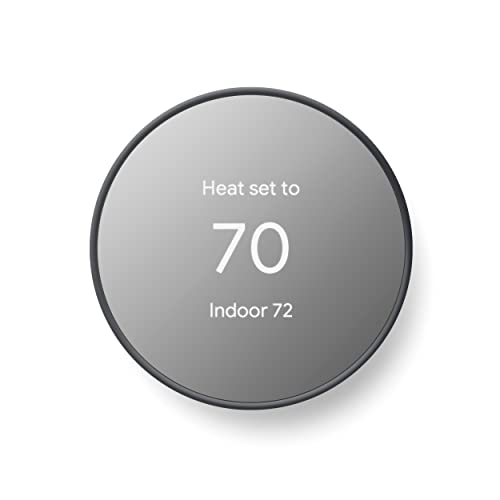
The Google Nest Thermostat – Smart Thermostat for Home suits households that want remote adjustments and an app-created schedule without paying for the Learning line’s added room sensor. It works with the Google Home app, can lower the temperature when you leave, and offers Savings Finder suggestions for schedule changes. The thermostat is ENERGY STAR certified, and Google says it works without a C wire in most homes.
Reasons to buy:
- Create and change an energy-conscious schedule in the Google Home app.
- Adjust the temperature remotely from a phone, tablet, or computer.
- Get HVAC monitoring alerts and maintenance reminders.
Reasons to avoid:
- Some heating-only, cooling-only, zone-controlled, and heat-pump systems need a C wire or compatible power accessory.
- It does not include the room sensor bundled with the fourth-generation Learning models.
Skip it if you want a thermostat that learns your routine or need room-based temperature control from an included sensor.
Best for Automatic Schedule Learning: Google Nest Learning Thermostat – 3rd Gen
The Google Nest Learning Thermostat – 3rd Gen is worth considering if you prefer a thermostat that learns the temperatures you like and builds a schedule around them. Home/Away Assist can switch to an Eco Temperature after you leave, while Energy History helps you see how much energy you used and why. This model works with Nest Temperature Sensors, but the sensor is sold separately.
Reasons to buy:
- Learns preferred temperatures and programs a schedule.
- Offers Home/Away Assist and Energy History.
- Provides HVAC monitoring alerts and maintenance reminders.
Reasons to avoid:
- A Nest Temperature Sensor costs extra if you want to prioritize a particular room.
- Its automatic learning may be less appealing if you want to set every schedule detail yourself.
Skip it if you want the fourth-generation model’s included sensor or prefer a simpler app-scheduled thermostat.
Best for Installer-Led Setup: Google Nest Learning Thermostat Pro Edition
The Google Nest Learning Thermostat Pro Edition is aimed at buyers planning professional installation, particularly where the HVAC setup is more involved. Its stated compatibility includes most 24V systems such as dual-fuel, geothermal, and zoned systems, in addition to common heating and cooling types. It includes a Nest Temperature Sensor and is designed for installer configuration and calibration, so it is a more specialized choice than a typical self-install purchase.
Reasons to buy:
- Includes a Nest Temperature Sensor for room-based control.
- Lists compatibility with dual-fuel, geothermal, and zoned HVAC systems.
- Designed for professional setup and offers specialized support.
Reasons to avoid:
- Professional installation is recommended, which may not suit a do-it-yourself plan.
- Confirm that the Pro Edition and its installation approach fit your exact system before purchase.
Skip it if your system is straightforward and you want a thermostat intended for an uncomplicated self-install.
Also Considered
The Google Nest Learning Thermostat (4th gen) in silver or polished gold could suit shoppers who prefer those finishes, while the Obsidian version is another finish choice; compare the included sensor and exact bundle before deciding. The Snow, Charcoal, Sand, and Fog versions of the Google Nest Thermostat – Smart Thermostat for Home offer the standard model’s core scheduling and app-control approach, so choose among them based on finish and current bundle details rather than assuming color changes its capabilities.
How to Choose the Best Nest Thermostat
Check HVAC compatibility and wiring first
A smart thermostat is only useful if it can control your heating and cooling equipment. Nest models are designed for many 24V systems, but compatibility varies by model and setup. Before choosing a finish or comparing features, use Google’s Nest Compatibility Checker and compare its result with the wires and system type in your home. If you are unsure what you have, ask an HVAC professional rather than guessing from the thermostat’s appearance.
Do not assume that “no C wire required” applies to every home. Google notes that the standard Nest Thermostat may need a C wire or compatible power accessory for some heating-only, cooling-only, zone-controlled, and heat-pump systems. The fourth-generation Learning Thermostat also works without a C wire in most homes, but checking your specific system remains important.
Decide whether you want a learning schedule
The standard Nest Thermostat lets you create a schedule in the Google Home app and offers suggestions through Savings Finder. That approach makes sense if you want to choose the schedule yourself and occasionally adjust it remotely. The third-generation Learning model instead learns the temperatures you prefer and programs itself, which may suit a household whose routine is fairly consistent.
Learning is not automatically better for every household. If several people change the temperature often, or you would rather keep direct control over each schedule setting, an app-programmed routine may feel more predictable. Consider whether you want suggestions and automation or prefer to make changes manually.
Consider where temperature sensing matters
A thermostat in a hallway cannot always reflect the comfort of a bedroom or another occupied room. The fourth-generation Learning Thermostat bundles a second-generation Nest Temperature Sensor, and the Pro Edition also includes a sensor. Google says you can use the sensor with the app to set the temperature a room should reach at a particular time.
The third-generation model works with Nest Temperature Sensors, but its sensor is sold separately. The standard Nest Thermostat does not include the sensor feature described for the Learning models. If you have a room that routinely feels too warm or cool, sensor inclusion may matter more than a display finish or learning feature.
Match the thermostat to your smart-home controls
All the choices here support app-based control, but voice assistant and smart-home details differ across model descriptions. The standard thermostat works through Google Home and is described as compatible with Google Assistant and Matter-certified voice assistants; one version also notes Alexa voice control. The fourth-generation Learning model is Matter compatible and lists Google Assistant, Alexa, and Siri voice control through compatible devices.
Compatibility does not mean every voice command or automation works identically across platforms. If you already use a particular assistant, check the exact model’s supported integrations and whether you need a compatible speaker or other smart device. For wider smart-home planning, our Matter smart-home hub guide explains how hubs fit into a connected home.
Choose self-installation or professional help
The regular Nest Thermostat and fourth-generation Learning model are presented as suitable for self-installation, but wiring and HVAC compatibility still determine whether that is a sensible plan. The Pro Edition is specifically positioned for professional installation, including installer calibration and support. If you have zoned, geothermal, or dual-fuel equipment, verify compatibility and installation needs before buying rather than relying on a broad system category alone.
How We Compared
We compared the Nest models by the decisions that most affect everyday use: HVAC compatibility, C-wire considerations, app and voice control, learning and scheduling features, room-sensor inclusion, and installation approach. Manufacturer and retailer information informed each product summary, while owner feedback was considered only where recurring themes were available. The recommendations distinguish the standard app-scheduled thermostat from Learning models and the installer-focused Pro Edition, rather than treating finishes or bundles as separate feature sets.
Frequently Asked Questions
Will a Nest Thermostat work without a C wire?
Often, but not in every system. Google says the standard Nest Thermostat is designed to work without a C wire in most homes, while some heating-only, cooling-only, zone-controlled, and heat-pump systems need a C wire or compatible power accessory. Check your wiring with Google’s compatibility tool before buying.
What is the difference between the Nest Thermostat and Nest Learning Thermostat?
The standard Nest Thermostat lets you make a schedule in the Google Home app and offers Savings Finder suggestions. Learning models add automatic schedule learning and other features that vary by generation. The fourth-generation model includes a Nest Temperature Sensor, while the third-generation model works with a sensor sold separately.
Can I control a Nest thermostat when I am away?
Yes. The standard Nest Thermostat and Learning models described here support remote temperature adjustment through an app on a phone or other device. Remote app access depends on having a working internet connection; the Fog version notes that you can still control the thermostat manually if the internet is unavailable.
Do Nest thermostats work with Alexa or Apple Home?
Support depends on the model and the smart-home setup. The fourth-generation Learning model is described as compatible with Alexa, Siri, and Google Assistant through compatible devices, and it supports Matter. The standard model’s descriptions mention Google Assistant and, for some versions, Alexa. Check the exact version and the devices required for voice control.
Is a Nest Temperature Sensor included?
The fourth-generation Nest Learning Thermostat bundles in this guide include a second-generation Nest Temperature Sensor, and the Pro Edition description also includes one. The third-generation Learning Thermostat works with a compatible Nest Temperature Sensor sold separately. The standard Nest Thermostat is not described as including a room sensor.
Should I install a Nest thermostat myself?
Self-installation may suit a compatible, straightforward system, and Google describes the standard and fourth-generation Learning models as easy to install yourself. The Pro Edition recommends professional installation. If you cannot identify your HVAC wiring or your system is zoned, dual-fuel, or geothermal, confirm the installation plan with a qualified HVAC professional.


Write Your Review
No reviews yet. Be the first to share your experience!