

Budget sit-stand desks vary widely in desktop shape, height range, storage, and power features. The Best Standing Desk Under $300 depends on whether you need a corner layout, a deep surface for multiple screens, or built-in drawers and outlets.
This guide compares the listed specifications and design details for seven desks, then explains what to check before choosing one. Consider your seated and standing heights, the weight and placement of your equipment, and whether your monitor mount can attach to the desktop.
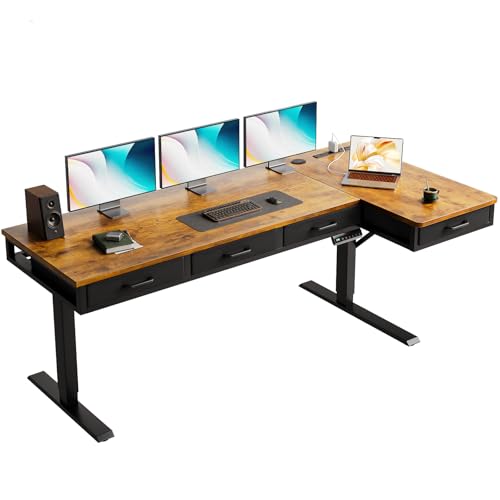
Pros
- Reversible L-shaped layout
- Four fabric drawers
- Three height presets
- Built-in outlets and USB ports
Cons
- Skip it if 63-inch width exceeds available space

Pros
- Three programmable height presets
- Spacious 71-inch desktop
- Built-in AC and USB ports
- Dual-beam frame and reinforced steel legs
Cons
- Desktop is not designed for monitor arm mounting
- Skip it if your setup requires monitor-arm mounting
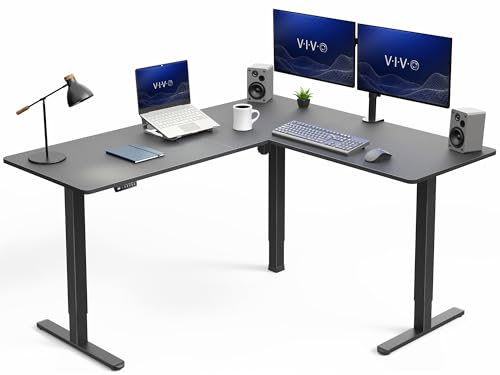
Pros
- Spacious L-shaped work surface
- Four programmable height presets
- Reversible table configuration
- 225 lb stated capacity
Cons
- Who should skip it: setups exceeding 225 lb capacity
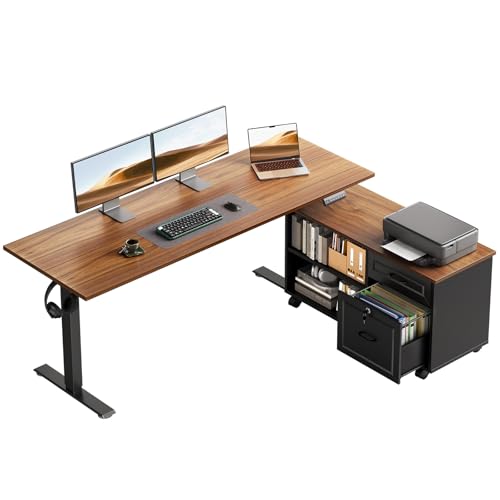
Pros
- Wide electric height range
- Three height presets
- Mobile cabinet adds workspace
- Lockable drawer and hanging hooks
Cons
- Who should skip it: buyers who prefer one-piece desktops
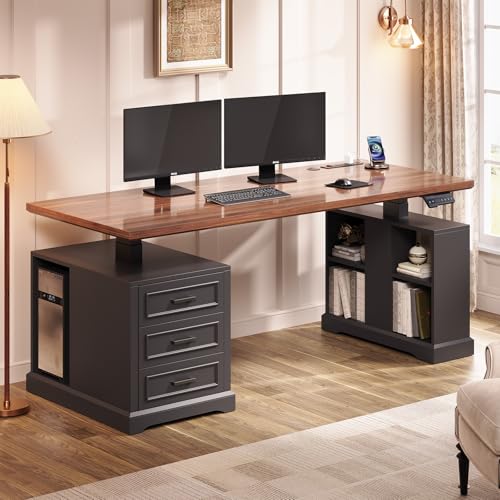
Pros
- Three programmable height presets
- Four outlets and two USB ports
- Three drawers plus open shelves
- 200-pound stated weight capacity
Cons
- Who should skip it: shoppers needing a narrower desk
- 200-pound capacity may limit heavier equipment setups

Pros
- Deep 32-inch work surface
- Two programmable height presets
- Listed 176 lb capacity
- Curved front edge
Cons
- Who should skip it: anyone short on floor space

Pros
- Spacious 71 × 32-inch work surface
- Dual-motor height adjustment
- 198 lb stated capacity
Cons
- Skip if your workspace cannot fit a 71 × 32-inch desktop
The Best Standing Desks by Use Case
Best for Corner Workspaces: VIVO Electric Corner Standing Desk, L-Shaped
The VIVO Electric Corner Standing Desk, L-Shaped is designed for a corner workstation or room divider, with an assembled outside footprint of 63 by 55.2 inches. Its three-part top and reversible layout suit people who need separate zones for monitors, paperwork, or a laptop. The listing specifies a 28.5-to-46.8-inch height range, a 225 lb capacity, and four memory presets, which can help when multiple people share preferred desk heights.
Reasons to buy:- L-shaped surface uses corner space and separates work areas.
- Four memory presets save preferred heights.
- Listed 225 lb capacity gives a clear load limit for planning equipment.
- The large footprint may not suit a narrow room or straight-wall layout.
- The listing specifies one motor, so buyers who prioritize a dual-motor design may prefer another option.
Skip it if you have limited floor space or need a simple straight desktop. See the VIVO Electric Corner Standing Desk, L-Shaped if your room can accommodate its corner shape.
Best for Built-In Charging: OffiGo 71″ Executive Electric Standing Desk Height
The OffiGo 71″ Executive Electric Standing Desk Height combines a wide 71-by-27.6-inch desktop with integrated charging ports. Its listed power panel has three AC outlets, two USB-A ports, and two USB-C ports, while two grommets help route cables. The three-piece desktop is 1.38 inches thick, and the listing recommends standard monitor stands rather than monitor-arm mounting. That warning matters if your setup depends on a clamp-mounted display.
Reasons to buy:- Wide desktop accommodates multiple devices and documents.
- Built-in outlets and USB ports provide charging access at the desk.
- Three memory presets save preferred heights within its 29.1-to-48-inch range.
- The listing says the desktop is not designed for monitor-arm mounting.
- Its recommended load capacity is 154 lb, so include monitors and other equipment when estimating the load.
Skip it if you need a clamp-mounted monitor arm or a desktop deeper than 27.6 inches. Consider the OffiGo 71″ Executive Electric Standing Desk Height if its charging layout and monitor-stand guidance fit your setup.
Best for Corner Storage: OffiGo 63 Inch L Shaped Electric Standing Desk
The OffiGo 63 Inch L Shaped Electric Standing Desk adds four fabric drawers to a reversible corner desk. Its listing specifies three AC outlets, one USB port, and one Type-C port, along with a cable tray behind the desk. The height range is 29.9 to 46.1 inches, and the 15-inch extra board can enlarge the work area. This combination may suit a home office where small supplies need a place but a fixed cabinet would take too much floor space.
Reasons to buy:- Four fabric drawers organize smaller office items.
- Reversible return lets you choose left- or right-side placement.
- Integrated outlets and ports keep charging connections close.
- The L-shaped layout needs more room than a straight desk.
- The listing does not state a weight capacity, so verify the limit with the seller before loading heavy equipment.
Skip it if you want a compact straight desk or need a confirmed load rating before purchase. The OffiGo 63 Inch L Shaped Electric Standing Desk is worth considering when drawers and flexible corner orientation matter more than a published capacity figure.
Best for Deep Desktop Space: Grandder 63×32 Electric Standing Desk
The Grandder 63×32 Electric Standing Desk has a 32-inch-deep curved desktop, giving monitors, a keyboard, and accessories more front-to-back room than the 27.6-inch-deep options listed here. Its stated height range is 28 to 45.6 inches, with two saved height levels and a listed 176 lb capacity. The listing also specifies anti-collision operation and noise below 45 dB. These are manufacturer claims, not independent measurements, so check whether the listed features meet your expectations.
Reasons to buy:- 32-inch depth supports a less crowded monitor-and-keyboard layout.
- Two saved positions provide quick access to seated and standing heights.
- The listing states a 176 lb capacity and anti-collision feature.
- Two presets offer fewer saved positions than desks with three or four.
- The published details do not list built-in outlets, drawers, or a monitor-arm warning, so confirm those needs with the seller.
Skip it if you need integrated storage or several memory presets. The Grandder 63×32 Electric Standing Desk makes more sense when desktop depth is your main priority.
Best for Dual-Motor Lifting: FLEXISPOT 71″x32″ Electric Standing Desk
The FLEXISPOT 71″x32″ Electric Standing Desk pairs a 71-by-32-inch work surface with a dual-motor lift system. Its listing specifies a 198 lb capacity and describes the motors as providing stable, quiet height adjustment. That combination is relevant for large multi-device setups, but the published information does not give a height range, preset count, or built-in power details. Check those specifics before buying, especially if you need saved positions or a particular seated height.
Reasons to buy:- Dual motors suit buyers who specifically want a motor in each lifting side.
- The 71-by-32-inch surface provides room for several devices.
- The listed capacity is 198 lb.
- The provided product details do not specify its height range or memory presets.
- Built-in outlets and storage are not listed, so verify whether they are included before purchase.
Skip it if a published height range, saved presets, or integrated charging are essential to your decision. The FLEXISPOT 71″x32″ Electric Standing Desk is a fit when dual motors and a large desktop are the leading requirements.
Also Considered
The OffiGo 55″ L Shaped Electric Standing Desk could suit buyers who want a mobile cabinet and a lower listed minimum height of 27.6 inches, but its main description focuses on cabinet flexibility rather than a published load capacity.
The SEDETA 63″ Farmhouse Electric Standing Desk with 3 may suit shoppers seeking three wood drawers, open shelves, a CPU stand, and built-in power. Its listed minimum height is 31 inches, so seated users should check that starting point against their ergonomic needs.
How to Choose the Best Standing Desk Under $300
Check the full height range, not just standing height
A desk should fit your seated posture as well as your standing posture. Your elbows should rest comfortably near desk height, and your feet should stay supported; a desk that rises high enough may still be too tall at its lowest setting. Compare the listing’s minimum and maximum heights with your own seated and standing positions. Among these options, the OffiGo 55-inch model lists a 27.6-inch minimum, while the SEDETA lists a 31-inch minimum. Those figures make the lower limit particularly important for shorter users.
Match the top shape and depth to your room
Measure available floor space, including room for a chair and walking path. A corner desk can make use of two adjoining walls, but its return occupies more floor area than a straight top. Desktop depth also affects how much room remains for a monitor, keyboard, and work materials. The Grandder lists 32 inches of depth, while the OffiGo executive model lists 27.6 inches. Use the outside dimensions, not just the advertised width, when planning a corner layout.
Estimate equipment load and understand motor details
Add the weight of monitors, a computer, speakers, arms, and other items that will move with the desktop. Compare that total with the listed capacity, and leave room for equipment you may add later. Capacity does not by itself establish how stable a desk will feel at maximum height. The VIVO lists a 225 lb capacity, the FLEXISPOT lists 198 lb, and the Grandder lists 176 lb. The OffiGo executive model gives a recommended capacity of 154 lb. If a listing does not supply a capacity, ask the seller rather than assuming one.
Motor count is another comparison point, not a complete measure of performance. The VIVO listing specifies one motor, while the FLEXISPOT specifies two. Compare that information alongside capacity, frame design, and the actual equipment load; avoid assuming a specific lifting speed or service life when the listing does not provide supporting figures.
Check monitor mounting and desktop construction
If you use a clamp-mounted monitor arm, read the desktop instructions carefully. The OffiGo executive listing explicitly says its three-piece top is not designed for monitor-arm mounting and recommends standard monitor stands. Other product descriptions here do not establish whether a clamp is supported. Verify the desktop material, thickness, panel joints, and clamp guidance with the manufacturer before attaching a heavy arm.
Choose storage and power features you will use
Built-in drawers and cabinets keep supplies nearby, but they can affect legroom and add parts during assembly. Compare the exact storage included: OffiGo’s corner model lists four fabric drawers, while SEDETA lists three wood drawers and open shelves. Power features also vary. Check the number and type of outlets and ports, then confirm that they fit your devices. A USB-C port listing does not specify every charging capability, so do not assume a particular power output beyond what the product details state.
Moving desks need cable slack so cords do not snag as the surface changes height. Grommets, cable trays, and integrated power can help organize a setup, but they do not replace checking cable length and routing. For broader workspace organization, see our guides to label makers for office cables and storage and document scanners for digitizing paperwork. You can also browse the full standing desk category and related office tech guides.
How We Compared
This comparison uses the published product specifications and descriptions, including dimensions, listed height ranges, stated load limits, motor arrangements, preset controls, desktop designs, storage, and power connections. We considered how those details relate to common workspace needs, such as fitting a desk into a corner, using a monitor arm, organizing supplies, or charging devices at the desk. Customer feedback was not supplied for assessment, so no recurring owner experiences or review patterns are claimed. Manufacturer performance statements are identified as listing claims where relevant.
Frequently Asked Questions
How do I know whether a desk will fit my seated height?
Compare the desk’s minimum height with your comfortable seated elbow position. Measure from the floor to your elbows while sitting in your usual chair, then account for the desktop and keyboard position. If a desk’s minimum height is above the level you need, it may not work well for seated use. Check the listed range before choosing, and ask the manufacturer about measurement conventions if the listing is unclear.
Can I attach a monitor arm to any of these desks?
No universal clamp compatibility is established by the published descriptions. The OffiGo 71-inch executive listing specifically advises against monitor-arm mounting on its desktop and recommends standard stands. For the other models, check the manufacturer guidance and confirm that the desktop thickness and construction can support your intended clamp. Do not assume that a wide or thick-looking top is suitable.
Does a dual-motor desk always lift more weight or move faster?
Motor count alone does not establish lifting speed or capacity. The FLEXISPOT listing specifies dual motors and a 198 lb capacity, while the VIVO lists one motor and a 225 lb capacity. Compare each model’s stated capacity and other frame details rather than treating motor count as a substitute for those specifications. The published descriptions do not provide comparable lift-speed figures.
What should I check before choosing an L-shaped desk?
Measure the full assembled footprint and decide which side should hold the return. Confirm whether the model is reversible and whether the return can be installed on the side you need. Leave room for the chair, drawers, and movement around the desk. The VIVO and OffiGo 63-inch models describe reversible layouts, but their dimensions and included storage differ.
Are built-in USB ports the same as a separate charger?
The listings provide port types and, for some models, limited output details, but they do not establish that every port will charge every device at its preferred rate. Check the stated voltage and current where provided, and compare them with your device’s charging needs. If a port’s output is not listed, ask the seller or plan to use a separate charger.
How much equipment weight should I include?
Include everything that rises with the desktop: monitors, computer, speakers, keyboard, and any clamp-mounted accessories. Check whether the listing’s capacity refers to the total load, and avoid treating a higher rating as a promise of stability at every height. If a model does not state a capacity, confirm it with the manufacturer before placing heavy equipment on the desk.



Write Your Review
No reviews yet. Be the first to share your experience!