

Choosing home theater audio can mean deciding between a compact soundbar, dedicated rear speakers, and overhead effects. The Best Surround Sound System for your room depends on what you watch, how much space you have for speakers, and whether your TV can send the audio formats you want.
This comparison covers four soundbar-based systems, from an LG model with rear speakers to ULTIMEA options with Dolby Atmos channels and wireless connections. Use the differences in channel layout, HDMI eARC, app controls, and subwoofer design to narrow the choices. For more TV advice, see our guides to choosing a 55-inch TV and comparing Roku TVs.

Pros
- Four surround speakers included
- Wired 5.25-inch subwoofer
- Extensive app-based sound adjustment
Cons
- Multiple speakers and subwoofer require more setup space
- Skip it if you want a single-speaker system

Pros
- Dolby Atmos and up-firing drivers
- Two surround speakers and subwoofer
- Extensive app-based sound adjustments
Cons
- Not compatible with DTS
- Skip it if DTS support is essential

Pros
- Includes wireless rear speakers
- Includes wireless subwoofer
- No separate receiver needed for rear speakers
- One-remote control with LG TVs
Cons
- Skip if you want a single-bar setup
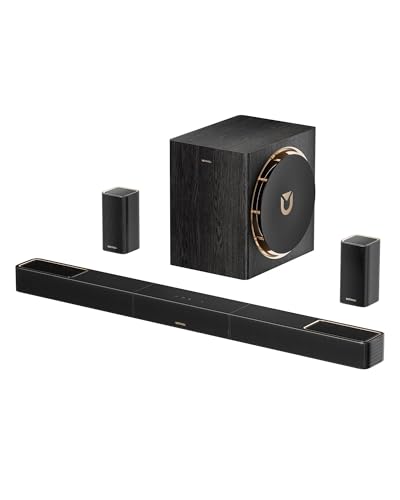
Pros
- Two wireless surround speakers included
- 8-inch subwoofer included
- 4K HDR pass-through
- HDMI eARC
Cons
- Who should skip it: buyers seeking a simpler soundbar setup
The Best Surround Sound Systems by Use Case
Best for Four Surround Speakers: ULTIMEA 7.1ch Surround Sound System with Dolby
The ULTIMEA 7.1ch Surround Sound System with Dolby is designed for listeners who want several speakers positioned around the room. Its listing describes three main channels, four surround speakers, and a 5.25-inch wired subwoofer. ULTIMEA recommends it for spaces from 108 to 270 square feet, making room size an important part of the decision. The rear right surround speaker pairs wirelessly with the soundbar, while the listing describes the other surround speakers as wired.
Its Dolby Atmos support and app-based EQ controls give you options for movie, music, voice, sports, game, and night listening. The 121 presets and 10-band equalizer may help if you want to adjust sound for different content rather than rely on one mode. Check speaker placement and cable paths first: multiple surround speakers can create a wider sound field, but need suitable locations and connections. Explore more audio guides if you are also comparing other speaker types.
Reasons to buy:
- Four surround speakers support a speaker layout suited to room-filling audio.
- Dolby Atmos support and six listed EQ modes offer ways to tailor playback.
- The manufacturer gives a recommended room-size range of 108 to 270 square feet.
Reasons to avoid:
- Some surround speakers are wired, so plan their placement and cable routing.
- The listing does not specify HDMI video pass-through or DTS compatibility; verify format and connection needs before buying.
Skip it if you want a minimal speaker layout or cannot accommodate several surround speakers and their cables.
Name it once: ULTIMEA 7.1ch Surround Sound System with Dolby.
Best Compact Atmos Layout: ULTIMEA 5.1.2ch Sound Bar with Dolby Atmos
The ULTIMEA 5.1.2ch Sound Bar with Dolby Atmos suits buyers who want a stated 5.1.2-channel layout with two rear speakers and up-firing drivers. The listed HDMI eARC connection supports lossless Dolby Atmos transmission, while CEC can synchronize compatible TV and soundbar power, volume, and input controls. These details matter if you want height effects and a more unified TV setup, but your television and source devices still need to support the relevant audio connection and format.
Its companion app offers a 10-band graphic EQ, 121 presets, and 13-step surround-level adjustment. That gives listeners more control over tonal preferences and rear-speaker levels than a soundbar with only fixed modes. The listing explicitly says this model is not compatible with DTS, so check the formats used by your movies, games, and streaming sources. Dolby Atmos effects also depend on compatible content and setup, not only the soundbar.
Reasons to buy:
- Two up-firing drivers and rear speakers form the listed 5.1.2-channel arrangement.
- HDMI eARC supports lossless 5.1.2-channel audio transmission according to the listing.
- App controls include EQ presets and adjustable surround levels.
Reasons to avoid:
- DTS is not supported, which may matter for some source material.
- Confirm your TV has HDMI eARC if you want the specified lossless audio connection.
Skip it if DTS compatibility is essential or you do not want to use an app for detailed sound adjustments.
Product link: ULTIMEA 5.1.2ch Sound Bar with Dolby Atmos
Best for LG TV Integration: LG S40TR 4.1 ch. Home Theater Soundbar with Rear
The LG S40TR 4.1 ch. Home Theater Soundbar with Rear is a practical match to consider if you own an LG TV and want rear speakers without adding a separate receiver. It includes a wireless subwoofer and wireless rear speakers, and supports Dolby Digital and DTS Digital. LG’s WOW Orchestra can play sound through a compatible LG TV and soundbar together, while WOW Interface lets you adjust soundbar settings from the TV remote and on-screen menu.
Clear Voice Plus and a center channel are relevant for viewers who often struggle to follow dialogue. The smart up-mixer is described as converting two-channel audio into a multichannel experience, which may widen playback from stereo sources. The listing does not identify HDMI eARC or Dolby Atmos support, so do not assume this model offers those features. Confirm the specific connection options and LG TV compatibility that matter for your setup.
Reasons to buy:
- Wireless rear speakers and a wireless subwoofer avoid cables running from those speakers to the soundbar.
- WOW Orchestra and WOW Interface add controls and shared playback features with compatible LG TVs.
- Clear Voice Plus targets dialogue clarity, and the system supports Dolby Digital and DTS Digital.
Reasons to avoid:
- The listing does not specify Dolby Atmos or HDMI eARC.
- WOW features are most relevant to compatible LG TV owners; verify your TV model before relying on them.
Skip it if you specifically need listed Dolby Atmos support or HDMI eARC for your intended connection.
Product link: LG S40TR 4.1 ch. Home Theater Soundbar with Rear
Best for Wireless Surround and Deep Bass: ULTIMEA Skywave X50 5.1.4ch Wireless Surround
The ULTIMEA Skywave X50 5.1.4ch Wireless Surround is the option to consider if you want a 5.1.4-channel system with wireless surround speakers and a larger, 8-inch subwoofer. The listing specifies dual 5GHz wireless transmission for the surround setup, a 760W peak power claim, and Dolby Atmos support. ULTIMEA also states that its subwoofer technology reaches down to 28Hz. These are manufacturer specifications, not a guarantee of the same listening experience in every room.
HDMI eARC and 4K HDR pass-through may suit a home theater where audio travels through the soundbar and video continues to the TV. Check your source, TV, cables, and desired video formats before choosing pass-through as your connection path. This system has a more elaborate feature set than the other choices, but it also calls for room to place a separate subwoofer and rear speakers. Its listed rating is lower than those of the other options, so consider that information alongside your own priorities rather than treating it as proof of a particular outcome.
Reasons to buy:
- Four height channels are part of its listed 5.1.4 layout.
- Dual 5GHz wireless transmission is specified for the surround setup.
- The 8-inch subwoofer, HDMI eARC, and 4K HDR pass-through cover several home theater priorities.
Reasons to avoid:
- The separate subwoofer and surround speakers need room for placement.
- Confirm video pass-through compatibility with your TV and sources, including the formats you use.
Skip it if you want a simpler speaker arrangement or do not need wireless surround and multiple height channels.
Product link: ULTIMEA Skywave X50 5.1.4ch Wireless Surround
How to Choose a Surround Sound System
Match channel layout to your room and listening position
Channel numbers describe a system’s speaker arrangement, but a higher number alone does not guarantee a better fit. The ULTIMEA 7.1ch model lists four surround speakers and a recommended room area, while the 5.1.2 and 5.1.4 models include height-channel designs. Think about where you sit, where rear speakers can go, and whether overhead effects matter for the films and shows you watch.
Check the listing’s channel count and speaker layout rather than comparing only a headline number. If the room cannot accommodate separate rear speakers, a multi-speaker model may be awkward even if its specifications look appealing. Also check whether a recommended room area is stated, as it is for the ULTIMEA 7.1ch system.
Check Dolby Atmos and other audio formats
Dolby Atmos support can be useful when you watch compatible content and want height effects, but the label does not mean every program will use those channels. The two ULTIMEA Atmos models and Skywave X50 list Atmos support. The LG S40TR lists Dolby Digital and DTS Digital instead, while the 5.1.2 ULTIMEA explicitly says it does not support DTS.
Before buying, check the formats provided by your streaming devices, game consoles, discs, and TV apps. If your library depends on a format the chosen soundbar does not support, the system may not suit your needs. Where the listing leaves a compatibility detail unclear, consult the manufacturer’s product information for your exact devices.
Choose connections around your TV and sources
HDMI eARC can carry audio from a compatible TV to a soundbar, and the ULTIMEA 5.1.2 listing specifies lossless audio transmission through eARC. The Skywave X50 also lists eARC and 4K HDR pass-through. These connection details matter when you want high-bandwidth audio or plan to route a video source through the soundbar.
Check the ports on your TV and the soundbar, and verify whether the TV has eARC rather than assuming every HDMI connection supports it. If using pass-through, confirm that the soundbar supports the video formats from your source and that your intended wiring preserves them. LG’s WOW features are a separate consideration: they are specifically presented as ways to coordinate the soundbar with a compatible LG TV.
Plan speaker placement and cable routing
Wireless speakers can reduce the need to run audio cables back to the soundbar, but they still need suitable positions and power connections. The LG model lists wireless rear speakers and a wireless subwoofer. The Skywave X50 lists wireless surround speakers, while the ULTIMEA 7.1ch listing describes wired front surrounds and a rear-right speaker that pairs wirelessly.
Read the connection details carefully: wireless audio links do not necessarily mean every speaker is cable-free. Measure available shelf, floor, and wall space before committing to a multi-speaker layout. For the 7.1ch system, account for its wired speaker connections; for the Skywave X50, plan room for the separate subwoofer and surrounds.
Consider dialogue controls and sound customization
If dialogue is your main concern, prioritize the features that address speech rather than choosing by power claims. The LG S40TR lists Clear Voice Plus and a center channel. The ULTIMEA 7.1ch system lists Voice as an EQ mode, while both smaller ULTIMEA systems offer app-based sound adjustments.
Check whether you prefer physical TV controls, app settings, or a mix. LG describes on-screen control through the TV remote for its WOW Interface; ULTIMEA’s models describe app-based EQ and presets. More adjustment options can be helpful if you enjoy tuning audio, but fixed or straightforward controls may be preferable if you want fewer settings to manage.
How We Compared
This guide compares the published product listings, including stated channel layouts, speaker connections, subwoofer details, audio formats, TV connections, and app or TV control features. We also considered the listed room recommendation for the ULTIMEA 7.1ch system and the customer rating information available for each product. No review text was provided, so this comparison does not infer customer experiences or recurring ownership patterns from ratings alone.
Frequently Asked Questions
Does a soundbar with Dolby Atmos work with any TV?
Not necessarily. The source, TV, connection, and soundbar all affect whether Atmos audio reaches the system. For the ULTIMEA 5.1.2 model, the listing specifies HDMI eARC for lossless Atmos transmission, so check whether your TV has eARC and supports the audio formats you plan to play.
Do wireless rear speakers need power cables?
Wireless describes the audio connection, not necessarily the power source. The product details identify wireless rear speakers for the LG S40TR and wireless surround speakers for the Skywave X50, but do not establish that those speakers operate without power connections. Check the manufacturer’s setup instructions and plan positions near suitable power access.
What is the difference between 5.1.2 and 5.1.4 sound?
In these listings, the final number indicates height channels: the 5.1.2 ULTIMEA model lists two up-firing drivers, and the Skywave X50 is described as a 5.1.4 system. The layouts are intended to add overhead effects to surround audio. The number alone does not establish how convincing those effects will sound in your room, so also consider speaker placement and compatible content.
Can I connect a surround sound system to a TV without eARC?
Connection options depend on the ports and supported audio formats of both devices. The ULTIMEA 5.1.2 listing highlights HDMI eARC for lossless 5.1.2-channel transmission, so a TV without eARC may not provide that specified connection. Review both manuals for alternative connections and their audio-format limits before purchasing.
Which system is a better fit for an LG TV?
The LG S40TR is the direct choice to investigate if you want LG’s WOW Orchestra and WOW Interface features. Those functions are described for use with an LG TV, but compatibility can depend on the TV model. Verify your exact television’s support before treating those features as available.
Should I choose more speakers or a larger subwoofer?
Choose based on what you want to improve. More surround and height speakers can support a more enveloping layout, while a larger subwoofer may appeal if low-frequency impact is a priority. The ULTIMEA 7.1ch system emphasizes four surround speakers; the Skywave X50 lists an 8-inch subwoofer and a 5.1.4 layout. Room space, speaker placement, and content compatibility should guide the choice.


Write Your Review
No reviews yet. Be the first to share your experience!