

A doorbell camera can show who is at your door, but the right choice depends on more than video resolution. Some models need existing wiring, while others run on batteries; storage, Wi-Fi bands, and smart-home compatibility also vary. This guide to the best video doorbell under $100 compares those practical differences so you can match a device to your home and daily routine.

Pros
- Wired and battery-powered installation options
- Local storage available without subscription
- Person, vehicle, and package detection included
- Indoor chime and angle wedges included
Cons
- Requires 2.4 GHz Wi-Fi
- microSD card not included
- Who should skip it: households needing 5 GHz Wi-Fi support

Pros
- Dual-camera views
- No-subscription AI detection
- Battery or hardwired power options
- Supports up to 512GB microSD storage
Cons
- Continuous recording requires hardwiring
- microSD card not included
- Who should skip it: households needing continuous recording without wired power

Pros
- 5MP resolution and 180-degree view
- Included 32GB SD card
- Package detection and two-way audio
- No subscription required
Cons
- Requires 2.4GHz Wi-Fi
- Who should skip it: households without 2.4GHz Wi-Fi
Pros
- Subscription-free local recording option
- Wide 166° field of view
- Indoor chime included
- Works with Alexa and Google Assistant
Cons
- Requires 2.4 GHz Wi-Fi; 5 GHz unsupported
- MicroSD card sold separately
- Skip if your Wi-Fi network only supports 5 GHz

Pros
- Retinal 2K video
- Low-light color video
- Uses existing doorbell wiring
Cons
- Requires a hardwire connection
- Who should skip it: shoppers who need Video Descriptions without a subscription
Pros
- Includes 4 GB microSD card
- No existing doorbell wiring required
- Indoor monitor supports two-way communication
- Compatible with Alexa and SwitchBot Smart Locks
Cons
- Indoor monitor requires a power outlet
- Shorter range may suffer through thick walls or metal doors
- Skip if monitor cannot stay near powered outlet

Pros
- Two doorbells included
- Up to 6x Enhanced Zoom
- Two-Way Talk and Live View
- Built-in rechargeable batteries
Cons
- USB-C charging cable not included
- Ring Protect subscription needed for past-event playback and AI alerts
- Skip if you need included charging cables or subscription-free past-event playback

Pros
- Built-in rechargeable battery
- Live View and two-way talk
- Phone motion alerts
- Alexa device integration
Cons
- Smart Alerts and video history require separate subscription
- Skip if you want person and package alerts without a subscription

Pros
- Built-in rechargeable battery
- Live View and two-way talk
- Phone motion alerts
- Alexa device integration
Cons
- Some alerts and video history require paid subscription
- Who should skip it: buyers avoiding subscriptions
Pros
- Works with HomeKit Secure Video, Alexa, Google Assistant, and SmartThings
- Local person and zone detection
- Supports PoE and 8–24V AC/DC wiring
- IP65-rated dust and water resistance
Cons
- HomeKit Secure Video requires iCloud+ and an Apple home hub
- HomeKit limits video resolution to 1200p
- Skip if you need full 2K resolution through HomeKit
The Best Video Doorbells by Use Case
Best for Flexible Power and Local Recording: Tapo 2K+ Wired or Battery Powered Smart Video
The Tapo 2K+ Wired or Battery Powered Smart Video suits homes where installation needs may change or where you want a choice between battery and existing doorbell wiring. The listing specifies a 180-degree view, person, vehicle, and package detection, and local microSD storage up to 512GB, with the card sold separately. Its included indoor chime and adjustable wedges add setup options, while the stated 2.4 GHz Wi-Fi requirement means it will not connect directly to a 5 GHz-only network.
Reasons to buy:
- Can run on its built-in battery or compatible 8–24V wiring.
- Supports local recording to a microSD card without a required subscription.
- Offers person, vehicle, and package alerts, plus a spotlight for color night vision.
Reasons to avoid:
- Local storage requires buying a compatible microSD card separately.
- Needs 2.4 GHz Wi-Fi, and continuous recording is listed as a hardwired feature.
Skip it if your home has only 5 GHz Wi-Fi or you want a camera that works without checking wiring and network requirements first.
Best for Two Views and Package Monitoring: Anona 3K Dual Cam Video Doorbell Camera
The Anona 3K Dual Cam Video Doorbell Camera is aimed at entrances where you want one view of visitors and another near the doorstep. Its listing describes a 5MP main camera and a secondary camera, with AI detection for people, pets, and packages. The rechargeable battery is specified for up to 100 days, while hardwiring supports 24/7 recording, so check whether your installation can provide the power mode you want.
Reasons to buy:
- Dual-camera design covers visitor-level activity and the area near packages.
- Includes person, pet, and package detection without a required subscription.
- Supports local microSD storage up to 512GB, plus optional cloud storage.
Reasons to avoid:
- Needs 2.4 GHz Wi-Fi, even though the listing also identifies Wi-Fi 6 support.
- The 100-day battery figure is a manufacturer claim, and actual charging intervals can depend on use.
Skip it if you prefer a simple single-camera doorbell or need a model that connects to 5 GHz Wi-Fi.
Best for an Indoor Visitor Screen: SwitchBot 2K Doorbell Camera with Monitor
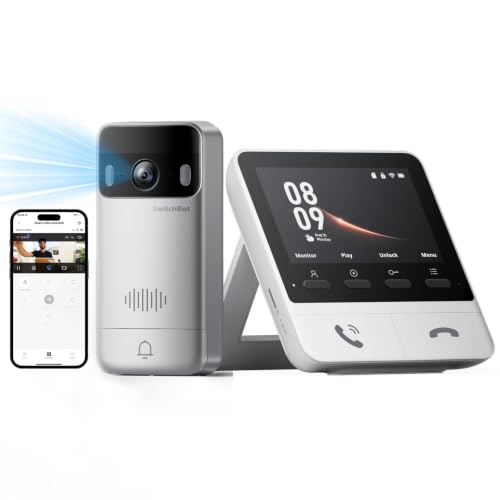
The SwitchBot 2K Doorbell Camera with Monitor pairs a battery-powered outdoor unit with a 4.3-inch indoor screen. That setup lets household members view and answer visitors without opening a phone app first, and the listing says the monitor can connect to a compatible SwitchBot Smart Lock. It also includes a 4GB SD card and supports larger microSD cards, but the indoor monitor needs its own power outlet.
Reasons to buy:
- Indoor monitor provides a direct way to see and speak with visitors.
- Includes a 4GB SD card and supports microSD storage up to 512GB.
- Supports Alexa and integration with SwitchBot Smart Locks; the listing also describes Home Assistant integration via RTSP.
Reasons to avoid:
- The monitor needs a power connection, and SwitchBot recommends keeping it within 5 meters of the outdoor unit.
- Thick walls, metal doors, and network conditions may affect connectivity or response time.
Skip it if you cannot place a powered screen near the door or want a phone-only setup with fewer indoor components.
Best for Apple Home and Wired Setups: Aqara Doorbell Camera G400 with Chime, Wired/PoE
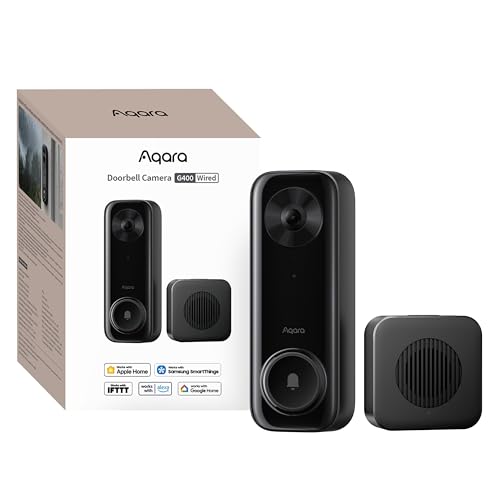
The Aqara Doorbell Camera G400 with Chime, Wired/PoE is a wired option for households that want to connect doorbell video with a broader smart-home setup. Its listing specifies 8–24V wiring or PoE, 2.4 and 5 GHz Wi-Fi 6, local detection, and support for HomeKit Secure Video, Alexa, Google Assistant, and SmartThings. HomeKit Secure Video needs an iCloud+ plan and an Apple home hub, and the listing notes resolution limitations when HomeKit is used.
Reasons to buy:
- Offers both existing low-voltage wiring and PoE power options.
- Supports HomeKit Secure Video as well as several other named smart-home platforms.
- Can record continuously to a separately purchased microSD card and supports NAS backup.
Reasons to avoid:
- It is not a battery-powered retrofit, so confirm wiring or PoE suitability before buying.
- HomeKit Secure Video needs an iCloud+ plan and Apple home hub; the listing says HomeKit limits resolution to 1200p.
Skip it if you rent, cannot run wiring or PoE, or want a battery-powered installation.
Best for Wired 2K Video: Ring Wired Doorbell 2K Plus (Newest Model)
The Ring Wired Doorbell 2K Plus (Newest Model) fits buyers who already have a compatible doorbell system and want a wired camera with 2K video. Its listing names motion alerts, up to 4x enhanced zoom, and low-light color video when ambient light is available; in total darkness, it switches to black-and-white video. Some notification features, including video descriptions, need a compatible Ring subscription, so check which features are included before relying on them.
Reasons to buy:
- Uses existing doorbell wiring for power.
- Offers 2K video and up to 4x enhanced zoom, according to the listing.
- Provides low-light color video when some ambient light is present.
Reasons to avoid:
- Requires a suitable wired doorbell connection rather than battery power.
- Video descriptions require a compatible Ring subscription and are unavailable in Illinois, according to the listing.
Skip it if you need local recording without a subscription or cannot use existing doorbell wiring.
Also Considered
The broader smart doorbell comparison may help if none of these installation styles fits; these remaining models suit narrower needs. The security camera guide can also help if you need coverage beyond the doorway.
The BOTSLAB 5MP Doorbell Camera could suit buyers who want a supplied 32GB SD card and a battery-operated camera, but its listing focuses on 2.4 GHz Wi-Fi and does not name broad voice-assistant compatibility.
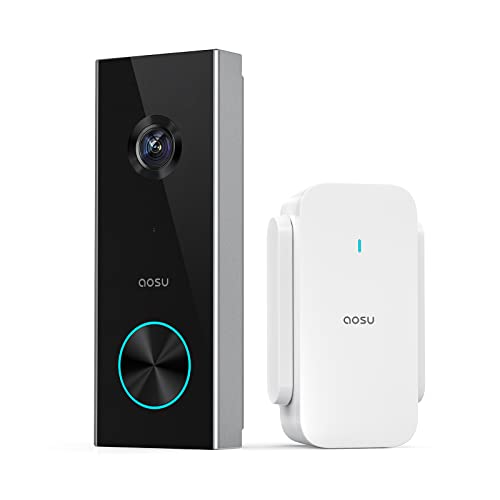
The aosu 2K Wireless Doorbell Camera with aosuBase is worth a look if you want an included base that combines Wi-Fi extension, storage, and an indoor chime; its microSD card is sold separately and storage support tops out at 128GB.
The Ring Battery Doorbell 2K (newest model) could fit a two-entry setup because its listing identifies a two-pack, but the published listing title’s pack quantity and price data should be checked on the product page before purchase.
The Like-New Ring Battery Doorbell and Like-New Ring Battery Doorbell offer the same listed features in different finishes. They are refurbished devices, and person or package alerts and recorded history depend on a separately sold Ring subscription.
How to Choose the Best Video Doorbell Under $100
Check power and installation first
Decide whether you can reuse existing doorbell wiring or need a battery-powered unit. Wired models can avoid periodic battery charging, and some listings specify continuous recording with wired power. Battery models can suit rentals or locations without wiring, but advertised battery life is a manufacturer estimate rather than a guaranteed interval. Review the required voltage, PoE support, charging method, and any indoor chime or monitor needs on the listing. For example, the Aqara model is wired or PoE, while SwitchBot’s outdoor unit is battery-powered and its indoor monitor needs an outlet.
Match the view to your doorstep
Field of view and camera layout affect what appears in the image. A tall, head-to-toe view can help show packages near the threshold, while a second camera can provide a separate angle on the doorstep. A wider number alone does not prove that a camera will capture your exact entry area, since placement and mounting angle matter. Compare the listed field of view and aspect ratio, then check whether wedges are included and whether the camera can be positioned to see the floor.
Understand recording and subscription limits
Live alerts and saved video are different needs. If you want to review past events without a recurring plan, look for local microSD support and check whether the card is included, its maximum supported capacity, and whether continuous recording is available in your chosen power mode. Optional cloud plans may add storage or alerts, but features can vary by brand. Ring listings identify some smart alerts and video descriptions as subscription-dependent; local-storage options such as Tapo and Aqara require a separately purchased card.
Confirm Wi-Fi and smart-home compatibility
Check the exact Wi-Fi band and ecosystem support before ordering. Several listed models need 2.4 GHz Wi-Fi, while the Aqara G400 lists both 2.4 and 5 GHz Wi-Fi 6. This matters if your router uses separate network names or your signal is weak at the front door. Also confirm whether you need Alexa, Google Assistant, Apple Home, SmartThings, Home Assistant, or a matching lock. Ecosystem support does not mean every feature works the same way across platforms, so review stated requirements such as the Apple home hub and iCloud+ plan for HomeKit Secure Video.
Choose alerts that fit your household
Motion detection can notify you about people, packages, pets, vehicles, or general activity, depending on the model. More alert categories can help you focus on deliveries, but check whether detection is included, requires cloud service, or can be adjusted with zones. A doorbell with an indoor screen may be easier for household members who do not want to rely on a phone. If you often cannot answer, look for two-way audio or quick replies, then check whether those features work through the doorbell app or an included monitor.
How We Compared
This comparison uses the published product listings, including their stated video views, power options, storage methods, detection features, Wi-Fi requirements, and smart-home compatibility. We also considered listing details about included chimes, monitors, memory cards, and subscription-dependent functions. Customer feedback data available for these products contains no written review details, so it does not support claims about long-term reliability or common owner experiences.
Frequently Asked Questions
Can a video doorbell work without existing wiring?
Yes. Several listed models use rechargeable batteries, including the SwitchBot doorbell and the Anona dual-camera model. Check whether any included indoor chime or monitor needs a separate outlet, and review the charging method and stated battery-life estimate.
Do these doorbells need a subscription to save video?
Not all of them. Tapo, Anona, BOTSLAB, aosu, SwitchBot, and Aqara list local microSD storage, though cards are not included with every model. Ring listings describe some alerts and saved-video features as subscription-dependent. Confirm which events can be saved locally and whether the card is included.
Will a 5 GHz Wi-Fi network work?
It depends on the model. Tapo, Anona, BOTSLAB, and aosu specify 2.4 GHz Wi-Fi, while Aqara lists 2.4 and 5 GHz Wi-Fi 6 support. The SwitchBot listing describes Wi-Fi connectivity but does not specify a supported band in the published details, so confirm that point with the seller before buying.
What is the advantage of a dual-camera doorbell?
A dual-camera design can show visitors and the area near the ground from separate views. The Anona listing identifies a main camera for visitors and a secondary camera for packages, pets, and nearby activity. Whether that layout helps depends on your doorway and mounting position.
Do I need an indoor chime or monitor?
An indoor chime provides an alert inside the home, while a monitor can show the visitor and support two-way conversation without opening a phone app. Some listed models include a chime; SwitchBot includes a screen that needs outlet power. Check the included components and compatibility with any existing mechanical chime before ordering.





Write Your Review
No reviews yet. Be the first to share your experience!