

A 10-foot cable can reach a couch, bedside table, or desk outlet without keeping your device close to the wall. But cable length alone does not tell you whether it can charge a laptop, connect to an older USB-A adapter, or support video. This guide to the best 10-foot USB-C cable compares connector types, listed power ratings, pack sizes, and practical limits so you can match a cord to your devices and charger.
Pros
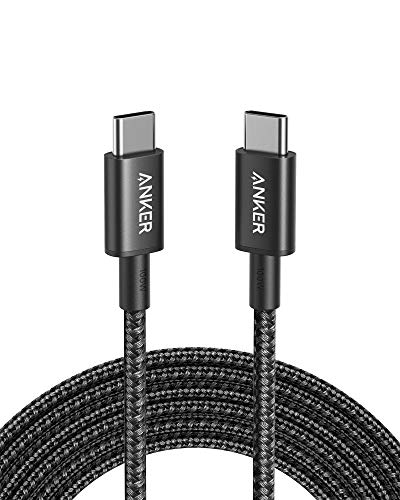
- Long 10-foot cable
- Supports up to 100W charging
- Nylon exterior with claimed 5,000-bend lifespan
Cons
- No video output; skip it for USB-C display connections

Pros
- Long 10-foot cable
- Up to 240W charging rating
- USB-IF certified
- Braided exterior uses recycled materials
Cons
- No screen mirroring; skip if you need display output

Pros
- Two cables included
- 10-foot length
- Supports up to 100W charging
- Nylon exterior
Cons
- Does not support video output
- Skip it if you need USB-C video output

Pros
- Two cables included
- Long 10-foot length
- Supports up to 240W charging
- Braided nylon construction
Cons
- Long cords may be cumbersome for travel
- Who should skip it: shoppers seeking compact, short cables

Pros
- Two cables included
- 10-foot length
- Up to 240W charging support
- Nylon braided construction
Cons
- No video output
- Who should skip it: people needing faster data transfers

Pros
- Three cables included
- Long 10-foot length
- Nylon-braided design
- Power Delivery up to 60W
Cons
- No Lightning or USB-A connection
- Does not support media display
- Skip if you need Lightning, USB-A, or display support

Pros
- Two cables included
- 10-foot length
- Braided construction
Cons
- No video output
- Skip if you need USB-C video output

Pros
- Two cables included
- 10-foot length
- Up to 100W charging support
- Braided cable construction
Cons
- Maximum charging speed depends on device and adapter
- Who should skip it: buyers needing faster data transfer

Pros
- Two cables included
- Up to 480Mbps data transfer
- Nylon-braided construction
Cons
- No USB Power Delivery support
- Who should skip it: users needing USB Power Delivery charging

Pros
- Three cables included
- Long 10-foot length
- Supports 60W PD charging
- Nylon-braided construction
Cons
- Who should skip it: users needing faster-than-480Mbps transfers
The Best USB-C Cables by Use Case
Best for Higher-Power Laptop Charging: UGREEN 240W USB C Cable 2-Pack
The UGREEN 240W USB C Cable 2-Pack suits a desk or shared charging area where two long USB-C cables can be useful. Its listing specifies USB Power Delivery 3.1 up to 240W, backward compatibility with 140W, 100W, and 65W devices, and data transfer up to 480Mbps. That high ceiling may suit a compatible laptop, but the cable cannot make a lower-rated charger or device charge at 240W.
Reasons to buy:
- Two cables in the pack provide a spare or let you outfit two locations.
- The listed 240W rating supports compatible high-power USB-C charging setups.
- Nylon braiding and a stated 10,000-plus bend test are listed durability details.
Reasons to avoid:
- Data transfer is listed at up to 480Mbps, not a high-speed data rate.
- The listing says it does not support video output.
Skip it if you need a cable for monitor video or your charger uses USB-A.
Best Single-Cable Choice: Anker USB C to USB C Cable
The Anker USB C to USB C Cable is a straightforward option when you need one long USB-C-to-USB-C cord for charging and data. The listing specifies charging up to 100W with a compatible charger, a nylon exterior, and a 5,000-bend lifespan. This one-pack version is a practical fit for a regular charging spot, while its stated power limit is below the 240W options in this roundup.
Reasons to buy:
- USB-C connectors at both ends work with compatible USB-C chargers and devices.
- The listed 100W ceiling can suit devices that support charging at that level.
- The listing includes a hook-and-loop cable tie for storage.
Reasons to avoid:
- It is one cable, rather than a multipack.
- The listing explicitly says it does not support video output.
Skip it if you need a USB-A connector, multiple cables, or monitor video over the cord.
Best for USB-A Chargers: Anker USB A to USB C Cable
The Anker USB A to USB C Cable has a USB-A plug on one end and USB-C on the other, making it the connector match for a USB-A wall adapter or computer port. The listing specifies a two-pack, charging up to 15W at 3A and 5V, and data transfer up to 480Mbps. Its lower stated power ceiling makes it more appropriate for phones and accessories than for a laptop that needs higher-wattage USB-C Power Delivery.
Reasons to buy:
- The USB-A-to-USB-C connector combination fits compatible older adapters.
- Two cables can cover separate rooms or provide a spare.
- The listing specifies nylon braiding and charging up to 15W.
Reasons to avoid:
- It is not compatible with Power Delivery, according to the listing.
- The published description says 6 feet, despite the product title describing 10 feet. Verify the selected listing variant and length before buying.
Skip it if you need a confirmed 10-foot cable or faster USB-C Power Delivery charging.
Best Three-Cable Value: SwaggWood 60W USB C to USB C Cable 10ft 3 Pack
The SwaggWood 60W USB C to USB C Cable 10ft 3 Pack offers three USB-C-to-USB-C cords for placing long cables at several charging spots. Its listing specifies up to 60W Power Delivery, nylon braiding, and compatibility with USB-C devices including phones, tablets, and laptops. That power rating can suit devices that accept up to 60W, but it is not the right pick if your laptop needs more power.
Reasons to buy:
- Three cables make it easier to keep one at a desk, bedside, and another location.
- The stated 60W Power Delivery rating is clearly below the 100W and 240W choices, helping narrow the match for lower-power devices.
- The listing specifies a braided exterior and says the cables do not support media display.
Reasons to avoid:
- USB-C-to-USB-C connectors will not plug directly into a USB-A charger.
- The listed 60W limit may not meet a higher-power laptop’s charging needs.
Skip it if your charger has a USB-A port or your device needs more than 60W.
Best Two-Pack for 100W Charging: USBC to USBC 100W [10ft/2 Pack]
The USBC to USBC 100W [10ft/2 Pack] pairs two long USB-C-to-USB-C cables with a listed maximum charging rate of 100W. The listing also specifies data transfer up to 480Mbps and a braided exterior, making it an option for charging compatible phones, tablets, or laptops at two locations. Its 100W rating depends on using a charger and device that support the required power, and it does not provide video output.
Reasons to buy:
- Two 10-foot cables cover multiple charging spots.
- The stated 100W rating offers more headroom than the 60W multipacks.
- The listing specifies USB-C plugs at both ends and 480Mbps data transfer.
Reasons to avoid:
- USB-C connectors require a compatible USB-C charger.
- The listing says the cable does not support video output.
Skip it if you need USB-A compatibility or a cable rated above 100W.
Also Considered
Anker USB C to USB C Cable in the two-pack version may suit buyers who want two 100W cables from Anker, but its listing also excludes video output and specifies a 5,000-bend lifespan.
Anker USB C to USB C Cable in the 240W two-pack may fit compatible higher-power devices, though the published listing gives it a lower rating than several other Anker entries and does not state data-transfer speed.
Anker Nano USB C to USB C Cable lists 240W charging and USB-IF certification, but its published description gives 1-, 3-, and 6-foot contents rather than confirming a 10-foot cable. Verify the selected length before considering it for this guide’s purpose.
KYEHD USB C to USB C Cable,3 Pack 10FT 60W PD may suit buyers seeking three 60W cables with 480Mbps data transfer, but it offers less charging headroom than the 100W and 240W alternatives.
How to Choose the Best 10-Foot USB-C Cable
Match both connectors to your charger and device
USB-C-to-USB-C cables need a compatible USB-C port at both ends. If your wall adapter has a USB-A port, a USB-C-to-USB-C cable will not fit it; choose a USB-A-to-USB-C cable such as the Anker USB A to USB C Cable instead. Check the port on the charger, not only the port on your phone or laptop, and confirm that the cable listing describes the connector layout you need.
Choose a wattage that fits your device and charger
A cable’s maximum power rating does not guarantee that a device will charge at that rate. The charger and device also need to support the relevant charging standard and power level. The picks here list ratings from 15W to 240W, so check your device’s charging requirements and your adapter’s output before choosing. A 240W cable can offer more headroom for a compatible laptop, while a 60W cable can be enough for a device that draws less power.
Separate charging power from data and video needs
Power rating, data speed, and video support are different capabilities. Several listings specify data transfer up to 480Mbps, but the Anker 100W cables and other models explicitly state that they do not support video output. If you want to connect a monitor, confirm that the exact cable supports video and that the device port supports display output. Do not assume that a USB-C plug means every cable supports the same functions.
Consider how many cables you need and where they will go
A single cable may be enough for one bedside charger, while a two- or three-pack can keep long cords at several desks or rooms. More cables can be convenient, but each still needs a compatible charger and device. Measure the route from outlet to device, including the path around furniture, and leave enough slack for comfortable use. Longer cords can help you avoid moving a device, but extra length can be harder to coil and store.
Check listed durability details and exact variant
Listings may describe braided jackets, bend-life claims, or included organizers. Treat these as manufacturer-provided details, not guarantees of how long a cable will last in your routine. Also verify the specific listing’s length and pack size. One Anker USB A to USB C Cable description says 6 feet even though its title presents a 10-foot version, so the selected variant deserves particular attention.
How We Compared
This comparison uses the published product listings, including connector types, stated charging wattage, data-transfer details, pack contents, materials, and listed limitations. We considered how those details may fit common uses such as charging a laptop at a desk, reaching a bedside outlet, or keeping cables in multiple rooms. Product-specific performance statements remain listing claims, and customer feedback was not supplied as usable evidence for establishing recurring owner experiences.
Frequently Asked Questions
Can any 10-foot USB-C cable charge a laptop?
No. Check the cable’s stated power rating, your laptop’s charging requirements, and the charger’s output. A 60W cable may not meet the needs of a laptop that calls for more power, while a cable rated for 240W still cannot raise the output of a lower-rated charger.
Will a USB-C cable work with a USB-A wall charger?
Only if one end of the cable has a USB-A plug. The Anker USB A to USB C Cable has that connector combination. USB-C-to-USB-C models need a USB-C port on the charger, so check the adapter before ordering.
Does a 240W cable charge every device at 240W?
No. The 240W figure describes the cable’s listed maximum, not the power every device will draw. Actual charging depends on the device, charger, and supported charging protocols. The cable rating alone does not establish charging speed.
Can these cables connect a laptop to a monitor?
Do not assume so. Several products in this guide explicitly say they do not support video output. Check the exact cable listing and confirm that your computer’s USB-C port supports display output before relying on a cable for a monitor.
Is 480Mbps enough for moving files?
It may be suitable for ordinary data transfer, but it is slower than higher-speed USB data connections. The listed 480Mbps figure is a maximum specification, not a promise of real-world transfer speed. If you regularly move large files, look for a cable that explicitly lists the data rate you need.
Why verify length and pack size on the selected listing?
Product pages can include multiple variants, and published descriptions may conflict. For example, one Anker USB-A listing describes 6-foot cables despite a 10-foot title. Confirm the selected length, connector type, and number of cables in the package before placing an order.



Write Your Review
No reviews yet. Be the first to share your experience!