

Smart bulbs can add voice control and scheduling, but brightness, connection requirements, and ecosystem support vary. This guide to the best smart bulbs for Google Home compares color and white-light options, Matter support, app features, and multipack choices so you can match bulbs to your rooms and routines.

Pros
- Matter, Alexa, and Google Assistant compatibility
- Tunable white light and 16 million colors
- App scheduling and group control
Cons
- Cannot be used with smart switches
- Skip if smart-switch control is essential
Pros
- Color and adjustable white light
- Alexa and Google Assistant compatibility
- Scheduling, timers, and remote app control
- No hub required
Cons
- Requires 2.4 GHz Wi-Fi
- Who should skip it: households without 2.4 GHz Wi-Fi

Pros
- Alexa and Google Assistant compatibility
- Local Bluetooth control when Wi-Fi is off
- Tunable white and RGB colors
- Six bulbs included
Cons
- Wi-Fi setup requires 2.4 GHz Wi-Fi and Bluetooth
- Who should skip it: shoppers avoiding app-based setup

Pros
- Matter certification enables easy multi-platform smart integration
- Operates over local network during internet outages
- Wide color temperature range from 1800K to 6500K
- High 90+ CRI rating provides accurate color rendering
Cons
- Incompatible with physical wall dimmer switches
- Supports only 2.4 GHz Wi-Fi networks

Pros
- Four bulbs per pack
- Full-color dimming
- Alexa and Google Assistant support
- Remote control through the Kasa app
Cons
- Who should skip it: shoppers wanting non-smart bulbs

Pros
- Four bulbs included
- No hub required
- Dimmable tunable white and RGB
- Alexa and Google Assistant support
Cons
- Initial Wi-Fi setup requires 2.4 GHz Wi-Fi and BLE
- Not suitable for use with dimmer switches
- Who should skip it: buyers needing dimmer-switch compatibility
Pros
- Four bulbs included
- Dimmable from 1% to 100%
- Adjustable warm-to-cool white light
- Alexa and Google Assistant support
Cons
- Cannot be used with smart switches
- Presets save only over Wi-Fi, with Bluetooth off
- Who should skip it: people who need smart-switch compatibility
The Best Smart Bulbs by Use Case
Best for Matter Setup: Govee LED Smart Light Bulbs
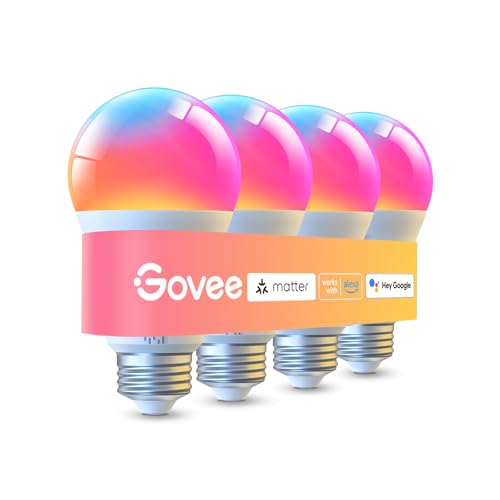
The two-pack Govee LED Smart Light Bulbs suits buyers who want bright color bulbs and a stated Matter connection for Google Assistant control. The listing specifies more than 1,000 lumens, 16 million colors, tunable 2,700K to 6,500K white, and dimming from 1% to 100%. Matter support can be useful if you want to connect compatible devices across supported smart-home platforms, while Govee’s app adds scenes and schedules.
Reasons to buy:
- More than 1,000 lumens gives this pair higher listed brightness than the 800-lumen options here.
- Matter support is specified alongside Google Assistant, Alexa, and the Govee Home app.
- The app offers up to 54 scene modes, plus sunrise and sunset scheduling.
Reasons to avoid:
- The listing says presets can be saved only over Wi-Fi with Bluetooth turned off.
- These bulbs cannot be used with smart switches, so check the control setup in your fixture.
Skip it if you need a bulb specifically approved for use with a smart switch or want a larger multipack.
Best for SmartLife Automation: Lightinginside Smart Light Bulbs Work
Lightinginside Smart Light Bulbs Work is a six-bulb set for buyers outfitting several sockets with color and tunable-white lighting. The listing specifies 800 lumens, 16 million colors, 2,700K to 6,500K white, Google Assistant compatibility, and control through SmartLife. Its BLE and Wi-Fi connection options may help with local control when Wi-Fi is unavailable, though remote access is listed as a Wi-Fi feature.
Reasons to buy:
- Six bulbs suit homes where several E26 sockets need matching smart controls.
- SmartLife supports schedules, timers, plans, and biorhythm functions.
- The listing specifies BLE backup for local control if Wi-Fi goes down.
Reasons to avoid:
- Initial Wi-Fi setup needs both 2.4GHz Wi-Fi and Bluetooth; Wi-Fi remote control also depends on Wi-Fi.
- At 800 lumens, the listed output is lower than the brighter Govee and Lightinginside 100W options.
Skip it if you need fewer bulbs, higher listed brightness, or Matter support specifically.
Best for Energy Monitoring: Kasa Smart Light Bulbs, Full Color Changing
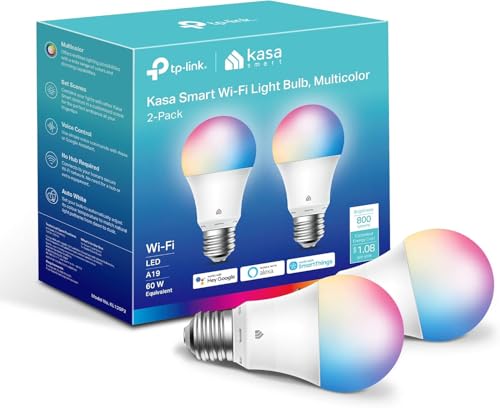
Kasa Smart Light Bulbs, Full Color Changing is a two-pack for Google Home users who want color control and an app that reports energy use. Each bulb is listed at 800 lumens and 9W, with 16 million colors and tunable white from 2,500K to 6,500K. Kasa also lists dawn-to-dusk color-temperature adjustment, schedules, and remote control through its app.
Reasons to buy:
- Energy monitoring adds a way to view real-time bulb usage in the Kasa app.
- Automatic color-temperature adjustment can follow natural-light patterns from dawn to dusk.
- Google Assistant voice control and remote app control are both specified.
Reasons to avoid:
- The bulbs require a 2.4GHz Wi-Fi network and do not list Matter support.
- The two-pack has 800 lumens per bulb, so consider the brighter options for larger or darker spaces.
Skip it if you want a multipack for several rooms or need Matter compatibility across platforms.
Best for Cross-Platform Matter: OREiN Matter Smart Light Bulb
OREiN Matter Smart Light Bulb is a four-pack for households using Google Home alongside other compatible platforms. The listing names Google Home, Alexa, Apple Home, and SmartThings, and says the bulbs pair through a Matter-certified app by scanning a QR code. They provide 800 lumens, more than 16 million colors, and tunable white from 1,800K to 6,500K.
Reasons to buy:
- Matter support and named platform compatibility suit a household that uses more than one smart-home system.
- The four-pack gives you multiple bulbs for coordinated rooms or fixtures.
- The listing specifies local-network operation even when the internet is offline.
Reasons to avoid:
- It supports 2.4GHz Wi-Fi, not 5GHz Wi-Fi.
- The listing warns against dimmer switches, which may cause flickering, buzzing, or bulb failure.
Skip it if your fixture uses a wall dimmer or your setup depends on 5GHz-only Wi-Fi.
Best for Brighter Rooms: Lightinginside Smart Light Bulbs 100W Work
Lightinginside Smart Light Bulbs 100W Work is a four-pack aimed at rooms where a higher listed output is useful. Its 1,350-lumen, 100W-equivalent bulbs offer RGB colors and tunable white from 2,700K to 6,500K, with Google Assistant support through SmartLife. BLE backup is listed for local control when Wi-Fi is off, while Wi-Fi provides remote access.
Reasons to buy:
- At 1,350 lumens per bulb, it has the highest listed brightness among these picks.
- SmartLife supports schedules, timers, plans, and grouped control.
- The four-pack combines brighter output with color and tunable-white adjustment.
Reasons to avoid:
- The bulbs should be dimmed in the app or with a voice assistant, not with a dimmer switch.
- Wi-Fi setup needs 2.4GHz Wi-Fi and Bluetooth; the listing does not specify Matter support.
Skip it if your fixtures have dimmer switches or you prefer a Matter-based setup.
Also Considered
Kasa Multicolor Dimmable Wi-Fi Smart Bulb, A19 could suit buyers who want four Kasa color bulbs with Google Assistant and away-mode scheduling, but its published feature details are less complete than those of the two-bulb Kasa pick.
Govee LED Smart Light Bulbs in the four-pack shares the 1,000-lumen output and color features of the two-pack, but its published listing does not specify Matter support and has a lower listed rating.
How to Choose Smart Bulbs for Google Home
Check Google Assistant and Matter Compatibility
Google Assistant compatibility means you can use voice commands through a compatible Google setup, but it does not tell you which app features or local controls are available. Check the listing for the exact assistant or platform name, then confirm the setup steps and supported features. Matter is a separate consideration: Govee’s two-pack and OREiN explicitly list Matter, while the published details for other bulbs do not.
If your household uses more than one smart-home platform, a Matter-listed product may fit your plan, but confirm that your intended Google Home setup supports the required pairing method. For a single Google Assistant setup, compare the stated app and connection requirements rather than assuming that all compatible bulbs work identically.
Match Brightness to the Room
Lumens describe listed light output, so use them to compare bulbs before deciding how many sockets to fill. The listed options range from 800 lumens to 1,350 lumens per bulb. The 1,350-lumen Lightinginside set and 1,000-lumen Govee pair are worth considering for spaces where the lower-output options may not be enough, while the 800-lumen models may suit smaller lamps or rooms.
Do not treat watt-equivalent labels as actual power draw. For example, the Kasa two-pack lists 800 lumens and 9W actual input, while the Lightinginside brighter set lists 1,350 lumens and 11W. Check both the lumen figure and the bulb’s fit in your fixture, then consider how many bulbs the room uses.
Confirm Socket, Wi-Fi, and Switch Requirements
These products are listed as A19 bulbs with E26 bases, but you should still compare the bulb shape and base with your fixture before ordering. Several models support only 2.4GHz Wi-Fi. The Lightinginside SmartLife sets also describe Bluetooth setup or backup, while OREiN warns that its bulbs are not for dimmer switches.
A smart bulb usually needs power at the wall switch to remain reachable through its app or voice assistant. Check the product instructions for switch restrictions and use app or voice dimming where specified. Do not assume that a conventional wall dimmer will work just because the bulb supports dimming.
Choose White-Light Range and Color Features
Color bulbs can also provide tunable white, but their listed ranges differ. Govee and the 100W-equivalent Lightinginside set specify 2,700K to 6,500K; Kasa lists 2,500K to 6,500K; OREiN lists 1,800K to 6,500K. A wider stated range gives you more adjustment between warm and cool white, while RGB colors suit accent lighting and scenes.
Compare app features only if you expect to use them. Kasa lists energy monitoring and automatic color-temperature adjustment; Govee lists scene modes and schedules; SmartLife bulbs list timer and schedule functions. These are product-specific details, not interchangeable features across every bulb in a brand’s range.
Pick a Pack Size That Fits Your Plan
Pack size can change which product makes sense when you are outfitting multiple rooms. The supplied choices include two-, four-, and six-bulb sets, so count the sockets you want to automate before comparing options. A larger pack may reduce the need to mix brands, but only if its brightness, app, and connectivity requirements fit every intended fixture.
For more background on network choices, see our guides to smart home hubs versus Wi-Fi and smart home hubs without subscriptions. Those articles cover broader smart-home control questions; check each bulb’s own listing for its specific setup requirements.
How We Compared
This comparison uses the published product listings, including their stated brightness, color and white-light ranges, pack sizes, app features, connection requirements, and named voice-assistant or Matter compatibility. We also considered listed limitations, such as dimmer-switch cautions and 2.4GHz Wi-Fi requirements. Customer-rating figures were supplied without review details, so they are not treated as evidence of recurring owner experiences.
Frequently Asked Questions
Will these bulbs work with Google Home?
The published listings identify Google Assistant or Google Home compatibility for these products. Setup may still differ by bulb and app. Check the product’s pairing instructions and confirm that your Wi-Fi band and Google Home setup meet the listed requirements.
Do smart bulbs need a hub?
The Lightinginside SmartLife bulbs are listed as requiring no hub, and the Kasa models are also described as hub-free. The OREiN listing describes Matter pairing through a compatible app. A no-hub claim does not remove Wi-Fi, Bluetooth, app, or platform requirements, so check those details before choosing.
Can I use these bulbs with a dimmer switch?
Do not assume so. The OREiN listing warns that smart bulbs usually do not work with dimmer switches, and Lightinginside specifically says to dim its brighter bulbs through the app or voice assistant rather than a dimmer switch. Check the exact bulb’s instructions and use its supported dimming method.
What does Matter add for a Google Home user?
Matter is a smart-home protocol intended to support interoperability among compatible devices and platforms. The Govee two-pack and OREiN set explicitly list Matter, but that does not guarantee that every app feature works the same way through every platform. Review the pairing instructions and decide whether you need cross-platform support or only Google Assistant control.
Which bulbs are brightest in this comparison?
Lightinginside Smart Light Bulbs 100W Work lists 1,350 lumens per bulb, while Govee LED Smart Light Bulbs lists more than 1,000 lumens. The other listed models list 800 lumens. These figures help compare stated output, but the right choice also depends on the room, fixture, and number of bulbs.


Write Your Review
No reviews yet. Be the first to share your experience!