

Choosing a tablet for an older adult means weighing readable screen size against portability, ease of use, and the apps they need. A large display can make video calls and reading more comfortable, while a familiar app store and straightforward settings may matter more than a fast refresh rate or stylus.
This guide compares four Android and Fire tablets for different routines, including video calls, reading, note-taking, and watching shows. Product details come from the published listings, so check app availability, accessibility settings, and exact memory configuration before buying.
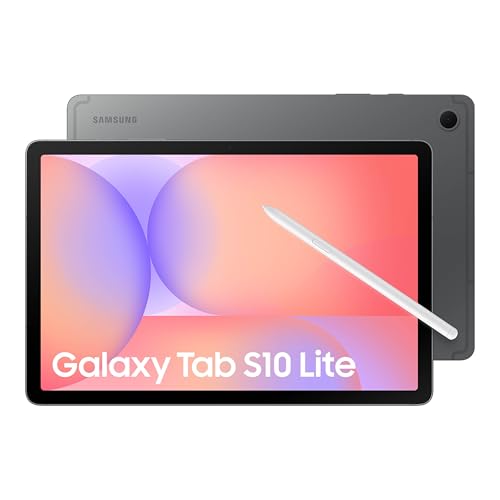
Pros
- Includes S Pen for precise writing and drawing
- MicroSD expansion supports up to 2TB storage
- Long manufacturer-rated battery life up to 16 hours
- Slim profile at 0.26 inches thick
Cons
- Standard LCD panel instead of premium display technology
- Demanding mobile gamers and power users should skip it

Pros
- Crisp 10.1-inch 1080p Full HD screen
- Expandable storage up to 1 TB via microSD
- Durable build using strengthened aluminosilicate glass
- Built-in parental controls through Amazon Kids
Cons
- Compatible stylus pen sold separately
- May arrive in generic Amazon packaging
- Amazon Kids+ content requires paid subscription

Pros
- Large 13.4-inch display with smooth 120Hz refresh rate
- Integrated 4G LTE and GPS for mobile connectivity
- Expandable storage up to 1TB via microSD card
- Includes 3.5mm headphone jack and factory-installed screen protector
Cons
- Relatively heavy at 1.59 pounds for handheld use
- Who should skip: buyers needing a compact, lightweight tablet
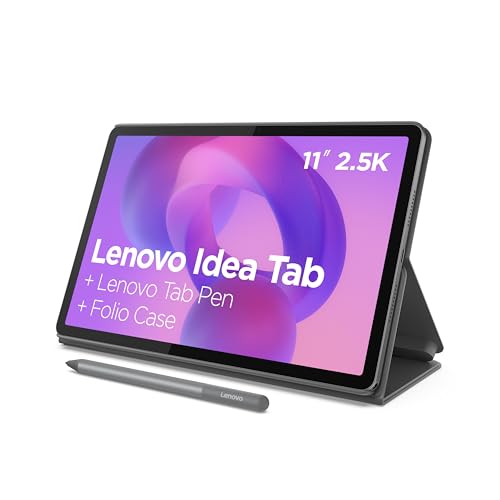
Pros
- Sharp 11-inch 2.5K display with 90Hz refresh rate
- Included Tab Pen stylus and folio case
- Large 256GB internal storage and 8GB memory
- Quad speakers tuned with Dolby Atmos
Cons
- 20W wired charging speed limits quick battery refills
- Demanding 3D gamers should skip entry-level graphics chip
The Best Tablets by Use Case
Best for Handwritten Notes: Samsung Galaxy Tab S10 Lite, 6GB RAM, 128GB
The Samsung Galaxy Tab S10 Lite, 6GB RAM, 128GB pairs a 10.9-inch LCD with an included S Pen, making it a sensible pick for someone who wants to write reminders, annotate notes, or use a stylus without buying one separately. Samsung lists 128GB of built-in storage and microSD expansion up to 2TB, a useful arrangement for keeping photos, books, and downloaded media on the tablet. The listing claims battery life up to 16 hours, but actual time varies with use.
Reasons to buy:
- The included S Pen supports handwriting, drawing, and note-taking.
- Expandable storage gives room for locally saved photos, videos, and files.
- Samsung lists Circle to Search and note-related intelligent features.
Reasons to avoid:
- The 10.9-inch display is smaller than the TECLAST’s 13.4-inch screen, which may matter for large text or shared viewing.
- Confirm which Samsung apps and accessibility controls suit the recipient before purchase.
Skip it if the recipient mainly wants the lowest-cost screen for reading and streaming and does not need pen input or Samsung’s connected-device features.
Best Budget Option: Amazon Fire HD 10 tablet, built for relaxation
The Amazon Fire HD 10 tablet, built for relaxation is a refurbished, certified Like-New device with a 10.1-inch 1080p display, suited to reading, streaming, and video calls. Its listing describes a 5MP front camera for Zoom and says storage can expand to 1TB with a separately sold microSD card. Alexa voice requests may help someone who prefers spoken commands, while Amazon Kids controls are more relevant when a family shares the tablet with children.
Reasons to buy:
- The Full HD screen is a clear size and resolution combination for shows and general browsing.
- Alexa support offers voice access to tasks such as asking for recipes or controlling compatible smart-home devices.
- The listing says Like-New devices include the same limited warranty as new devices.
Reasons to avoid:
- The listing conflicts on memory: the product name says 4GB RAM, while its feature text says 3GB. Verify the exact unit specification.
- This is a refurbished model, and the listing does not establish whether every app the recipient wants is available in Amazon’s app environment.
Skip it if the user depends on a particular Android app or wants a new tablet rather than a refurbished one.
Best for a Large Viewing Area: TECLAST T65 13.4” Android16 4G Tablet
The TECLAST T65 13.4″ Android16 4G Tablet has the largest stated screen in this group: a 13.4-inch IPS display with 1920 × 1200 resolution. That extra area can help when enlarging text, viewing sheet music, or watching video from across a room, though its 720g weight makes it less convenient to hold for long stretches than a smaller tablet may be. The listing specifies 128GB of storage, expansion up to 1TB, 4G LTE, and a 3.5mm headphone jack.
Reasons to buy:
- The 13.4-inch screen provides the largest stated viewing area among these options.
- 4G LTE can provide mobile connectivity where a suitable service plan and network are available; confirm carrier compatibility and any service costs.
- A 3.5mm jack supports wired headphones, and the listing specifies a 1-year manufacturer warranty.
Reasons to avoid:
- At 720g, it may be cumbersome for someone who plans to hold a tablet while reading.
- The listing does not name a stylus as included, so verify accessories before expecting pen input.
Skip it if the recipient needs a light tablet for one-handed use or does not need a large display or mobile-data option.
Best for Included Pen and Case: Lenovo Idea Tab – College Tablet
The Lenovo Idea Tab – College Tablet includes a Tab Pen and folio case, giving a buyer useful accessories for writing and carrying the tablet. Its 11-inch 2.5K IPS touchscreen is a middle-sized option, and Lenovo lists 8GB memory and 256GB storage. The listing also describes quad Dolby Atmos-tuned speakers and up to 12 hours of YouTube playback, a manufacturer estimate rather than a guaranteed result for every routine.
Reasons to buy:
- The included pen and folio case reduce the need to source those accessories separately.
- 256GB of listed storage exceeds the built-in capacity stated for the other three models.
- Lenovo specifies hardware-based low-blue-light technology and Circle to Search with Google.
Reasons to avoid:
- The 11-inch screen is not as large as the TECLAST’s, which may matter when viewing small text.
- Confirm the recipient’s preferred apps and whether the supplied folio is comfortable for their intended position and grip.
Skip it if the user wants the biggest possible screen or a very low-cost tablet focused on basic entertainment.
How to Choose the Best Tablet for Seniors
Screen size, resolution, and readability
Screen size affects more than movie viewing. A larger panel can give text and on-screen controls more room, but it usually makes the device harder to hold and carry. The TECLAST’s 13.4-inch screen is the largest here; the Samsung, Lenovo, and Fire models are closer to 10 to 11 inches. If possible, compare a screen in person and check whether the operating system allows larger text, display scaling, and high contrast. Those settings are not fully detailed in every published listing.
Apps, operating system, and setup
App compatibility may matter more than processor speed for someone who uses a particular video-call service, library app, banking app, or family photo service. The Samsung, TECLAST, and Lenovo listings describe Android devices; the Fire listing identifies an Amazon Fire tablet. Do not assume the same app catalog or setup process across platforms. Before choosing, check the exact apps the recipient needs, how they install updates, and whether a family member can help set up accounts and accessibility options.
Keep the home screen simple after setup: place frequently used apps where they are easy to find and remove shortcuts that cause confusion. For shared device guidance, compare the supplied tablet features for different work routines and reading-focused tablet options. Those pages cover other use cases, not a guarantee of compatibility with these particular models.
Connectivity for calls and use away from home
Every model needs a suitable way to reach the internet for online calls, streaming, and many apps. The TECLAST listing specifies 4G LTE as well as Wi-Fi, but cellular use depends on carrier support and may involve a separate plan. The other published product details do not specify cellular connectivity. For a tablet that will stay at home, reliable access to the home Wi-Fi network may be enough. If family video calls are a priority, also compare camera placement and stated camera specifications; the Fire listing specifically names a 5MP front-facing camera.
Storage, memory, and accessories
Storage holds installed apps and saved photos, books, and videos. Lenovo lists 256GB, while Samsung lists 128GB with microSD expansion up to 2TB, TECLAST lists 128GB with expansion up to 1TB, and the Fire listing describes 32GB or 64GB configurations with microSD expansion up to 1TB. Confirm which Fire capacity is being offered and whether a card is sold separately. A memory discrepancy also appears in its listing, so check whether the unit has 3GB or 4GB RAM rather than relying on the conflicting copy.
Accessories can change the experience. Samsung lists an S Pen, and Lenovo lists a Tab Pen and folio case. The Fire listing says its compatible stylus is sold separately, while the TECLAST information provided does not identify an included pen. If the recipient writes notes, consider our guide to tablets for handwritten notes with a stylus. Check the exact package contents before purchase, since accessory inclusion should not be assumed.
Battery claims, weight, and charging routine
Published battery estimates can help compare models, but video playback, brightness, wireless connections, and app use affect runtime. Samsung lists up to 16 hours, Lenovo lists up to 12 hours of YouTube playback, and TECLAST specifies an 8,000mAh battery without giving a runtime estimate. The Fire data available here does not state battery runtime. Consider where the tablet will be used, whether it can stay near an outlet, and whether the owner can manage its charging connection. The TECLAST’s stated 720g weight may be a meaningful concern for someone with limited grip strength.
How We Compared
We compared the published listing specifications and feature descriptions, including screen size and resolution, listed memory and storage, expansion options, connectivity, accessories, camera details, and battery claims. We also considered the stated product condition and warranty information where provided. The product data reports zero customer reviews for these listings, so customer feedback cannot establish a pattern of owner experience here. Listings may contain omissions or conflicting details, including the Fire tablet’s RAM information; verify the exact configuration and package contents before ordering.
Frequently Asked Questions
Which tablet has the largest screen?
The TECLAST T65 has the largest stated screen at 13.4 inches. Its larger size can be useful for reading and shared viewing, but its stated 720g weight may make it less comfortable to hold for long periods.
Which models include a pen?
The Samsung listing specifies an S Pen, and the Lenovo listing names a Tab Pen and folio case. The Fire tablet’s stylus is sold separately according to its listing. The supplied TECLAST details do not confirm an included pen, so check the package contents if writing by hand is important.
Can these tablets make video calls?
The Fire listing specifically mentions using its 5MP front-facing camera for Zoom calls. The other published descriptions do not provide front-camera specifications, so check the exact model details and the video-call app’s availability before choosing a different tablet.
Does the TECLAST need a cellular plan?
The TECLAST listing specifies 4G LTE and Wi-Fi. Cellular access may require a compatible carrier and separate service plan; confirm network compatibility and costs with the provider. Wi-Fi alone can serve at home where a suitable network is available.
Which option suits someone who mainly reads and watches shows?
The Fire HD 10 listing emphasizes reading and streaming and specifies a 10.1-inch Full HD screen. Choose it only if its app environment includes the services the person uses and refurbished condition is acceptable. For a larger viewing area, consider the TECLAST, while accounting for its greater stated weight.
Should I prioritize more storage or a larger screen?
Prioritize screen area if the user often enlarges text, watches video, or reads sheet music. Prioritize storage if they keep many photos, videos, or downloaded books on the tablet. Lenovo lists 256GB of built-in storage, while Samsung and TECLAST list 128GB with microSD expansion; the Fire listing offers 32GB or 64GB configurations with expansion. Check the exact model capacity and whether a memory card is included.



Write Your Review
No reviews yet. Be the first to share your experience!