

Consumer devices frequently crack, overheat, or wash out under direct sunlight on active jobsites. Selecting the best tablet for construction field work involves balancing display luminance, drop survivability, operating system requirements, and battery uptime in harsh outdoor conditions.
Whether managing digital blueprints in full daylight, entering inspection checklists in dusty utility trenches, or running specialized engineering utilities, selecting the right platform prevents costly operational downtime. This guide breaks down key hardware attributes across Windows and Android devices to match specific trade workloads.

Pros
- Bright 1000-nit display suited for direct sunlight
- Durable IP65 and MIL-STD-810H rated enclosure
- Built-in 4G LTE, GPS, and fast WiFi 6
- Expandable storage up to 512GB via TF card
Cons
- Lacks fingerprint recognition for quick biometric login
- Substantial weight makes extended one-handed operation difficult
- Skip if needing lightweight portability or biometric authentication

Pros
- Durable IP65 casing rated for four-foot drops
- Full Windows 11 Pro with built-in Ethernet port
- Swappable 5000mAh battery with included carry handle
- Bright 10.1-inch 1200p display with scratch-resistant glass
Cons
- Relatively heavy at over 2.2 pounds
- Entry-level Intel N5100 processor limits heavy multitasking
- Modest 128GB eMMC storage may require external drives

Pros
- Hot-swappable battery system prevents mid-shift shutdowns
- High 650-nit brightness improves outdoor screen legibility
- IP65 water resistance and MIL-STD-810H drop protection
- Built-in 4G LTE and GPS for field connectivity
Cons
- Entry-level Intel N5105 processor limits demanding multitasking
- Heavy 2.2-pound chassis strains single-handed handheld operation
- Skip if needing desktop-tier processing power

Pros
- Exceptionally bright 1200-nit outdoor display
- Substantial 12200mAh battery capacity
- Waterproof and dustproof IP68 rating
- Ample 8GB RAM and 256GB storage
Cons
- Heavier than standard consumer tablets at 1.38 pounds
- Runs on older Android 10 operating system
- Buyers seeking sleek indoor tablets should skip this model

Pros
- Rugged IP68 and IP69K water and dust resistance
- Smooth 8.68-inch 120Hz display with 600-nit brightness
- Large 7200mAh battery with 18W USB-C charging
- Built-in rear camping light and 50MP camera
Cons
- Noticeably thick 0.6-inch profile and 1.19-pound weight
- Users wanting an ultralight casual tablet should skip it
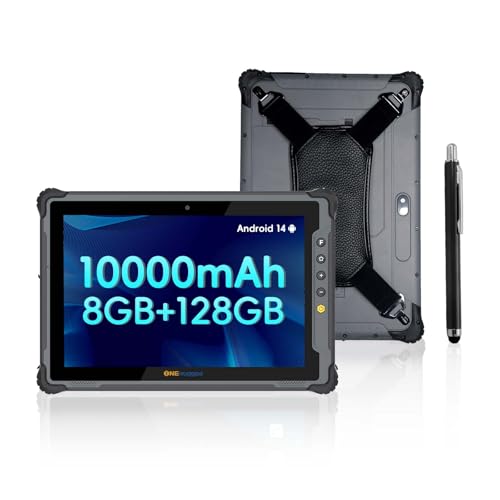
Pros
- High-brightness 1000-nit display for outdoor legibility
- User-swappable 10000mAh battery extends uptime
- Certified MIL-STD-810H shock and IP65 dust-water resistance
- Built-in 4G LTE connectivity and GPS navigation
Cons
- Heavy 2.25-pound weight causes fatigue during handheld use
- Thick 0.87-inch chassis lacks everyday consumer portability

Pros
- Hot-swappable dual-battery setup avoids work interruptions
- High-brightness 650-nit display aids outdoor visibility
- User-accessible M.2 slot supports easy SSD upgrades
- Certified IP65 and MIL-STD-810G rugged build
Cons
- Intel N5100 CPU limits demanding multitasking performance
- Modest 128GB base storage requires early upgrade
- Skip if your workflow requires intensive desktop software
How to Choose the Best Tablet for Construction Field Work
Display Brightness and Sunlight Readability
Outdoor visibility makes or breaks a tablet on an active project site. Standard office displays typically output between 300 and 400 nits, which quickly washes out under direct mid-day sun, forcing workers to seek shade simply to read a dimension. Construction use demands high-brightness panels, typically ranging from 600 to 1,200 nits.
High screen luminance introduces higher power draw, which depletes battery cells faster if brightness is pinned at maximum. Models providing 1,000 nits or higher allow smooth blueprint review in direct exposure, though field crews should plan around the trade-off between visibility and runtime.
Ingress Protection and Drop Certification
Dust, concrete particles, and sudden rain showers easily ruin consumer electronics without heavy-duty enclosures. IP ratings define protection against foreign matter and water. An IP65 rating guarantees complete dust sealing and defense against low-pressure water jets, while IP68 ratings allow deeper immersion resistance.
Mechanical impact defense is typically evaluated via MIL-STD-810G or MIL-STD-810H standards, certifying survival against 4-foot drops onto hard surfaces. Selecting certified rugged enclosures eliminates the need for bulky aftermarket cases that can trap heat during summer operations.
Operating System: Windows 11 Pro vs. Android
Software compatibility determines platform choice. Windows 11 Pro tablets run full desktop architecture, making them essential for running native CAD tools, SCADA systems, legacy estimating software, and domain-joined network assets backed by BitLocker encryption. The trade-off is higher passive power drain and bulkier thermal management.
Android tablets provide longer battery runtimes and rapid startup for field inspection forms, cloud project management dashboards, and lightweight photo documentation. Teams needing complex multi-window multitasking or desktop office software should verify platform compatibility before opting for mobile operating systems.
Battery Architecture and Hot-Swap Support
A dead tablet stops productivity across entire trades. While internal battery packs between 7,000mAh and 12,200mAh can support a full single shift, multi-shift projects or extended GPS tracking demand continuous power. Hardware featuring hot-swappable dual batteries allows swapping the primary pack without powering down the device or losing active data entries.
Single-cell devices require tethering to a vehicle charger or wall outlet, creating potential workflow bottlenecks if fast-charging infrastructure is unavailable on the project site.
Field Connectivity and Integrated Sensors
Jobsites rarely offer dependable local Wi-Fi coverage across the entire build footprint. Integrated 4G LTE cellular connectivity allows supervisors and trade contractors to sync change orders, download revision sheets, and submit daily logs straight from remote zones. Built-in GPS and GLONASS assist surveying, equipment tagging, and layout apps directly on location.
Standard tablets relying purely on office tethering limit communication to the site trailer, increasing walking time across sprawling facilities.
How We Compared These Products
Our editorial team evaluated the included devices by analyzing manufacturer technical specifications, ingress protection metrics, verified military standard durability ratings, display nit outputs, processor platforms, and real-world trade customer feedback. We examined software application compatibility ranging from simple digital checklist apps to enterprise CAD viewers. This review relies entirely on comprehensive product specification research rather than proprietary lab benchmarks.
Which Option Fits Your Needs?
For professionals requiring full Windows compatibility to inspect CAD files, execute digital forms, and interface with corporate domains, the MUNBYN IRT14 Rugged Tablet Windows 11 Pro delivers an optimal balance. Its 10.1-inch screen pushes 1,000 nits of brightness to combat direct sunlight, backed by an IP65 housing and an Intel N5100 processor. Who should skip it: crews prioritizing ultra-light mobility or those needing integrated fingerprint biometric access.
For large-format drawing review, the ONERugged M20J Rugged Tablet 12.2 Inch Windows 11 offers a spacious 12.2-inch Full HD screen and an Intel N5105 CPU. It features a hot-swappable dual-battery layout that keeps the unit powered during pack changes, preventing lost work on long shifts. Who should skip it: field personnel needing compact single-hand operation during ladder climbs or tight utility inspections.
When maximum daylight visibility and extended field uptime take priority, the TRIPLTEK 8″ PRO (4G LTE, 256GB) provides a remarkable 1,200-nit display and an immense 12,200mAh battery pack in an IP68-rated chassis. Its compact form factor suits drone operation and site inspection. Who should skip it: enterprise users requiring desktop Windows applications or current Android platform updates beyond Android 10.
Field crews managing cloud-based project management apps will benefit from the ONERugged 10.1″ Rugged Tablet M10T Android 14. It combines modern Android 14 architecture, an octa-core MediaTek Helio G99 chip, 1,000 nits of brightness, and a swappable 10,000mAh battery for continuous multi-shift operations. Who should skip it: trades bound strictly to legacy Windows software suites.
For compact portability on mobile inspections, the AGM P3 Rugged Mini Tablet Android 16, 8.68″ 120Hz provides IP68 and IP69K sealing alongside a high-resolution 50MP rear camera for quality-control site photos. Who should skip it: users requiring large-screen drafting visibility or extreme daylight performance beyond 600 nits.
Frequently Asked Questions
How many nits of display brightness are needed for outdoor field work?
Direct outdoor sunlight typically requires at least 600 nits for comfortable reading in shaded areas, while open jobsites without overhead cover demand 1,000 nits or more. Lower-rated screens appear dark, washing out complex schematics and increasing reading fatigue under direct rays.
What does an IP65 rating mean on a construction site?
The first digit, 6, denotes total protection against dust, concrete grit, and small airborne debris. The second digit, 5, verifies protection against low-pressure water streams from any angle, ensuring the device survives rain, mud splatters, and quick washdowns with a damp cloth.
Can rugged Windows tablets run desktop CAD applications?
Windows 11 Pro rugged tablets equipped with quad-core Intel Celeron or Jasper Lake processors can smoothly open basic CAD viewers, mark up 2D schematics, and run standard estimating packages. However, heavy 3D rendering or complex BIM modeling generally demands higher-tier workstations.
What is the benefit of a hot-swappable battery?
Hot-swappable configurations feature a smaller internal backup cell that powers the tablet for several minutes while the primary battery is removed and replaced. This eliminates rebooting, preserves open documentation forms, and allows continuous field operation across double shifts.
Are analog notebooks or electronic calculators still useful alongside tablets?
Analog field tools such as waterproof stone paper pads or dedicated fractional construction calculators serve as reliable backups. They do not rely on battery life or touch sensitivity, allowing quick field notes during heavy downpours or rapid conversions when handling dirty tools.



Write Your Review
No reviews yet. Be the first to share your experience!