

USB-C cables can look alike while differing in supported charging power, length, and durability details. This guide to the Best USB-C Cable for iPhone 18 compares two USB-C to USB-C options so you can match a cable to your phone, other devices, charger, and everyday setup.

Pros
- Two cables included
- 6-foot length
- Up to 60W Power Delivery
- Hook-and-loop cable ties included
Cons
- Who should skip it: Lightning-device or USB-A-charger owners
- Does not support media display
Pros
- Two cables included
- 6.6-foot length per cable
- Up to 240W charging support
- Braided cable construction
Cons
- USB-C connectors only, no USB-A
- Who should skip it: anyone needing USB-A connectivity
The Best USB-C Cables by Use Case
Best for Everyday Phone Charging: Anker USB C to USB C Cable
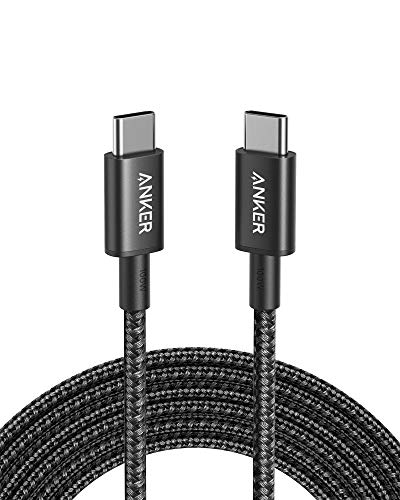
The Anker USB C to USB C Cable suits everyday charging when your phone and wall adapter both use USB-C. The listing specifies Power Delivery charging up to 60W, a 6-foot length, and a reinforced nylon exterior. Its power ceiling is ample for many phone-charging setups, but actual charging speed depends on the phone, adapter, and their supported charging rates.
Reasons to buy:
- USB-C connectors at both ends, suitable only for devices and chargers with USB-C ports.
- 6-foot length gives more reach than a short bedside cable.
- The listing specifies up to 5,000 bends and includes a hook-and-loop cable tie.
Reasons to avoid:
- It does not connect to USB-A chargers or Lightning-port devices.
- Its 480Mbps data rate and lack of media-display support make it a poor choice when faster file transfers or video output are priorities.
Skip it if you need a USB-A connection, a Lightning connector, or a cable specified for charging above 60W.
Best for Higher-Power USB-C Gear: LISEN USB C to USB C Cable
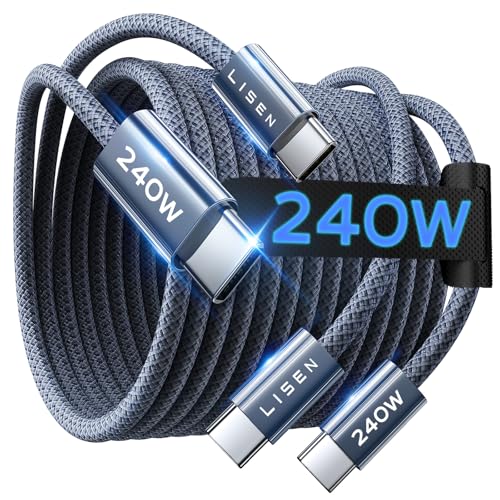
The LISEN USB C to USB C Cable is the higher-power option in this comparison. Its listing specifies support for USB Power Delivery 3.1 EPR and charging up to 240W, plus a 6.6-foot length. That ceiling can suit compatible USB-C laptops as well as phones, but a 240W rating does not make a phone charge at 240W: the charger and device set the usable rate.
Reasons to buy:
- 240W maximum charging support gives more headroom for compatible high-power devices than the 60W Anker cable.
- The listing specifies a 6.6-foot cable and a two-pack.
- The listing identifies 480Mbps data transfer and an E-Marker chip for power negotiation.
Reasons to avoid:
- It is USB-C to USB-C only, so it will not connect to a USB-A charger or Lightning-port device.
- The high wattage offers no faster charging when the phone, adapter, or other connected equipment supports a lower rate.
Skip it if you only need a basic phone cable and do not expect to charge higher-power USB-C devices.
Best for a Longer Reach: LISEN USB C to USB C Cable
For a setup where the outlet is farther from a desk or bedside table, the LISEN USB C to USB C Cable has a listed length of 6.6 feet. That is 0.6 feet longer than the Anker option, a modest difference that may help with placement without guaranteeing it will reach every outlet. Check where the charger sits and where you use the device before choosing a cable length.
Reasons to buy:
- The 6.6-foot listing length offers the longer reach of these two options.
- The two-pack can provide a cable for separate charging locations.
- Its USB-C connectors support compatible USB-C phone, tablet, and laptop setups.
Reasons to avoid:
- The listing does not provide a measured length under use, so check whether 6.6 feet suits your room layout.
- Extra cable length can leave more cord to manage when you charge close to an outlet.
Skip it if you want a shorter cable for a compact charging space or need USB-A at either end.
Best for a Stated Bend-Cycle Rating: Anker USB C to USB C Cable
The Anker USB C to USB C Cable may appeal if you compare cables by a stated flexibility claim: its listing says the cable withstands up to 5,000 bends and has a reinforced nylon exterior. Treat that figure as a manufacturer specification, not a guarantee of how long a cable will last in your particular routine. Its 60W maximum also makes it the more limited choice for devices that need more charging power.
Reasons to buy:
- The listing gives a specific up-to-5,000-bend claim.
- A reinforced nylon exterior is specified for the cable.
- A hook-and-loop tie is included for storage and cable organization.
Reasons to avoid:
- Its stated charging limit is 60W, below the LISEN cable’s 240W maximum.
- The listing does not support media display, and its data rate is 480Mbps.
Skip it if you need higher-than-60W charging, video output, or a USB-A-to-USB-C cable.
How to Choose the Best USB-C Cable for iPhone 18
Confirm both connectors
Both cables here are USB-C to USB-C. That means the cable needs a USB-C port on the phone and a USB-C port on the charger. Product titles refer to iPhone 18, but the published details do not confirm the phone’s port configuration. Verify the port on your exact phone model before ordering. If your charging adapter has a USB-A port, neither cable listed here is the right connector match.
Connector shape and charging capability are separate questions. A USB-C plug fitting a port does not establish that every charging feature, data speed, or display function is supported. Check the device and adapter specifications as well as the cable listing, especially when connecting tablets or computers.
Match cable power to your charger and device
The Anker listing specifies up to 60W, while LISEN specifies up to 240W and PD3.1 EPR support. These figures are maximum cable capabilities, not promised charging speeds for every connected device. The phone, charger, and cable must all support a compatible charging arrangement, and the device will not draw more power than it can accept.
For phone charging alone, a higher maximum rating may not provide a practical speed benefit. If you also plan to use the cable with a laptop, compare that computer’s charging needs with the adapter and cable limits. Choose LISEN when its higher stated ceiling is useful to your compatible equipment; choose Anker when a 60W ceiling fits your needs.
Choose a length that suits the charging spot
Anker is listed at 6 feet and LISEN at 6.6 feet. The difference is small, but it could matter when an outlet sits just beyond the reach of a shorter cord. Measure or estimate the route from the adapter to the device, allowing for how you will position both ends.
Longer cables can be convenient at a desk or bedside, while a shorter cable may leave less cord to gather in a bag or on a small table. Neither listing provides a separate travel pouch. Anker includes a hook-and-loop cable tie, which can help keep that cable organized when stored.
Separate charging from data and display needs
Both listings specify data transfer up to 480Mbps. That is a separate capability from charging wattage, so the 240W LISEN rating does not indicate faster file transfers. Anker explicitly says it does not support media display. The supplied LISEN details do not establish display support, so do not buy either cable for video output without confirming that requirement in the listing.
If you mainly charge a phone, the listed data rate may be secondary. If you regularly move large files or connect a device to a display, verify the required data and video standards for the device and cable before choosing. A charging cable is not automatically a full-featured data or display cable.
Compare the included quantity and durability claims
Both products are listed as two-packs, which can suit separate rooms or provide a spare. Anker specifies a reinforced nylon exterior and a claim of up to 5,000 bends. LISEN claims over 40,000 flex cycles and describes a 48-strand nylon covering. These are listing claims rather than independently established lifespan results, so consider them as product details, not guarantees.
Think about how you store and use a cable: frequent coiling, tight bends, or pulling by the cord can put stress on connectors and covering. The LISEN listing advises avoiding bending, crushing, heat, and moisture exposure. Keep charging ports clean and intact, and use a charger that follows USB-C Power Delivery requirements, as its safety notice recommends.
How We Compared
This comparison draws on the published product listings, including connector type, stated charging limits, cable length, data rate, included accessories, and listed construction details. We also considered how those specifications affect common phone, tablet, and laptop charging setups. The supplied material includes no customer feedback beyond ratings shown with zero reviews, so this guide does not use buyer reports to establish reliability or performance.
Frequently Asked Questions
Will either cable work with an iPhone 18?
Both are USB-C to USB-C cables, and their product listings name iPhone 18. Confirm that your exact phone model has a USB-C port and check the charging adapter’s connector before buying. Neither cable connects directly to a Lightning port or a USB-A charger.
Does a 240W cable charge a phone faster than a 60W cable?
Not automatically. The phone and charger determine the charging rate they can use, so a 240W cable does not force more power into a phone. LISEN’s higher rating is most relevant if you also have compatible equipment that can use a higher-power cable.
Can these cables charge a laptop?
The listings describe compatibility with USB-C devices, including laptops, and LISEN states support up to 240W while Anker specifies up to 60W. Check your laptop’s charging requirement and adapter output. The cable’s maximum rating alone does not confirm that a particular laptop will charge at its maximum rate.
Can I use either cable to connect my phone to a display?
Anker explicitly states that its cable does not support media display. The supplied LISEN information does not establish display support either. If display output matters, choose a cable whose listing clearly confirms the required video capability and verify that the phone supports display output.
Which cable is better for travel?
Both listings describe two cables, and neither is especially short at the stated lengths of 6 feet and 6.6 feet. Anker includes a hook-and-loop tie for organization. For travel, consider whether that length suits your bag and charging setup, and remember that both require a USB-C charger.
What charger should I use with these cables?
Use a charger with a USB-C port and compatible USB Power Delivery support. The LISEN listing specifically advises using a charger compliant with USB-C PD. Confirm the charger’s output and the device’s charging support, since the cable does not determine the full charging setup’s capabilities.




Write Your Review
No reviews yet. Be the first to share your experience!