

Choosing a Thunderbolt 5 cable means matching its speed and power claims to your devices, while picking a length and connector that fit your desk. This guide compares options for multi-display setups, external storage, laptop charging, and tight workspaces, with attention to certification and compatibility details.

Pros
- 80Gbps specified data transfer
- Up to 240W power delivery
- 3.3-foot braided cable
Cons
- Skip it if 3.3 feet is too short

Pros
- Supports Thunderbolt 5, Thunderbolt 4, Thunderbolt 3, and USB4
- Up to 240W charging support
- Braided nylon exterior
Cons
- 1-foot length limits placement flexibility
- Skip it if you need a longer cable
Pros
- Right-angle connector for tighter desk setups
- Supports up to 240W charging
- Backward compatibility with Thunderbolt 3, 4, and 5
Cons
- Who should skip it: users who need a straight connector

Pros
- Up to 80Gbps data transfer
- Up to 240W charging
- Broad backward compatibility
- 5-foot passive cable design
Cons
- Top speeds require compatible devices
- Skip it if your setup needs a longer cable

Pros
- 80Gbps rated data transfer
- Up to 240W power delivery
- 5-foot cable length
Cons
- Advertised speeds and display modes require compatible devices
- Who should skip it: Buyers needing only basic charging or data transfer

Pros
- 10-foot cable length
- Rated for up to 80Gbps data transfer
- Supports up to 240W power delivery
Cons
- Who should skip it: users needing display modes their devices do not support


Pros
- Thunderbolt 5 certified
- Up to 240W Power Delivery
- Braided cable with reinforced strain relief
- 2-year limited warranty
Cons
- Skip if you do not need high bandwidth

Pros
- 80Gbps claimed data transfer
- Up to 240W charging
- Dual 8K display support
Cons
- 3.3-foot length may limit desk placement
- Who should skip it: buyers needing a longer cable

Pros
- Supports up to 120Gbps with Thunderbolt 5
- Up to 240W power delivery
- Broad Thunderbolt and USB-C compatibility
- Braided cable rated for 20,000 bends
Cons
- Maximum performance requires a Thunderbolt 5 host
- Who should skip it: users who do not need high bandwidth
The Best Thunderbolt 5 Cables by Use Case
Best for Certified Thunderbolt 5: Satechi Certified Thunderbolt 5 Cable
The Satechi Certified Thunderbolt 5 Cable suits buyers who prioritize stated Thunderbolt 5 certification alongside full-bandwidth capabilities. Its listing specifies 80Gbps bidirectional throughput, up to 120Gbps unidirectional bandwidth, and support for dual 8K at 60Hz or triple 4K at 144Hz. That combination suits a compatible workstation with fast storage or several high-resolution displays.
Reasons to buy:
- Thunderbolt 5 certification is specified in the product listing.
- The listing states support for up to 240W Power Delivery.
- Braided construction, reinforced strain relief, and aluminum housing are listed.
Reasons to avoid:
- The published information does not state cable length, so confirm it suits your setup.
- Full speed and display support depend on compatible host, display, and connected devices.
Skip it if you need a clearly stated cable length before choosing or your devices do not support Thunderbolt 5 speeds.
Best for USB-IF Certification: Silkland USB-IF Certified USB4 for Thunderbolt 5
This Silkland cable is a fit for buyers who want a stated USB-IF certification and a 5-foot reach. The listing identifies USB4 Version 2.0, USB-IF certification, and TID 13829, along with up to 80Gbps bidirectional data transfer and 240W charging. It also lists 120Gbps display bandwidth and multi-monitor modes, but the connected computer and displays must support the chosen setup.
Reasons to buy:
- USB-IF certification and its TID are specified in the listing.
- Five-foot length offers more reach than the 1-foot option in this guide.
- The listing states compatibility with Thunderbolt 5, 4, and 3, USB4, and USB 3.2 devices.
Reasons to avoid:
- Its listed display modes are not guaranteed by the cable alone; check host and display limits.
- USB-IF certification is not the same claim as Thunderbolt 5 certification.
Skip it if you specifically want a product listing that identifies Thunderbolt 5 certification rather than USB-IF certification.
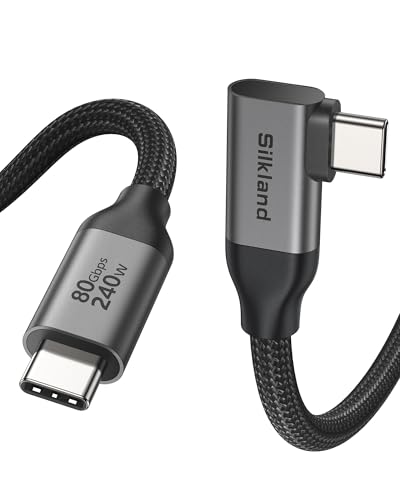
Best for Tight Desk Setups: Silkland 80Gbps USB 4 for Thunderbolt 5 Cable
The distinctive feature here is its 90-degree connector, which can route the cable alongside a laptop or dock rather than straight out from the port. The listing specifies a 4-foot cable, up to 80Gbps bidirectional data, 120Gbps display bandwidth, and 240W charging. That layout may help reduce cable crowding, though the right-angle orientation needs to match the direction you want the cable to run.
Reasons to buy:
- The L-shaped connector is designed for desks and docking stations.
- Four-foot length provides a middle ground between short desk leads and longer runs.
- The listing specifies compatibility with Thunderbolt 5, 4, and 3, USB 3.2, and USB-C devices.
Reasons to avoid:
- A fixed 90-degree connector may not fit every port orientation or protective case.
- The listing says actual transfer speed depends on the connected device.
Skip it if you need straight connectors at both ends or want a cable longer than 4 feet.
Best Value: Fitee 80Gbps USB4 Cable for Thunderbolt 5 Cable
Among the selected options, this Fitee cable has the lowest listed price, making it a value-oriented choice for a 5-foot USB-C connection. Its specifications include 80Gbps bidirectional data transfer, up to 120Gbps display bandwidth, 240W Power Delivery, and support for dual 8K or triple 4K at 144Hz displays. Buyers should treat those as listed capabilities, not a promise that every laptop or monitor will reach them.
Reasons to buy:
- Five-foot length and listed 240W support cover common laptop-and-dock arrangements.
- The listing gives specific multi-display modes, including triple 4K at 144Hz.
- Compatibility is listed for Thunderbolt 5, 4, and 3, USB4, and USB 3.2.
Reasons to avoid:
- The published details do not identify a formal cable certification.
- The listing does not specify a particular shielding design or connector material.
Skip it if certification is your main selection criterion or you need a short cable for a close-connected device.
Best for Long Runs: Thunderbolt 5 Cable 10FT Compatible, 80Gbps
This 10-foot option is aimed at setups where a short cable cannot reach a dock, display, or storage device comfortably. The listing claims 80Gbps data transfer, 120Gbps video bandwidth, and up to 240W Power Delivery, with compatibility stated for Thunderbolt 5, 4, and 3 and USB4 devices. Longer cable length can make placement easier, but verify the listed capabilities against your exact host and peripherals.
Reasons to buy:
- Ten-foot length offers more placement flexibility than the shorter options here.
- The listing specifies support for dual 8K at 60Hz or triple 4K at 144Hz.
- 240W charging support is specified for compatible devices.
Reasons to avoid:
- The published listing does not identify an independent certification.
- The listing notes that the connected laptop and SSD must support 80Gbps to reach that transfer rate.
Skip it if your devices sit close together or you want a cable whose listing explicitly names a certification.
Also Considered
The Silkland 80Gbps Intel-Certified Thunderbolt 5 may suit buyers seeking a 5-foot passive cable with stated Intel certification, though its listing is more costly than several non-certified alternatives.
For a very short connection, the Silkland USB 4 for Thunderbolt 5 Cable 1FT lists 80Gbps data, 240W charging, and 1-foot length, but that reach limits where devices can sit.
The Anker Prime Thunderbolt 5 Cable is a 3.3-foot Thunderbolt 5-certified option with 80Gbps data and 240W charging; consider it if that length and brand are a better fit than the selected picks.
Buyers wanting a low-profile connector and a stated 64Gbps PCIe capability can consider the CalDigit Thunderbolt 5 Pro Braided Cable, while noting that maximum performance needs a Thunderbolt 5 host.
How to Choose a Thunderbolt 5 Cable
Check the host and device ports first
USB-C describes the connector shape, not a guaranteed data rate, display mode, or charging level. Thunderbolt 5 speed needs a compatible Thunderbolt 5 host and connected equipment; older Thunderbolt and USB devices may work at their own maximum supported specifications. Check the computer, dock, SSD, and display documentation before paying for a cable with higher listed capabilities. The CalDigit listing, for example, states that performance is limited by the host port.
Match length and connector shape to your workspace
Measure the route between ports, including the slack needed to move a laptop or dock. Short cables can keep a compact setup tidy, while longer ones offer more placement freedom but may leave excess cable to manage. A right-angle connector can sit closer to a device, but check its orientation and whether a case blocks the port. Compare the 1-foot, 4-foot, 5-foot, and 10-foot options in this guide against your actual route rather than choosing by length alone.
Read data-rate claims in context
Most listings here specify up to 80Gbps bidirectional data transfer. That can matter when moving large files between a compatible computer and a fast external SSD, but the cable cannot make a slower host, drive, or dock run at 80Gbps. Some listings also mention 120Gbps display bandwidth. This is a display-focused bandwidth mode, not a claim that ordinary file transfers run at 120Gbps. Confirm the exact device support and display arrangement before relying on a maximum figure.
Separate display support from charging support
Display resolution and refresh rate depend on the computer’s graphics output, the display, and the connection path, including any dock or adapter. A cable listing may state dual 8K or triple 4K support, but that does not mean every computer can drive those screens at the listed rates. For charging, check the laptop’s required wattage and the charger’s output as well as the cable’s rating. The 240W claims in this guide apply only when the power source and device support the relevant Power Delivery level.
Decide whether certification matters to you
Certification labels are useful when you want a listing to identify verification against a particular standard. Do not treat USB-IF certification and Thunderbolt certification as interchangeable: they identify different certifications. The Satechi listing says Thunderbolt 5 certified, while the Silkland USB-IF model names USB-IF certification and TID 13829. If a specific certification is important, confirm that the exact product variant and length you are buying carry it. For further cable and charging guides, browse our charging cables category and Power & Charging guides.
How We Compared
This comparison uses the published product listings to assess stated data rates, display modes, charging support, cable lengths, connector designs, compatibility, certification language, and construction details. We also considered the customer feedback information available for each item, which lists no review text or review count to evaluate. Manufacturer specifications describe claimed capabilities; actual results depend on the connected computer, charger, dock, storage device, and display.
Frequently Asked Questions
Will a Thunderbolt 5 cable work with a USB-C device?
Many products in this guide list backward compatibility with USB-C, USB4, or older Thunderbolt devices. The connector may fit, but speed, display output, and charging are limited by the device ports and supported standards. Check the specific cable’s compatibility list and your device documentation.
Does any USB-C cable support Thunderbolt 5 speeds?
No. USB-C is the connector type, and USB-C cables do not all support the same data rates or power levels. Choose a cable whose listing states the required Thunderbolt or USB specification, then confirm that the host and connected device support it too.
Can these cables charge a laptop at 240W?
Several listings specify up to 240W Power Delivery, but that figure does not mean every laptop will draw 240W. The laptop and power adapter must support the required charging level, and the cable cannot raise either device’s limit. Check your laptop’s charging requirements before choosing.
Will a cable’s 8K or triple-monitor claim work with my computer?
Not necessarily. The computer’s graphics capability, port standard, dock, displays, resolution, and refresh rate all affect the available setup. Treat the product listing’s display modes as supported possibilities, then compare them with the specifications for every device in your chain.
Should I choose a longer cable?
Choose enough length to route the cable without pulling on the ports, but avoid extra length that makes your desk harder to manage. Consider the device positions, dock location, and whether a connector shape helps with clearance. Confirm that the chosen product’s listing states the length you need.



Write Your Review
No reviews yet. Be the first to share your experience!