

Garage access devices solve different problems: one can add Wi-Fi control to an existing opener, while another combines PIN entry with a camera and app features. This guide to the best smart garage door keypad helps you compare opener compatibility, voice control, guest access, and whether camera features fit your needs.
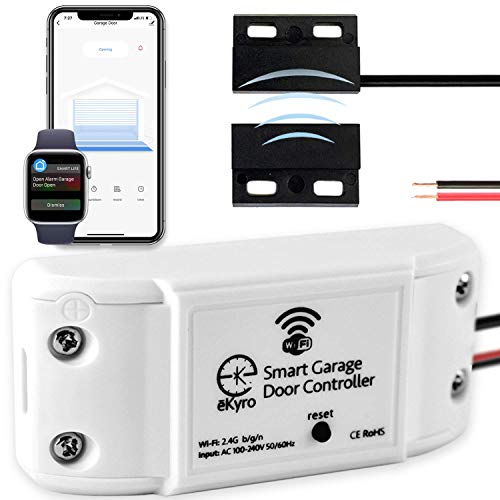
Pros
- Phone and voice-assistant control
- No monthly fees for listed features
- Supports scheduling and automatic closing
Cons
- May require an adapter for compatibility
- Does not work with RYOBI openers
- Who should skip it: RYOBI opener owners

Pros
- Customizable PIN codes and scheduled passes
- Live viewing and two-way audio
- Camera and keypad in one device
Cons
- Advanced detection and video history require subscription
- Controls one garage door opener
- Skip it if your opener is incompatible
The Best Garage Door Access Devices by Use Case
Best for Voice Assistant Control: eKyro Smart Garage Door Opener
The eKyro Smart Garage Door Opener is a Wi-Fi controller for people who want to operate and monitor an existing garage door opener through a phone or voice assistant. Its listing names Alexa, Google Home, iPhone, Siri, and Android support, and says app control, scheduling, automatic closing, and alerts have no monthly fee. That makes it a fit for households that value remote operation more than a camera or PIN keypad.
Reasons to buy:
- Supports control through listed voice assistants and mobile platforms.
- Includes scheduling, automatic closing, and remote monitoring without monthly fees, according to the listing.
- Multiple controllers can work together, with one controller needed for each garage door.
Reasons to avoid:
- It is not a keypad and does not provide PIN-code entry or a camera.
- Compatibility is not universal: the listing excludes RYOBI openers and says some openers may need an adapter. Confirm the exact opener model before purchase.
Skip it if you need outdoor PIN access for guests, camera viewing, or confirmed compatibility with a RYOBI opener.
Best for PIN Access and Video Monitoring: myQ Smart Garage Door Video Keypad with Wide-Angle
The myQ Smart Garage Door Video Keypad with Wide-Angle combines customizable PIN codes, app control, a wide-angle camera, motion detection, notifications, and two-way audio. Its listing specifies compatibility with one LiftMaster, Chamberlain, or Craftsman opener manufactured after 1993. This device suits a household that wants to grant scheduled access to family, guests, or service providers and check a live camera feed through the myQ app.
Reasons to buy:
- Custom PIN codes and time-specific passes support more controlled guest access.
- Camera, motion notifications, remote viewing, and two-way audio combine access and monitoring features.
- Designed for a single compatible opener, with the supported brands and manufacturing date stated in the listing.
Reasons to avoid:
- Compatibility is limited to specified LiftMaster, Chamberlain, and Craftsman openers made after 1993. Verify the model rather than relying on brand alone.
- Advanced AI detection, recorded video history, and enhanced motion detection require a myQ subscription after the included free trial.
Skip it if your opener is outside the listed brands and date range, or if you want advanced video history without a subscription.
How to Choose the Best Smart Garage Door Keypad
Check opener compatibility before comparing features
Compatibility comes first because a smart access device cannot control an opener it does not support. The myQ listing identifies LiftMaster, Chamberlain, and Craftsman openers manufactured after 1993, and specifies control of one opener. The eKyro listing describes broad compatibility through an adapter but explicitly excludes RYOBI. These descriptions are not interchangeable: check your opener’s brand and model, then confirm support with the device listing or manufacturer before ordering.
If you have more than one garage door, check how many controllers the setup needs. The eKyro listing says each door needs its own controller, though multiple eKyro controllers can be paired together. The myQ listing is for a single opener. Do not assume one device will control multiple doors.
Choose between keypad entry and app-based control
A keypad addresses a different need from a phone-operated controller. PIN codes can let someone enter without borrowing your phone or receiving a voice-assistant command. The myQ device offers customizable codes and time-specific passes, which may suit households coordinating access for visitors or service providers.
The eKyro product focuses on remote operation, monitoring, scheduling, automatic closing, and voice control. Its published features do not include a keypad or camera. Choose based on how people actually enter the garage: if you need hands-free access from outside, look for PIN entry; if you mainly want app or voice operation, compare controller compatibility and supported platforms.
Separate included features from subscription features
Recurring fees can change which features remain useful after setup. The eKyro listing says its listed functions, including scheduling and voice-assistant use, do not require a monthly fee. It also notes that optional SMS messages or phone calls may cost extra, while not being necessary for device functions.
The myQ listing distinguishes standard app and camera functions from premium options. AI-powered detection for people, cars, and packages, recorded video history, and enhanced motion detection require a subscription; a free trial is included. Before choosing a camera-equipped keypad, check which alerts and recordings are available without an ongoing plan and whether those paid features matter to you.
Match monitoring features to your privacy needs
A camera, motion detection, notifications, remote viewing, and two-way audio can help you check activity near the garage. They also mean that camera access and app settings deserve attention. The myQ listing describes these features, but the published details do not specify video storage duration, privacy controls, or all subscription terms. Review current app and service information before relying on recording or advanced alerts.
If video is not a priority, avoid paying attention to camera features that do not address your access needs. The eKyro controller offers no camera in the published feature list, but includes remote control and monitoring through a phone or voice assistant. Confirm exactly what its monitoring shows and which notifications it supports before purchase.
Verify Wi-Fi, app, and voice assistant needs
Both products depend on app-based smart features, and the eKyro listing specifically says the opener connects to Wi-Fi. It names Alexa, Google Home, iPhone, Siri, and Android compatibility. The myQ description centers control, PIN management, notifications, and live viewing in the myQ app. Check the current app requirements and your home network coverage at the garage before choosing; the published information does not specify Wi-Fi bands or network range.
Voice assistant names alone do not guarantee that every function works through voice. If voice operation is important, confirm which commands and integrations the manufacturer supports for your setup. For app-dependent features, also consider who in the household will manage codes, alerts, and account access.
How We Compared
We compared the published product descriptions and feature details, focusing on opener compatibility, access methods, app and voice support, monitoring, and subscription requirements. The available information supports two distinct use cases: eKyro emphasizes Wi-Fi and voice control, while myQ combines PIN entry with camera features. Product specifications and compatibility claims come from the published listings; buyers should verify current requirements for their exact opener and app setup.
Frequently Asked Questions
Is a smart garage door keypad the same as a Wi-Fi garage controller?
No. A keypad lets someone enter a code at the garage, while a Wi-Fi controller adds app-based operation or monitoring to a compatible opener. The myQ product combines a keypad with camera and app features. The eKyro product is a Wi-Fi controller, not a keypad, based on its published feature list.
Will either device work with any garage door opener?
No universal compatibility is established by the published information. The myQ listing names LiftMaster, Chamberlain, and Craftsman openers made after 1993. The eKyro listing says most openers may work, potentially with an adapter, and excludes RYOBI. Check the exact model and manufacturer guidance before buying.
Can I give a guest temporary garage access?
The myQ listing supports unique PIN codes and time-specific passes through its app, which is the relevant feature for scheduled guest access. The supplied eKyro details do not describe PIN codes or temporary keypad passes. Confirm how codes are created, shared, and removed in the current app before relying on them for access management.
Does the myQ video keypad need a subscription?
The listing says premium features require a myQ subscription. Those features include AI-powered detection for people, cars, and packages, recorded video history, and enhanced motion detection. It also states that a free trial is included. Check current plan terms and identify which camera and notification features work without a paid plan.
Which option makes more sense for a household with several garage doors?
The eKyro listing says each door needs its own controller, while multiple eKyro controllers can be paired together. The myQ listing describes control of a single opener. If you have multiple doors, count each opener separately and confirm how the app handles multiple devices before choosing.
What should I check before installing a smart garage access device?
Start with opener brand and model, manufacturing date where relevant, and the device’s stated compatibility. Then check Wi-Fi availability, app requirements, the number of doors supported, and any subscription needed for features you plan to use. Follow the manufacturer’s installation and access-control instructions, and keep PINs and app credentials limited to people who need them.


Write Your Review
No reviews yet. Be the first to share your experience!