

A floodlight camera can light a driveway and send motion alerts, but saving and reviewing footage may depend on a subscription. The best floodlight camera without subscription for your home depends on whether you want local recording, wired or solar power, broad camera coverage, or a simpler installation.
This guide compares those practical differences across 9 models. Check storage requirements, Wi-Fi bands, and mounting needs before choosing, especially if you plan to replace an existing outdoor light.
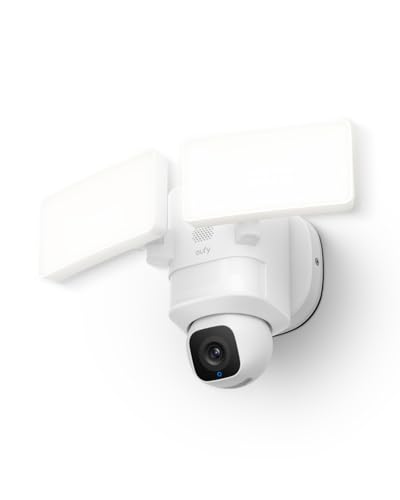
Pros
- Pan-and-tilt coverage with scheduled patrols
- AI tracking for people and vehicles
- 2K video and 2,000-lumen lights
- 24/7 recording with hardwired power
Cons
- Requires hardwired installation
- Uses 2.4GHz Wi-Fi
- Skip it if hardwired installation or 2.4GHz Wi-Fi is unsuitable

Pros
- Dual lenses with up to 8x hybrid zoom
- Pan, tilt, and AI tracking
- Local continuous recording without a subscription fee
- Adjustable floodlight and built-in alarm
Cons
- Wired outdoor installation required
- Continuous recording needs microSD card or HomeBase S380
- Skip it if you need 3K resolution during AI tracking

Pros
- Built-in siren
- Customizable dual-zone motion detection
- Two-way audio
- Works with Alexa
Cons
- Requires existing outdoor wiring
- Person detection requires optional subscription
- Skip if outdoor wiring is unavailable

Pros
- 2K video with color night vision
- Dimmable motion-activated floodlights
- Local continuous recording option
- Works with Alexa and Google Assistant
Cons
- Requires 2.4GHz Wi-Fi, not 5GHz
- Who should skip it: homes without 2.4GHz Wi-Fi

Pros
- 2K HDR video
- 160-degree field of view
- Up to 2,000 lumens
- Live streaming without a subscription
Cons
- Advanced features require a paid plan after one month
- Skip it if you need battery-powered installation

Pros
- Plug-in or hardwired installation
- 20-foot power cord included
- Continuous local recording available
- Works with Alexa and Google Assistant
Cons
- MicroSD card sold separately
- 5 GHz Wi-Fi 6 networks unsupported
- Who should skip it: users requiring 5 GHz Wi-Fi 6

Pros
- 128GB MicroSD card included
- No required cloud subscription
- Two-way audio and siren
- Alexa and Google Home support
Cons
- Requires hardwired installation at an outdoor junction box
- Connects only over 2.4GHz Wi-Fi
- Skip it if you need battery-powered or plug-in operation

Pros
- Two cameras included
- Solar-powered, wire-free setup
- AI detection for people, vehicles, and animals
- Local storage options with no monthly fees
Cons
- microSD card not included
- Who should skip it: buyers who need an included microSD card

Pros
- 2K HDR video
- Up to 2,000-lumen floodlight
- Continuous hardwired power
- Two-way audio and remote siren
Cons
- Requires hardwiring to a compatible 4-inch junction box
- Advanced features require paid plan after trial
- Who should skip it: Homes without suitable hardwired installation
The Best Floodlight Cameras by Use Case
Best for 360-Degree Coverage: eufy Security Floodlight Camera E30, 2K
The eufy Security Floodlight Camera E30, 2K suits homeowners who want a powered camera that can pan and tilt across a broad outdoor area. Its listing specifies 2K video, automatic tracking for people and vehicles, 2,000-lumen motion-activated lights, and 24/7 recording. Those features make it a useful fit for a yard or driveway where a fixed view may leave angles uncovered.
Reasons to buy:
- Pan-and-tilt movement supports 360-degree viewing, with scheduled patrol and manual control.
- AI detection can follow people and vehicles, according to the product listing.
- Hardwired power supports continuous recording, and the listing states there is no monthly fee.
Reasons to avoid:
- It needs hardwired power, so it is not a wire-free choice for a location without suitable wiring.
- The listed Wi-Fi connection is 2.4 GHz; check your network and mounting location before buying.
Skip it if you need a solar camera or want to avoid hardwired installation.
Best for Zoom and Distant Detail: eufy Security Floodlight Camera E340, Dual-Lens
The eufy Security Floodlight Camera E340, Dual-Lens is aimed at areas where one wide view may not be enough. It pairs a 3K wide-angle lens with a 2K telephoto lens and up to 8x hybrid zoom, and its pan-and-tilt movement adds adjustable coverage. The listing notes that maximum resolution drops to 2K when AI tracking or Dual Views is active, an important detail if you expect to use those features together.
Reasons to buy:
- Dual lenses combine a broad view with a telephoto option for closer details.
- Supports local continuous recording when a microSD card up to 128 GB is installed, or when connected to eufy HomeBase S380.
- Dual-band Wi-Fi 6 supports 2.4 GHz and 5 GHz networks.
Reasons to avoid:
- The microSD card is not specified as included, so confirm storage needs and purchase it separately if required.
- AI tracking and Dual Views reduce the maximum resolution to 2K, according to the listing.
Skip it if you want the simplest fixed-view camera or do not want to arrange local storage.
Best for Plug-In Installation: Onforu 2K Floodlight Camera Plug&Hardwired
The Onforu 2K Floodlight Camera Plug&Hardwired offers two power approaches: plug-in operation with its listed 20-foot cord or hardwired installation. That flexibility can help if your preferred location lacks a suitable junction box, though a cord still needs a safe, practical route. The listing also specifies 2K video, three adjustable light heads rated at 5,500 lumens, and local continuous recording to a separately purchased microSD card.
Reasons to buy:
- Plug-in and hardwired options suit different mounting situations.
- Three adjustable light heads and a listed 180-degree PIR detection area let you tailor coverage.
- Local recording supports microSD cards up to 256 GB, with no mandatory subscription stated.
Reasons to avoid:
- The microSD card is sold separately, and cloud storage is optional rather than required.
- The listing says 5 GHz Wi-Fi is not supported on Wi-Fi 6 networks, so verify compatibility with your router.
Skip it if you need battery or solar power, or your network does not meet the stated Wi-Fi requirements.
Best for Lower-Cost Local Recording: WYZE Floodlight Camera v2
The WYZE Floodlight Camera v2 combines 2K video with a 160-degree camera view, 2,800-lumen lights, and local recording to a microSD card. Its 270-degree PIR detection area is a separate specification from the camera’s field of view, so consider both when planning placement. This wired model could suit a homeowner who wants local recording and app-based motion zones without paying for a cloud plan to save footage.
Reasons to buy:
- Local continuous recording is supported with a microSD card, and the listing describes storage for up to 30 days.
- Color night vision, two-way talk, and a 105 dB siren add monitoring and deterrence options.
- Motion zones can be customized in the Wyze app.
Reasons to avoid:
- It connects to 2.4 GHz Wi-Fi and does not support 5 GHz.
- The storage duration depends on recording conditions and card setup; confirm card compatibility and capacity before purchase.
Skip it if your camera location depends on a 5 GHz-only connection or you need a wire-free unit.
Best for Solar-Powered Placement: REOLINK Solar Floodlight Security Cameras
The REOLINK Solar Floodlight Security Cameras are a two-camera pack designed for outdoor locations where running power cables is inconvenient. The listing specifies a rechargeable battery with a 3 W solar panel, 2K video, a 150-degree view, and motion-activated lighting up to 1,000 lumens. Local storage can use a microSD card up to 512 GB, a Reolink Home Hub Series device, or a Reolink NVR, but the card is not included.
Reasons to buy:
- Solar power avoids hardwiring, subject to the camera receiving enough sunlight at its chosen position.
- AI detection can identify people, vehicles, and animals, with selectable detection types.
- Local storage options are listed without a required monthly fee, and Wi-Fi 6 support includes 2.4 GHz and 5 GHz.
Reasons to avoid:
- The listed floodlight output is up to 1,000 lumens, lower than the wired models with higher stated outputs.
- Solar charging depends on placement and sunlight; the listing’s runtime claim should not replace checking conditions at your property.
Skip it if you need maximum floodlight brightness or cannot place the solar panel where it receives useful sunlight.
Also Considered
Feit Electric Floodlight Camera, 5000 Lumens may suit buyers who want a pre-installed 128 GB microSD card and 1080p continuous recording, but its camera resolution is lower than the 2K options above.
Blink Wired Floodlight Camera offers 2,600-lumen lighting and 1080p live view, but local clip backup needs a separately purchased Sync Module and storage device.
Arlo Wired Floodlight Camera 2K HDR and Arlo Wired Floodlight Camera provide 2K HDR video and 2,000-lumen lighting, but their advanced history and detection features require a paid plan after the trial.
How to Choose a Floodlight Camera Without Subscription
Check what “no subscription” means for video storage
A camera may provide live video and alerts for free while charging for saved clips, longer history, or advanced detection. For footage you can review later, look for explicit local-storage support and identify what it needs: a microSD card, a hub, an NVR, or a USB storage setup. The E340, Onforu, WYZE, and REOLINK listings describe local options; the Feit listing specifies a pre-installed 128 GB card. Check whether storage is included, maximum supported capacity, and which features remain free.
Match power and installation to the mounting spot
Hardwired cameras suit an existing outdoor-light junction box and can provide continuous power, but installation involves electrical wiring. The E30, E340, WYZE, and Arlo models are listed as wired. Onforu also offers plug-in operation with a 20-foot cord, while REOLINK uses solar power and a rechargeable battery. Before buying, check the product’s mounting and power instructions, whether your location has a compatible junction box or outlet, and whether you can position a solar panel in useful sunlight.
Compare camera view, movement, and light output separately
Field of view describes how much the lens sees at once; pan-and-tilt movement can change where a camera points. Neither figure alone tells you whether a particular corner, gate, or driveway will stay in view. The E30 and E340 pan and tilt, while the REOLINK cameras list a 150-degree view and the WYZE model lists a 160-degree view. Light output also varies: select a brighter wired light if broad, strong illumination is a priority, or consider solar placement where adding wiring is difficult. Check light-head adjustment and detection zones in the listing.
Verify Wi-Fi band and smart-home compatibility
Outdoor walls and distance from the router can affect connectivity, so confirm the required Wi-Fi band at the planned mounting point. The E30 lists 2.4 GHz, WYZE lists 2.4 GHz only, and E340 and REOLINK list dual-band support. Onforu’s listing includes a specific caveat for 5 GHz on Wi-Fi 6 networks. Voice-assistant support also differs: Onforu lists Alexa and Google Assistant, while WYZE lists Alexa and Google Assistant and Feit lists Alexa and Google Home. Check the exact model’s app, network requirements, and assistant support rather than assuming all devices work with the same setup.
Choose detection features for your property
Motion detection can trigger lights, alerts, and recordings, but the type of sensor and available controls affect how you tailor coverage. Onforu lists 180-degree PIR detection, and WYZE lists 270-degree PIR detection plus customizable zones. Eufy E30 and E340 describe AI detection and tracking, while REOLINK lists AI detection for people, vehicles, and animals. Review which detections are available without a plan, how zones are set, and whether tracking changes resolution or camera coverage.
How We Compared
We compared the published product listings, focusing on power and installation, local storage, resolution, lighting, camera movement and viewing angle, Wi-Fi requirements, detection features, and stated voice-assistant compatibility. Customer feedback information was limited to the published ratings, which showed no review totals, so this guide relies on listed specifications and does not treat those ratings as evidence of recurring owner experiences. Features and storage details can vary by model, app, and setup; confirm current requirements on the listing before buying.
Frequently Asked Questions
Can a floodlight camera record without a subscription?
Some can, if they support local storage and you install or connect the required storage device. The published listings identify microSD recording for E340, Onforu, WYZE, and REOLINK, while Feit specifies an included 128 GB card. Check whether the camera records continuously or by event, whether storage is included, and which playback features require a plan.
Do these cameras need existing outdoor wiring?
Most models in this comparison use wired power, and several are intended to connect to an existing outdoor junction box. Onforu also lists plug-in installation with a 20-foot cord. REOLINK is the solar-powered option in this selection. Follow the manufacturer’s installation directions and use a qualified electrician if you are unsure about electrical work.
Is 2K video always better than 1080p for outdoor security?
Higher listed resolution can provide more image detail, but the usable view also depends on lens coverage, lighting, network connection, and recording settings. A 2K label does not guarantee that faces or distant details will be clear at every position. Consider camera placement and whether useful footage is saved locally, not resolution alone.
Will a 5 GHz Wi-Fi camera work on my network?
Check the exact model’s supported bands and your router settings. Some cameras here use 2.4 GHz only, while E340 and REOLINK list dual-band Wi-Fi. Onforu’s listing warns that 5 GHz is not supported on Wi-Fi 6 networks. Confirm the caveat with the manufacturer if your router setup is unclear.
Should I choose solar or hardwired power?
Hardwired models suit locations with compatible existing wiring and provide continuous power as described in their listings. Solar models can avoid a power cable, but panel placement and sunlight matter. Pick based on the actual mounting location, not only the advertised power type, and check the installation requirements before ordering.



Write Your Review
No reviews yet. Be the first to share your experience!