

Garage door controllers can add phone access and alerts, but Apple compatibility is not always clear. A product that mentions Siri or iPhone support does not necessarily support Apple HomeKit, so buyers should confirm the exact integration they need before choosing.
This guide to the best smart garage door opener for HomeKit compares two retrofit controllers by their stated app support, voice assistant features, opener compatibility, network needs, and automation options. Neither published listing confirms HomeKit support, so treat Apple ecosystem compatibility as a question to verify rather than an established feature.
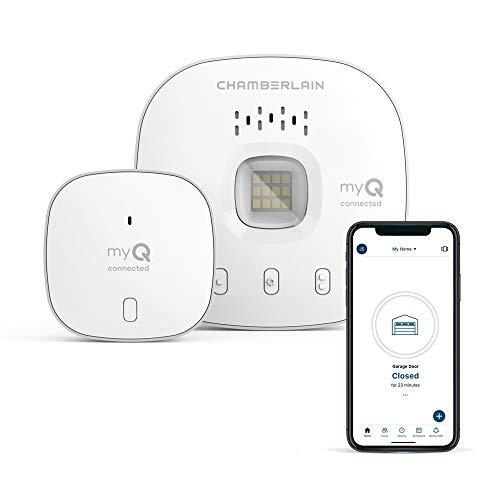
Pros
- Remote app control
- Scheduled closing
- Access sharing
Cons
- Requires 2.4 GHz Wi-Fi within 50 feet
- Who should skip it: owners of incompatible openers or non-sectional doors
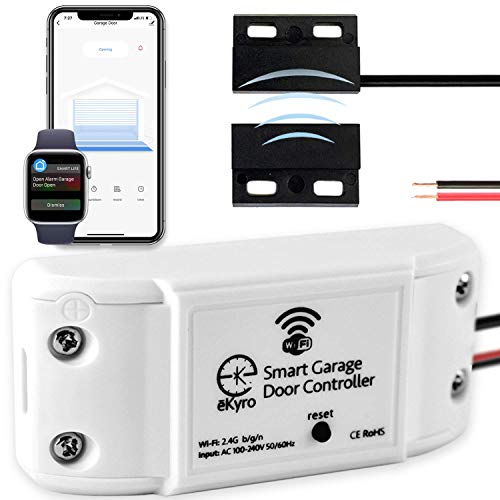
Pros
- Phone and voice-assistant control
- No monthly fees for listed features
- Supports scheduling and automatic closing
Cons
- May require an adapter for compatibility
- Does not work with RYOBI openers
- Who should skip it: RYOBI opener owners
The Best Smart Garage Door Controllers by Use Case
Best for Specified Opener Compatibility: CHAMBERLAIN Smart Garage Control
The CHAMBERLAIN Smart Garage Control pairs a wireless hub with a door sensor and uses the myQ app for phone-based access. Its listing names opener conditions to check, making it a more clearly documented choice for buyers whose opener falls within those limits. The product does not list HomeKit support, so iPhone users should not assume it will appear in Apple Home.
Reasons to buy:
- The myQ app is listed for iPhone and Android, with remote open and close control.
- A close schedule can help set a regular time for closing the garage door.
- Bluetooth is listed as a setup aid, and a separate sensor can support control of a second door.
Reasons to avoid:
- It needs a 2.4 GHz Wi-Fi router using 802.11 B/G/N, within 50 feet of the hub, according to the listing.
- Compatibility excludes some opener types, including any Chamberlain Group opener with a yellow learn button made between 2010 and 2021, any Linear opener, and openers whose photoelectric sensors change power mode as described in the listing.
Skip it if you need confirmed Apple HomeKit support or your opener falls into one of the stated exclusions. Check the opener model and sensor behavior before ordering.
Best for Multiple Voice Assistant Options: eKyro Smart Garage Door Opener
The eKyro Smart Garage Door Opener is a Wi-Fi controller designed to connect with an existing opener. Its listing names Alexa, Google Home, iPhone, Siri, and Android support, plus door-left-open alerts and scheduled or automatic closing. Siri and iPhone support are relevant for Apple users, but the listing does not explicitly identify Apple HomeKit compatibility, so verify the exact control path before choosing it for a Home app setup.
Reasons to buy:
- It lists several voice assistant options, including Siri, Alexa, and Google Home.
- The listing describes remote monitoring and control, door-left-open alerts, scheduling, and automatic closing without monthly fees for those functions.
- Each door can have its own eKyro controller, and multiple controllers can be paired together.
Reasons to avoid:
- The listing says an adapter may be needed for some openers and explicitly says it does not work with RYOBI openers.
- It does not confirm Apple HomeKit support. Additional SMS messages or phone calls may cost extra.
Skip it if you own a RYOBI opener or require documented HomeKit integration without contacting the seller to clarify compatibility.
How to Choose the Best Smart Garage Door Opener for HomeKit
Confirm HomeKit rather than relying on Siri wording
For Apple Home, distinguish between controlling a product with Siri and adding it to HomeKit. The eKyro listing names Siri and iPhone, while the CHAMBERLAIN listing names its myQ app for iPhone. Neither published description explicitly confirms HomeKit or Apple Home integration. If you want to use the Home app, create Apple Home automations, or control the garage through another Apple Home device, ask the manufacturer to confirm that exact function and any required bridge or account.
If app-based iPhone control is enough, the listings provide more direct support for that basic use. Still, check which app handles setup and daily control. An iPhone-compatible app is not the same thing as a HomeKit accessory, and voice assistant availability alone does not establish every Apple Home feature.
Check opener model, sensor type, and adapter needs
Retrofit controllers depend on the opener they connect to. CHAMBERLAIN lists compatibility with most brands manufactured after 1993 that use photoelectric sensors that do not shut off, but it also identifies important exclusions. Compare your opener’s brand, model, learn button, and sensor behavior with those conditions rather than relying only on the phrase “most brands.”
eKyro describes its controller as universal, while also noting that an adapter may be required and that RYOBI openers are not supported. “Universal” therefore does not remove the need to confirm the exact opener. Check the listing or ask the manufacturer whether your model needs an adapter and whether that adapter is included or sold separately.
Match the network requirements to your garage
CHAMBERLAIN specifies a 2.4 GHz Wi-Fi router using 802.11 B/G/N, with the router within 50 feet of the Smart Garage Control. If your router is farther away, or your setup does not provide the listed network band and standards, confirm a workable connection before purchasing. The supplied eKyro details say it connects to Wi-Fi but do not state a frequency, Wi-Fi standard, or range. Ask for those details if your garage has weak coverage or a network with restricted bands.
Wi-Fi access matters for phone control and remote monitoring described by these products. Do not assume that a successful phone connection inside the house proves the controller will have a reliable connection in the garage. Check signal availability at the intended installation location and follow each product’s setup instructions.
Choose alerts and schedules that fit your routine
Both products describe ways to manage an open or closing door, but their listed details differ. CHAMBERLAIN specifies a close schedule and myQ app control. eKyro lists a door-left-open alert, scheduling, and automatic closing. Decide whether you mainly need a reminder, a set closing time, remote access, or voice commands, then confirm the precise behavior in the manufacturer’s app information.
Automatic closing changes how the door behaves without a manual command, so consider whether a scheduled closure suits your household and routine. Review available settings and alert behavior before enabling automation. The published information does not establish whether every alert method is included: eKyro notes that additional SMS messages or phone calls may cost extra.
Plan for each door and all ongoing charges
If your garage has two doors, check whether the system needs another controller or sensor. CHAMBERLAIN says a second door can be controlled with an additional sensor sold separately. eKyro says each door needs its own eKyro controller, although multiple controllers can be paired together. This difference affects what you need to purchase and set up for a multi-door garage.
For ongoing costs, eKyro states that its listed core functions, including voice assistant use, scheduling, automatic closing, and remote control, have no monthly fees. It separately notes possible charges for additional SMS messages or calls. The CHAMBERLAIN information available here does not specify a subscription requirement, so verify current account and service terms rather than assuming they match eKyro.
How We Compared
This comparison uses the published product descriptions and listed features, including app and voice assistant support, network requirements, opener compatibility limits, sensor or adapter details, and automation options. The published data does not establish HomeKit support for either product, and it includes no customer feedback to assess. Recommendations are therefore conditional on confirming the opener model and the Apple integration you need.
Frequently Asked Questions
Do either of these controllers explicitly support Apple HomeKit?
Neither published product description explicitly confirms Apple HomeKit support. eKyro lists Siri and iPhone compatibility, and CHAMBERLAIN lists its myQ app for iPhone. If Apple Home app integration is essential, verify it with the manufacturer before buying.
Does Siri compatibility mean a device works with HomeKit?
No. A listing that mentions Siri does not by itself confirm that an accessory can be added to Apple Home or used in HomeKit automations. Ask whether the exact product supports Apple Home, and whether it needs a bridge or other equipment.
How can I check whether my garage door opener is compatible?
Find the opener’s brand and model, then compare them with the controller’s compatibility details. For CHAMBERLAIN, check the listed manufacturing date and sensor conditions, including the stated yellow learn button and Linear exclusions. For eKyro, confirm whether your opener needs an adapter and note its stated RYOBI exclusion.
What Wi-Fi does CHAMBERLAIN Smart Garage Control need?
Its listing specifies a 2.4 GHz router using 802.11 B/G/N, within 50 feet of the controller. Check your router’s settings and the signal at the garage before choosing it. The supplied eKyro details do not provide equivalent frequency or range specifications.
Can one controller manage two garage doors?
The published details describe an additional sensor, sold separately, for a second door with CHAMBERLAIN. eKyro says each door needs its own controller, and that multiple eKyro controllers can be paired. Confirm required accessories and setup steps for your particular opener arrangement.
Which option suits someone who wants remote alerts?
eKyro specifically lists a door-left-open alert, while CHAMBERLAIN lists app access and a close schedule. Compare the alert types you need and check whether they arrive as app notifications, messages, or calls. eKyro notes that additional SMS messages or phone calls may cost extra.



Write Your Review
No reviews yet. Be the first to share your experience!